Disk Space decreasing continiously

mas9

New member
Local time
2:12 PM
Messages
4
Hello There,
I have windows 7 home 64 on Dell inspiron 5010. I am using this computer from last 3 years and recently came with C drive (window installation) space problem. I lost around 20 GB space in last one month and I did not install any program in this time but actually deleted a few to get space.
I had the same problem last month and I uninstalled utorrent, which gave me around 20 GB space and I thought it was the issue but I was wrong. There is no utorrent now but the space is still decreasing and only in one month its down from 25 GB 6 GB and turned red.
I have google chrome, Avast free antivirus and don't play any games.
So far
I cleaned my disk. (Gave me a few MB)
Installed and scanned Malwarebytes Anti malware. No virus found.
Disabled hibernation.
There is limit to restore points also.
Even got help from Microsoft windows and the window support guy checked my computer with taking the control but couldn't detect issues and asked me to purchase some program, which I refused.
No scan detects issues but space keeps decreasing.
I scanned with space sniffer, which shows 49.4 GB used of 88 GB total.Windows is 25.5 GB. Win sxs 13.4 GB. App Data 7 GB. Pagefile 2.8 GB. Rest smaller blocks. Ghost shows 33 GB in grey, unknown.
Please Help.
 

Attachments
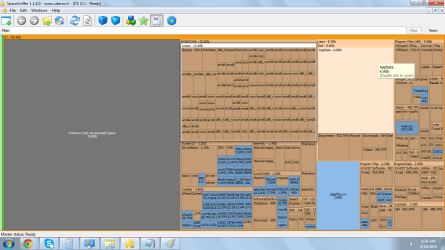
  • Screen View Space Sniffer.png
    Screen View Space Sniffer.png
    162.6 KB · Views: 7

My Computer

Computer type
PC/Desktop
Computer Manufacturer/Model Number
Dell Inspiron 5010
OS
Window 7 Home Basic 64
CPU
i3
Memory
3GB
Hard Drives
300 GB
Antivirus
Avast free
Browser
Google Chrome
Hello Mas9 and Welcome to SevenForums,

you can use this tool:
TreeSize Free - Quickly Scan Directory Sizes and Find Space Hogs execute this on your C drive. you can browse those folders where big amount of your HDD was being used. You can delete it or you can post back the result (Print Screen) on your next reply so that we can help you analyze what sort of stuff is in your PC.

ShoTTaS
 

My Computer

Computer type
PC/Desktop
Computer Manufacturer/Model Number
HP
OS
Windows 7 Pro 32bit
CPU
Dual Core
Antivirus
Trend Micro

My Computer

Computer type
PC/Desktop
Computer Manufacturer/Model Number
home built
OS
Multi-Boot W7_Pro_x64 W8.1_Pro_x64 W10_Pro_x64 +Linux_VMs +Chromium_VM
CPU
AMD Athlon II x4 620
Motherboard
Gigabyte GA-MA785G-UD3H
Memory
6GB GSkill DDR2 800
Graphics Card(s)
AMD 4670 GPU + AMD 4200 IGP
Sound Card
on board Realtek ALC889A
Monitor(s) Displays
RCA 40" LCD TV, Insignia 32" LCD TV, HP 15" LCD monitor
Screen Resolution
1680 x 1050
Hard Drives
OCZ Vertex 3 120GB,
Samsung F3 1TB (3),
Several others - WD, Seagate, Hitachi, ...
PSU
Corsair 500 W
Case
Rosewill mid tower
Cooling
CM 90mm rifle
Keyboard
Gyration wireless, Logitech wireless, Dell USB wired
Mouse
Gyration wireless, Logitech wireless, V7 USB wired
Internet Speed
Spectrum - 100Mbps D / 10Mbps U
Antivirus
Avast, MBAM3, EMET, WinPatrol
Browser
Pale Moon, Firefox, IE
Other Info
2 multi-boot PC's
Mainly HTPC/Office/Gen purpose (no gaming).
Trendnet USB KVM.
LG DVD burner/Blue Ray Player.
Tray system for removable SATA backup drives.

Not currently OCd, under-volted.
I use Hybrid sleep, rarely re-boot or shutdown.

Hauppauge HD-PVR, Avermedia PCIe TV Tuner, Hauppauge PCI TV Tuner.
Dear ShoTTaS,
Thank you for your help.
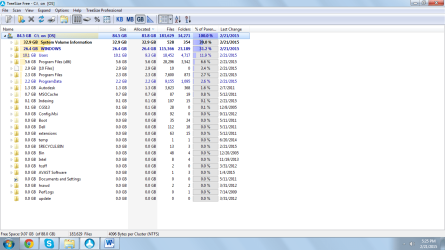
I have attached the scan result by TreeSize Free.
mas
 

Attachments

  • TreeSize Free Screen Shot.png
    TreeSize Free Screen Shot.png
    145 KB · Views: 2

My Computer

Computer type
PC/Desktop
Computer Manufacturer/Model Number
Dell Inspiron 5010
OS
Window 7 Home Basic 64
CPU
i3
Memory
3GB
Hard Drives
300 GB
Antivirus
Avast free
Browser
Google Chrome
Dear DavidE,
Thank you for your help.
Space dedicated for System restore was 50% and I reduced it to 10% and restarted computer but it didn't freed any space on the Hard drive.
mas
 

My Computer

Computer type
PC/Desktop
Computer Manufacturer/Model Number
Dell Inspiron 5010
OS
Window 7 Home Basic 64
CPU
i3
Memory
3GB
Hard Drives
300 GB
Antivirus
Avast free
Browser
Google Chrome
Did you check the percent after restarting ?
Maybe it's still 50% ?
You might need to delete old restore points, then decrease the percent, then reboot ?
 

My Computer

Computer type
PC/Desktop
Computer Manufacturer/Model Number
home built
OS
Multi-Boot W7_Pro_x64 W8.1_Pro_x64 W10_Pro_x64 +Linux_VMs +Chromium_VM
CPU
AMD Athlon II x4 620
Motherboard
Gigabyte GA-MA785G-UD3H
Memory
6GB GSkill DDR2 800
Graphics Card(s)
AMD 4670 GPU + AMD 4200 IGP
Sound Card
on board Realtek ALC889A
Monitor(s) Displays
RCA 40" LCD TV, Insignia 32" LCD TV, HP 15" LCD monitor
Screen Resolution
1680 x 1050
Hard Drives
OCZ Vertex 3 120GB,
Samsung F3 1TB (3),
Several others - WD, Seagate, Hitachi, ...
PSU
Corsair 500 W
Case
Rosewill mid tower
Cooling
CM 90mm rifle
Keyboard
Gyration wireless, Logitech wireless, Dell USB wired
Mouse
Gyration wireless, Logitech wireless, V7 USB wired
Internet Speed
Spectrum - 100Mbps D / 10Mbps U
Antivirus
Avast, MBAM3, EMET, WinPatrol
Browser
Pale Moon, Firefox, IE
Other Info
2 multi-boot PC's
Mainly HTPC/Office/Gen purpose (no gaming).
Trendnet USB KVM.
LG DVD burner/Blue Ray Player.
Tray system for removable SATA backup drives.

Not currently OCd, under-volted.
I use Hybrid sleep, rarely re-boot or shutdown.

Hauppauge HD-PVR, Avermedia PCIe TV Tuner, Hauppauge PCI TV Tuner.

My Computer

Computer type
PC/Desktop
Computer Manufacturer/Model Number
home built
OS
Multi-Boot W7_Pro_x64 W8.1_Pro_x64 W10_Pro_x64 +Linux_VMs +Chromium_VM
CPU
AMD Athlon II x4 620
Motherboard
Gigabyte GA-MA785G-UD3H
Memory
6GB GSkill DDR2 800
Graphics Card(s)
AMD 4670 GPU + AMD 4200 IGP
Sound Card
on board Realtek ALC889A
Monitor(s) Displays
RCA 40" LCD TV, Insignia 32" LCD TV, HP 15" LCD monitor
Screen Resolution
1680 x 1050
Hard Drives
OCZ Vertex 3 120GB,
Samsung F3 1TB (3),
Several others - WD, Seagate, Hitachi, ...
PSU
Corsair 500 W
Case
Rosewill mid tower
Cooling
CM 90mm rifle
Keyboard
Gyration wireless, Logitech wireless, Dell USB wired
Mouse
Gyration wireless, Logitech wireless, V7 USB wired
Internet Speed
Spectrum - 100Mbps D / 10Mbps U
Antivirus
Avast, MBAM3, EMET, WinPatrol
Browser
Pale Moon, Firefox, IE
Other Info
2 multi-boot PC's
Mainly HTPC/Office/Gen purpose (no gaming).
Trendnet USB KVM.
LG DVD burner/Blue Ray Player.
Tray system for removable SATA backup drives.

Not currently OCd, under-volted.
I use Hybrid sleep, rarely re-boot or shutdown.

Hauppauge HD-PVR, Avermedia PCIe TV Tuner, Hauppauge PCI TV Tuner.
Dear DavidE and shoTTas,

I checked many a times the restore space is fixed to 15%. I deleted all restore points but the system Volume information is still 34 GB of total 88. Windows folder is 26.2. C drive is red and I do not know what else to do.
 

My Computer

Computer type
PC/Desktop
Computer Manufacturer/Model Number
Dell Inspiron 5010
OS
Window 7 Home Basic 64
CPU
i3
Memory
3GB
Hard Drives
300 GB
Antivirus
Avast free
Browser
Google Chrome
In TreeSize free click on the little arrow to the left of the Icon for the System Volume Information folder.
This should expand the folder so you can drill down and see what files are using a lot of space.
 

My Computer

Computer type
PC/Desktop
Computer Manufacturer/Model Number
home built
OS
Multi-Boot W7_Pro_x64 W8.1_Pro_x64 W10_Pro_x64 +Linux_VMs +Chromium_VM
CPU
AMD Athlon II x4 620
Motherboard
Gigabyte GA-MA785G-UD3H
Memory
6GB GSkill DDR2 800
Graphics Card(s)
AMD 4670 GPU + AMD 4200 IGP
Sound Card
on board Realtek ALC889A
Monitor(s) Displays
RCA 40" LCD TV, Insignia 32" LCD TV, HP 15" LCD monitor
Screen Resolution
1680 x 1050
Hard Drives
OCZ Vertex 3 120GB,
Samsung F3 1TB (3),
Several others - WD, Seagate, Hitachi, ...
PSU
Corsair 500 W
Case
Rosewill mid tower
Cooling
CM 90mm rifle
Keyboard
Gyration wireless, Logitech wireless, Dell USB wired
Mouse
Gyration wireless, Logitech wireless, V7 USB wired
Internet Speed
Spectrum - 100Mbps D / 10Mbps U
Antivirus
Avast, MBAM3, EMET, WinPatrol
Browser
Pale Moon, Firefox, IE
Other Info
2 multi-boot PC's
Mainly HTPC/Office/Gen purpose (no gaming).
Trendnet USB KVM.
LG DVD burner/Blue Ray Player.
Tray system for removable SATA backup drives.

Not currently OCd, under-volted.
I use Hybrid sleep, rarely re-boot or shutdown.

Hauppauge HD-PVR, Avermedia PCIe TV Tuner, Hauppauge PCI TV Tuner.
Back
Top