
DiskPart and Network Share question

doctore

New member
Power User
VIP
Local time
7:12 AM
Messages
265
I'm trying to install Win7 from a network image, but I am running into a problem before I even began :)

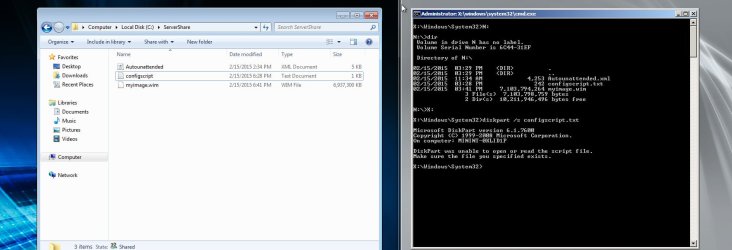
OK, here is the deal: I have a simple DiskPart script (copied directly from Microsoft) that is on the same network share the image is on. I have booted the targeted computer with PE and added the network share with letter "N" (logged in and everything). But when I try to run the script - I get an error, as shown on the screenshot below.

You can see that the network share is mapped and the script exists. (on the left is the server).
Btw, I tried running "diskpart /s n:\configscript.txt" but that just gives me a list of the diskpart commands.

P.S. For what is worth, if I run "notepad n:\configscript.txt", the script opens just fine. So I guess I am looking for a way to run n:\configscript.txt from DiskPart, if that makes sence :)

Any help would be greatly appreciated!
 

Attachments
  • diskp.jpg
    diskp.jpg
    104.2 KB · Views: 5

My Computer

Computer type
PC/Desktop
OS
Windows 7 Pro
I'd take that question to Technet which handles more IT Pro questions like this, while we are almost entirely a consumer forum.
 
Just a guess, but have you tried

diskpart /s n:\configscript.txt or diskpart /s "n:\configscript.txt"
 

My Computer

Computer type
PC/Desktop
Computer Manufacturer/Model Number
Lenovo IdeaCenter 450
OS
Windows 10 Pro X64
CPU
Intel Quad Core i7-4770 @ 3.4Ghz
Memory
16.0GB PC3-12800 DDR3 SDRAM 1600 MHz
Graphics Card(s)
Intel Integrated HD Graphics
Sound Card
Realtek HD Audio
Monitor(s) Displays
HP 22" LCD
Screen Resolution
1680 x 1050
Hard Drives
250GB Samsung EVO SATA-3 SSD
2TB Seagate ST2000DM001 SATA-2
1.5TB Seagate ST3150041AS SATA
Keyboard
Dell USB
Mouse
Lenovo USB
Internet Speed
Cable via Road Runner 3MB Upload, 30MB Download
Antivirus
Windows Defender, MBAM Pro, MBAE
Browser
Seamonkey
Other Info
UEFI/GPT
PLDS DVD-RW DH16AERSH
I tried running "diskpart /s n:\configscript.txt" but that just gives me a list of the diskpart commands.

They way you've executed the script is absolutely correct (diskpart /s n:\configscript.txt). The problem lies within the actual configscript.txt diskpart-script file: it contains a syntax error somewhere (which is why diskpart spits you a list of valid diskpart commands).
 

My Computer

Computer type
PC/Desktop
OS
Windows 10, Windows 8.1 Pro, Windows 7 Professional, OS X El Capitan
I'm trying to install Win7 from a network image, but I am running into a problem before I even began :)

OK, here is the deal: I have a simple DiskPart script (copied directly from Microsoft) that is on the same network share the image is on. I have booted the targeted computer with PE and added the network share with letter "N" (logged in and everything). But when I try to run the script - I get an error, as shown on the screenshot below.

You can see that the network share is mapped and the script exists. (on the left is the server).
Btw, I tried running "diskpart /s n:\configscript.txt" but that just gives me a list of the diskpart commands.

P.S. For what is worth, if I run "notepad n:\configscript.txt", the script opens just fine. So I guess I am looking for a way to run n:\configscript.txt from DiskPart, if that makes sence :)

Any help would be greatly appreciated!
diskpart /s n:\configscript.txt

but you did: diskpart /s configscript.txt !!!
 

My Computer

Computer type
Laptop
Computer Manufacturer/Model Number
ACER ASPIRE 5742G
OS
Microsoft Windows 7 Home Premium 64-bits 7601 Multiprocessor Free Service Pack 1
CPU
Intel(R) Core(TM) i3 CPU M 370 @ 2.40GHz
Motherboard
Acer Aspire 5742G
Memory
4,00 GB
Graphics Card(s)
ATI Mobility Radeon HD 5400 Series
Sound Card
(1) AMD High Definition Audio Device (2) Realtek High Defi
Screen Resolution
1366 x 768 x 32 bits (4294967296 colors) @ 60 Hz
Hard Drives
WDC WD5000BEVT-22ZAT0
Back
Top