Hello Everyone,
Here is the problem where I messed up and help me please ,
,
I had problem with my Asus notebook for black screen after login and I was not able to resolve the issue.
1. So I decided to to format my "C: drive" and was trying to install windows 7 on my windows 7 laptop GPT partition (UEFI) and when it didn't allow me to install win7 on partitioned drive.
2. I followed YouTube video foolishly.So I selected my notebook "C drive", which is disk 0 and then, I thought that I have selected my "C drive partition".
3. I executed diskpart clean command ( without any parameters, not clean all. ONLY CLEAN) :'(
everything gone after that .
.
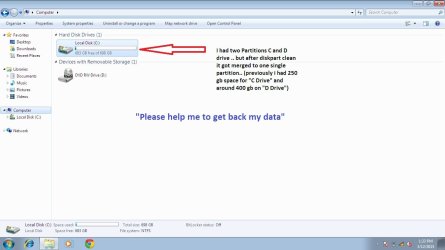
4. Then I saw my all partitions are gone and this is what i want to recover. (i had 2 partitions, C drive- 250 gb space, D drive- 400 gb space) and I had important data in "D drive(around 100 gb)".
5. And after diskpart clean command , I see that my C and D drive partitions got merged as one single partition.
6. I was in panic, then I was able install Win 7 with intentions to recover data from "D drive" and planning to recover my lost data.
How do I recover my data(D Drive importantly) ? .. Please assist me .. your help will most helpful .. I am worried..
Here is the problem where I messed up and help me please
,I had problem with my Asus notebook for black screen after login and I was not able to resolve the issue.
1. So I decided to to format my "C: drive" and was trying to install windows 7 on my windows 7 laptop GPT partition (UEFI) and when it didn't allow me to install win7 on partitioned drive.
2. I followed YouTube video foolishly.So I selected my notebook "C drive", which is disk 0 and then, I thought that I have selected my "C drive partition".
3. I executed diskpart clean command ( without any parameters, not clean all. ONLY CLEAN) :'(
everything gone after that
.4. Then I saw my all partitions are gone and this is what i want to recover. (i had 2 partitions, C drive- 250 gb space, D drive- 400 gb space) and I had important data in "D drive(around 100 gb)".
5. And after diskpart clean command , I see that my C and D drive partitions got merged as one single partition.
6. I was in panic, then I was able install Win 7 with intentions to recover data from "D drive" and planning to recover my lost data.
How do I recover my data(D Drive importantly) ? .. Please assist me .. your help will most helpful .. I am worried..
Attachments
My Computer
At a glance
Windows 7 home 64 bit4
- Computer type
- Laptop
- Computer Manufacturer/Model Number
- Asus
- OS
- Windows 7 home 64 bit
- Memory
- 4
- Hard Drives
- 750 gb