
Display at bootup

PeaB4YouGo

Celebrity Guest
Guru
Local time
2:46 AM
Messages
455
Location
Ironwood, MI
I did a little searching before I wrote this, so if it's covered someplace, point me in the right direction, please. I never found anything like it in the search.

I have a NVidia 250GTS. I use HDMI to feed the Acer 23 in monitor that is my main display. I also have a generic 19 in CRT that I feed with the VGA port as a secondary. We use it for displaying system monitoring and web pages while gaming.

Here's the thing... When I boot, the secondary display shows my post (things like Memory checks, drive detection, "Loading Operating System"...etc. I'd like to see that on the main display, instead.

Is there any way to do this? I'm assuming that the video card defaults to my VGA display because it's the lowest denominator. I'd just like to see all of that on the flat panel, because it is nearly instant-on.

Thanx ahead of time... and pls pardon any misuse of terms.
 

My Computer

Computer type
PC/Desktop
Computer Manufacturer/Model Number
iBuyPower NZXT
OS
Microsoft Windows 10 Home Build 15036
CPU
Intel(R) Core(TM) i7-860 @ 2.80GHz
Motherboard
Gigabyte Technology Co., Ltd. P55-UD3L
Memory
4.00 GB
Graphics Card(s)
NVIDIA GeForce GTX 750
Sound Card
(1) Line 6 UX2 (2) Realtek High Definition Audio
Monitor(s) Displays
23" acer
Screen Resolution
1920 x 1080 x 32 bits (4294967296 colors) @ 60 Hz
Hard Drives
(1) WDC WD5000AAKS-00D2B0 ATA Device (2) Seagate FreeAgent Go 250G USB Device
Cooling
Corsair H75 liquid cooler (Very easy to install, actually)
Internet Speed
60M cable modem-->Linksys E1200-->1Gbps net card
Browser
Chrome
Other Info
This is probably the longest I've ever had a Windows machine run without having to restore it to scratch. I'm used to restoring to "factory" about every 2 yrs. I've run with Win7 since new in 2009 and only recently (Nov, '14) restored to clean up the machine from all my 'xperimenting. LOL!! I may never need another machine.

Upgraded to 10 when it was still free, then installed 2017 update.
Hi PeaB4YouGo,

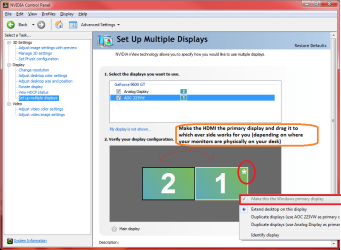
Have you tried to set the the HDMI display as the primary display in the Nvidia Control Panel? This is different from configuring it inside windows only.

This works for me with my (slightly older) Nvidia card.

Attached is a picture, your version of nvidia Control panel may look different to mine.

- Tim
 

Attachments

  • monitors.png
    monitors.png
    40.3 KB · Views: 29

My Computer

Computer Manufacturer/Model Number
Custom Hack job
OS
Windows 7 Ultimate 64 bit
CPU
Intel(R) Core(TM)2 Quad CPU Q8200 @ 2.33GHz
Motherboard
GigaByte EP45-UD3
Memory
8 GB Kingston
Graphics Card(s)
Nvidia GeForce 9600GT
Sound Card
Soundblaster Audigy
Monitor(s) Displays
AOC x2 22"
Hard Drives
2 x Samsung 500GB (RAID)
2 x Samsung 2TB
1 x WD Green 2TB
1 x Seagate 1TB
1 x Samsung 500GB
PSU
Thermaltake QFan 750W
Case
CM Scout Gaming
Cooling
Coolermaster V10
Keyboard
Microsoft Wireless Keyboard 1000
Mouse
Microsoft Wireless Optical 2000
Internet Speed
320
Other Info
Winfast PVR2000CP
LG DVD-RAM DVD/RW/DL Super Multi
Linksys WMP300Nx2 Wireless Adapter
Been there...no joy. I'm really beginning to believe that the only reason you designate one display as the primary is so that Windows knows where to put the taskbar and any new program icons when you install them.

Heh. Thanx for trying, though.
 

My Computer

Computer type
PC/Desktop
Computer Manufacturer/Model Number
iBuyPower NZXT
OS
Microsoft Windows 10 Home Build 15036
CPU
Intel(R) Core(TM) i7-860 @ 2.80GHz
Motherboard
Gigabyte Technology Co., Ltd. P55-UD3L
Memory
4.00 GB
Graphics Card(s)
NVIDIA GeForce GTX 750
Sound Card
(1) Line 6 UX2 (2) Realtek High Definition Audio
Monitor(s) Displays
23" acer
Screen Resolution
1920 x 1080 x 32 bits (4294967296 colors) @ 60 Hz
Hard Drives
(1) WDC WD5000AAKS-00D2B0 ATA Device (2) Seagate FreeAgent Go 250G USB Device
Cooling
Corsair H75 liquid cooler (Very easy to install, actually)
Internet Speed
60M cable modem-->Linksys E1200-->1Gbps net card
Browser
Chrome
Other Info
This is probably the longest I've ever had a Windows machine run without having to restore it to scratch. I'm used to restoring to "factory" about every 2 yrs. I've run with Win7 since new in 2009 and only recently (Nov, '14) restored to clean up the machine from all my 'xperimenting. LOL!! I may never need another machine.

Upgraded to 10 when it was still free, then installed 2017 update.
hmm.... I will think on this..... google a bit..... forget about it.... come back to it.... and see what that gives us.

it's still weird that it worked on mine... but they are different models.
 

My Computer

Computer Manufacturer/Model Number
Custom Hack job
OS
Windows 7 Ultimate 64 bit
CPU
Intel(R) Core(TM)2 Quad CPU Q8200 @ 2.33GHz
Motherboard
GigaByte EP45-UD3
Memory
8 GB Kingston
Graphics Card(s)
Nvidia GeForce 9600GT
Sound Card
Soundblaster Audigy
Monitor(s) Displays
AOC x2 22"
Hard Drives
2 x Samsung 500GB (RAID)
2 x Samsung 2TB
1 x WD Green 2TB
1 x Seagate 1TB
1 x Samsung 500GB
PSU
Thermaltake QFan 750W
Case
CM Scout Gaming
Cooling
Coolermaster V10
Keyboard
Microsoft Wireless Keyboard 1000
Mouse
Microsoft Wireless Optical 2000
Internet Speed
320
Other Info
Winfast PVR2000CP
LG DVD-RAM DVD/RW/DL Super Multi
Linksys WMP300Nx2 Wireless Adapter
Well google tells me that you are not the only person with this issue.

Just to clarify, there is no way to swap your cables around to make this work is there? i.e. there's no HDMI port on the monitor that you currently use as VGA is there?

All I've got is a maybe..... You could try the nvidia bios editor, perhaps you can choose the default display and re-flash the bios if you're game. This seems to be where the issue is. I should be able to attach it here for you as I've lost the link. You'll need to download your bios from somewhere though to play with it.

Good luck and please let us know if you solve this one... it irks me, it should be possible.
 

Attachments

My Computer

Computer Manufacturer/Model Number
Custom Hack job
OS
Windows 7 Ultimate 64 bit
CPU
Intel(R) Core(TM)2 Quad CPU Q8200 @ 2.33GHz
Motherboard
GigaByte EP45-UD3
Memory
8 GB Kingston
Graphics Card(s)
Nvidia GeForce 9600GT
Sound Card
Soundblaster Audigy
Monitor(s) Displays
AOC x2 22"
Hard Drives
2 x Samsung 500GB (RAID)
2 x Samsung 2TB
1 x WD Green 2TB
1 x Seagate 1TB
1 x Samsung 500GB
PSU
Thermaltake QFan 750W
Case
CM Scout Gaming
Cooling
Coolermaster V10
Keyboard
Microsoft Wireless Keyboard 1000
Mouse
Microsoft Wireless Optical 2000
Internet Speed
320
Other Info
Winfast PVR2000CP
LG DVD-RAM DVD/RW/DL Super Multi
Linksys WMP300Nx2 Wireless Adapter
Well google tells me that you are not the only person with this issue.

Just to clarify, there is no way to swap your cables around to make this work is there? i.e. there's no HDMI port on the monitor that you currently use as VGA is there?

All I've got is a maybe..... You could try the nvidia bios editor, perhaps you can choose the default display and re-flash the bios if you're game. This seems to be where the issue is. I should be able to attach it here for you as I've lost the link. You'll need to download your bios from somewhere though to play with it.

Good luck and please let us know if you solve this one... it irks me, it should be possible.


I'd rather not mess with the BIOS. Regarding the VGA, this is an older CRT that only works with VGA. It's not that big a thing, and thanx for looking. Who knows, we'll find something in the future (when I can afford a new vid card, should a BIOS flash screw things up.)
 

My Computer

Computer type
PC/Desktop
Computer Manufacturer/Model Number
iBuyPower NZXT
OS
Microsoft Windows 10 Home Build 15036
CPU
Intel(R) Core(TM) i7-860 @ 2.80GHz
Motherboard
Gigabyte Technology Co., Ltd. P55-UD3L
Memory
4.00 GB
Graphics Card(s)
NVIDIA GeForce GTX 750
Sound Card
(1) Line 6 UX2 (2) Realtek High Definition Audio
Monitor(s) Displays
23" acer
Screen Resolution
1920 x 1080 x 32 bits (4294967296 colors) @ 60 Hz
Hard Drives
(1) WDC WD5000AAKS-00D2B0 ATA Device (2) Seagate FreeAgent Go 250G USB Device
Cooling
Corsair H75 liquid cooler (Very easy to install, actually)
Internet Speed
60M cable modem-->Linksys E1200-->1Gbps net card
Browser
Chrome
Other Info
This is probably the longest I've ever had a Windows machine run without having to restore it to scratch. I'm used to restoring to "factory" about every 2 yrs. I've run with Win7 since new in 2009 and only recently (Nov, '14) restored to clean up the machine from all my 'xperimenting. LOL!! I may never need another machine.

Upgraded to 10 when it was still free, then installed 2017 update.
I have a 220GT and its the other way around. It has a DVI and a VGA connector. The monitor on the DVI connector shows the post screen, welcome screen and login screen and the one on the VGA is blank with a no signal box until windows loads my desktop. The monitor on the DVI connector is my main monitor so in my case I have no reason to want to change it. I don't know how anyway. If you do figure it out though, I'm going to take note for future reference.
 

My Computer

Computer type
PC/Desktop
Computer Manufacturer/Model Number
Home Built
OS
Windows 10 Education 64 bit
CPU
AMD Phenom II X4 980 Black Edition Deneb 3.7GHz
Motherboard
Asus M4N68T-M V2 µATX Motherboard
Memory
8GB 4GBx2 Kingston PC10600 DDR3 1333 Memory
Graphics Card(s)
Zotac NVIDIA Geforce GT640 2 Gig DDR3 PCIe
Sound Card
VIA VT1708s High Definition Audio 8-channel Onboard
Monitor(s) Displays
22" LG E2242 1080p and 2 19" I-INC AG191D
Screen Resolution
1280x1024 - 1920x1080 - 1280x1024
Hard Drives
Crucial M100 256 GB SSD and 500 GB WD Blue SATA
PSU
Thermaltake TR 620
Case
Power Up Black ATX Mid-Tower Case
Cooling
Stock heatsink and fan
Keyboard
Logitech Wireless K350 Wave
Mouse
Logitech Wireless M570 Trackman Wheel
Internet Speed
80 Mbps Down 30 Mbps Up
Antivirus
Windows Defender
Browser
Internet Explorer 11
Other Info
HP DVD1040e Lightscribe - External USB2
Same card, opposite scenario... interesting. Maybe take not of your bios revisions, flashing with an authorized bios is not too hard and relatively safe (if they are different of course).

As an after thought, just check the monitor itself, there should be a menu button on it (it may also be be called OSD).

I theorise that if the HDMI monitor is set to default to VGA, it will try to find VGA, after a while it can't so it would try HDMI and then work correctly, this would mean that it misses the start up selection as your default monitor. Alphanumeric just got me thinking and it may be worth a look to check this On Screen Display and see if there is an option you can change.

Otherwise I'm-a-outta-ideas. :P
 

My Computer

Computer Manufacturer/Model Number
Custom Hack job
OS
Windows 7 Ultimate 64 bit
CPU
Intel(R) Core(TM)2 Quad CPU Q8200 @ 2.33GHz
Motherboard
GigaByte EP45-UD3
Memory
8 GB Kingston
Graphics Card(s)
Nvidia GeForce 9600GT
Sound Card
Soundblaster Audigy
Monitor(s) Displays
AOC x2 22"
Hard Drives
2 x Samsung 500GB (RAID)
2 x Samsung 2TB
1 x WD Green 2TB
1 x Seagate 1TB
1 x Samsung 500GB
PSU
Thermaltake QFan 750W
Case
CM Scout Gaming
Cooling
Coolermaster V10
Keyboard
Microsoft Wireless Keyboard 1000
Mouse
Microsoft Wireless Optical 2000
Internet Speed
320
Other Info
Winfast PVR2000CP
LG DVD-RAM DVD/RW/DL Super Multi
Linksys WMP300Nx2 Wireless Adapter
It looks like the Video card decides. I just booted up with only my VGA monitor connected and the post displayed on it. Windows made it my main display and put my desktop on it. While windows was still running I went and connected my DVI monitor back up. I heard the new hardware beep and when I sat back down my desktop was moved back to the DVI monitor. I had switched to single display, "Computer Only" before the test. Just turning the monitor off doesn't do anything because it's still detected. I would say that if your video card sees a monitor on the better quality connector thats the "one" it uses.
For me this was the first dual display video card that didn't light up both monitors during the post. All my AGP cards just mirror everything onto both monitors until windows loads my desktop. Even the login screen would be in stereo.:D
 

My Computer

Computer type
PC/Desktop
Computer Manufacturer/Model Number
Home Built
OS
Windows 10 Education 64 bit
CPU
AMD Phenom II X4 980 Black Edition Deneb 3.7GHz
Motherboard
Asus M4N68T-M V2 µATX Motherboard
Memory
8GB 4GBx2 Kingston PC10600 DDR3 1333 Memory
Graphics Card(s)
Zotac NVIDIA Geforce GT640 2 Gig DDR3 PCIe
Sound Card
VIA VT1708s High Definition Audio 8-channel Onboard
Monitor(s) Displays
22" LG E2242 1080p and 2 19" I-INC AG191D
Screen Resolution
1280x1024 - 1920x1080 - 1280x1024
Hard Drives
Crucial M100 256 GB SSD and 500 GB WD Blue SATA
PSU
Thermaltake TR 620
Case
Power Up Black ATX Mid-Tower Case
Cooling
Stock heatsink and fan
Keyboard
Logitech Wireless K350 Wave
Mouse
Logitech Wireless M570 Trackman Wheel
Internet Speed
80 Mbps Down 30 Mbps Up
Antivirus
Windows Defender
Browser
Internet Explorer 11
Other Info
HP DVD1040e Lightscribe - External USB2
For me this was the first dual display video card that didn't light up both monitors during the post. All my AGP cards just mirror everything onto both monitors until windows loads my desktop. Even the login screen would be in stereo.:D
THAT can hurt yer eyes. heh

Thanx for your suggestions, folks. Never had a dual display before. I wanna get FS10 installed, and see what good it is. You know, run the gauges and a front view on the smaller monitor, etc...:)
 

My Computer

Computer type
PC/Desktop
Computer Manufacturer/Model Number
iBuyPower NZXT
OS
Microsoft Windows 10 Home Build 15036
CPU
Intel(R) Core(TM) i7-860 @ 2.80GHz
Motherboard
Gigabyte Technology Co., Ltd. P55-UD3L
Memory
4.00 GB
Graphics Card(s)
NVIDIA GeForce GTX 750
Sound Card
(1) Line 6 UX2 (2) Realtek High Definition Audio
Monitor(s) Displays
23" acer
Screen Resolution
1920 x 1080 x 32 bits (4294967296 colors) @ 60 Hz
Hard Drives
(1) WDC WD5000AAKS-00D2B0 ATA Device (2) Seagate FreeAgent Go 250G USB Device
Cooling
Corsair H75 liquid cooler (Very easy to install, actually)
Internet Speed
60M cable modem-->Linksys E1200-->1Gbps net card
Browser
Chrome
Other Info
This is probably the longest I've ever had a Windows machine run without having to restore it to scratch. I'm used to restoring to "factory" about every 2 yrs. I've run with Win7 since new in 2009 and only recently (Nov, '14) restored to clean up the machine from all my 'xperimenting. LOL!! I may never need another machine.

Upgraded to 10 when it was still free, then installed 2017 update.
I don't run dual when I play games, although I think I would make an exception for a flight sim. I play mostly first person shooters and some race sims. Having the frames of my two LCD's smack dab in the middle doesn't work out so well for a first person shooter. Hmmm, maybe I should go to 3 displays, yeah thats the ticket. Opens wallet, watches moth fly out, and thinks to himself, well maybe not. :(
 

My Computer

Computer type
PC/Desktop
Computer Manufacturer/Model Number
Home Built
OS
Windows 10 Education 64 bit
CPU
AMD Phenom II X4 980 Black Edition Deneb 3.7GHz
Motherboard
Asus M4N68T-M V2 µATX Motherboard
Memory
8GB 4GBx2 Kingston PC10600 DDR3 1333 Memory
Graphics Card(s)
Zotac NVIDIA Geforce GT640 2 Gig DDR3 PCIe
Sound Card
VIA VT1708s High Definition Audio 8-channel Onboard
Monitor(s) Displays
22" LG E2242 1080p and 2 19" I-INC AG191D
Screen Resolution
1280x1024 - 1920x1080 - 1280x1024
Hard Drives
Crucial M100 256 GB SSD and 500 GB WD Blue SATA
PSU
Thermaltake TR 620
Case
Power Up Black ATX Mid-Tower Case
Cooling
Stock heatsink and fan
Keyboard
Logitech Wireless K350 Wave
Mouse
Logitech Wireless M570 Trackman Wheel
Internet Speed
80 Mbps Down 30 Mbps Up
Antivirus
Windows Defender
Browser
Internet Explorer 11
Other Info
HP DVD1040e Lightscribe - External USB2
I don't run dual when I play games, although I think I would make an exception for a flight sim. I play mostly first person shooters and some race sims. Having the frames of my two LCD's smack dab in the middle doesn't work out so well for a first person shooter. Hmmm, maybe I should go to 3 displays, yeah thats the ticket. Opens wallet, watches moth fly out, and thinks to himself, well maybe not. :(

We must have similar wallets..... mine does that too :confused:
 

My Computer

Computer Manufacturer/Model Number
Custom Hack job
OS
Windows 7 Ultimate 64 bit
CPU
Intel(R) Core(TM)2 Quad CPU Q8200 @ 2.33GHz
Motherboard
GigaByte EP45-UD3
Memory
8 GB Kingston
Graphics Card(s)
Nvidia GeForce 9600GT
Sound Card
Soundblaster Audigy
Monitor(s) Displays
AOC x2 22"
Hard Drives
2 x Samsung 500GB (RAID)
2 x Samsung 2TB
1 x WD Green 2TB
1 x Seagate 1TB
1 x Samsung 500GB
PSU
Thermaltake QFan 750W
Case
CM Scout Gaming
Cooling
Coolermaster V10
Keyboard
Microsoft Wireless Keyboard 1000
Mouse
Microsoft Wireless Optical 2000
Internet Speed
320
Other Info
Winfast PVR2000CP
LG DVD-RAM DVD/RW/DL Super Multi
Linksys WMP300Nx2 Wireless Adapter
I did a little searching before I wrote this, so if it's covered someplace, point me in the right direction, please. I never found anything like it in the search.

I have a NVidia 250GTS. I use HDMI to feed the Acer 23 in monitor that is my main display. I also have a generic 19 in CRT that I feed with the VGA port as a secondary. We use it for displaying system monitoring and web pages while gaming.

Here's the thing... When I boot, the secondary display shows my post (things like Memory checks, drive detection, "Loading Operating System"...etc. I'd like to see that on the main display, instead.

Is there any way to do this? I'm assuming that the video card defaults to my VGA display because it's the lowest denominator. I'd just like to see all of that on the flat panel, because it is nearly instant-on.

Thanx ahead of time... and pls pardon any misuse of terms.

The first display to show boot information is the one that Windows uses as the Primary display. If yours is not the one you want then like me swop the cables
 

My Computer

OS
Windows 7 Pro 64bit
CPU
Intel core 2 Duo E8400
Motherboard
Gigabyte GA-EP45-DS3
Memory
Corsair Dominator DDR2 8500 1066MHz 8GB
Graphics Card(s)
Sapphire Radeon HD 4850
Sound Card
Echo Mia Midi
Monitor(s) Displays
Samsung SyncMaster 172x and Hitachi CM752ET (CRT)
PSU
450W
Cooling
120mm and 75mm fans
Back
Top