
Solved Display becomes cropped/smaller post boot on monitor

mystvearn

New member
Member
VIP
Local time
9:02 PM
Messages
123
I have been using a dual monitor setup for my work.

The work PC is a Dell optiplex 760 to which I have added a Sapphire R7 240 GPU and OCZ synapse 64 GB. Aside from that the normal 3 GB ram since its running Win7 32 bit.

The main monitor was a Dell U2311H via the DVI socket. The second included Dell monitor is a standard 19" square monitor via VGA.
I've had to relocate the U2311H and replaced it wth a Dell S234L monitor. Since the S2340L does not come with a DVI socket, I used the HDMI socket instead.

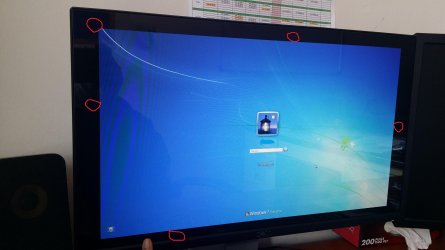
The problem is that post-boot after the DOS and the windows loading screen, the screen gets smaller in size and is not the full monitor from the password screen onwards. The resolution has been set to 1080p. Windows screen resolution does show 1080p, however a smaller cropped version. Its like I'm loosing an inch on each side. I have no idea why.

I think it may be due to the HDMI socket, but the monitor does support 1080p. The secondary monitor is connected via VGA. I have unplugged the second monitor and just use one monitor just to see if the problem disappears, it is still there. There are no problems with the monitor since the dell menu appear fine and the DOS loads up full screen.

Any ideas?
http://www.hardwarecanucks.com/foru...-ocz-synapse-64gb-ssd-cache-drive-review.html
 

My Computer My Computer

At a glance

Windows 7 64 bit Pro
OS
Windows 7 64 bit Pro
Sound Card
On board
Monitor(s) Displays
Dual Monitor: Dell U2311H 23" monitor, LG M227WD
Screen Resolution
1920x1080x2 (landscape)
Keyboard
Microsoft Ergonomic Keyboard 4000
Mouse
Logitech M 705
Internet Speed
25mb/1mb
Other Info
Printer: HP F4180
Speakers: Creative Gigaworks T20 Series II
Hi You might want to check in the graphics control panel for over scanning something along those lines and try adjusting it.
 

My Computer My Computer

At a glance

win 10
Computer type
PC/Desktop
Computer Manufacturer/Model Number
dell xps 9000
OS
win 10
And use the monitor menu buttons to make sure something isn`t set wrong there.

Does the problem monitor work fine by itself ?
 

My Computer My Computer

At a glance

Windows 10 Pro x64Intel Core i7 6700KGSkill TridentZ RGB 16GB 3600 16-16-16-36EVGA GTX 980 Ti SC x2
Computer type
PC/Desktop
Computer Manufacturer/Model Number
Skylake Special #666
OS
Windows 10 Pro x64
CPU
Intel Core i7 6700K
Motherboard
Asus Sabertooth Z170 Mark 1
Memory
GSkill TridentZ RGB 16GB 3600 16-16-16-36
Graphics Card(s)
EVGA GTX 980 Ti SC x2
Sound Card
Realtek High Definition
Monitor(s) Displays
AOC G2460PG
Screen Resolution
1920 x 1080 144Hz
Hard Drives
Samsung 860 Pro 256GB, Seagate Barracuda 4TB x2
PSU
EVGA 1000 P2, EVGA White Custom Braided Cables
Case
Corsair Vengeance C70 Gunmetal Black
Cooling
Corsair H100i v2, Corsair ML120 x2, Thermal Grizzly Kryonaut
Keyboard
Logitech G910 Orion Spectrum
Mouse
Logitech G700s
Internet Speed
Verizon Fios Quantum Gateway 75/75
Antivirus
Windows Defender, Malwarebytes Free 3.8.3
Browser
Chrome
Other Info
Corsair SP120 x4, LG Blu-ray Drive, Durabrand HT-395 100 Watt Dolby Digital Amp, Corsair H2100 Wireless 7.1 Headset
Hi You might want to check in the graphics control panel for over scanning something along those lines and try adjusting it.

Did not find anything out of the ordinary in the AMD catalyst control.

And use the monitor menu buttons to make sure something isn`t set wrong there.

Does the problem monitor work fine by itself ?

It was from another computer. It was working fine. All display prior to the windows boot screen is normal. I've included a picture of the monitor cropped edges with the red circles which represents the gaps. Its like a watching a frame in a frame.

I have tried connecting the VGA port directly to the monitor. It scales up nicely to the edges of the screen. I have also tried a HDMI-DVI adapter just to try the DVI port on the graphics card. It has the same problem with the HDMI port only. The picture is still cropped.

I've also tried it with two other PCs:
1. ASRock H97M PRO4 motherboard with onboard graphics. Scales nicely.
2. Asus Strix 780 6gb OC. Scales nicely.
I've retained the same HDMI cable. So cable is not an issue.

Also tried changing the main monitor as a secondary monitor and stand alone monitor. Does not work. I'm beginning to think its the graphic card, though I have no idea what is wrong with it. The PC does know this is a Dell S2340L which is connected to it.
 

Attachments

  • 20150324_115407.jpg
    20150324_115407.jpg
    580.1 KB · Views: 3

My Computer My Computer

At a glance

Windows 7 64 bit Pro
OS
Windows 7 64 bit Pro
Sound Card
On board
Monitor(s) Displays
Dual Monitor: Dell U2311H 23" monitor, LG M227WD
Screen Resolution
1920x1080x2 (landscape)
Keyboard
Microsoft Ergonomic Keyboard 4000
Mouse
Logitech M 705
Internet Speed
25mb/1mb
Other Info
Printer: HP F4180
Speakers: Creative Gigaworks T20 Series II
Name each port the video card has and name each video socket (input) the problem monitor has.
 

My Computer My Computer

At a glance

Windows 10 Pro x64Intel Core i7 6700KGSkill TridentZ RGB 16GB 3600 16-16-16-36EVGA GTX 980 Ti SC x2
Computer type
PC/Desktop
Computer Manufacturer/Model Number
Skylake Special #666
OS
Windows 10 Pro x64
CPU
Intel Core i7 6700K
Motherboard
Asus Sabertooth Z170 Mark 1
Memory
GSkill TridentZ RGB 16GB 3600 16-16-16-36
Graphics Card(s)
EVGA GTX 980 Ti SC x2
Sound Card
Realtek High Definition
Monitor(s) Displays
AOC G2460PG
Screen Resolution
1920 x 1080 144Hz
Hard Drives
Samsung 860 Pro 256GB, Seagate Barracuda 4TB x2
PSU
EVGA 1000 P2, EVGA White Custom Braided Cables
Case
Corsair Vengeance C70 Gunmetal Black
Cooling
Corsair H100i v2, Corsair ML120 x2, Thermal Grizzly Kryonaut
Keyboard
Logitech G910 Orion Spectrum
Mouse
Logitech G700s
Internet Speed
Verizon Fios Quantum Gateway 75/75
Antivirus
Windows Defender, Malwarebytes Free 3.8.3
Browser
Chrome
Other Info
Corsair SP120 x4, LG Blu-ray Drive, Durabrand HT-395 100 Watt Dolby Digital Amp, Corsair H2100 Wireless 7.1 Headset
Name each port the video card has and name each video socket (input) the problem monitor has.

Only the Dell Optiplex PC with Sapphire R7 240
Ports: - Connection
VGA - Dell E90S
HDMI - Dell S2340L
DVI - (free port)

Changing from both HDMI and DVI gives this cropped screen.
 

My Computer My Computer

At a glance

Windows 7 64 bit Pro
OS
Windows 7 64 bit Pro
Sound Card
On board
Monitor(s) Displays
Dual Monitor: Dell U2311H 23" monitor, LG M227WD
Screen Resolution
1920x1080x2 (landscape)
Keyboard
Microsoft Ergonomic Keyboard 4000
Mouse
Logitech M 705
Internet Speed
25mb/1mb
Other Info
Printer: HP F4180
Speakers: Creative Gigaworks T20 Series II
My Computer My Computer

At a glance

Windows 10 Pro x64Intel Core i7 6700KGSkill TridentZ RGB 16GB 3600 16-16-16-36EVGA GTX 980 Ti SC x2
Computer type
PC/Desktop
Computer Manufacturer/Model Number
Skylake Special #666
OS
Windows 10 Pro x64
CPU
Intel Core i7 6700K
Motherboard
Asus Sabertooth Z170 Mark 1
Memory
GSkill TridentZ RGB 16GB 3600 16-16-16-36
Graphics Card(s)
EVGA GTX 980 Ti SC x2
Sound Card
Realtek High Definition
Monitor(s) Displays
AOC G2460PG
Screen Resolution
1920 x 1080 144Hz
Hard Drives
Samsung 860 Pro 256GB, Seagate Barracuda 4TB x2
PSU
EVGA 1000 P2, EVGA White Custom Braided Cables
Case
Corsair Vengeance C70 Gunmetal Black
Cooling
Corsair H100i v2, Corsair ML120 x2, Thermal Grizzly Kryonaut
Keyboard
Logitech G910 Orion Spectrum
Mouse
Logitech G700s
Internet Speed
Verizon Fios Quantum Gateway 75/75
Antivirus
Windows Defender, Malwarebytes Free 3.8.3
Browser
Chrome
Other Info
Corsair SP120 x4, LG Blu-ray Drive, Durabrand HT-395 100 Watt Dolby Digital Amp, Corsair H2100 Wireless 7.1 Headset
I have got a idea, maybe not a good idea but anyway.

What power supply does you system have?
Every monitor you add puts a load on the video card therefor more load on the power supply.
 

My Computer My Computer

At a glance

Windows 10 Pro. 64/ version 1709 Windows 7 Pr...Intel i7-6800K @ 4.3Corsair Platinum 16 gig @2400EVGA GTX 1070 OC
Computer type
PC/Desktop
Computer Manufacturer/Model Number
Home made Desktop
OS
Windows 10 Pro. 64/ version 1709 Windows 7 Pro/64
CPU
Intel i7-6800K @ 4.3
Motherboard
ASUS X-99 Deluxe II
Memory
Corsair Platinum 16 gig @2400
Graphics Card(s)
EVGA GTX 1070 OC
Monitor(s) Displays
Asus 27" LED LCD/VE278Q
Screen Resolution
1920-1080 or 1280-720 HDMI
Hard Drives
INTEL SSD 730-240 Gb Sata 3.0/
PSU
EVGA Platium 1200W
Case
Phanteks Luxe Tempered Glass 8 fans/ one radiator
Cooling
XSPC/ Water Cooled CPU
Keyboard
Das 4 Professional
Mouse
Logitech M705/MX Anywhere 2-S
Internet Speed
100 mbits
Antivirus
Microsoft Security Essentials/ Malwarebytes Premium 3.0/ SAS
Browser
I.E. 11 default/Firefox/ ISP Time Warner Cable/Spectrum
Other Info
LG BluRay Burner/
Sound system-KLipsch-THX/
Icy Dock ssd Hot Swap bays.
But a monitor is self powered, I really don`t think that has anything to do with his issue.

Somethings off with the software adjustments. One monitor is working fine off the card, just have to figure out the issue on the other.

But as Jack asks, what is the wattage of the power supply, giving us the exact make and model will help us along.
 

My Computer My Computer

At a glance

Windows 10 Pro x64Intel Core i7 6700KGSkill TridentZ RGB 16GB 3600 16-16-16-36EVGA GTX 980 Ti SC x2
Computer type
PC/Desktop
Computer Manufacturer/Model Number
Skylake Special #666
OS
Windows 10 Pro x64
CPU
Intel Core i7 6700K
Motherboard
Asus Sabertooth Z170 Mark 1
Memory
GSkill TridentZ RGB 16GB 3600 16-16-16-36
Graphics Card(s)
EVGA GTX 980 Ti SC x2
Sound Card
Realtek High Definition
Monitor(s) Displays
AOC G2460PG
Screen Resolution
1920 x 1080 144Hz
Hard Drives
Samsung 860 Pro 256GB, Seagate Barracuda 4TB x2
PSU
EVGA 1000 P2, EVGA White Custom Braided Cables
Case
Corsair Vengeance C70 Gunmetal Black
Cooling
Corsair H100i v2, Corsair ML120 x2, Thermal Grizzly Kryonaut
Keyboard
Logitech G910 Orion Spectrum
Mouse
Logitech G700s
Internet Speed
Verizon Fios Quantum Gateway 75/75
Antivirus
Windows Defender, Malwarebytes Free 3.8.3
Browser
Chrome
Other Info
Corsair SP120 x4, LG Blu-ray Drive, Durabrand HT-395 100 Watt Dolby Digital Amp, Corsair H2100 Wireless 7.1 Headset
The monitor is self powered but the signal comes from the video card which gets it power from the power supply.
How much power that takes for the signal; I really don't know.

Still be nice to know what power supply is in the system.
 

My Computer My Computer

At a glance

Windows 10 Pro. 64/ version 1709 Windows 7 Pr...Intel i7-6800K @ 4.3Corsair Platinum 16 gig @2400EVGA GTX 1070 OC
Computer type
PC/Desktop
Computer Manufacturer/Model Number
Home made Desktop
OS
Windows 10 Pro. 64/ version 1709 Windows 7 Pro/64
CPU
Intel i7-6800K @ 4.3
Motherboard
ASUS X-99 Deluxe II
Memory
Corsair Platinum 16 gig @2400
Graphics Card(s)
EVGA GTX 1070 OC
Monitor(s) Displays
Asus 27" LED LCD/VE278Q
Screen Resolution
1920-1080 or 1280-720 HDMI
Hard Drives
INTEL SSD 730-240 Gb Sata 3.0/
PSU
EVGA Platium 1200W
Case
Phanteks Luxe Tempered Glass 8 fans/ one radiator
Cooling
XSPC/ Water Cooled CPU
Keyboard
Das 4 Professional
Mouse
Logitech M705/MX Anywhere 2-S
Internet Speed
100 mbits
Antivirus
Microsoft Security Essentials/ Malwarebytes Premium 3.0/ SAS
Browser
I.E. 11 default/Firefox/ ISP Time Warner Cable/Spectrum
Other Info
LG BluRay Burner/
Sound system-KLipsch-THX/
Icy Dock ssd Hot Swap bays.

My Computer My Computer

At a glance

Windows 10 Pro x64Intel Core i7 6700KGSkill TridentZ RGB 16GB 3600 16-16-16-36EVGA GTX 980 Ti SC x2
Computer type
PC/Desktop
Computer Manufacturer/Model Number
Skylake Special #666
OS
Windows 10 Pro x64
CPU
Intel Core i7 6700K
Motherboard
Asus Sabertooth Z170 Mark 1
Memory
GSkill TridentZ RGB 16GB 3600 16-16-16-36
Graphics Card(s)
EVGA GTX 980 Ti SC x2
Sound Card
Realtek High Definition
Monitor(s) Displays
AOC G2460PG
Screen Resolution
1920 x 1080 144Hz
Hard Drives
Samsung 860 Pro 256GB, Seagate Barracuda 4TB x2
PSU
EVGA 1000 P2, EVGA White Custom Braided Cables
Case
Corsair Vengeance C70 Gunmetal Black
Cooling
Corsair H100i v2, Corsair ML120 x2, Thermal Grizzly Kryonaut
Keyboard
Logitech G910 Orion Spectrum
Mouse
Logitech G700s
Internet Speed
Verizon Fios Quantum Gateway 75/75
Antivirus
Windows Defender, Malwarebytes Free 3.8.3
Browser
Chrome
Other Info
Corsair SP120 x4, LG Blu-ray Drive, Durabrand HT-395 100 Watt Dolby Digital Amp, Corsair H2100 Wireless 7.1 Headset
Thanks Brian for finding that information.

You know I like proper quality power supplies. It's just a thing with me.
Plus I try not to chase problems around just to find out that one of the basic wasn't looked at.
 

My Computer My Computer

At a glance

Windows 10 Pro. 64/ version 1709 Windows 7 Pr...Intel i7-6800K @ 4.3Corsair Platinum 16 gig @2400EVGA GTX 1070 OC
Computer type
PC/Desktop
Computer Manufacturer/Model Number
Home made Desktop
OS
Windows 10 Pro. 64/ version 1709 Windows 7 Pro/64
CPU
Intel i7-6800K @ 4.3
Motherboard
ASUS X-99 Deluxe II
Memory
Corsair Platinum 16 gig @2400
Graphics Card(s)
EVGA GTX 1070 OC
Monitor(s) Displays
Asus 27" LED LCD/VE278Q
Screen Resolution
1920-1080 or 1280-720 HDMI
Hard Drives
INTEL SSD 730-240 Gb Sata 3.0/
PSU
EVGA Platium 1200W
Case
Phanteks Luxe Tempered Glass 8 fans/ one radiator
Cooling
XSPC/ Water Cooled CPU
Keyboard
Das 4 Professional
Mouse
Logitech M705/MX Anywhere 2-S
Internet Speed
100 mbits
Antivirus
Microsoft Security Essentials/ Malwarebytes Premium 3.0/ SAS
Browser
I.E. 11 default/Firefox/ ISP Time Warner Cable/Spectrum
Other Info
LG BluRay Burner/
Sound system-KLipsch-THX/
Icy Dock ssd Hot Swap bays.
If you think it`s the card as you said earlier, is there anyway you can pull the card and test the problem monitor by somehow connecting it directly to the motherboard ?

Do not forget to enable the integrated graphics as I mentioned earlier.
 

My Computer My Computer

At a glance

Windows 10 Pro x64Intel Core i7 6700KGSkill TridentZ RGB 16GB 3600 16-16-16-36EVGA GTX 980 Ti SC x2
Computer type
PC/Desktop
Computer Manufacturer/Model Number
Skylake Special #666
OS
Windows 10 Pro x64
CPU
Intel Core i7 6700K
Motherboard
Asus Sabertooth Z170 Mark 1
Memory
GSkill TridentZ RGB 16GB 3600 16-16-16-36
Graphics Card(s)
EVGA GTX 980 Ti SC x2
Sound Card
Realtek High Definition
Monitor(s) Displays
AOC G2460PG
Screen Resolution
1920 x 1080 144Hz
Hard Drives
Samsung 860 Pro 256GB, Seagate Barracuda 4TB x2
PSU
EVGA 1000 P2, EVGA White Custom Braided Cables
Case
Corsair Vengeance C70 Gunmetal Black
Cooling
Corsair H100i v2, Corsair ML120 x2, Thermal Grizzly Kryonaut
Keyboard
Logitech G910 Orion Spectrum
Mouse
Logitech G700s
Internet Speed
Verizon Fios Quantum Gateway 75/75
Antivirus
Windows Defender, Malwarebytes Free 3.8.3
Browser
Chrome
Other Info
Corsair SP120 x4, LG Blu-ray Drive, Durabrand HT-395 100 Watt Dolby Digital Amp, Corsair H2100 Wireless 7.1 Headset

Yes. Did everything there before posting here. Rotating the display also is cropped.

This the problem monitor?

Dell 23 Monitor - S2340L


Is this your card ?

Sapphire AMD Radeon R7 240 2GB DDR3 VGA/DVI/HDMI PCI-Express Video Card w/ Boost - Newegg.com


I agree, there has to be an adjustment for that monitor in CCC.

Keep working on it, you will figure it out.

You`ve tested the monitor on other machines and it works fine, so it`s the card and software.

Personally, I`m shocked you would purchase a monitor without at least 3 video connections, but that`s not the issue here. :)

I'm beginning to think its the card. If I don't solve this today, I'll find a Nvidia based replacement soon and sell off the R7 240.

Actually this is not my main monitor. My main monitor was a Dell U2311HM model. Had to swap it with my wife since she says the S2340L is too high. So I just exchanged it with her. I use the monitor sometimes in portrait mode for reading pdf's. The workplace was supposed to provide her a PC, but since they are slow, I decided to buy her a work PC instead. Hence the budget monitor.

I have got a idea, maybe not a good idea but anyway.

What power supply does you system have?
Every monitor you add puts a load on the video card therefor more load on the power supply.

I can see where you are coming from. The PSU is OEM-part of the Dell optiplex 780 machine. Prior to purchasing the R7 240, I check each component and used the PSU calculator so that I don't go overboard buying a high end card which is not supported. I have taken into account the SSD and the additional RAM which I placed in the PC. The computer runs fine. I am reluctant to invest more in this PC since its a work pc.

I've resorted to buying a Nvidia Geforce GT 730 1 GB DDR5 as a replacement. Will sell the R7 240 2 GB DDR3 off. Power consumption is similar so I think it will not be an issue.
 

My Computer My Computer

At a glance

Windows 7 64 bit Pro
OS
Windows 7 64 bit Pro
Sound Card
On board
Monitor(s) Displays
Dual Monitor: Dell U2311H 23" monitor, LG M227WD
Screen Resolution
1920x1080x2 (landscape)
Keyboard
Microsoft Ergonomic Keyboard 4000
Mouse
Logitech M 705
Internet Speed
25mb/1mb
Other Info
Printer: HP F4180
Speakers: Creative Gigaworks T20 Series II
ok keep us posted if new card solves the problem.
 

My Computer My Computer

At a glance

win 10
Computer type
PC/Desktop
Computer Manufacturer/Model Number
dell xps 9000
OS
win 10
It would still be nice to know the total output wattage of the PSU, Dell`s are pretty crappy PC`s in my opinion and they use crappy PSU`s.

It should be written right on the label on the PSU

Who`s brand card did you get, please post the manufacturer`s link of the exact card.
 

My Computer My Computer

At a glance

Windows 10 Pro x64Intel Core i7 6700KGSkill TridentZ RGB 16GB 3600 16-16-16-36EVGA GTX 980 Ti SC x2
Computer type
PC/Desktop
Computer Manufacturer/Model Number
Skylake Special #666
OS
Windows 10 Pro x64
CPU
Intel Core i7 6700K
Motherboard
Asus Sabertooth Z170 Mark 1
Memory
GSkill TridentZ RGB 16GB 3600 16-16-16-36
Graphics Card(s)
EVGA GTX 980 Ti SC x2
Sound Card
Realtek High Definition
Monitor(s) Displays
AOC G2460PG
Screen Resolution
1920 x 1080 144Hz
Hard Drives
Samsung 860 Pro 256GB, Seagate Barracuda 4TB x2
PSU
EVGA 1000 P2, EVGA White Custom Braided Cables
Case
Corsair Vengeance C70 Gunmetal Black
Cooling
Corsair H100i v2, Corsair ML120 x2, Thermal Grizzly Kryonaut
Keyboard
Logitech G910 Orion Spectrum
Mouse
Logitech G700s
Internet Speed
Verizon Fios Quantum Gateway 75/75
Antivirus
Windows Defender, Malwarebytes Free 3.8.3
Browser
Chrome
Other Info
Corsair SP120 x4, LG Blu-ray Drive, Durabrand HT-395 100 Watt Dolby Digital Amp, Corsair H2100 Wireless 7.1 Headset
Any information on the power supply sticker would be helpful.
Watts, Amps and volts.

Dell puts the smallest spec power supply they can get away with for the hardware they installed.
The supply power supply will not have any leeway for upgrades of hardware.

So we don't guide you in the wrong direction we need the exact information we request. As precise as you can give us.

Also consider you may have more than one problem. But the first step in my opinion is a proper power supply. Power supplies are the heart of a computer.
 

My Computer My Computer

At a glance

Windows 10 Pro. 64/ version 1709 Windows 7 Pr...Intel i7-6800K @ 4.3Corsair Platinum 16 gig @2400EVGA GTX 1070 OC
Computer type
PC/Desktop
Computer Manufacturer/Model Number
Home made Desktop
OS
Windows 10 Pro. 64/ version 1709 Windows 7 Pro/64
CPU
Intel i7-6800K @ 4.3
Motherboard
ASUS X-99 Deluxe II
Memory
Corsair Platinum 16 gig @2400
Graphics Card(s)
EVGA GTX 1070 OC
Monitor(s) Displays
Asus 27" LED LCD/VE278Q
Screen Resolution
1920-1080 or 1280-720 HDMI
Hard Drives
INTEL SSD 730-240 Gb Sata 3.0/
PSU
EVGA Platium 1200W
Case
Phanteks Luxe Tempered Glass 8 fans/ one radiator
Cooling
XSPC/ Water Cooled CPU
Keyboard
Das 4 Professional
Mouse
Logitech M705/MX Anywhere 2-S
Internet Speed
100 mbits
Antivirus
Microsoft Security Essentials/ Malwarebytes Premium 3.0/ SAS
Browser
I.E. 11 default/Firefox/ ISP Time Warner Cable/Spectrum
Other Info
LG BluRay Burner/
Sound system-KLipsch-THX/
Icy Dock ssd Hot Swap bays.
If you think it`s the card as you said earlier, is there anyway you can pull the card and test the problem monitor by somehow connecting it directly to the motherboard ?

Do not forget to enable the integrated graphics as I mentioned earlier.

I can't really test the HDMI/DVI socket since the motherboard comes with VGA and DP. No HDMI or DVI. Quite weird since DVI should be quite standard compared to DP. Connecting the VGA to the monitor does not help since I've tried connecting it to the VGA port on the R7. It works and scales nicely.


It would still be nice to know the total output wattage of the PSU, Dell`s are pretty crappy PC`s in my opinion and they use crappy PSU`s.

It should be written right on the label on the PSU

Who`s brand card did you get, please post the manufacturer`s link of the exact card.

Dell has crappy PSU for anything not written Alienware or XPS and since I've opened and went through it, it is not really that upgradeable since everything is bolted with their card. It says it supports 500W IINM. I've taken the liberty to buy something cheap way in the capacity of the PC since it was given to me. The PC itself came with Windows Vista (which I told the IT dept to upgrade to Windows 7).

I bought this Gainward GeForce GT 730 1024MB. Since I could not find the PSU requirements on that page, I think its similar unit with this Palit.

Any information on the power supply sticker would be helpful.
Watts, Amps and volts.

Dell puts the smallest spec power supply they can get away with for the hardware they installed.
The supply power supply will not have any leeway for upgrades of hardware.

So we don't guide you in the wrong direction we need the exact information we request. As precise as you can give us.

Also consider you may have more than one problem. But the first step in my opinion is a proper power supply. Power supplies are the heart of a computer.

Yes, the PSU is the most important thing.

However, since my institution is currently on a tight budget, new PC's are not been ordered to match the amount of staff. Whatever is given to staff are now recycled 5-10 year old PC. Some lucky stuff got new PC's in 2012. Some people are still happy running XP on their machines.

I have another PC which I instructed my institution to buy for viewing 3D DICOM and obj files and crunching lots of numbers. When that project is over, I will use it as my main work PC. This current Dell needs to lasts 18 months more. The PC replacement has these specs:
A Dell U2715H, to a Asus Strix 780 6GB GC
I5-4690
16 GB RAM
Win 7 64 bit
256 GB SSD
4 TB HDD
A 750W Corsair PSU.

They had cash, so I thought I'd specced the PC to match my PC at home :D
 

My Computer My Computer

At a glance

Windows 7 64 bit Pro
OS
Windows 7 64 bit Pro
Sound Card
On board
Monitor(s) Displays
Dual Monitor: Dell U2311H 23" monitor, LG M227WD
Screen Resolution
1920x1080x2 (landscape)
Keyboard
Microsoft Ergonomic Keyboard 4000
Mouse
Logitech M 705
Internet Speed
25mb/1mb
Other Info
Printer: HP F4180
Speakers: Creative Gigaworks T20 Series II

My Computer My Computer

At a glance

Windows 10 Pro x64Intel Core i7 6700KGSkill TridentZ RGB 16GB 3600 16-16-16-36EVGA GTX 980 Ti SC x2
Computer type
PC/Desktop
Computer Manufacturer/Model Number
Skylake Special #666
OS
Windows 10 Pro x64
CPU
Intel Core i7 6700K
Motherboard
Asus Sabertooth Z170 Mark 1
Memory
GSkill TridentZ RGB 16GB 3600 16-16-16-36
Graphics Card(s)
EVGA GTX 980 Ti SC x2
Sound Card
Realtek High Definition
Monitor(s) Displays
AOC G2460PG
Screen Resolution
1920 x 1080 144Hz
Hard Drives
Samsung 860 Pro 256GB, Seagate Barracuda 4TB x2
PSU
EVGA 1000 P2, EVGA White Custom Braided Cables
Case
Corsair Vengeance C70 Gunmetal Black
Cooling
Corsair H100i v2, Corsair ML120 x2, Thermal Grizzly Kryonaut
Keyboard
Logitech G910 Orion Spectrum
Mouse
Logitech G700s
Internet Speed
Verizon Fios Quantum Gateway 75/75
Antivirus
Windows Defender, Malwarebytes Free 3.8.3
Browser
Chrome
Other Info
Corsair SP120 x4, LG Blu-ray Drive, Durabrand HT-395 100 Watt Dolby Digital Amp, Corsair H2100 Wireless 7.1 Headset
Back
Top