
Display Driver Has Stopped Responding

Wrinkledlion

New member
Local time
3:12 PM
Messages
82
Sometimes, after having been on for a long time, my screen will go black for a few seconds. It comes back a bit awkwardly, with different parts of the screen appearing separately. Once everything is back, I get a little popup saying that the display driver stopped responding, and has recovered. It's only a minor annoyance, but I'd like to know if there's any way to fix this? In my device manager, it says that I'm missing a video controller, which could be the cause of this.
 

Attachments
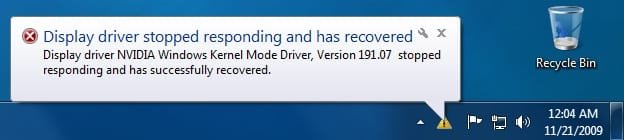
  • displaydriver.jpg
    displaydriver.jpg
    15.1 KB · Views: 24

My Computer

OS
Windows 7
Motherboard
Shuttle FB61 (Springdale-G-6A79AH2AC-00)
Graphics Card(s)
NVIDIA GeForce 8400 GS
Sound Card
Realtek AC'97 Audio
Monitor(s) Displays
Samsung SyncMaster 2243SWX
Screen Resolution
1920 x 1080
Hi Wrinkledlion, Its the sort of thing you really want to get sorted. The first step would be to check your manufacturer for driver updates that could address this issue
If you could fill out your system specs in your user control panel at the top of the page it would be appreciated as it would make it easier to assist you
 

My Computer

Computer Manufacturer/Model Number
Hewlett Packard Compaq Presario CQ60-305au
OS
Windows Seven Home Premium 32bit SP1
CPU
AMD Athlon QI46 2.1Ghz
Motherboard
Wistron 303c
Memory
2048 Mb DDR2 SD RAM
Graphics Card(s)
NVidea GE GoForce 8200M G/256mb dedicated graphics memory
Sound Card
MCP78S NVidea high definition
Monitor(s) Displays
15.6" High definition Brightview Widescreen
Screen Resolution
1336x768
Hard Drives
Toshiba MK2555GSX ATA
Back
Top