Display driver stopped responding

Locketi

New member
Local time
2:01 PM
Messages
19
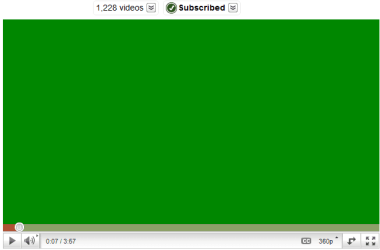
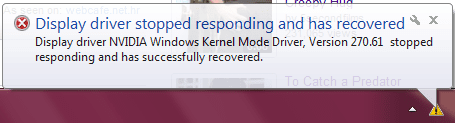
I recently installed Win7 and had to manually install drivers. Lately, I've been getting this error while watching internet videos once or twice a day. My screen flickers, goes black for a second, and flashes back and the video screens are green... I don't understand why this is happening but it's really starting to bug me. Any suggestions?
 

Attachments
  • display driver.PNG
    display driver.PNG
    10.4 KB · Views: 10
  • youtube.PNG
    youtube.PNG
    3.7 KB · Views: 23

My Computer

Computer Manufacturer/Model Number
XPS M1530
OS
Windows 7 Ultimate 32bit
CPU
Intel Mobile Core 2 Duo T8100 @ 2.10GHz
Motherboard
Dell Inc. 0D500F (Microprocessor)
Memory
4GB
Graphics Card(s)
NVIDIA GeForce 8400M GS
Sound Card
HD
Monitor(s) Displays
Generic PnP Monitor
Screen Resolution
1280x800@60Hz
Hard Drives
244GB Western Digital WDC WD2500BEVS-75UST0 ATA Device (SATA)
Keyboard
HID device
Mouse
HID compliant
We see this a lot where users replace a bunch of drivers given by the Win7 installer.

This is not XP. Win7 is mostly driver-complete, with newer arriving quickly via optional Windows Updates. Any drivers then missing in Device Manager can then be imported via the Support Downloads webpage for the computer or device.

You should not change out any drivers given by the installer/updates unless performance problems point to that driver.

You can try to roll back the drivers you changed to the ones given by the installer, then watch optional Updates. But what is often required when this mistake is made is to reinstall Win7.
 
We see this a lot where users replace a bunch of drivers given by the Win7 installer.

This is not XP. Win7 is mostly driver-complete, with newer arriving quickly via optional Windows Updates. Any drivers then missing in Device Manager can then be imported via the Support Downloads webpage for the computer or device.

You should not change out any drivers given by the installer/updates unless performance problems point to that driver.

You can try to roll back the drivers you changed to the ones given by the installer, then watch optional Updates. But what is often required when this mistake is made is to reinstall Win7.

Oh? Well I upgraded from vista to win7 and ... it wiped out my drivers so I reinstalled from the win7 website. Not sure if I understand you correctly.. I should just wait for my computer to suggest an update for the drivers?
 

My Computer

Computer Manufacturer/Model Number
XPS M1530
OS
Windows 7 Ultimate 32bit
CPU
Intel Mobile Core 2 Duo T8100 @ 2.10GHz
Motherboard
Dell Inc. 0D500F (Microprocessor)
Memory
4GB
Graphics Card(s)
NVIDIA GeForce 8400M GS
Sound Card
HD
Monitor(s) Displays
Generic PnP Monitor
Screen Resolution
1280x800@60Hz
Hard Drives
244GB Western Digital WDC WD2500BEVS-75UST0 ATA Device (SATA)
Keyboard
HID device
Mouse
HID compliant
Yes, enable hardware auto-updating here to help get newer drivers delivered via optional Windows Updates quickly: Automatically get recommended drivers and updates for your hardware

After the Vista debacle where manufacturers held out on drivers to force us to buy newer hardware, MS spent a fortune to get drivers into the Win7 installer or quickly updated via optional Windows Updates.

Drivers are automated in Win7 so that with rare exception Win7 is the authority on its drivers.
 
Alrighty. Thanks!
 

My Computer

Computer Manufacturer/Model Number
XPS M1530
OS
Windows 7 Ultimate 32bit
CPU
Intel Mobile Core 2 Duo T8100 @ 2.10GHz
Motherboard
Dell Inc. 0D500F (Microprocessor)
Memory
4GB
Graphics Card(s)
NVIDIA GeForce 8400M GS
Sound Card
HD
Monitor(s) Displays
Generic PnP Monitor
Screen Resolution
1280x800@60Hz
Hard Drives
244GB Western Digital WDC WD2500BEVS-75UST0 ATA Device (SATA)
Keyboard
HID device
Mouse
HID compliant
Try another display driver for your model adapter.

See if optional Updates has any cued. Check the Nvidia site for newer. Check your installed drivers to choose another to try.

You can see the installed ones at Device Manager>Display>Update Driver>Browse>Choose.

Make sure you have the latest flashplayer update, reinstall flashplayer.
 
I have sampe problem now.. actually when i wanna stram from any player youtube, or whatever, it is not working, freeze 3-4 second and than show green display and said.. "display driver stopped responding and has recovered" my Card is ATI Mobility Radeon 5650, now i m going to resintall windows and check if it's going to fix it.
 

My Computer

Computer Manufacturer/Model Number
Intel Core II Duo
OS
Windows 7
CPU
E8400 @3.00 GHz
Motherboard
P5KC
Memory
2 GB
Graphics Card(s)
NVIDIA Geforce 8600 GT
Sound Card
Realtek Sound Card
Monitor(s) Displays
HP L1706
I was at their site,, downloaded, but not fixed.. and when i download ati.com and download 1 KB package
AMD Catalyst™ Display Driver


after exctraction itwhen i click setup it's said..
==============
errorlt.jpg
erroryi.jpg

------
so i let my SONY LAPTOP update from website which is

but no sux,, and it happens when i stream media from youtube or any player online, but i hope it's not problem of hardware, ,, as i don't want to take it back to sony as i have to finish my project :(( please help
 

My Computer

Computer Manufacturer/Model Number
Intel Core II Duo
OS
Windows 7
CPU
E8400 @3.00 GHz
Motherboard
P5KC
Memory
2 GB
Graphics Card(s)
NVIDIA Geforce 8600 GT
Sound Card
Realtek Sound Card
Monitor(s) Displays
HP L1706
ok mate.. i'll have a look and let u know.. thanks for your responses :)
 

My Computer

Computer Manufacturer/Model Number
Intel Core II Duo
OS
Windows 7
CPU
E8400 @3.00 GHz
Motherboard
P5KC
Memory
2 GB
Graphics Card(s)
NVIDIA Geforce 8600 GT
Sound Card
Realtek Sound Card
Monitor(s) Displays
HP L1706
Actually, i have uninstalled ATI Driver and now it's not detecting same problem. Though sometimies sound when i'm playing music on winamp, sound sumtimes freeze 3-4 sec like pitched down and then recover.
So i have not installed any driver yet, as i found it working though i have to update driver (install) as photoshop is askin for its features.
 

My Computer

Computer Manufacturer/Model Number
Intel Core II Duo
OS
Windows 7
CPU
E8400 @3.00 GHz
Motherboard
P5KC
Memory
2 GB
Graphics Card(s)
NVIDIA Geforce 8600 GT
Sound Card
Realtek Sound Card
Monitor(s) Displays
HP L1706
This is happening with YouTube Videos?

One other thought ..

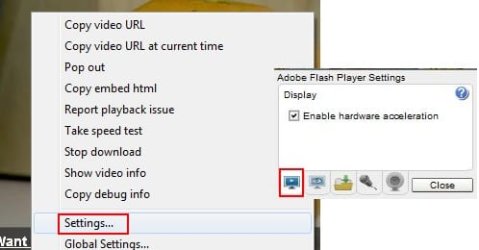
1) make sure your flash player is up to date.
2) Does it show as Enable HW acceleration?
If so, it may worth trying to disble it, and see if it helps.

Just right click the Video, and choose settings.
1.jpg


Still need to resolve the driver issue however.
 

My Computer

Computer Manufacturer/Model Number
Custom (Self Build)
OS
Windows 7 Home Premium 64bit
CPU
Intel Core i7 2700k
Motherboard
eVGA P67 SLI
Memory
8GB Mushkin Redline Ridgebacks @1866
Graphics Card(s)
EVGA GTX570 SC
Sound Card
XiFi Titanium HD
Monitor(s) Displays
LG W2453V
Screen Resolution
1920x1080
Hard Drives
Intel 320 80GB -- Intel X25-V 40GB --WD Black 1TB x2 -- WD Blue 640GB
PSU
Seasonic x750
Case
Corsair 600T SE White
Cooling
eVGA Superclocked CPU Cooler
Keyboard
Saitek Cyborg
Antivirus
Kaspersky
Browser
IE
Other Info
LG BD/DVD
This is happening with YouTube Videos?

One other thought ..

1) make sure your flash player is up to date.
2) Does it show as Enable HW acceleration?
If so, it may worth trying to disble it, and see if it helps.

Just right click the Video, and choose settings.
View attachment 155926


Still need to resolve the driver issue however.

Hmm... nope. I'm noticing it happens whenever I watch media. I've disabled the acceleration and installed an updated flash. I'll report back with results. Thanks.
 

My Computer

Computer Manufacturer/Model Number
XPS M1530
OS
Windows 7 Ultimate 32bit
CPU
Intel Mobile Core 2 Duo T8100 @ 2.10GHz
Motherboard
Dell Inc. 0D500F (Microprocessor)
Memory
4GB
Graphics Card(s)
NVIDIA GeForce 8400M GS
Sound Card
HD
Monitor(s) Displays
Generic PnP Monitor
Screen Resolution
1280x800@60Hz
Hard Drives
244GB Western Digital WDC WD2500BEVS-75UST0 ATA Device (SATA)
Keyboard
HID device
Mouse
HID compliant
What driver is being used for Display?

I think it has no driver, for now. and that BSOD problem is solved after uninstall ATI DRIVER, also i update Flash player and Direct X.. but that sound sometimes freezing.. is there posibility that it cause of VGA CARD or even SOUND CARD? it's SONY LAPTOP VPCEB4C5E
 

My Computer

Computer Manufacturer/Model Number
Intel Core II Duo
OS
Windows 7
CPU
E8400 @3.00 GHz
Motherboard
P5KC
Memory
2 GB
Graphics Card(s)
NVIDIA Geforce 8600 GT
Sound Card
Realtek Sound Card
Monitor(s) Displays
HP L1706
It's not possible to have no driver for Display. Check in Device Manager under Display. Click on it to see what it says on General and Driver tab.

Are there are any drivers in error in Device Manager, shown by an ! exclamation mark?
 
I don't know if my flash was outdated or what, but so far so good... my display is no longer flashing and ruining my videos! Thanks gregrocker and Wishmaster!

Good luck to you though, djlevan.
 

My Computer

Computer Manufacturer/Model Number
XPS M1530
OS
Windows 7 Ultimate 32bit
CPU
Intel Mobile Core 2 Duo T8100 @ 2.10GHz
Motherboard
Dell Inc. 0D500F (Microprocessor)
Memory
4GB
Graphics Card(s)
NVIDIA GeForce 8400M GS
Sound Card
HD
Monitor(s) Displays
Generic PnP Monitor
Screen Resolution
1280x800@60Hz
Hard Drives
244GB Western Digital WDC WD2500BEVS-75UST0 ATA Device (SATA)
Keyboard
HID device
Mouse
HID compliant
Thank you matie,
Greg, yeah you are right, have a look. it guess it's older versions..
======
capturebfv.jpg


Btw. no marks.. everything seems to be good.. and there is for details as well
=======
cap2hl.jpg

======
Thanks for your effort bro for helping me ;)
 

My Computer

Computer Manufacturer/Model Number
Intel Core II Duo
OS
Windows 7
CPU
E8400 @3.00 GHz
Motherboard
P5KC
Memory
2 GB
Graphics Card(s)
NVIDIA Geforce 8600 GT
Sound Card
Realtek Sound Card
Monitor(s) Displays
HP L1706
Back
Top