
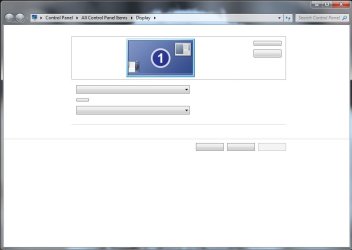
Display Options Missing???

idemockle

New member
Local time
2:37 PM
Messages
5
Anyone know what would cause my display options to be missing?? I attached a screenshot. I'm running Windows 7 64 bit.
 

Attachments

  • Untitled.jpg
    Untitled.jpg
    28.3 KB · Views: 17

My Computer

Computer Manufacturer/Model Number
OEM
OS
Windows 7 Professional 64 bit
CPU
Intel Core i7 920
Motherboard
EVGA X58 SLI LE
Memory
4 GB DDR3 1600 MHz GSkill (2 2Gb)
Graphics Card(s)
XFX ATI Radeon HD 5850
Hard Drives
500gb Western Digital
PSU
Corsair CMPSU-750TX 750W
Anyone know what would cause my display options to be missing?? I attached a screenshot. I'm running Windows 7 64 bit.

Have you recently run any Registry Cleaners and/or Tweaking Utilities? These things cause more problems than they claim to fix...

Regardless of how this happened, have you tried using System Restore to go back to a point before this problem started?
 

My Computer

Computer type
PC/Desktop
Computer Manufacturer/Model Number
Virtual Machine
OS
Windows 7 Professional 32-bit SP1
CPU
AMD A4/A6
Motherboard
Intel Corporation 440BX Desktop Reference Platform
Memory
3.00GB EDO
Graphics Card(s)
VMware SVGA 3D
Sound Card
High Definition Audio Device
Monitor(s) Displays
Generic Non-PnP Monitor on VMware SVGA 3D
Screen Resolution
1440x900
Hard Drives
1 x 60GB VMware Virtual SATA Hard Drive ATA Device
Antivirus
Kaspersky Total Security
Thanks for the reply. No, I haven't run any of that type of nonsense. I did use System Restore to a point before I updated my graphics driver and it didn't help. I guess I could try going further back.

I also ran Malwarebytes to see if that would fix it and it didn't do anything either.

I tried going back to my furthest system restore point. It still didn't fix the problem, but for some reason it changed the name of "Display" when I right click on my desktop to "Screen Resolution."
 

My Computer

Computer Manufacturer/Model Number
OEM
OS
Windows 7 Professional 64 bit
CPU
Intel Core i7 920
Motherboard
EVGA X58 SLI LE
Memory
4 GB DDR3 1600 MHz GSkill (2 2Gb)
Graphics Card(s)
XFX ATI Radeon HD 5850
Hard Drives
500gb Western Digital
PSU
Corsair CMPSU-750TX 750W
I tried going back to my furthest system restore point. It still didn't fix the problem, but for some reason it changed the name of "Display" when I right click on my desktop to "Screen Resolution."

Which is what it's supposed to be. The bottom three entries on the desktop right-click menu are thus:
  • Screen resolution
  • Gadgets
  • Personalize
If either of them was different, then something changed them, and may very well have stuffed things up in the process. What new software and/or utilities have you recently installed?

What anti-virus are you using?

To determine if any system file have been corrupted, and to possibly repair them, try this:
  1. Click the Start Orb
  2. Type "cmd" in the search box (without quotes).
  3. When "cmd" appears in the results, right-click and select "run as administrator"
  4. In the command prommpt window, type "SFC /scannow" (without quotes), and press <ENTER>
 

My Computer

Computer type
PC/Desktop
Computer Manufacturer/Model Number
Virtual Machine
OS
Windows 7 Professional 32-bit SP1
CPU
AMD A4/A6
Motherboard
Intel Corporation 440BX Desktop Reference Platform
Memory
3.00GB EDO
Graphics Card(s)
VMware SVGA 3D
Sound Card
High Definition Audio Device
Monitor(s) Displays
Generic Non-PnP Monitor on VMware SVGA 3D
Screen Resolution
1440x900
Hard Drives
1 x 60GB VMware Virtual SATA Hard Drive ATA Device
Antivirus
Kaspersky Total Security
Which is what it's supposed to be. The bottom three entries on the desktop right-click menu are thus:
  • Screen resolution
  • Gadgets
  • Personalize
Thanks, I'm trying the scan now. I think the change of name had to do with a Windows update. When I went back and installed all the updates removed by the system restore, the name changed back to "Display" in the menu.
 

My Computer

Computer Manufacturer/Model Number
OEM
OS
Windows 7 Professional 64 bit
CPU
Intel Core i7 920
Motherboard
EVGA X58 SLI LE
Memory
4 GB DDR3 1600 MHz GSkill (2 2Gb)
Graphics Card(s)
XFX ATI Radeon HD 5850
Hard Drives
500gb Western Digital
PSU
Corsair CMPSU-750TX 750W
Okay, I scanned it and it said it found some corrupt files it couldn't fix. It gave me an "Access is Denied" error when I tried to open the log file, but by copying it to the desktop I was able to open it. I've attached the file.

To answer your question about my virus scan software, I use AVG free version, but I had it deactivated for a week or so a while back because it was incompatible with a game I was playing at the time.

Edit: If you can decipher that log file, God bless you lol.

Edit 2: As for recent software installations... Nothing really, other than reinstalling AVG. I haven't installed anything besides that in a few weeks, but I never really change my display settings so who knows when this started? I did update my BIOS and my graphics card driver recently but I'm doubtful that this would be caused by anything like that.
 

My Computer

Computer Manufacturer/Model Number
OEM
OS
Windows 7 Professional 64 bit
CPU
Intel Core i7 920
Motherboard
EVGA X58 SLI LE
Memory
4 GB DDR3 1600 MHz GSkill (2 2Gb)
Graphics Card(s)
XFX ATI Radeon HD 5850
Hard Drives
500gb Western Digital
PSU
Corsair CMPSU-750TX 750W
You said that the problems started after an update to your graphics drivers. Could it be that when you system restored , it did not fully roll back on the driver update? I once had a similar problem on XP and solved it by deleting the display adapter from the hardware profile and allowing windows to detect it on reboot. I then re-installed the original drivers that worked....Just my 2cents worth!! Good luck!
 

My Computer

OS
win7
To answer your question about my virus scan software, I use AVG free version, but I had it deactivated for a week or so a while back because it was incompatible with a game I was playing at the time.

Why on Earth and everything else in the Universe would you do that????! Deactivating your anti-virus for even longer than 5 minutes (in my opinion) should be considered a capital crime...

Your anti-virus was off for a week, and that alone should have the alarm bells ringing, especially if during that time you browse the 'net or used discs and usb drives of friends and relatives.

I've quickly perused the log you attached, and I see a lot of errors in the lines of "00000574 Manifest hash for component ..... does not match expected value. ".

Under the circumstances, this corruption, combined with no AV, would indicate a virus.

Can you please post screenshots of Task Manager (after enabling "Show Processes from All Users"). Take multiple screenshots if the complete lists of tasks require scrolling to view everything.

Do the same for the "Startup" section of MSCONFIG (<WINDOWS_LOGO_KEY>+<R>, MSCONFIG)

I want to try and determine what is running that should not be there...
 

My Computer

Computer type
PC/Desktop
Computer Manufacturer/Model Number
Virtual Machine
OS
Windows 7 Professional 32-bit SP1
CPU
AMD A4/A6
Motherboard
Intel Corporation 440BX Desktop Reference Platform
Memory
3.00GB EDO
Graphics Card(s)
VMware SVGA 3D
Sound Card
High Definition Audio Device
Monitor(s) Displays
Generic Non-PnP Monitor on VMware SVGA 3D
Screen Resolution
1440x900
Hard Drives
1 x 60GB VMware Virtual SATA Hard Drive ATA Device
Antivirus
Kaspersky Total Security
@dzomlija
"Under the circumstances, this corruption, combined with no AV, would indicate a virus."
Could be a little strong don't you think/ I agree it COULD be a virus and your point on disabling their AV program setting the alarm bells ringing is fair. But since the problem started following a driver update attempt, it sounds more like file corruption during install/update don't you think??
 

My Computer

OS
win7
@dzomlija
"Under the circumstances, this corruption, combined with no AV, would indicate a virus."
Could be a little strong don't you think/ I agree it COULD be a virus and your point on disabling their AV program setting the alarm bells ringing is fair. But since the problem started following a driver update attempt, it sounds more like file corruption during install/update don't you think??

Fair enough, but what caused the corruption to begin with?

Off Topic:
I won't apologize for coming on a bit strong, but of all the stupid things in the world that I hate most, disabling one's AV is almost at the top of the list. Right up there with "I overclocked my CPU, and now it won't work at all" or "I used a registry cleaner, and now nothing wants to work", etc...
 

My Computer

Computer type
PC/Desktop
Computer Manufacturer/Model Number
Virtual Machine
OS
Windows 7 Professional 32-bit SP1
CPU
AMD A4/A6
Motherboard
Intel Corporation 440BX Desktop Reference Platform
Memory
3.00GB EDO
Graphics Card(s)
VMware SVGA 3D
Sound Card
High Definition Audio Device
Monitor(s) Displays
Generic Non-PnP Monitor on VMware SVGA 3D
Screen Resolution
1440x900
Hard Drives
1 x 60GB VMware Virtual SATA Hard Drive ATA Device
Antivirus
Kaspersky Total Security
@dzomlija, Corruption could possibly have happened when the system restore was carried out, we just don't know exactly what has been done to the system. Your point re AV is well made and I agree. Re the CPU being overclocked...its one helluva expensive way to buy a toaster!! LOL
 

My Computer

OS
win7
wily: Thanks for the suggestion, unfortunately my driver was successfully rolled back during the system restore and it did not fix the problem.

Dzomlija:
Don't worry about coming off strong, you're right, it is stupid. But I'll be damned if I'm going to give up a $30 purchase when I've never had a virus problem I couldn't eventually fix. I never use any discs I'm not 100% sure of, but of course you can never be sure of the internet. And btw I overclock my CPU pretty substantially and it works perfectly. :P Anyway, I ran a full AVG scan and it didn't find anything.
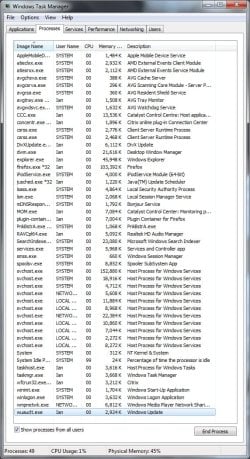
Here's a screenshot of my processes. Not all that much there, I think. Citrix is a remote desktop program I use to access programs I need for schoolwork. Catalyst Control Center is from my graphics driver. PnkBstrA.exe is an anti-cheating thing that was installed along with a game. Everything else seems like it should be there, but I'm no expert.

Same with msconfig. Practically everything is from Microsoft, and I can vouch for the few things that aren't.
 

Attachments

  • Untitled.jpg
    Untitled.jpg
    132.4 KB · Views: 10
  • ms config startup.png
    ms config startup.png
    65.2 KB · Views: 6

My Computer

Computer Manufacturer/Model Number
OEM
OS
Windows 7 Professional 64 bit
CPU
Intel Core i7 920
Motherboard
EVGA X58 SLI LE
Memory
4 GB DDR3 1600 MHz GSkill (2 2Gb)
Graphics Card(s)
XFX ATI Radeon HD 5850
Hard Drives
500gb Western Digital
PSU
Corsair CMPSU-750TX 750W
Nothing sticks out in the processes list. However, the processes list doesn't show what dll's are associated with all the svchost processes. So, it's hard to say whether or not one of those processes is infected.

Personally, this issue sounds a lot more like a corruption during update installation that may just end up requiring a clean install due to its complexity and unknown origin.

One thing I like to do when I do a clean install is only install all of the latest windows updates and drivers and then do a system backup image to an external drive. This way, if a clean install is needed in the future, I simply do a system restore to this image, saving many hours of time as you simply need to install whatever updates have come out since the original clean install and update. Then, rinse and repeat. Do a system restore to that image you created, only download the latest updates, do another system image of this for later use.
 

My Computer

OS
XP / Win7 x64 Pro
CPU
Intel Quad-Core Q9450 @ 3.2GHz
Motherboard
Asus P5-E
Memory
2x2GB GSkill DDR2
Graphics Card(s)
NVIDIA GeForce 8600 GTS (EVGA)
Monitor(s) Displays
Dell 2408WFP
Screen Resolution
1920x1200
Back
Top