Display Problem

awesome19sunny

New member
Local time
6:31 PM
Messages
50
Location
Takiyapar, Danapur, Patna, India,
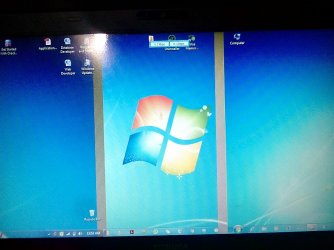
Sometimes Display looks good.. But sometimes distorted with two bold line strips as in given attachment.
Please Reply to my post with solution.
Thanks in advance.
 

Attachments

  • IMG_20160829_005257_1.jpg
    IMG_20160829_005257_1.jpg
    462.8 KB · Views: 6

My Computer

Computer type
Laptop
Computer Manufacturer/Model Number
Toshiba/PSC2UG-012001
OS
Windows 7 Ultimate x64
CPU
Intel (R) Core (TM) i5-2430 2.40ghz
Motherboard
Toshiba
Memory
4096 mb
Hard Drives
Toshiba mk5075gsx (s1)
Internet Speed
3Mbps
Antivirus
Quick heal Antivirus Pro
Browser
Chrome
Awesome mate have you tried updating the graphic driver for the machine if not try and do quote that part number on the Toshiba support site it relates to where the machine was built and built for.

Just one query your monitor screen looks back to front to me is the taskbar appears to read from left to right as opposed to any of my machines where the date etc is on the far right??

Now of course it could mean that the screen is failing too in which case you will need to replace it and if you can let us know what model the machine is (we already know that all important part number) there are some good sites referring to replacing those screens ie Disassemble, repair, upgrade Toshiba laptop yourself. is one I have used a lot .
 

My Computer

Computer type
PC/Desktop
Computer Manufacturer/Model Number
Own build (new) Desk1 / Asus ROG Win 7 / Desk2 1st build
OS
Desk1 7 Home Prem / Desk2 10 Pro / Main lap Asus ROG 10 Pro 2 laptop Toshiba 7 Pro Asus P2520 7 & 10
CPU
Desk1 i5 3750K / Laptop i7 GTX 860M / Desk2 i5 2500
Motherboard
Desk1 Asus P877-V / Desk2 Gigabyte H67 UD3H / Laptop ?
Memory
Desk1 8GB (1866) / Desk2 16GB (1333) / Laptop 8Gb DDR3
Graphics Card(s)
Desk 1& 2NVidia GTX 650 & Laptops on board Intel
Sound Card
Desk 1 & 2 -XONAR DG Realtek High Def audio Laptop
Monitor(s) Displays
Desk 1 Benq HD 2450 / Desk2 Philips 24" / Laptop 17.5"
Screen Resolution
1920x1080 D1 & D2 & Laptop 1
Hard Drives
Desk1 Samsung 120GB 830 SSD
Asus ROG 256GB 850 Pro SSD
Desk2 Samsung 840 256 SSD
Toshiba 120GB EVO
PSU
Desk 1 Corsair HX 1050/ Laptop ? / Desk 2 Corsair HX 650
Case
Desk 1 Cooler HAF XM ? Toshiba laptop / Desk2 Coolermaster
Cooling
Fans on all Desk1 -2 Desk2 - all Coolermasters 5 Laptop ?
Keyboard
Desk 1 MS Sidewinder X6 Desk 2 MS Sidewinder X 4
Mouse
Desk 1&2 - Gigabyte MS 900 gamer - laptop - Logitec wireless
Internet Speed
ADSL2+
Other Info
One other Desktop (tester) and spare Toshba laptop both with SSD's
Running Kaspersky 2016 ISS on all machines config'd identically
Logitec audio stereo systems on each machine (x3)
Canon MG5250MFC
Router/modem TP-Link running WPA2SK

Thanks for the information. Here the Model No- PSC2UG-012001 of my Toshiba laptop.
 

My Computer

Computer type
Laptop
Computer Manufacturer/Model Number
Toshiba/PSC2UG-012001
OS
Windows 7 Ultimate x64
CPU
Intel (R) Core (TM) i5-2430 2.40ghz
Motherboard
Toshiba
Memory
4096 mb
Hard Drives
Toshiba mk5075gsx (s1)
Internet Speed
3Mbps
Antivirus
Quick heal Antivirus Pro
Browser
Chrome
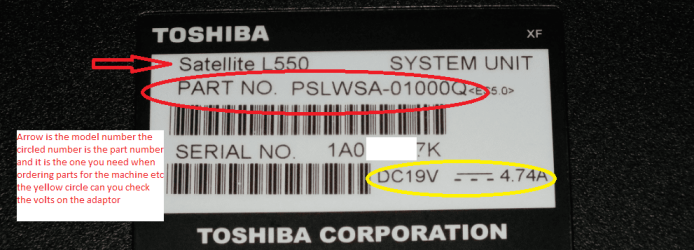
Yes Awesome mate that is the PART NO I/we need the model number see the pic of my Toshiba PART NO the actual model number of mine is a Toshiba Satellite L550 as per my pic
So you should have a A something or L something P something etc etc
 

Attachments

  • PART NO.PNG
    PART NO.PNG
    112.5 KB · Views: 2

My Computer

Computer type
PC/Desktop
Computer Manufacturer/Model Number
Own build (new) Desk1 / Asus ROG Win 7 / Desk2 1st build
OS
Desk1 7 Home Prem / Desk2 10 Pro / Main lap Asus ROG 10 Pro 2 laptop Toshiba 7 Pro Asus P2520 7 & 10
CPU
Desk1 i5 3750K / Laptop i7 GTX 860M / Desk2 i5 2500
Motherboard
Desk1 Asus P877-V / Desk2 Gigabyte H67 UD3H / Laptop ?
Memory
Desk1 8GB (1866) / Desk2 16GB (1333) / Laptop 8Gb DDR3
Graphics Card(s)
Desk 1& 2NVidia GTX 650 & Laptops on board Intel
Sound Card
Desk 1 & 2 -XONAR DG Realtek High Def audio Laptop
Monitor(s) Displays
Desk 1 Benq HD 2450 / Desk2 Philips 24" / Laptop 17.5"
Screen Resolution
1920x1080 D1 & D2 & Laptop 1
Hard Drives
Desk1 Samsung 120GB 830 SSD
Asus ROG 256GB 850 Pro SSD
Desk2 Samsung 840 256 SSD
Toshiba 120GB EVO
PSU
Desk 1 Corsair HX 1050/ Laptop ? / Desk 2 Corsair HX 650
Case
Desk 1 Cooler HAF XM ? Toshiba laptop / Desk2 Coolermaster
Cooling
Fans on all Desk1 -2 Desk2 - all Coolermasters 5 Laptop ?
Keyboard
Desk 1 MS Sidewinder X6 Desk 2 MS Sidewinder X 4
Mouse
Desk 1&2 - Gigabyte MS 900 gamer - laptop - Logitec wireless
Internet Speed
ADSL2+
Other Info
One other Desktop (tester) and spare Toshba laptop both with SSD's
Running Kaspersky 2016 ISS on all machines config'd identically
Logitec audio stereo systems on each machine (x3)
Canon MG5250MFC
Router/modem TP-Link running WPA2SK
Laptop-Toshiba Satellite C640 -X4014
 

My Computer

Computer type
Laptop
Computer Manufacturer/Model Number
Toshiba/PSC2UG-012001
OS
Windows 7 Ultimate x64
CPU
Intel (R) Core (TM) i5-2430 2.40ghz
Motherboard
Toshiba
Memory
4096 mb
Hard Drives
Toshiba mk5075gsx (s1)
Internet Speed
3Mbps
Antivirus
Quick heal Antivirus Pro
Browser
Chrome
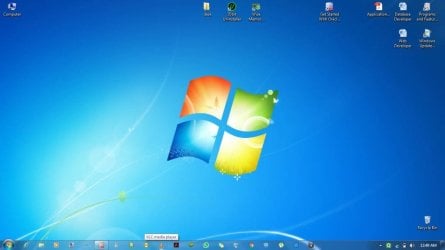
Sometimes distorted Display becomes good.. I don't know how?
Can you tell me what is the exact problem?
 

Attachments

  • Good.jpg
    Good.jpg
    35.5 KB · Views: 1

My Computer

Computer type
Laptop
Computer Manufacturer/Model Number
Toshiba/PSC2UG-012001
OS
Windows 7 Ultimate x64
CPU
Intel (R) Core (TM) i5-2430 2.40ghz
Motherboard
Toshiba
Memory
4096 mb
Hard Drives
Toshiba mk5075gsx (s1)
Internet Speed
3Mbps
Antivirus
Quick heal Antivirus Pro
Browser
Chrome
Ok now this seems to me like a cable connection issue. As you know you open and close the screen quite a few times in the life of a laptop and I am just hanging on a guess that the ribbon cable from the screen to the machine is or does work lose creating conduction problems. If you look at this and it is the closest model i can find on this site to yours if you click on step 10 and step 11 in the disassembly guide you will see what I mean. It could even be a dry joint at the machine socket too.
Toshiba Satellite C655 C650 C650 C650D screen removal guide this is for the C650 but is probably very close to what is inside your machine.

Just found this too but the images are a little small but you can see what I mean
https://www.youtube.com/watch?v=C4VlL7SPp0w
 

My Computer

Computer type
PC/Desktop
Computer Manufacturer/Model Number
Own build (new) Desk1 / Asus ROG Win 7 / Desk2 1st build
OS
Desk1 7 Home Prem / Desk2 10 Pro / Main lap Asus ROG 10 Pro 2 laptop Toshiba 7 Pro Asus P2520 7 & 10
CPU
Desk1 i5 3750K / Laptop i7 GTX 860M / Desk2 i5 2500
Motherboard
Desk1 Asus P877-V / Desk2 Gigabyte H67 UD3H / Laptop ?
Memory
Desk1 8GB (1866) / Desk2 16GB (1333) / Laptop 8Gb DDR3
Graphics Card(s)
Desk 1& 2NVidia GTX 650 & Laptops on board Intel
Sound Card
Desk 1 & 2 -XONAR DG Realtek High Def audio Laptop
Monitor(s) Displays
Desk 1 Benq HD 2450 / Desk2 Philips 24" / Laptop 17.5"
Screen Resolution
1920x1080 D1 & D2 & Laptop 1
Hard Drives
Desk1 Samsung 120GB 830 SSD
Asus ROG 256GB 850 Pro SSD
Desk2 Samsung 840 256 SSD
Toshiba 120GB EVO
PSU
Desk 1 Corsair HX 1050/ Laptop ? / Desk 2 Corsair HX 650
Case
Desk 1 Cooler HAF XM ? Toshiba laptop / Desk2 Coolermaster
Cooling
Fans on all Desk1 -2 Desk2 - all Coolermasters 5 Laptop ?
Keyboard
Desk 1 MS Sidewinder X6 Desk 2 MS Sidewinder X 4
Mouse
Desk 1&2 - Gigabyte MS 900 gamer - laptop - Logitec wireless
Internet Speed
ADSL2+
Other Info
One other Desktop (tester) and spare Toshba laptop both with SSD's
Running Kaspersky 2016 ISS on all machines config'd identically
Logitec audio stereo systems on each machine (x3)
Canon MG5250MFC
Router/modem TP-Link running WPA2SK
I have opened my screen Back panel, and tried as suggested, but not able to fixed that issue.
 

My Computer

Computer type
Laptop
Computer Manufacturer/Model Number
Toshiba/PSC2UG-012001
OS
Windows 7 Ultimate x64
CPU
Intel (R) Core (TM) i5-2430 2.40ghz
Motherboard
Toshiba
Memory
4096 mb
Hard Drives
Toshiba mk5075gsx (s1)
Internet Speed
3Mbps
Antivirus
Quick heal Antivirus Pro
Browser
Chrome
To go back to the beginning the two stripes they are random or do they pop up after a certain time of the machine running?
It seems to me that there may well be a problem with that screen panel and I have to ask has the machine been dropped or damaged by direct force on the screen?
 

My Computer

Computer type
PC/Desktop
Computer Manufacturer/Model Number
Own build (new) Desk1 / Asus ROG Win 7 / Desk2 1st build
OS
Desk1 7 Home Prem / Desk2 10 Pro / Main lap Asus ROG 10 Pro 2 laptop Toshiba 7 Pro Asus P2520 7 & 10
CPU
Desk1 i5 3750K / Laptop i7 GTX 860M / Desk2 i5 2500
Motherboard
Desk1 Asus P877-V / Desk2 Gigabyte H67 UD3H / Laptop ?
Memory
Desk1 8GB (1866) / Desk2 16GB (1333) / Laptop 8Gb DDR3
Graphics Card(s)
Desk 1& 2NVidia GTX 650 & Laptops on board Intel
Sound Card
Desk 1 & 2 -XONAR DG Realtek High Def audio Laptop
Monitor(s) Displays
Desk 1 Benq HD 2450 / Desk2 Philips 24" / Laptop 17.5"
Screen Resolution
1920x1080 D1 & D2 & Laptop 1
Hard Drives
Desk1 Samsung 120GB 830 SSD
Asus ROG 256GB 850 Pro SSD
Desk2 Samsung 840 256 SSD
Toshiba 120GB EVO
PSU
Desk 1 Corsair HX 1050/ Laptop ? / Desk 2 Corsair HX 650
Case
Desk 1 Cooler HAF XM ? Toshiba laptop / Desk2 Coolermaster
Cooling
Fans on all Desk1 -2 Desk2 - all Coolermasters 5 Laptop ?
Keyboard
Desk 1 MS Sidewinder X6 Desk 2 MS Sidewinder X 4
Mouse
Desk 1&2 - Gigabyte MS 900 gamer - laptop - Logitec wireless
Internet Speed
ADSL2+
Other Info
One other Desktop (tester) and spare Toshba laptop both with SSD's
Running Kaspersky 2016 ISS on all machines config'd identically
Logitec audio stereo systems on each machine (x3)
Canon MG5250MFC
Router/modem TP-Link running WPA2SK
Back
Top