
You are using an out of date browser. It may not display this or other websites correctly.
You should upgrade or use an alternative browser.
You should upgrade or use an alternative browser.
display problem ! :(
- Thread starter anky
- Start date

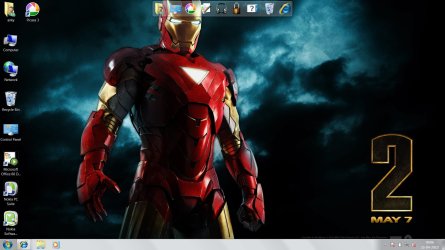

Right click on the Desktop > Screen resolution > change the resolution to that which is appropriate for your screen (you may have to test a couple).
My Computer
- Computer Manufacturer/Model Number
- HP, Dell, Gateway, Toshiba - 4 laptops and 2 desktops
- OS
- Vista, Windows7, Mint Mate, Zorin, Windows 8
- CPU
- from 1.6GHz Duo to i7
- Monitor(s) Displays
- 2x HP w2207
- Hard Drives
- 5x HDD, 7x SSD, 12x Externals
- Keyboard
- with trackball - no mices
- Mouse
- Trackball mice
- Internet Speed
- DSL 6000

- Local time
- 2:49 PM
- Messages
- 1,325
Check the "Desktop Window Manager Session" service, that service responsible for Aero, if it's stopped - Aero goes down, if it's running, you get Aero with all it's glory.
zzz2496
zzz2496
My Computer
- Computer Manufacturer/Model Number
- Self Built
- OS
- Windows7 Ultimate 64bit
- CPU
- Intel Core 2 Quad Q6600
- Motherboard
- Abit IN9-32X-MMAX
- Memory
- DDR2 Adata 4GB
- Graphics Card(s)
- Nvidia GeForce GTX 285 1024 and Nvidia GeForce 8800GT 512
- Sound Card
- Asus Xonar HDAV 1.3
- Monitor(s) Displays
- Dell 2407WFP and BenQ 2400v and Philips 150v3
- Screen Resolution
- 3840x1200 and 1024x768
- Hard Drives
- 2 WDC 1TB
1 WDC 1.5TB
1 WDC 640GB
1 WDC 320GB
1 Seagate 200GB
- PSU
- Corsair TX 850W
- Case
- Cooler Master HAF932
- Cooling
- Arctic Cooling Freezer Extreme and plenty of fans...
- Keyboard
- MicrosoftNaturalKeyboard 4000/Apple Alu keyboard/Dinovo mini
- Mouse
- Logitech G5/MarbleMouseTrackball/PerformanceMX/SpacePilotPRO
- Internet Speed
- 1.5Mbps down/384Kbps up
- Other Info
- APC SURT 1000XL
Logitech Z-560
Wiimote
Mikrotik Router
Linksys (now Cisco) SD2008 8 port Gigabit switch
Linksys WRT54G (acting as AP)
Apple wireless Aluminium keyboard
Apple Magic Mouse
Xbox360 wired controller
how to do that???
Type services in start menu search and you get this window
Attachments

My Computer
- Computer type
- PC/Desktop
- Computer Manufacturer/Model Number
- Self Built
- OS
- Win 10 Pro x64
- CPU
- Intel I5-2500K @3.3GHz
- Motherboard
- Asrock P67 Extreme4
- Memory
- 16GB G.Skill Ripjaws X (4x4GB)
- Graphics Card(s)
- EVGA GeForce 750 Ti SC 2GB
- Sound Card
- ASUS Xonar DG 5.1 Channels 24-bit 96KHz PCI Interface Sound
- Monitor(s) Displays
- auria eq2367
- Screen Resolution
- 1920 x 1080
- Hard Drives
- 250GB Samsung 850 EVO SSD
1TB WD Blue
1TB Hitachi
- PSU
- SeaSonic X 650W 80 Plus Gold
- Case
- Corsair Obsidian 750D
- Cooling
- Corsair H60, Three 140mm case fans
- Keyboard
- Logitech Wireless Keyboard K520
- Mouse
- Logitech Wireless Mouse M310
- Internet Speed
- Wave Broadband ~ 100 dn 5 up
- Antivirus
- Windows Defender, Malwarebytes Premium
- Browser
- Edge, IE11, Chrome
- Other Info
- Laptop specs: HP g7-1365dx /
CPU: AMD A6-3420M APU with Radeon(tm) HD Graphics /
RAM: Crucial 8Gb (2x4Gb) /
SSD: Crucial M4-CT128M4SSD2 ATA Device/ FW 000F /
GFX: AMD Radeon HD 6520G /
OS: Windows 10 Pro x64
Have you tried just changing the theme and then changing it back?
My Computer
- Computer type
- PC/Desktop
- Computer Manufacturer/Model Number
- Self Built
- OS
- Win 10 Pro x64
- CPU
- Intel I5-2500K @3.3GHz
- Motherboard
- Asrock P67 Extreme4
- Memory
- 16GB G.Skill Ripjaws X (4x4GB)
- Graphics Card(s)
- EVGA GeForce 750 Ti SC 2GB
- Sound Card
- ASUS Xonar DG 5.1 Channels 24-bit 96KHz PCI Interface Sound
- Monitor(s) Displays
- auria eq2367
- Screen Resolution
- 1920 x 1080
- Hard Drives
- 250GB Samsung 850 EVO SSD
1TB WD Blue
1TB Hitachi
- PSU
- SeaSonic X 650W 80 Plus Gold
- Case
- Corsair Obsidian 750D
- Cooling
- Corsair H60, Three 140mm case fans
- Keyboard
- Logitech Wireless Keyboard K520
- Mouse
- Logitech Wireless Mouse M310
- Internet Speed
- Wave Broadband ~ 100 dn 5 up
- Antivirus
- Windows Defender, Malwarebytes Premium
- Browser
- Edge, IE11, Chrome
- Other Info
- Laptop specs: HP g7-1365dx /
CPU: AMD A6-3420M APU with Radeon(tm) HD Graphics /
RAM: Crucial 8Gb (2x4Gb) /
SSD: Crucial M4-CT128M4SSD2 ATA Device/ FW 000F /
GFX: AMD Radeon HD 6520G /
OS: Windows 10 Pro x64

Right-click 'Computer' on your desktop,
then click on 'properties', then 'Advanced system settings',
then in the new dialog that pops up in the 'Performance' section click the 'Settings' button and check 'Enable desktop composition' is ticked.
EDIT: Also bear in mind that if you set the shortcut properties under the 'Compatibility' tab to 'disable desktop composition' for any app you have ran, it could also cause the same effect.
then click on 'properties', then 'Advanced system settings',
then in the new dialog that pops up in the 'Performance' section click the 'Settings' button and check 'Enable desktop composition' is ticked.
EDIT: Also bear in mind that if you set the shortcut properties under the 'Compatibility' tab to 'disable desktop composition' for any app you have ran, it could also cause the same effect.
My Computer
- Computer Manufacturer/Model Number
- Self Built
- OS
- XP Pro SP3 x86/Vista SP2 x64/Win7 x64 Triple-boot
- CPU
- AMD64 X2 AM2 5000+
- Motherboard
- Asus MSN-X Plus
- Memory
- Corsair TWX 2Gb (2x1Gb) DDR2 800Mhz
- Graphics Card(s)
- PCI-X 2.0 Inno3D (NVidia) 9500GT 1Gb DDR2
- Sound Card
- Onboard Realtec ALC662-GR
- Monitor(s) Displays
- Relisys 17' CRT (model unknown)
- Screen Resolution
- 1024x768
- Hard Drives
- 750Gb Samsung 7200-3Gb/s 32Mb Cache SATA
- PSU
- 500W
- Cooling
- Standard AMD CPU Fan, One side, front and rear case fan.
- Keyboard
- Microsoft Multimedia Keyboard
- Mouse
- Samsung Optical
- Internet Speed
- 10M
Are you running 'uxstyle' by any chance? If so, does downloading the newest version help any?
My Computer
- Computer Manufacturer/Model Number
- Self Built
- OS
- XP Pro SP3 x86/Vista SP2 x64/Win7 x64 Triple-boot
- CPU
- AMD64 X2 AM2 5000+
- Motherboard
- Asus MSN-X Plus
- Memory
- Corsair TWX 2Gb (2x1Gb) DDR2 800Mhz
- Graphics Card(s)
- PCI-X 2.0 Inno3D (NVidia) 9500GT 1Gb DDR2
- Sound Card
- Onboard Realtec ALC662-GR
- Monitor(s) Displays
- Relisys 17' CRT (model unknown)
- Screen Resolution
- 1024x768
- Hard Drives
- 750Gb Samsung 7200-3Gb/s 32Mb Cache SATA
- PSU
- 500W
- Cooling
- Standard AMD CPU Fan, One side, front and rear case fan.
- Keyboard
- Microsoft Multimedia Keyboard
- Mouse
- Samsung Optical
- Internet Speed
- 10M
I can't help feeling that UxStyle has something to do with it then, maybe reinstall it and see what happens.. I'm clutching at straws really and it isn't an ideal fix, but it has to be worth a shot just to narrow it down to the culprit.
If everything is fine after re-installing the newest version then uxstyles at fault I'd say IMO..
If everything is fine after re-installing the newest version then uxstyles at fault I'd say IMO..
My Computer
- Computer Manufacturer/Model Number
- Self Built
- OS
- XP Pro SP3 x86/Vista SP2 x64/Win7 x64 Triple-boot
- CPU
- AMD64 X2 AM2 5000+
- Motherboard
- Asus MSN-X Plus
- Memory
- Corsair TWX 2Gb (2x1Gb) DDR2 800Mhz
- Graphics Card(s)
- PCI-X 2.0 Inno3D (NVidia) 9500GT 1Gb DDR2
- Sound Card
- Onboard Realtec ALC662-GR
- Monitor(s) Displays
- Relisys 17' CRT (model unknown)
- Screen Resolution
- 1024x768
- Hard Drives
- 750Gb Samsung 7200-3Gb/s 32Mb Cache SATA
- PSU
- 500W
- Cooling
- Standard AMD CPU Fan, One side, front and rear case fan.
- Keyboard
- Microsoft Multimedia Keyboard
- Mouse
- Samsung Optical
- Internet Speed
- 10M
My Computer
- OS
- windows 7
- Local time
- 2:49 PM
- Messages
- 1,325
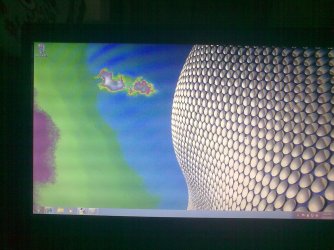
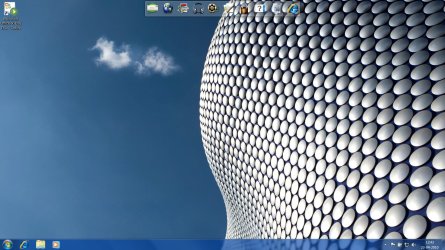
It looks like, umm... lack of bit depth? Can you fill your system specs, so that others (including me) can help you a bit easier... Oh and, what's the current display driver version do you use now?
zzz2496
zzz2496
My Computer
- Computer Manufacturer/Model Number
- Self Built
- OS
- Windows7 Ultimate 64bit
- CPU
- Intel Core 2 Quad Q6600
- Motherboard
- Abit IN9-32X-MMAX
- Memory
- DDR2 Adata 4GB
- Graphics Card(s)
- Nvidia GeForce GTX 285 1024 and Nvidia GeForce 8800GT 512
- Sound Card
- Asus Xonar HDAV 1.3
- Monitor(s) Displays
- Dell 2407WFP and BenQ 2400v and Philips 150v3
- Screen Resolution
- 3840x1200 and 1024x768
- Hard Drives
- 2 WDC 1TB
1 WDC 1.5TB
1 WDC 640GB
1 WDC 320GB
1 Seagate 200GB
- PSU
- Corsair TX 850W
- Case
- Cooler Master HAF932
- Cooling
- Arctic Cooling Freezer Extreme and plenty of fans...
- Keyboard
- MicrosoftNaturalKeyboard 4000/Apple Alu keyboard/Dinovo mini
- Mouse
- Logitech G5/MarbleMouseTrackball/PerformanceMX/SpacePilotPRO
- Internet Speed
- 1.5Mbps down/384Kbps up
- Other Info
- APC SURT 1000XL
Logitech Z-560
Wiimote
Mikrotik Router
Linksys (now Cisco) SD2008 8 port Gigabit switch
Linksys WRT54G (acting as AP)
Apple wireless Aluminium keyboard
Apple Magic Mouse
Xbox360 wired controller