
Display Problems in Windows 7..

yuji

New member
Local time
3:37 PM
Messages
18
Alright, this is the deal.. I been trying to upgade to windows 7 for MONTHS now and I been TRYING to get my monitor to work with windows 7 (as I can't afford a new monitor as of yet..) . my default screen resolution in windows 7 and my video card: ATI Technologies Inc Rage 128 Pro Ultra TF (old video driver..)
ANYWAYS, i been wondering if it was possible to get my video/monitor working properly.. WHEN I install windows 7 normally and try to set it to 1280 x 1024 or something like that (since it's the only normal small screen resolution, the other looks WAY too big and screen looks stretched, and moved to the center - left.
is there any way to make it look right? any tweaks, tools ... I could use to make it look normal like it does in WinXP?
P.S I'm not sure if this is the right forum so mods if this is the wrong place please move it sorry for the trouble

thanks!
~Yuji
 

My Computer

Computer type
PC/Desktop
Computer Manufacturer/Model Number
unknown
OS
Windows 7
CPU
AMD Athlon(tm) II X2 250 Processor
Motherboard
Gigabyte Technology Co., Ltd. M68MT-S2P
Memory
1.75 GB
Graphics Card(s)
NVIDIA GeForce 7025 / NVIDIA nForce 630a
Sound Card
(1) Realtek High Definition Audio (2) ManyCam Virtual Micr
Monitor(s) Displays
NVIDIA GeForce 7025 / NVIDIA nForce 630a
Screen Resolution
1600 x 900 x 32 bits (4294967296 colors) @ 60 Hz
Hard Drives
WDC WD50 00AAKX-001CA SCSI Disk Device
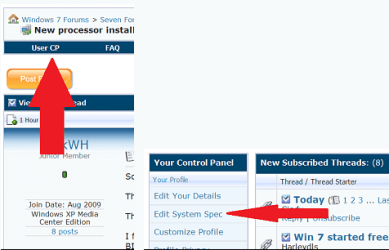
First plese fill in your ystem specs. here

usercp 1.png

If you need help with them try this program |MG| HWiNFO32 3.67 Download
Or |MG| Speccy 1.08.218 Download
Plus if you know your monmitor modle # then we could possibly get a driver (.inf file) for it so it will show up in device manger as your monitor. This will usually allow you to have full control over your native resolutions.

Their is also another program called powerstrip that alows you to do all kinds of adjusments on your monitor
PowerStrip - Download
And excuse the title but a guide for using it Powerstrip Guide for the powerstrip impaired

After you have filed in your specs we can be of more help. Also if you would please take a snip of your device manager and post it so we can see what it is looking like. You can use the snipping tools and follow this
http://www.sevenforums.com/general-...ed-method-uploading-posting-screen-shots.html
Thanks. Fabe
 

My Computer

Computer Manufacturer/Model Number
Self Built
OS
Windows 7 ultimate 64 bit / XP Home sp3
CPU
intel Core 2 Duo E8400 3.0ghz
Motherboard
Asus P5ND bios 1401
Memory
8 gigs 1066 OCZ Fata1ty
Graphics Card(s)
EVGA GTX 580 Call of Duty Black Ops Edition
Sound Card
Creative Soundblaster Audigy 2zs
Monitor(s) Displays
Asus 24in LCD's 2MS X2
Screen Resolution
1920x1080p @60Hz
Hard Drives
WD Caviar 500 Black/ WD Caviar 200 Blue
PSU
OCZ 700W GameXtreme
Case
NZXT Apollo
Cooling
Corsair H50 CPU/120mm x3 /60mm x2 /Corsair Dominator Ram
Keyboard
Logitech Bluetooth Wireless MX5000
Mouse
Logitech Bluetooth Wireless MX1000
Internet Speed
Download 19.83 Upload 0.97
Other Info
Logitech Z2300 Speakers/ Bose Noise Cancelling Headphones/Avermedia PCI-e Hybrid TV Bravo/Epson NX415 all in one/ 4 Port Powered USB Hub/ LG 10x Bluray Burner /TSST Corp DVDRW External
I'm sorry for not responding for like a week now.. I've been busy with other windows anyways back on top here's my system info I didn't fill it out in my profile yet.. I am quite lazy right now so I'll do that later for now... I got a screenshot. ^^
2h67c0m.png

(It's not the greatest I know haha but that's all I have right now.)
and for the drive manager.. I wasn't sure what you wanted to see from it so here you go anyway..
dhd9h2.png

hope you can help.. =)
thanks.
 

My Computer

Computer type
PC/Desktop
Computer Manufacturer/Model Number
unknown
OS
Windows 7
CPU
AMD Athlon(tm) II X2 250 Processor
Motherboard
Gigabyte Technology Co., Ltd. M68MT-S2P
Memory
1.75 GB
Graphics Card(s)
NVIDIA GeForce 7025 / NVIDIA nForce 630a
Sound Card
(1) Realtek High Definition Audio (2) ManyCam Virtual Micr
Monitor(s) Displays
NVIDIA GeForce 7025 / NVIDIA nForce 630a
Screen Resolution
1600 x 900 x 32 bits (4294967296 colors) @ 60 Hz
Hard Drives
WDC WD50 00AAKX-001CA SCSI Disk Device
is there any way to make it look right? any tweaks, tools ... I could use to make it look normal like it does in WinXP?

Yeah, use XP. Your problem is that you are trying to run Windows 7 on completely unsupported hardware that has had all support dropped. You have a chipset that hasn't seen an update since 2005,

http://downloadcenter.intel.com/Detail_Desc.aspx?agr=Y&DwnldID=8178&ProdId=757&lang=eng

and a video card that has been even longer, the last update for it was a decade ago,

Drivers for Discontinued ATI Rage

About the best you can hope for is that the drivers will install using compatibility mode,

http://www.sevenforums.com/tutorials/316-compatibility-mode.html

Other than that this is one of those where you would be better served staying with XP until such a time as you get a new computer.
 

My Computer

Computer type
PC/Desktop
Computer Manufacturer/Model Number
Me
OS
Win 7 Ultimate x64
CPU
FX-8350 @ 4.6 GHz so far
Motherboard
Asus M5A97 EVO
Memory
ADATA XPG V1 Series Black 8GB DDR3 1600
Graphics Card(s)
Sapphire R9 270x Dual-X
Sound Card
Xonar DGX w/ Corsair Vengence 1300
Monitor(s) Displays
Acer S232HL Abid
Screen Resolution
1920x1080
Hard Drives
120 GB OCZ Vertex 3
500 GB Seagate 7200.12
PSU
Antec Earthwatts 650W Green
Case
Antec Three Hundred
Cooling
Cooler Master 212 EVO
Keyboard
Logitech G510
Mouse
Logitech G500s
Internet Speed
35000/3000
Back
Top