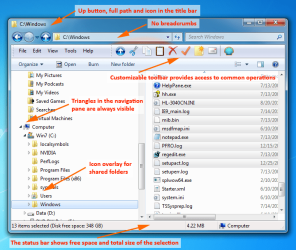
Display Real Path in Explorer

Wewpt

New member
Local time
10:37 AM
Messages
9
I know this is an old issue, but I haven't given up.

Windows 7, not using the Classic theme or Aero, how can I force windows to show real paths in the address bar automatically rather than 'friendly paths'.

Sevenforums has always been my goto when I get stuck, I have to believe *someone* has figured out how to do this ;)

Anyone?

*Not sure why this was moved as it is not something that can be done without (probably) modifying the registry or using a custom dll but oh well :o
 
Last edited:

My Computer

Computer type
PC/Desktop
OS
Windows 7 Ultimate x64

My Computer

Computer type
Laptop
Computer Manufacturer/Model Number
HP EliteBook 8530w Mobile Workstation
OS
Windows 7 Ultimate x64 (XP, 98SE, 95, 3.11, DOS 7.10 on VM) + Ubuntu 10.04 LTS Lucid Lynx
CPU
Intel Core 2 Duo Processor P8600 (2.40 GHz, 3 MB L2 cache)
Motherboard
Mobile Intel PM45 Express Chipset ICH9M-Enhanced
Memory
4GB 800 MHz DDR2 SDRAM
Graphics Card(s)
ATI Mobility FireGL V5700 with 256 MB
Sound Card
SoundMAX Integrated Digital HD Audio
Monitor(s) Displays
15.4-inch WXGA anti-glare (1280 x 800 resolution)
Screen Resolution
1280 x 800
Hard Drives
500GB + 1TB
Mouse
Synaptics PS/2 Port Touchpad, USB Mouse
Internet Speed
4 Mbps
Antivirus
MSE
Browser
Firefox, Chrome, IE
Other Info
Authentec AES2810 Fingerprint Reader
I've pretty much given up.

I used to have a doc on how to do it, but it's gone, involved registry edits. If I ever find it I'll be sure to post.

Classic Shell doesn't play nice for me when I disable the Start Menu option (only using Explorer mods). Never liked the program much tbh.

Thanks though, I'm sure someone will find your response useful.
 

My Computer

Computer type
PC/Desktop
OS
Windows 7 Ultimate x64
It's been done in the past. Search for "no breadrcrumb" or "breadcrumb killer" (Windows 7)

You might find software that used to work but became buggy and projects have been retired.

You might want to mess about with Explorer++ and it's portable with options to replace Explorer. Personally I just pin a shortcut to taskbar and launch it from there.

Downside: Preview pane (optional) will only display at bottom.

Explorer++ - A small and fast file manager for Windows
 

My Computer

Computer type
Laptop
Computer Manufacturer/Model Number
ASUS
OS
Microsoft Windows 7 Home Premium 64-bit 7601 Multiprocessor Free Service Pack 1
CPU
AMD C-60 APU with Radeon(tm) HD Graphics
Motherboard
ASUSTeK COMPUTER INC. X501U
Memory
4.00 GB
Graphics Card(s)
AMD Radeon HD 6290 Graphics
Sound Card
(1) AMD High Definition Audio Device (2) Realtek High Defi
Screen Resolution
1366 x 768 x 32 bits (4294967296 colors) @ 60 Hz
Hard Drives
Hitachi HTS545050A7E380 SATA Disk Device
Antivirus
Comodo CIS & FW, SecureAplus App Whitelisting, Threatfire
Browser
Cyberfox 64bit, Opera 64bit, Airfox
Other Info
Spy-The-Spy, HitmanPro.Alert, Norton Connect Safe, MJRegWatcher, BitDefender TrafficLight, Voodoo Shield, Zemana AntiMalware
Back
Top