

G'day,
I have several versions of LinuxMint (9, 11 and 12) as well as a few other distros running perfectly at 1920 x 1080 resolution (my native resolution) under VMWare Player. I have never had a problem specifying this resolution, without or without the VMWare tools installed.
Recently I also installed LinuxMint13, but for some reason the 1920 x 1080 resolution is not available for selection. Unfortunately I don't how to (or even its possible) to manually specify a 1920 x 1080 resolution? Perhaps there is a sudo command from a terminal I can run to do this? Can anyone suggest anything?
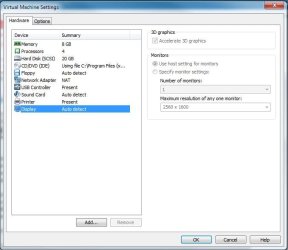
I am using the host setting for monitors in VMWare Player as shown below.
Thanks,
Golden
I have several versions of LinuxMint (9, 11 and 12) as well as a few other distros running perfectly at 1920 x 1080 resolution (my native resolution) under VMWare Player. I have never had a problem specifying this resolution, without or without the VMWare tools installed.
Recently I also installed LinuxMint13, but for some reason the 1920 x 1080 resolution is not available for selection. Unfortunately I don't how to (or even its possible) to manually specify a 1920 x 1080 resolution? Perhaps there is a sudo command from a terminal I can run to do this? Can anyone suggest anything?
I am using the host setting for monitors in VMWare Player as shown below.
Thanks,
Golden
Attachments
My Computer
- Computer type
- PC/Desktop
- Computer Manufacturer/Model Number
- Golden Mk. I.4
- OS
- Windows 10 Pro x64 ; Xubuntu x64
- CPU
- Intel i7 860 @ 2.80 GHz O/C'ed to 4.0GHz
- Motherboard
- Gigabyte P55A-UD3R Rev.1. Award BIOS F13
- Memory
- 16GB Corsair Vengance DDR3 @ 661 MHz Dual Channel (9-9-9-24)
- Graphics Card(s)
- EVGA NVidia GTX 560 1024MB
- Sound Card
- Realtek Integrated
- Monitor(s) Displays
- Dual Samsung SyncMaster 2494HS
- Screen Resolution
- 1920*1080 and 1920*1080
- Hard Drives
- 1*Samsung 840 EVO 120GB SSD;
1*OCZ Vertex 2 60GB SSD;
2*Samsung F3 SpinPoint 1TB in RAID0;
1*Samsung F1 SpinPoint 1TB;
2*Western Digital 1TB External USB 3.0
1*Western Digital 500GB External USB 3.0
1*Seagate 500GB External USB 2.0
- PSU
- Thermaltake ToughPower QFan 750W
- Case
- Thermaltake Element S VK60001W2Z
- Cooling
- Corsair H60 Water Cooling, 2*230mm and 2*80mm case fans
- Keyboard
- Logitech G110
- Mouse
- Logitech MX518

