Ken is right on the display of My Computer on the desktop as it's normally shown in Start Menu, but you may not have "Network" in your Start Menu. Also "Show on Desktop" is not available on right click of Network.
Easy solution though.
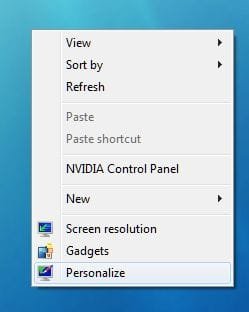
1. Open Personalise by right clicking on blank area of desktop and select "Personalise":
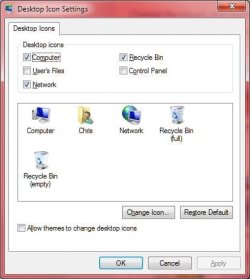
2. Select "Change Desktop Icons" in top right Menu list.
3. Select "Computer" and "Network" if not already selected. Also make sure tick is removed from "Allow themes to change desktop icons". Apply and OK out to save changes.
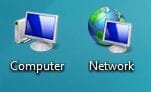
4. Computer and Network are now shown on your Desktop.
Job done!
My Computer
Computer Manufacturer/Model Number
Self Build
OS
Windows 7 Home Premium x64
CPU
Intel Core 2 Quad Q6600 @ 2.40GHz
Motherboard
Asus P5B-E
Memory
4Gb (2x Corsair CM2X2048-6400C5)
Graphics Card(s)
NVIDIA GeForce 9600 GT 512Mb
Sound Card
Realtek High Definition Audio Device
Monitor(s) Displays
Mirai 22" Widescreen and LG 19" Standard
Screen Resolution
1680 x 1050 and 1280 x 1024
Hard Drives
Western Digital 500Gb SATA x 2
Samsung 1Tb SATA
PSU
Hiper Modular 530W
Case
Akasa Ecplise 62 Midi
Cooling
Artic Cooling Freezer Pro 7
Keyboard
Advent Standard with Hotkeys
Mouse
PC Line PCL-FL1 Wired Laser
Internet Speed
ISP: Fast.co.uk up to 8Mb
Other Info
Netgear Router plus 5 Way LAN Switch, Samsung Ethernet Laser Printer, Epson PX650 Colour PSC, plus 2 more Desktop PCs, 3 Laptops and 2 Netbooks in same Home Network.
Netgear Router plus 5 Way LAN Switch, Samsung Ethernet Laser Printer, Epson PX650 Colour PSC, plus 2 more Desktop PCs, 3 Laptops and 2 Netbooks in same Home Network.