
UPDATE: Never mind - problem solved since originally posted. The adapter physically broke so it has to be that and not a Windows issue. The wires disconnected within the larger square box but it was internal, so you couldn't see it, and the cable itself on the outside didn't appear loose or wiggly (you had to pick it up and try twisting it around in order to notice, and normally you wouldn't twist an apparently solid cable-plug connection. Usually with cables you either see the plug physically coming loose, or the audio/video becomes static-y neither of which was the case here).
------------------------------------------------------------------------------
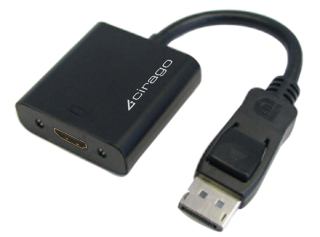
My Thinkpad suddenly stopped recognizing the DisplayPort. I had been connecting to the TV using the adapter pictured and HDMI cable going from that to into the TV. Everything worked flawlessly for two years or so then suddenly a few days ago it's as if the connection doesn't exist.
Tried everything like restarting, disconnecting/reconnecting, checking TV's input settings, changing laptop's display (duplicate / extend / projector only / disconnect projector)
Thanks
Thinkpad T520
Win Pro 64 bit
------------------------------------------------------------------------------
My Thinkpad suddenly stopped recognizing the DisplayPort. I had been connecting to the TV using the adapter pictured and HDMI cable going from that to into the TV. Everything worked flawlessly for two years or so then suddenly a few days ago it's as if the connection doesn't exist.
Tried everything like restarting, disconnecting/reconnecting, checking TV's input settings, changing laptop's display (duplicate / extend / projector only / disconnect projector)
Thanks
Thinkpad T520
Win Pro 64 bit
Last edited:
My Computer
- Computer type
- Laptop
- Computer Manufacturer/Model Number
- Lenovo Thinkpad T520
- OS
- 7 Pro 64
- CPU
- Intel Core i5-2540M 2.6 GHz
- Memory
- 6 GB RAM
- Hard Drives
- 1 Tb

 .
.