
DivX Burning

SkinyJim

New member
Local time
9:13 AM
Messages
25
Location
New Zealand
Hi everyone.

I intend to make some DVD's to play in a DivX player. So preferably I would like a DivX format :) What video and audio codecs would you recommend? What file format should the video files be and what program would you recommend to convert these files from .avi, and what program would you recommend to burn them? I would like the resulting video to be a fair-good quality.

Thanks :)
 

My Computer

Computer Manufacturer/Model Number
Original HP M7199a, being refurbished
OS
Windows 7 Ultimate x64 Build 7600
CPU
Intel Pentium Dual Core E6500 (2.93Ghz)
Motherboard
Asus P5G41T-M LX
Memory
4GB Kingston DDR3 1333MHz
Graphics Card(s)
Onboard Intel something
Sound Card
-
Hard Drives
200Gb SATA
PSU
400W (stock)
Case
HP M7199a Chassis
Cooling
Stock
Keyboard
N/A
Mouse
Logitech MX 1000
Internet Speed
Slow
If you have a Divx player there is no need to convert the .avi file to dvd format, the Divx player shoule render the files. Anytime you reencode a media file to another format there is always some loss of quality. Hence the question why are you converting in the first place?
 

My Computer

OS
Windows 7
Not my avi files :( not sure why. The player I tested them on was definately DivX. Though I did just burn them on using windows explorer.....
 

My Computer

Computer Manufacturer/Model Number
Original HP M7199a, being refurbished
OS
Windows 7 Ultimate x64 Build 7600
CPU
Intel Pentium Dual Core E6500 (2.93Ghz)
Motherboard
Asus P5G41T-M LX
Memory
4GB Kingston DDR3 1333MHz
Graphics Card(s)
Onboard Intel something
Sound Card
-
Hard Drives
200Gb SATA
PSU
400W (stock)
Case
HP M7199a Chassis
Cooling
Stock
Keyboard
N/A
Mouse
Logitech MX 1000
Internet Speed
Slow
I would recommend looking at the structure of the .avi file to determine why they are not playing on your standard DivX certified dvd player. As I said before you will lose considerable quality by reencoding and will have to purchase conversion software like ConvertXtoDVD.

Simply copy and paste the .avi file to the DVD disc like you would any other file to a folder.

Check the structural integrity of the .avi container file by downloading and running Medianinfo ( MediaInfo - Download). You should see a video and one or more audio streams with the attributes of the stream identified.

Some reasons why the DivX video in an .avi container file may not play:
(1) the conatainer file is corrupted as it exists on the dvd.
(2) you are using a standard definition dvd player (720 x 480 max) and the video
is high definition (1920 x 1080 max).
(3) the DivX video was encoded as PAL (23.976 frames/sec) and your dvd player
is NTSC (29.976 frames/sec) or vice-versa.

All of these conditions can be ascertained from the information displayed by Mediainfo.
 

My Computer

OS
Windows 7
Ok, here's the info I pulled from the file. The DivX player would play dvd's in a PAL format.

Format : AVI
Format/Info : Audio Video Interleave
File size : 351 MiB
Duration : 43mn 3s
Overall bit rate : 1 139 Kbps
Writing application : transcode-1.0.2

Video
ID : 0
Format : MPEG-4 Visual
Format profile : Advanced Simple@L5
Format settings, BVOP : Yes
Format settings, QPel : No
Format settings, GMC : No warppoints
Format settings, Matrix : Default (H.263)
Codec ID : XVID
Codec ID/Hint : XviD
Duration : 43mn 3s
Bit rate : 993 Kbps
Width : 624 pixels
Height : 352 pixels
Display aspect ratio : 16:9
Frame rate : 23.976 fps
Resolution : 8 bits
Colorimetry : 4:2:0
Scan type : Progressive
Bits/(Pixel*Frame) : 0.189
Stream size : 306 MiB (87%)
Writing library : XviD 1.2.0SMP (UTC 2006-01-08)

Audio
ID : 1
Format : MPEG Audio
Format version : Version 1
Format profile : Layer 3
Mode : Joint stereo / MS Stereo
Codec ID : 55
Codec ID/Hint : MP3
Duration : 43mn 3s
Bit rate mode : Variable
Bit rate : 133 Kbps
Nominal bit rate : 128 Kbps
Channel(s) : 2 channels
Sampling rate : 48.0 KHz
Resolution : 16 bits
Stream size : 41.0 MiB (12%)
Alignment : Aligned on interleaves
Interleave, duration : 24 ms (0.58 video frame)
Writing library : LAME3.96r
Encoding settings : -m j -V 4 -q 3 -lowpass 17.5 --abr 128
 

My Computer

Computer Manufacturer/Model Number
Original HP M7199a, being refurbished
OS
Windows 7 Ultimate x64 Build 7600
CPU
Intel Pentium Dual Core E6500 (2.93Ghz)
Motherboard
Asus P5G41T-M LX
Memory
4GB Kingston DDR3 1333MHz
Graphics Card(s)
Onboard Intel something
Sound Card
-
Hard Drives
200Gb SATA
PSU
400W (stock)
Case
HP M7199a Chassis
Cooling
Stock
Keyboard
N/A
Mouse
Logitech MX 1000
Internet Speed
Slow
Your .avi files were encoded with transcode 1.0.2 (Transcode 1.0.2 free download. Transcode is a suite of command line utilities for transcoding video and audio codecs, and for converting beween different container) which is Linux and I have never encountered. I am guessing that because the audio and video headers show atrributes that are a bit different to what I am accustomed to seeing, your DivX dvd player is having trouble interpolating some of the information in the headers. The .avi file seems structurally correct.

Where did you get the files? Do they play in Windows Media Player? Are you getting any error messages when you try to play the file on the dvd player? Is the dvd player even rcognizing that you have .avi files on the dvd when you start it?

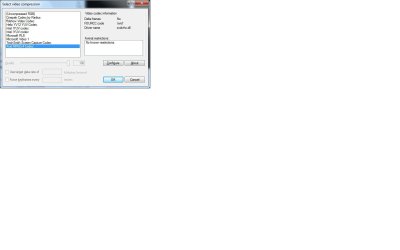
You could try to transcode the files with VirtualDubMod which is more dvd player friendly ( Download VirtualDubMod). Open the file on the main menu. Then to reencode just "save as" from the file menu and change the compession to Xvid MPEG-4 Codec. It will automatically reencode the video. Since the videos are already in Xvid MPEG-4 Codec (newer format) the loss in quality if any would be less than converting to the older MPEG-2 (dvd format).
 

Attachments

  • Capture.jpg
    Capture.jpg
    39.7 KB · Views: 22
Last edited:

My Computer

OS
Windows 7
I see no reason why the file should not play on your standalone DivX compatible dvd player. The most likely culprit would be your TV itself.

Many years ago ( times of VCRs ) US casettes would not play on TVs here in India. Now we have TVs that will automaticallly play any format whatsoever. Almost all DVD players are the same except for the region codes set at depending on the country in which they are sold. We too have these limitations BUT the installation / sales people make some minor jumper settings to make them region free once they are sold. For PAL compatibility the frame rate would have to be jacked up to from 23.976 to 30 WIMHO is too high. Inserting 25% extra frames to make them compatible would quite definitely degrade the viewing experience.

If you have HDMI compatible PC and TV you would be better off taking that route. I generally use Avidemux - 2.5 (Dec 2009 build - Avidemux.2009-12-19.Win32.Final.exe) for my conversions/ downsizing etc. The Jan 2010 build crashes too frequently for comfort.
 

My Computer

OS
windows 7

My Computer

OS
win7 ultimate x64
CPU
Intel Core2 Duo E8400 @ 3.0
Motherboard
NVIDIA nForce 680i SLI
Memory
4gb corsair 6400 ddr2
Graphics Card(s)
Palit GTX260 Sonic 216 SP
Sound Card
sb audigy 24bit
Monitor(s) Displays
i-inc 19" lcd
Screen Resolution
1440x900
Hard Drives
seagate barracuda 7200 250 gb
PSU
ULTRA LSP Pro 750
Case
ultra midtower
Cooling
air
Back
Top