
nachoamedina
New member
- Local time
- 1:40 AM
- Messages
- 5
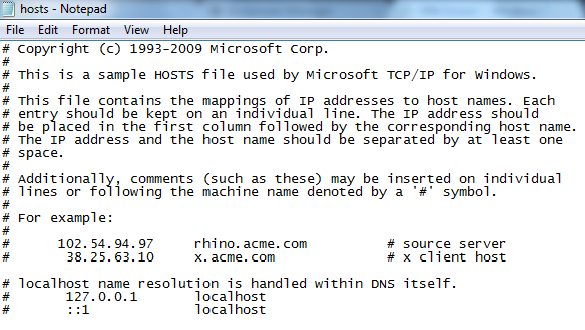
About a month ago I had to reinstall windows because I got a virus (unfortunately). The first week it was all swell but then I started getting these strange DNS errors. I have no clue how to fix it, I've tried changing the DNS servers to the Google ones and the cmd ipconfig /flushdns fix. I don't know what else to do.
Also, it's very strange but this issue only happens when I try to use a web browser. When I play games online I don't have a problem
Just in case here is what I got when I put ipconfig /all in cmd.
C:\Windows\system32>ipconfig /all
Windows IP Configuration
Host Name . . . . . . . . . . . . : Ignacio-PC
Primary Dns Suffix . . . . . . . :
Node Type . . . . . . . . . . . . : Hybrid
IP Routing Enabled. . . . . . . . : No
WINS Proxy Enabled. . . . . . . . : No
Ethernet adapter Local Area Connection:
Connection-specific DNS Suffix . :
Description . . . . . . . . . . . : Realtek PCIe GBE Family Controller
Physical Address. . . . . . . . . : 10-78-D2-8E-EE-4A
DHCP Enabled. . . . . . . . . . . : Yes
Autoconfiguration Enabled . . . . : Yes
Link-local IPv6 Address . . . . . : fe80::4dd9:b9e9:4a8c:1808%11(Preferred)
IPv4 Address. . . . . . . . . . . : 192.168.0.10(Preferred)
Subnet Mask . . . . . . . . . . . : 255.255.255.0
Lease Obtained. . . . . . . . . . : Wednesday, July 25, 2012 11:16:48 PM
Lease Expires . . . . . . . . . . : Thursday, July 26, 2012 12:53:18 AM
Default Gateway . . . . . . . . . : 192.168.0.1
DHCP Server . . . . . . . . . . . : 192.168.0.1
DHCPv6 IAID . . . . . . . . . . . : 235960530
DHCPv6 Client DUID. . . . . . . . : 00-01-00-01-17-7C-1E-FF-10-78-D2-8E-EE-4A
DNS Servers . . . . . . . . . . . : 190.160.0.15
200.83.1.5
190.160.0.13
NetBIOS over Tcpip. . . . . . . . : Enabled
Tunnel adapter isatap.{45B6A9F0-0325-4035-930C-561074319176}:
Media State . . . . . . . . . . . : Media disconnected
Connection-specific DNS Suffix . :
Description . . . . . . . . . . . : Microsoft ISATAP Adapter
Physical Address. . . . . . . . . : 00-00-00-00-00-00-00-E0
DHCP Enabled. . . . . . . . . . . : No
Autoconfiguration Enabled . . . . : Yes
Tunnel adapter Teredo Tunneling Pseudo-Interface:
Connection-specific DNS Suffix . :
Description . . . . . . . . . . . : Teredo Tunneling Pseudo-Interface
Physical Address. . . . . . . . . : 00-00-00-00-00-00-00-E0
DHCP Enabled. . . . . . . . . . . : No
Autoconfiguration Enabled . . . . : Yes
IPv6 Address. . . . . . . . . . . : 2001:0:9d38:953c:24ba:203f:419a:9d96(Pref
erred)
Link-local IPv6 Address . . . . . : fe80::24ba:203f:419a:9d96%12(Preferred)
Default Gateway . . . . . . . . . : ::
NetBIOS over Tcpip. . . . . . . . : Disabled
Also, it's very strange but this issue only happens when I try to use a web browser. When I play games online I don't have a problem
Just in case here is what I got when I put ipconfig /all in cmd.
C:\Windows\system32>ipconfig /all
Windows IP Configuration
Host Name . . . . . . . . . . . . : Ignacio-PC
Primary Dns Suffix . . . . . . . :
Node Type . . . . . . . . . . . . : Hybrid
IP Routing Enabled. . . . . . . . : No
WINS Proxy Enabled. . . . . . . . : No
Ethernet adapter Local Area Connection:
Connection-specific DNS Suffix . :
Description . . . . . . . . . . . : Realtek PCIe GBE Family Controller
Physical Address. . . . . . . . . : 10-78-D2-8E-EE-4A
DHCP Enabled. . . . . . . . . . . : Yes
Autoconfiguration Enabled . . . . : Yes
Link-local IPv6 Address . . . . . : fe80::4dd9:b9e9:4a8c:1808%11(Preferred)
IPv4 Address. . . . . . . . . . . : 192.168.0.10(Preferred)
Subnet Mask . . . . . . . . . . . : 255.255.255.0
Lease Obtained. . . . . . . . . . : Wednesday, July 25, 2012 11:16:48 PM
Lease Expires . . . . . . . . . . : Thursday, July 26, 2012 12:53:18 AM
Default Gateway . . . . . . . . . : 192.168.0.1
DHCP Server . . . . . . . . . . . : 192.168.0.1
DHCPv6 IAID . . . . . . . . . . . : 235960530
DHCPv6 Client DUID. . . . . . . . : 00-01-00-01-17-7C-1E-FF-10-78-D2-8E-EE-4A
DNS Servers . . . . . . . . . . . : 190.160.0.15
200.83.1.5
190.160.0.13
NetBIOS over Tcpip. . . . . . . . : Enabled
Tunnel adapter isatap.{45B6A9F0-0325-4035-930C-561074319176}:
Media State . . . . . . . . . . . : Media disconnected
Connection-specific DNS Suffix . :
Description . . . . . . . . . . . : Microsoft ISATAP Adapter
Physical Address. . . . . . . . . : 00-00-00-00-00-00-00-E0
DHCP Enabled. . . . . . . . . . . : No
Autoconfiguration Enabled . . . . : Yes
Tunnel adapter Teredo Tunneling Pseudo-Interface:
Connection-specific DNS Suffix . :
Description . . . . . . . . . . . : Teredo Tunneling Pseudo-Interface
Physical Address. . . . . . . . . : 00-00-00-00-00-00-00-E0
DHCP Enabled. . . . . . . . . . . : No
Autoconfiguration Enabled . . . . : Yes
IPv6 Address. . . . . . . . . . . : 2001:0:9d38:953c:24ba:203f:419a:9d96(Pref
erred)
Link-local IPv6 Address . . . . . : fe80::24ba:203f:419a:9d96%12(Preferred)
Default Gateway . . . . . . . . . : ::
NetBIOS over Tcpip. . . . . . . . : Disabled
My Computer
- OS
- Windows 7 Ultimate x64



 ) if this cant be fixed.