DNS lookup failed

Attyize

New member
Local time
1:46 AM
Messages
5
For the past month, I have been getting this error two or three times a day:

The server at Google can't be found, because the DNS lookup failed. DNS is the network service that translates a website's name to its Internet address. This error is most often caused by having no connection to the Internet or a misconfigured network. It can also be caused by an unresponsive DNS server or a firewall preventing Google Chrome from accessing the network. (Google Chrome)

I've contacted my network administrator and she said that she isn't having any problems connecting to my router and the problem must be from my PC. The only way of fixing the problem is to Disable/Enable my current connection. I've looked up on Google for numerous solutions and I've tried some of them but none resolved my problem.

Any help is greatly appreciated.
 

My Computer

OS
Windows 7 Ultimate 32 bit
For the past month, I have been getting this error two or three times a day:

The server at Google can't be found, because the DNS lookup failed. DNS is the network service that translates a website's name to its Internet address. This error is most often caused by having no connection to the Internet or a misconfigured network. It can also be caused by an unresponsive DNS server or a firewall preventing Google Chrome from accessing the network. (Google Chrome)

I've contacted my network administrator and she said that she isn't having any problems connecting to my router and the problem must be from my PC. The only way of fixing the problem is to Disable/Enable my current connection. I've looked up on Google for numerous solutions and I've tried some of them but none resolved my problem.

Any help is greatly appreciated.

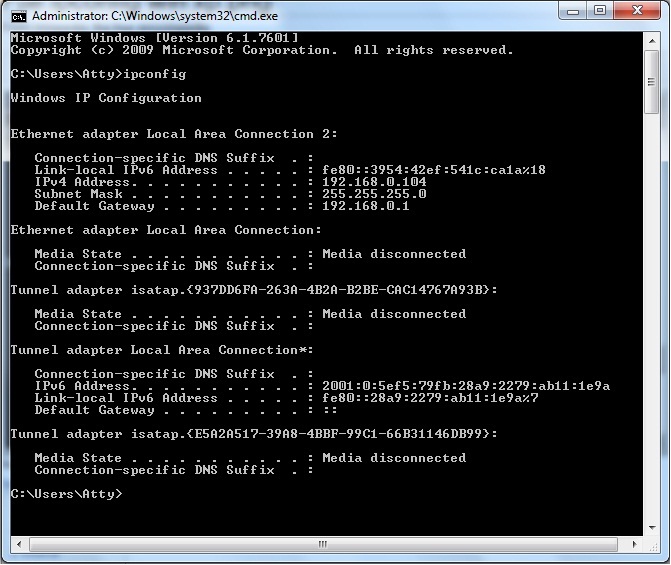
If you can post a screen shot of the ipconfig/all from this machine I may be able to help. :)
 

My Computer

Computer type
PC/Desktop
Computer Manufacturer/Model Number
Home built
OS
Windows 7 Ult, Windows 8.1 Pro,
CPU
Q9650-4.275GHz, E8600 4.5GHz, E6750-3.8GHz
Motherboard
Evga 780i FTW
Memory
G.Skill PC2 9600 1200Mhz 5 5 5 15 2T
Graphics Card(s)
GTX480
Sound Card
Asus Xonar D2
Monitor(s) Displays
HannsG
Screen Resolution
1680X1050
Hard Drives
GSkill Phoenix Pro 120GB SSD
PSU
ThermalTake Toughpower 1000Watt modular
Case
ThermalTake XaserV
Cooling
Xigmatek S1283
Keyboard
Logitech G15
Mouse
Logitech G9
Internet Speed
T1
THchg.jpg
 

My Computer

OS
Windows 7 Ultimate 32 bit
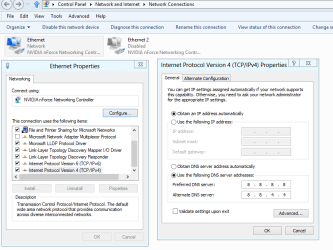
It might help if you type the DNS server directly into the IPv4 properties window.

As it stands you are aren't picking up the DNS server from the router or modem?

The picture below shows you where to type the DNS. The one's shown are Google's DNS servers. After choosing IPv4 for this connection just right click and choose properties.

This is just to work around the problem as it appears to be a chrome only problem in which case simply flushing the DNS cache might help, use this command at the command prompt. ipconfig/flushdns

One solution posted was this: I did the following; Go to Control Panel, Admin tools, Services, right click on DNS Client and reset. Same for DHCP Client service. Then to CMD window and enter IPCONFIG/FLUSHDNS.
You can read more about this problem in the link below.
http://productforums.google.com/forum/#!topic/chrome/B4k68v6IHxs
 

Attachments

  • Static DNS Google.PNG
    Static DNS Google.PNG
    57.9 KB · Views: 158

My Computer

Computer type
PC/Desktop
Computer Manufacturer/Model Number
Home built
OS
Windows 7 Ult, Windows 8.1 Pro,
CPU
Q9650-4.275GHz, E8600 4.5GHz, E6750-3.8GHz
Motherboard
Evga 780i FTW
Memory
G.Skill PC2 9600 1200Mhz 5 5 5 15 2T
Graphics Card(s)
GTX480
Sound Card
Asus Xonar D2
Monitor(s) Displays
HannsG
Screen Resolution
1680X1050
Hard Drives
GSkill Phoenix Pro 120GB SSD
PSU
ThermalTake Toughpower 1000Watt modular
Case
ThermalTake XaserV
Cooling
Xigmatek S1283
Keyboard
Logitech G15
Mouse
Logitech G9
Internet Speed
T1
Okay, I tried your last solution and let's give it time to see if the problem occurs again.
By the way, my problem appears in all browsers.

Thanks a lot for your help
 

My Computer

OS
Windows 7 Ultimate 32 bit
Still doesn't work. I even did an in-depth scan with ESET Smart Security because recently I have been getting Detected DNS cache poisoning attack notifications from my antivirus. There were no threats found from the scan. Furthermore, I'm now using Google's DNS servers to see if this work around works. Now, I'll be performing a DNS flush that I found in this thread: http://www.sevenforums.com/system-security/197311-detected-dns-cache-poisoning-attack.html
 

My Computer

OS
Windows 7 Ultimate 32 bit
Still doesn't work. I even did an in-depth scan with ESET Smart Security because recently I have been getting Detected DNS cache poisoning attack notifications from my antivirus. There were no threats found from the scan. Furthermore, I'm now using Google's DNS servers to see if this work around works. Now, I'll be performing a DNS flush that I found in this thread: http://www.sevenforums.com/system-security/197311-detected-dns-cache-poisoning-attack.html

If you ran the command I posted "ipconfig/flushdns the DNS is already flushed.

The other command that Jacee posted is just to reset the IP, flush DNS and reset the network stack and winsock.

I already have the entire file converted from an .exe to a batch file which is easier to run. Save and unzip then run the file, your machine will automatically reboot. :)

As for the DNS cache poisoning attack. Most updated A/V's should be able to detect and remove this.
If not there is a manual procedure for this in the link below.
http://www.ehow.com/how_6395264_remove-dns-changer-virus.html
 

Attachments

Last edited:

My Computer

Computer type
PC/Desktop
Computer Manufacturer/Model Number
Home built
OS
Windows 7 Ult, Windows 8.1 Pro,
CPU
Q9650-4.275GHz, E8600 4.5GHz, E6750-3.8GHz
Motherboard
Evga 780i FTW
Memory
G.Skill PC2 9600 1200Mhz 5 5 5 15 2T
Graphics Card(s)
GTX480
Sound Card
Asus Xonar D2
Monitor(s) Displays
HannsG
Screen Resolution
1680X1050
Hard Drives
GSkill Phoenix Pro 120GB SSD
PSU
ThermalTake Toughpower 1000Watt modular
Case
ThermalTake XaserV
Cooling
Xigmatek S1283
Keyboard
Logitech G15
Mouse
Logitech G9
Internet Speed
T1
It still doesn't work even with the work around. I even tried your IPResetALL.zip file but without any luck.
 

My Computer

OS
Windows 7 Ultimate 32 bit
Back
Top