Solved DNS server is not obtained automatically

ddongee

New member
I use my 2nd computer for internet using wireless adapter via 1st computer's router.

However, when I diagnose my 2nd computer network connection i get an error "Your computer appears to be correctly configured, but the device or resource (DNS server) is not responding"

this error was found when I replaced old road runner internet service provider's cable modem to new one

Internet works though, it disconnects randomly and very unstable.

I did some alternation other forums suggested like cycling the router, ipconfig /flushdns, calling road runner and ask them for dns address but non of them fixed the issue

I also manually assigned google dns address (this seemed it fixed the problem but internet was slower than the time with no error before)

How can I fix this problem ? help will be appreciated thanks.
 

My Computer

OS
windows 7 home 64bit
With your computer setup as normal, click on Start then Run or press Window key (next to left Ctrl key) +R and paste the following into the Run box, exactly as shown, including double quotes:

cmd /c "ipconfig /all > postme.txt & ping yahoo.com >> postme.txt & notepad postme.txt & del postme.txt"

and press ENTER.

A file will open in Notepad. Please copy and paste the contents here. Close the Notepad window and the file will be deleted and the Command Prompt window will also close.

If you don't have a Run selection off the Start menu, see here: Enable Run Command on Windows 7 or Vista Start Menu
 

My Computer

Computer type
PC/Desktop
Computer Manufacturer/Model Number
Lenovo IdeaCenter 450
OS
Windows 10 Pro X64
CPU
Intel Quad Core i7-4770 @ 3.4Ghz
Memory
16.0GB PC3-12800 DDR3 SDRAM 1600 MHz
Graphics Card(s)
Intel Integrated HD Graphics
Sound Card
Realtek HD Audio
Monitor(s) Displays
HP 22" LCD
Screen Resolution
1680 x 1050
Hard Drives
250GB Samsung EVO SATA-3 SSD
2TB Seagate ST2000DM001 SATA-2
1.5TB Seagate ST3150041AS SATA
Keyboard
Dell USB
Mouse
Lenovo USB
Internet Speed
Cable via Road Runner 3MB Upload, 30MB Download
Antivirus
Windows Defender, MBAM Pro, MBAE
Browser
Seamonkey
Other Info
UEFI/GPT
PLDS DVD-RW DH16AERSH
With your computer setup as normal, click on Start then Run or press Window key (next to left Ctrl key) +R and paste the following into the Run box, exactly as shown, including double quotes:

cmd /c "ipconfig /all > postme.txt & ping yahoo.com >> postme.txt & notepad postme.txt & del postme.txt"

and press ENTER.

A file will open in Notepad. Please copy and paste the contents here. Close the Notepad window and the file will be deleted and the Command Prompt window will also close.

If you don't have a Run selection off the Start menu, see here: Enable Run Command on Windows 7 or Vista Start Menu


Windows IP Configuration

Host Name . . . . . . . . . . . . : Dongcom
Primary Dns Suffix . . . . . . . :
Node Type . . . . . . . . . . . . : Hybrid
IP Routing Enabled. . . . . . . . : No
WINS Proxy Enabled. . . . . . . . : No

Wireless LAN adapter Wireless Network Connection 5:

Connection-specific DNS Suffix . :
Description . . . . . . . . . . . : Medialink MWN-USB150N
Physical Address. . . . . . . . . : C8-3A-35-C0-FB-EF
DHCP Enabled. . . . . . . . . . . : Yes
Autoconfiguration Enabled . . . . : Yes
Link-local IPv6 Address . . . . . : fe80::41af:d508:266:fe9d%19(Preferred)
IPv4 Address. . . . . . . . . . . : 192.168.0.101(Preferred)
Subnet Mask . . . . . . . . . . . : 255.255.255.0
Lease Obtained. . . . . . . . . . : 2012y 3w 16d Friday AM 10:52:34
Lease Expires . . . . . . . . . . : 2012y 3w 18d Sunday AM 12:12:46
Default Gateway . . . . . . . . . : 192.168.0.1
DHCP Server . . . . . . . . . . . : 192.168.0.1
DHCPv6 IAID . . . . . . . . . . . : 331889205
DHCPv6 Client DUID. . . . . . . . : 00-01-00-01-14-11-9A-20-90-E6-BA-D3-FF-4A
DNS Servers . . . . . . . . . . . : 207.69.188.185
207.69.188.186
NetBIOS over Tcpip. . . . . . . . : Enabled

Tunnel adapter isatap.earthlink.net:

Media State . . . . . . . . . . . : Media disconnected
Connection-specific DNS Suffix . :
Description . . . . . . . . . . . : Microsoft ISATAP Adapter
Physical Address. . . . . . . . . : 00-00-00-00-00-00-00-E0
DHCP Enabled. . . . . . . . . . . : No
Autoconfiguration Enabled . . . . : Yes

Tunnel adapter Local Area Connection* 9:

Media State . . . . . . . . . . . : Media disconnected
Connection-specific DNS Suffix . :
Description . . . . . . . . . . . : Microsoft Teredo Tunneling Adapter
Physical Address. . . . . . . . . : 00-00-00-00-00-00-00-E0
DHCP Enabled. . . . . . . . . . . : No
Autoconfiguration Enabled . . . . : Yes

Pinging yahoo.com [72.30.38.140] with 32 bytes of data:
Reply from 72.30.38.140: bytes=32 time=90ms TTL=50
Reply from 72.30.38.140: bytes=32 time=111ms TTL=50
Reply from 72.30.38.140: bytes=32 time=88ms TTL=50
Reply from 72.30.38.140: bytes=32 time=146ms TTL=50

Ping statistics for 72.30.38.140:
Packets: Sent = 4, Received = 4, Lost = 0 (0% loss),
Approximate round trip times in milli-seconds:
Minimum = 88ms, Maximum = 146ms, Average = 108ms
 

My Computer

OS
windows 7 home 64bit
this error was found when I replaced old road runner internet service provider's cable modem to new one

When you switched to new modem does your IPS know it? If not, a possibility is that your Modem isn't accepting more than one IP address from your network to access your ISP. Notice the Connection-specific DNS Suffix is empty.
 

My Computer

Computer Manufacturer/Model Number
Lenovo ThinkPad T60
OS
Windows 7 Ultimate 64Bit
CPU
GenuineIntel Intel(R) Core(TM) DuoCore T2400 @ 1.83GHz
Motherboard
Intel(R) 82801G (ICH7 Family)
Memory
2.00 GB
Graphics Card(s)
Mobile Intel(R) 945 Express Chipset
Sound Card
SoundMAX Integrated Digital HD Audio
Monitor(s) Displays
ThinkPad Display
Screen Resolution
1400x1050
Hard Drives
100Gb SATA
Keyboard
Standard Keyboard
Mouse
HID-compliant Mouse
Internet Speed
Cable Broadband - 54Mbps
Other Info
Intel(R) PRO/1000 PL Network Connection
11a/b/g Wireless LAN Mini PCI Express Adapter
"Your computer appears to be correctly configured, but the device or resource (DNS server) is not responding"

It just means that the DNS Server isnt responding to pings.

Check your DHCP settings on your router. The DNS IP Address supplied by your router should be 192.168.0.1 which its not at the moment as its giving you an external DNS Server of your ISP.


Dave
 

My Computer

Computer type
PC/Desktop
Computer Manufacturer/Model Number
Custom
OS
Windows 7 Ultimate x64
CPU
Intel Core i7 2600K (O/C 4.7GHz)
Motherboard
Asus ROG Maximus IV Extreme-Z - Intel Z68 Chipset
Memory
8GB Corsair Vengeance LP, DDR3, 1600Mhz
Graphics Card(s)
Nvidia GTX 460 Graphics Card
Sound Card
Onboard
Monitor(s) Displays
Dell E228WFP
Hard Drives
2 x 500GB Samsung SpinPoint Drives (1 for OS, 1 for Data and Apps)
PSU
CoolerMaster 1000W
Case
CoolerMaster HAF
Cooling
Air
Internet Speed
Fibre - 60MB Down, 30MB Up
Antivirus
ESET NOD32 Antivirus
I use my 2nd computer for internet using wireless adapter via 1st computer's router.

However, when I diagnose my 2nd computer network connection i get an error "Your computer appears to be correctly configured, but the device or resource (DNS server) is not responding"

this error was found when I replaced old road runner internet service provider's cable modem to new one

Internet works though, it disconnects randomly and very unstable.

I did some alternation other forums suggested like cycling the router, ipconfig /flushdns, calling road runner and ask them for dns address but non of them fixed the issue

I also manually assigned google dns address (this seemed it fixed the problem but internet was slower than the time with no error before)

How can I fix this problem ? help will be appreciated thanks.

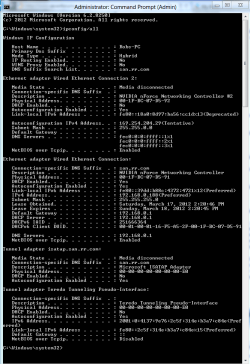
If you can post again a screen shot of your ipconfig/all with the windows expanded all the way "sample below" it would be most helpful. :)
 

Attachments

  • ipconfig.PNG
    ipconfig.PNG
    77.7 KB · Views: 67

My Computer

Computer type
PC/Desktop
Computer Manufacturer/Model Number
Home built
OS
Windows 7 Ult, Windows 8.1 Pro,
CPU
Q9650-4.275GHz, E8600 4.5GHz, E6750-3.8GHz
Motherboard
Evga 780i FTW
Memory
G.Skill PC2 9600 1200Mhz 5 5 5 15 2T
Graphics Card(s)
GTX480
Sound Card
Asus Xonar D2
Monitor(s) Displays
HannsG
Screen Resolution
1680X1050
Hard Drives
GSkill Phoenix Pro 120GB SSD
PSU
ThermalTake Toughpower 1000Watt modular
Case
ThermalTake XaserV
Cooling
Xigmatek S1283
Keyboard
Logitech G15
Mouse
Logitech G9
Internet Speed
T1
Chev65, the info is in his 2nd post, capture of ipconfig /all and valid ping response from yahoo.com.
 

My Computer

Computer type
PC/Desktop
Computer Manufacturer/Model Number
Lenovo IdeaCenter 450
OS
Windows 10 Pro X64
CPU
Intel Quad Core i7-4770 @ 3.4Ghz
Memory
16.0GB PC3-12800 DDR3 SDRAM 1600 MHz
Graphics Card(s)
Intel Integrated HD Graphics
Sound Card
Realtek HD Audio
Monitor(s) Displays
HP 22" LCD
Screen Resolution
1680 x 1050
Hard Drives
250GB Samsung EVO SATA-3 SSD
2TB Seagate ST2000DM001 SATA-2
1.5TB Seagate ST3150041AS SATA
Keyboard
Dell USB
Mouse
Lenovo USB
Internet Speed
Cable via Road Runner 3MB Upload, 30MB Download
Antivirus
Windows Defender, MBAM Pro, MBAE
Browser
Seamonkey
Other Info
UEFI/GPT
PLDS DVD-RW DH16AERSH
Hello,

Out of curiosity, how did you solve the problem?


Dave
 

My Computer

Computer type
PC/Desktop
Computer Manufacturer/Model Number
Custom
OS
Windows 7 Ultimate x64
CPU
Intel Core i7 2600K (O/C 4.7GHz)
Motherboard
Asus ROG Maximus IV Extreme-Z - Intel Z68 Chipset
Memory
8GB Corsair Vengeance LP, DDR3, 1600Mhz
Graphics Card(s)
Nvidia GTX 460 Graphics Card
Sound Card
Onboard
Monitor(s) Displays
Dell E228WFP
Hard Drives
2 x 500GB Samsung SpinPoint Drives (1 for OS, 1 for Data and Apps)
PSU
CoolerMaster 1000W
Case
CoolerMaster HAF
Cooling
Air
Internet Speed
Fibre - 60MB Down, 30MB Up
Antivirus
ESET NOD32 Antivirus
Back
Top