Solved DNS Server isn't responding

Lindaw1954

New member
Local time
3:02 PM
Messages
30
I am getting the 'DNS Server isn't responding error' on my Sony computer. I have a wireless router from Verizon FIOS.

I took my Sony to McDonalds, to see if the problem was with my computer or the router, and apparently it is my computer, as I could not connect to McDonalds wifi.

It also does not help to plug the ethernet cable directly into the computer.

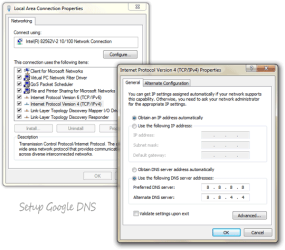
I did try specifying the DNS server IP as noted in previous searches, but to no avail.

As an added note, our Toshiba did seem to lose it's wireless connection also, but I plugged it into the ethernet cable and it worked fine. As of this evening, I unplugged the cable from the Toshiba, and it seems to be working fine.

Hoping someone can help me this evening!
 

My Computer

Computer Manufacturer/Model Number
Sony Electronics
OS
Windows 7 64 bit
CPU
Intel Core i3
Memory
4mg

My Computer

Computer type
PC/Desktop
OS
Microsoft Windows 10 Professional / Windows 7 Professional
CPU
Intel i5-3570
Motherboard
Lenovo Mahobay
Memory
16GB DDR3
Graphics Card(s)
AMD Radeon HD 7850 2GB
Sound Card
(1) Realtek HD Audio (2) AMD HD Audio
Monitor(s) Displays
LG LS192WS
Screen Resolution
1440 x 900 @ 32bit color
Hard Drives
(1) SUV300S37A/120G (2) ST3500413AS SATA Disk Device AHCI mode enabled.
PSU
Corsair HX620
Case
Thermaltake V4 Black Edition
Cooling
Cooler Master Hyper 212 + Artic Silver 5 on CPU/GPU
Keyboard
Dell SK-8115
Mouse
Razer Copperhead with MAPED mat (awesome!)
Internet Speed
100 Mbps up/down
Browser
Chrome
I am not very comfortable with this solution. I am not familiar with changing configuration settings, etc.

Are there any other solutions?

It seems to me that there should be a common/easy solution, since our Toshiba is not experiencing the same issues.

Thanks for the suggestions!
 

My Computer

Computer Manufacturer/Model Number
Sony Electronics
OS
Windows 7 64 bit
CPU
Intel Core i3
Memory
4mg

Attachments

  • google_dns.png
    google_dns.png
    37.2 KB · Views: 1,921

My Computers

System One System Two

  • Computer type
    PC/Desktop
    Computer Manufacturer/Model Number
    PowerSpec G164
    OS
    WIN10
    CPU
    AMD Ryzen 5 3600 6-Core Processor 3.59 GHz
    Memory
    16.0 GB
    Internet Speed
    VERY FAST>>>!!!
  • Antivirus
    ESET Security Premium
I tried to follow the instructions below, but nothing has changed. I am on a wireless router.

The problem is that I have three network connections showing and not sure which one is correct:

1, Local area connection (I have this disabled) Marvell Yukon 88E8057PCI . . .

2. Wireless network connection 5HGB5 Atheros AR9287 Wireless network (this is my home network)

3. Wireless Network connection 2 (not connected) Microsoft Virtual WiFi Miniport adapter

I followed the instructions for my 5HGB5 network, but nothing changed. My computer is on Windows 7.

Again, my husbands Toshiba is working fine wirelessly.

Thanks again for any help you can give me.
 

My Computer

Computer Manufacturer/Model Number
Sony Electronics
OS
Windows 7 64 bit
CPU
Intel Core i3
Memory
4mg
I tried to follow the instructions below, but nothing has changed. I am on a wireless router.

The problem is that I have three network connections showing and not sure which one is correct:

1, Local area connection (I have this disabled) Marvell Yukon 88E8057PCI . . .

2. Wireless network connection 5HGB5 Atheros AR9287 Wireless network (this is my home network)

3. Wireless Network connection 2 (not connected) Microsoft Virtual WiFi Miniport adapter

I followed the instructions for my 5HGB5 network, but nothing changed. My computer is on Windows 7.

Again, my husbands Toshiba is working fine wirelessly.

Thanks again for any help you can give me.

The most likely problem is that you have the McAfee update problem. If you have McAfee installed that is it.
You have no Internet access and/or see error messages from McAfee on your computer
 

My Computer

Computer type
PC/Desktop
Computer Manufacturer/Model Number
Home built
OS
Windows 7 Ult, Windows 8.1 Pro,
CPU
Q9650-4.275GHz, E8600 4.5GHz, E6750-3.8GHz
Motherboard
Evga 780i FTW
Memory
G.Skill PC2 9600 1200Mhz 5 5 5 15 2T
Graphics Card(s)
GTX480
Sound Card
Asus Xonar D2
Monitor(s) Displays
HannsG
Screen Resolution
1680X1050
Hard Drives
GSkill Phoenix Pro 120GB SSD
PSU
ThermalTake Toughpower 1000Watt modular
Case
ThermalTake XaserV
Cooling
Xigmatek S1283
Keyboard
Logitech G15
Mouse
Logitech G9
Internet Speed
T1
Just wanted to let everyone know that McAfee was indeed the culprit. I was able to follow the instructions from Shawn77 and get my internet working after about an hour.

Thanks so much to everyone for their help and suggestions.
 

My Computer

Computer Manufacturer/Model Number
Sony Electronics
OS
Windows 7 64 bit
CPU
Intel Core i3
Memory
4mg
Back
Top