DNS Server not responding

missdahlia87

New member
Local time
9:08 PM
Messages
1
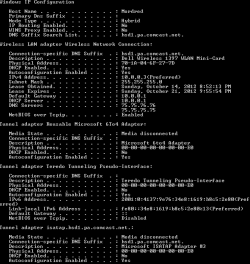
My internet has been very slow for several months now. I have Comcast and I'm on a laptop with wireless. The signal strength says excellent, but pages load very slowly most of the time. It goes through phases where it doesn't want to load anything at all. When I try to diagnose the connection it either says there isn't a problem or that the DNS server isn't responding. I'm not great with computers so I thought it might be easier to ask for help before trying a bunch of remedies that might make things worse.

I've attached a screenshot of the Ipconfig/all.
 

Attachments

  • Untitled.png
    Untitled.png
    5.9 KB · Views: 73

My Computer

OS
Windows 7
Hello missdahlia87 Welcome to the Seven Forums!

Surprizingly this is usually a quick fix by one of a few methods since the problem is far more common then most realize. The first thing any ISP(Internet Service Provider) will advise is simply unplugging the cable modem for a good 20 seconds or so while the desktop or laptop is shut down. Often the further advixe when hard wired would be unplugging the ethernet cable as well.

A simple restart may get you right back online while at times the Ipconfig /release and Ipconfig /new commands entered at the command can be a help in resetting and re-establishing a private IP address again once the modem resyncs with the ISP.

Your configuration is the same as always to note here however while the time out factor to reach your home page isn't being met. Sometimes clearing out the IE or other browser's offline content being the cache and temporary internet files as well as looking over the advanced IE settings to see if the automatic network discovery box is checked off can also help.

With anything misconfigured and then suddenly configured correctly or when the connection is restored you may see the prompt screen for selecting Home, Work, or Publc appear where you simply click on the Home option to get back underway again. As far as Comcast being slow at times the particular time of day or night can play a role as far as how populated the host servers are by internet traffic.

Don't you love the promises of faster speeds and then run into slllowwwww... downs?! :rolleyes: With a recent account change here to the business class Comcast has been promoting lately I still am yet to see any great speed increases overall.

 

My Computers

System One System Two

  • Computer type
    PC/Desktop
    Computer Manufacturer/Model Number
    Custom builds = 2
    OS
    W7 Ultimate x64/W10 Pro x64/W11 Pro Triple Boot - Main PC W7 Remote PC Micro ATX W7 Pro x64/W11 Pro
    CPU
    AMD Phenom II X4 975 Deneb 3.6ghz - 965 2nd remote pc
    Motherboard
    Gigabyte GA-790XTA-UD4-Gigabyte GA-880GM-D2H remote pc
    Memory
    Kingston Hyper X DDR3 1600 1.5v 16gb - Hyper X Fury 8gb 2nd
    Graphics Card(s)
    MSI HD Radeon 5750 1gb - MSI HD Radeon 6450 on mini tower
    Sound Card
    Creative Labs X-Fi Xtreme Audio P - Realtek onooard 2nd case
    Monitor(s) Displays
    ASUS VW199T-P 19" HP 2082a Main-HP 2082a 20" remote pc
    Screen Resolution
    Asus 1440x900 - HP 1600x900
    Hard Drives
    WD Black 1TB HD per OS W7, W10, and pending W11 presently on 500gb OS Drive - Pending Triple 1TB HDs for Spanned Storage/backup volume
    Single 2TB external USB enclosure, single 1TB System 7 Host/Boot drive, Pending 8TB external HD for system image b
    PSU
    Corsair 750TX - primary / Corsair CX600 - second
    Case
    Antec 900-2 - SSD compatible / NZXT Vulcan mini tower
    Cooling
    Zalman CNPS9900A
    Keyboard
    AZIO L70 Backlit Letters Gaming - ONN Cordless/USB
    Mouse
    MSI DS200 Programmable, Logitech Cordless
    Internet Speed
    30mbps upgrade - primary hard wired - mini tower usb WiFi
    Antivirus
    GFI VIPRE Internet Security 2014 on W7 2016 beta on W10,
    Browser
    Cyberfox, WaterFox 64bit FF variants, FireFox x64, Pale Moon
    Other Info
    Accomdata fan cooled usb 2.0 PIDE/Sata II, III external enclosure.
    Sambient usb/eSata PATA/Sata II, III external enclosure.
  • Computer type
    PC/Desktop
    System Manufacturer/Model Number
    CUSTOM ASSEMBLY
    OS
    W7 Pro x64/W11 Pro
    CPU
    AMD Deneb 3.6ghz - 965
    Motherboard
    Gigabyte GA-880GM-D2H remote pc
    Memory
    Kingston Hyper X Fury 8gb
    Graphics Card(s)
    MSI HD Radeon 6450 DVI Output
    Sound Card
    Realtek onooard Creative or Other separate PENDING
    Monitor(s) Displays
    VIZIO 32" LCD TV Separate LCD Pending
    Screen Resolution
    1600x1080
    Hard Drives
    WD 500GB OS Host/Boot WD Green 1TB Storage/Backup
    PSU
    Corsair 600W - THERMALTAKE 600W spare case
    Case
    NZXT Vulcan mini tower
    Cooling
    Twin 120mm Top Fans - 240mm Side Cover
    Keyboard
    ONN Cordless/USB Logitech Cordless
    Mouse
    ONN USB/Cordless - Logitech Cordless
    Internet Speed
    DSL 5G
    Browser
    MS Edge, FireFox, WaterFox x64, FireFox Nightly
    Other Info
    OS Testing-Remote Access to Main TeamViewer
My internet has been very slow for several months now. I have Comcast and I'm on a laptop with wireless. The signal strength says excellent, but pages load very slowly most of the time. It goes through phases where it doesn't want to load anything at all. When I try to diagnose the connection it either says there isn't a problem or that the DNS server isn't responding. I'm not great with computers so I thought it might be easier to ask for help before trying a bunch of remedies that might make things worse.

I've attached a screenshot of the Ipconfig/all.

Have you tried typing in two different DNS server addresses? You might want to try using Google's DNS servers at 8.8.8.8 and 8.8.4.4

You could also be having channel crossover problems with your neighbors, you can find out which channel is best by installing the Xirrus software and if you can post the results here I can make sure it's not a channel overlap problem.

http://www.xirrus.com/Products/Wi-Fi-Inspector

Which A/V software are you running?
 

My Computer

Computer type
PC/Desktop
Computer Manufacturer/Model Number
Home built
OS
Windows 7 Ult, Windows 8.1 Pro,
CPU
Q9650-4.275GHz, E8600 4.5GHz, E6750-3.8GHz
Motherboard
Evga 780i FTW
Memory
G.Skill PC2 9600 1200Mhz 5 5 5 15 2T
Graphics Card(s)
GTX480
Sound Card
Asus Xonar D2
Monitor(s) Displays
HannsG
Screen Resolution
1680X1050
Hard Drives
GSkill Phoenix Pro 120GB SSD
PSU
ThermalTake Toughpower 1000Watt modular
Case
ThermalTake XaserV
Cooling
Xigmatek S1283
Keyboard
Logitech G15
Mouse
Logitech G9
Internet Speed
T1
Have you tried typing in two different DNS server addresses? You might want to try using Google's DNS servers at 8.8.8.8 and 8.8.4.4

I would follow the advice above. After pinging 75.75.76.76 & 75.75.75.75 i received a 20% packet loss from each host. That's probably what's causing your problems.
 

My Computer

OS
Windows 7 Ultimate x64
I was finding that here between two different laptops one running 7 Home Premium and the other an older Vista Home Premium model. The established WiFi connection to the first G type and later N type router was 100% all the time while surfing was a problem at times.

Yet they always manage to get on the social networks and move through those without issues! And this is with Comcast here.

The Xirrus Wi-Fi Inspector will come in handy with the 7 Pro desktop since that connects by way of a usb WiFi adapter while the main Ultimate case is strictly RJ-45 ethernet. I'll be transferring that around to the 7 Pro and laptops for a look. The gadget didn't install however on the 64bit 7 for some reason however.
 

My Computers

System One System Two

  • Computer type
    PC/Desktop
    Computer Manufacturer/Model Number
    Custom builds = 2
    OS
    W7 Ultimate x64/W10 Pro x64/W11 Pro Triple Boot - Main PC W7 Remote PC Micro ATX W7 Pro x64/W11 Pro
    CPU
    AMD Phenom II X4 975 Deneb 3.6ghz - 965 2nd remote pc
    Motherboard
    Gigabyte GA-790XTA-UD4-Gigabyte GA-880GM-D2H remote pc
    Memory
    Kingston Hyper X DDR3 1600 1.5v 16gb - Hyper X Fury 8gb 2nd
    Graphics Card(s)
    MSI HD Radeon 5750 1gb - MSI HD Radeon 6450 on mini tower
    Sound Card
    Creative Labs X-Fi Xtreme Audio P - Realtek onooard 2nd case
    Monitor(s) Displays
    ASUS VW199T-P 19" HP 2082a Main-HP 2082a 20" remote pc
    Screen Resolution
    Asus 1440x900 - HP 1600x900
    Hard Drives
    WD Black 1TB HD per OS W7, W10, and pending W11 presently on 500gb OS Drive - Pending Triple 1TB HDs for Spanned Storage/backup volume
    Single 2TB external USB enclosure, single 1TB System 7 Host/Boot drive, Pending 8TB external HD for system image b
    PSU
    Corsair 750TX - primary / Corsair CX600 - second
    Case
    Antec 900-2 - SSD compatible / NZXT Vulcan mini tower
    Cooling
    Zalman CNPS9900A
    Keyboard
    AZIO L70 Backlit Letters Gaming - ONN Cordless/USB
    Mouse
    MSI DS200 Programmable, Logitech Cordless
    Internet Speed
    30mbps upgrade - primary hard wired - mini tower usb WiFi
    Antivirus
    GFI VIPRE Internet Security 2014 on W7 2016 beta on W10,
    Browser
    Cyberfox, WaterFox 64bit FF variants, FireFox x64, Pale Moon
    Other Info
    Accomdata fan cooled usb 2.0 PIDE/Sata II, III external enclosure.
    Sambient usb/eSata PATA/Sata II, III external enclosure.
  • Computer type
    PC/Desktop
    System Manufacturer/Model Number
    CUSTOM ASSEMBLY
    OS
    W7 Pro x64/W11 Pro
    CPU
    AMD Deneb 3.6ghz - 965
    Motherboard
    Gigabyte GA-880GM-D2H remote pc
    Memory
    Kingston Hyper X Fury 8gb
    Graphics Card(s)
    MSI HD Radeon 6450 DVI Output
    Sound Card
    Realtek onooard Creative or Other separate PENDING
    Monitor(s) Displays
    VIZIO 32" LCD TV Separate LCD Pending
    Screen Resolution
    1600x1080
    Hard Drives
    WD 500GB OS Host/Boot WD Green 1TB Storage/Backup
    PSU
    Corsair 600W - THERMALTAKE 600W spare case
    Case
    NZXT Vulcan mini tower
    Cooling
    Twin 120mm Top Fans - 240mm Side Cover
    Keyboard
    ONN Cordless/USB Logitech Cordless
    Mouse
    ONN USB/Cordless - Logitech Cordless
    Internet Speed
    DSL 5G
    Browser
    MS Edge, FireFox, WaterFox x64, FireFox Nightly
    Other Info
    OS Testing-Remote Access to Main TeamViewer
Back
Top