
Do I have 64 bit capability?

jacatone

New member
Member
Local time
7:10 PM
Messages
84
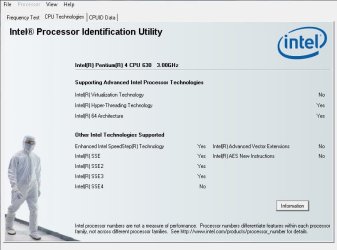
I'm running Win7 HP x86 on my eMachine and ran the Intel CPU ID Utility and it gave me the attached result. Does this mean I can run a x64 bit version of Win7? Thanks.
 

Attachments
  • SNAG-0000.jpg
    SNAG-0000.jpg
    43.7 KB · Views: 106
Last edited:

My Computer

OS
Windows 7 Home Premium
Yes you can
 

My Computer

Computer type
PC/Desktop
Computer Manufacturer/Model Number
Custom Build
OS
Windows 10 Pro x64, Arch Linux
CPU
Intel Core 2 Quad Q8200 OC'd 3.08GHz
Motherboard
Asus Rampage formula LGA775
Memory
8GB DDR2 900Mhz
Graphics Card(s)
MSI GT730 2GB GDDR5 (Kepler)
Sound Card
Supreme FX2
Monitor(s) Displays
Samsung LS22F350 LED
Screen Resolution
1080P
Hard Drives
Kingston SSDNow UV400 120GB, 500GB Hitachi, 2TB Samsung, 500GB Seagate FreeAgent, 640GB Samsung, 160GB Toshiba (Arch)
PSU
AeroCool 500W Bronze
Cooling
Cooler Master V6 + 3X fans
Keyboard
Prolink keyboard
Mouse
Logitech M705
Internet Speed
1MiB/s
Browser
Chrome Beta

My Computer

Computer type
PC/Desktop
Computer Manufacturer/Model Number
Self built custom
OS
64-bit Windows 11 Pro for Workstations
CPU
Intel i7-8700K OC'd to 5 GHz
Motherboard
ASUS ROG Maximus XI Formula Z390
Memory
64 GB (4x16GB) G.SKILL TridentZ RGB DDR4 3600 MHz
Graphics Card(s)
ASUS ROG-STRIX-GTX1080TI-O11G-GAMING
Sound Card
Integrated
Monitor(s) Displays
2 x Samsung Odyssey G7 27"
Screen Resolution
2560x1440
Hard Drives
1TB Samsung 990 PRO M.2,
4TB Samsung 990 PRO PRO M.2,
TerraMaster F8 SSD Plus NAS
PSU
Seasonic Prime Titanium 850W
Case
Thermaltake Core P3
Cooling
Corsair Hydro H115i
Keyboard
Logitech wireless K800
Mouse
Logitech MX Master 4
Internet Speed
2 Gb/s Download and 100 Mb/s Upload
Antivirus
Malwarebyte Anti-Malware Premium
Browser
Google Chrome
Other Info
Logitech Z625 speaker system,
Logitech BRIO 4K Pro webcam,
HP Color LaserJet Pro MFP M477fdn,
APC SMART-UPS RT 1000 XL - SURT1000XLI,
Galaxy S23 Plus phone
7 on a Pentium 4? What about your other hardware specs?
 

My Computer

OS
Debian Squeeze Stable 64-bit
Actually, I only have 512MB of RAM but I attached a 4GB flash drive and used that Power Boost feature. It works really well.
 

My Computer

OS
Windows 7 Home Premium
Actually, I only have 512MB of RAM but I attached a 4GB flash drive and used that Power Boost feature. It works really well.

The minimum ram required for 64 bit is twice that of 32 (4 gigs of ram) what ever USB sitck you are using does not count toward it so with the amount of ram you have stay away from 64 bit unless you are upgrading it.


edit. Macgyvr is correct. the numbers are ABSOLUTE MINIMUM 32BIT= 1 GIG, 64BIT= 2 GIGS. More if you want any sort of performance and aero to run.
 
Last edited:

My Computer

Computer Manufacturer/Model Number
HP Pavillion dv-7 1005 Tx
OS
Win 8 Release candidate 8400
CPU
[email protected]
Memory
4 gigs
Graphics Card(s)
Nvidia 9600M
Sound Card
HD built-in
Monitor(s) Displays
17" Wxga
Screen Resolution
1440x900
Cooling
none
Internet Speed
45Mb down 5Mb up
Actually, I only have 512MB of RAM but I attached a 4GB flash drive and used that Power Boost feature. It works really well.

The minimum ram required for 64 bit is twice that of 32 (4 gigs of ram) what ever USB sitck you are using does not count toward it so with the amount of ram you have stay away from 64 bit unless you are upgrading it.

This is incorrect. The requirements are 1GB for 32 bit and 2GB for 64 bit (from Microsoft's page here).
 

My Computer

Computer Manufacturer/Model Number
Custom
OS
Windows 7 Ultimate RTM (Technet)
CPU
3.00 gigahertz Intel Core2 Duo E8400
Motherboard
ASUSTeK Computer INC. P5K/EPU Rev 1.xx
Memory
4GB
Graphics Card(s)
ATI Radeon X1950 Pro
Sound Card
Built in HD Audio
Monitor(s) Displays
22" Gateway LCD
Screen Resolution
1920 x 1200
Hard Drives
ST3160023A [Hard drive] (160.04 GB) -- drive 0, rev 8.01, ST3500630AS [Hard drive] (500.11 GB) -- drive 2, rev 3.AAK
ST3500630AS [Hard drive] (500.11 GB) -- drive 1, rev 3.AAK
Keyboard
Logitech G11
Mouse
Microsoft Wireless Laser Mouse 5000
Internet Speed
13.44 Mbps
Actually, I only have 512MB of RAM but I attached a 4GB flash drive and used that Power Boost feature. It works really well.

The minimum ram required for 64 bit is twice that of 32 (4 gigs of ram) what ever USB sitck you are using does not count toward it so with the amount of ram you have stay away from 64 bit unless you are upgrading it.

This is incorrect. The requirements are 1GB for 32 bit and 2GB for 64 bit (from Microsoft's page here).

thanks for the numerical correction of a well known fact.. The premise still valid.
 

My Computer

Computer Manufacturer/Model Number
HP Pavillion dv-7 1005 Tx
OS
Win 8 Release candidate 8400
CPU
[email protected]
Memory
4 gigs
Graphics Card(s)
Nvidia 9600M
Sound Card
HD built-in
Monitor(s) Displays
17" Wxga
Screen Resolution
1440x900
Cooling
none
Internet Speed
45Mb down 5Mb up
It says right in your screen shot that your system is x64 compatible.
Actually, I only have 512MB of RAM but I attached a 4GB flash drive and used that Power Boost feature. It works really well.
ReadyBoost is meant to provide a little boot to system with under 1 GB of memory. However, it would never replace the performance of actual memory. 512 MB is WAAAAAY too low for modern OSes, and well below what's been "usable" for several years now. Do yourself a favor, and regardless of your OS choice, add more memory.
 

My Computer

OS
Windows 7 Ultimate x64 SP1
CPU
Intel Core i7-2600
Motherboard
Gigabyte GA-P67A-UD3P-B3
Memory
12 GB Patriot Extreme DDR3-1333
Graphics Card(s)
Nvidia GTX 470
Monitor(s) Displays
Dell UltraSharp 2209WA
Hard Drives
OCZ Agility3 240 GB, WD5001AALS, WD7501AALS
PSU
OCZ ModStream 700W
Case
CoolerMaster HAF 912 Advanced
Cooling
CoolerMaster Hyper 212 Plus
seriously! adding more ram has so many benefits and its not expensve at all! btw I ran windows 7 on my HP pent 4 and it worked perfectly! but I did install 4 gb of ram...
 

My Computer

Computer type
PC/Desktop
Computer Manufacturer/Model Number
Asus clone / Gateway DX4850-57
OS
Se7en X64 ultimate/Se7en X64 ultimate
CPU
Intel quad [email protected]/intel i7 quad [email protected]
Motherboard
Asus P5KPL-CM/Intel H67
Memory
kingston 4GB/32GB DDR3 Dual-Channel 1333MHz
Graphics Card(s)
ATI Radeon HD5770 1GB/NVidia GeForce GTX560 2GB
Sound Card
5.1 onboard/5.1 onboard
Monitor(s) Displays
sharp Aqous 46" 120MHz/LG 32" LCD/Asus VW266H 26"
Screen Resolution
1824X1026/1920X1080
Hard Drives
2x150GB=300GB raptor drives 10,000rpm+1TB seagate portable hard drive for movies/music/pictures/game iso's /programs
Gateway: Kingston 240GB Solid State Drive and 1.5 TB for storage
PSU
700 watts / 700 watts coolermaster extreme/on board
Case
Asus mid tower / Gateway mid tower
Cooling
stock / stock
Keyboard
logitech / razor Lycosa gaming
Mouse
logitech gaming mouse G500 5700DPI/Razer Lycosa & DeathAdder
Internet Speed
60MB/s
Hi there
Hold your horses a little bit.

You certainly CAN run a 64 Bit OS like W7 x-64 but what you unfortunately WON'T be able to do is run a 64 Bit GUEST VIRTUAL MACHINE. -- You can run a 32 bit virtual machine with no probs on that system.

If you aren't interested in running Virtual machines then no prob.

Incidentally you *Might* be able to turn the INTEL Virtualisation feature on in the BIOS setup -- at boot time press the relevant key to get into the BIOS setup -- not sure what it is on your system -- it's often things like the DEL key or F2 or whatever.

Just add more RAM anyway --its cheap enough and even if you only have 1 memory slot single slot 4GB RAM modules are common and cheap now --- ensure you buy RAM with the same number of PINS -- if you go to a store take the module with you -- there are a few different types of RAM now with different numbers of pins so don't waste money by buying the wrong type.

A PENTIUM IV will FLY on W7 with 4GB RAM -- the main drawback is a Pentium IV is a power hungry hog and if it's a laptop your battery will probably only last around 30 mins if that !!!!.

That's one reason why Pentium IV's disappeared from laptops fairly quickly --was nothing to do with performance -- they just GOBBLED up power.

Cheers
jimbo
 

My Computer

Computer type
PC/Desktop
Computer Manufacturer/Model Number
Custom built, several laptops HP/ASUS
OS
Linux CENTOS 7 / various Windows OS'es and servers
CPU
Intel i7 Intel i5
Memory
8GB, 16GB
Graphics Card(s)
On Motherboard
Sound Card
Realtek HD audio
Monitor(s) Displays
Apple Cinema display, Samsung LCD
Screen Resolution
1920 X 1080
Hard Drives
4 X 1TB SATA
Mouse
Toshiba wireless laser
Internet Speed
> 20MB up
Is there any benefit to installing 64bit windows if you're going to have 4gb ram?? - is that extra 1/2 gb usable over 32bit going to make any difference.
 

My Computer

Computer type
PC/Desktop
OS
openSUSE 13.1 64bit
CPU
i7
Motherboard
Gigabyte UD5
Memory
6gb Gskill matched DDR3
Graphics Card(s)
Radeon HD4600
Sound Card
All onboard
Monitor(s) Displays
HP 2159v
Hard Drives
120gb Samsung SSD for the OS
2 * 1tb WD Caviar Black for storage
PSU
Corsair 750w
Case
Antec 920
Cooling
Aksas Nero
Is there any benefit to installing 64bit windows if you're going to have 4gb ram?? - is that extra 1/2 gb usable over 32bit going to make any difference.


about 10%. nothing you will see or feel. Plus 32bit uses less resources than 64 so it may be a wash.
 

My Computer

Computer Manufacturer/Model Number
HP Pavillion dv-7 1005 Tx
OS
Win 8 Release candidate 8400
CPU
[email protected]
Memory
4 gigs
Graphics Card(s)
Nvidia 9600M
Sound Card
HD built-in
Monitor(s) Displays
17" Wxga
Screen Resolution
1440x900
Cooling
none
Internet Speed
45Mb down 5Mb up
Hi there
unless you NEED 64 bit applications -- I'd stick with the 32 bit version on that particular machine.

32 / vs 64 bit performance is not easy to compare on these types of machines -- a 32 bit application runs in a WOW (Windows on Windows) system -- overhead here on a 64 bit enabled CPU. 32 Bit applications will take at least TWO Internal instructions lengths compared with a native 64 bit piece of machine code -- but again it's not so simple -- your older DISKS and other hardware will be so much slower than the overhead of the CPU translating / mapping 32 bit code to the 64 bit CPU architecture that you really won't see any difference.

The value lies in 64 bit code when you run a true 64 bit application like Photoshop - then you WILL see a difference even with only 4GB RAM -- always assuming your disks aren't really slow.

For your older machine I'd stick with the 32 bit version.

Cheers
jimbo
 

My Computer

Computer type
PC/Desktop
Computer Manufacturer/Model Number
Custom built, several laptops HP/ASUS
OS
Linux CENTOS 7 / various Windows OS'es and servers
CPU
Intel i7 Intel i5
Memory
8GB, 16GB
Graphics Card(s)
On Motherboard
Sound Card
Realtek HD audio
Monitor(s) Displays
Apple Cinema display, Samsung LCD
Screen Resolution
1920 X 1080
Hard Drives
4 X 1TB SATA
Mouse
Toshiba wireless laser
Internet Speed
> 20MB up
Get some more ram, its very cheap these days, like 4GB for 40 bucks or something. Once you go 64bit under the proper conditions, I bet you wont go back to 32bit.
 

My Computer

Computer type
PC/Desktop
OS
Microsoft Windows 10 Professional / Windows 7 Professional
CPU
Intel i5-3570
Motherboard
Lenovo Mahobay
Memory
16GB DDR3
Graphics Card(s)
AMD Radeon HD 7850 2GB
Sound Card
(1) Realtek HD Audio (2) AMD HD Audio
Monitor(s) Displays
LG LS192WS
Screen Resolution
1440 x 900 @ 32bit color
Hard Drives
(1) SUV300S37A/120G (2) ST3500413AS SATA Disk Device AHCI mode enabled.
PSU
Corsair HX620
Case
Thermaltake V4 Black Edition
Cooling
Cooler Master Hyper 212 + Artic Silver 5 on CPU/GPU
Keyboard
Dell SK-8115
Mouse
Razer Copperhead with MAPED mat (awesome!)
Internet Speed
100 Mbps up/down
Browser
Chrome
Hi there

DEFINITELY get more RAM -- I even "Upped" a tiny ACER ASPIRE ONE Netbook to 4GB -- cost me 32 EUR for a single 4GB memory module. Works brilliantly -- I can even run TWO VM's on this tiny netbook as well I generally have an XP VM and a Virtual W2K3 SERVER !!!! although for this I do use an external monitor.

It even runs Photoshop CS5 passably too -- although you have to have an external monitor for most functions since the screen resolution is too small for the minimum photoshop requitrments with the netbooks own screen. - WWorks fine with external monitor.

BTW the humble Netbook with a decent SSD and the 4GB RAM makes a lot of "conventional" Laptops and even some desktops look really SLOW -- and it has decent Video including a proper HDMI full 1080p HD video out -- but to make full use of this you really need to add more RAM like I've done by chucking out the 1GB module and replacing it with the 4GB module -- there's only a single memory slot on these.

Don't be put off by the sales specifications -- sometimes the specs say 1GB RAM max -- but that was because at the time the specs were written when 4GB or even 2GB single memory modules were either hard to obtain or prohibitively expensive.

Any machine however old that is capabable of running a 32 BIT OS CAN have up to 4GB memory installed AND WORKING providing you can find the appropriate memory module.

I'm often amazed at how many errors you see in the system specifications for some machines.


Cheers
jimbo
 

My Computer

Computer type
PC/Desktop
Computer Manufacturer/Model Number
Custom built, several laptops HP/ASUS
OS
Linux CENTOS 7 / various Windows OS'es and servers
CPU
Intel i7 Intel i5
Memory
8GB, 16GB
Graphics Card(s)
On Motherboard
Sound Card
Realtek HD audio
Monitor(s) Displays
Apple Cinema display, Samsung LCD
Screen Resolution
1920 X 1080
Hard Drives
4 X 1TB SATA
Mouse
Toshiba wireless laser
Internet Speed
> 20MB up
Hi there

DEFINITELY get more RAM -- I even "Upped" a tiny ACER ASPIRE ONE Netbook to 4GB -- cost me 32 EUR for a single 4GB memory module. Works brilliantly -- I can even run TWO VM's on this tiny netbook as well I generally have an XP VM and a Virtual W2K3 SERVER !!!! although for this I do use an external monitor.

It even runs Photoshop CS5 passably too -- although you have to have an external monitor for most functions since the screen resolution is too small for the minimum photoshop requitrments with the netbooks own screen. - WWorks fine with external monitor.

BTW the humble Netbook with a decent SSD and the 4GB RAM makes a lot of "conventional" Laptops and even some desktops look really SLOW -- and it has decent Video including a proper HDMI full 1080p HD video out -- but to make full use of this you really need to add more RAM like I've done by chucking out the 1GB module and replacing it with the 4GB module -- there's only a single memory slot on these.

Don't be put off by the sales specifications -- sometimes the specs say 1GB RAM max -- but that was because at the time the specs were written when 4GB or even 2GB single memory modules were either hard to obtain or prohibitively expensive.

Any machine however old that is capabable of running a 32 BIT OS CAN have up to 4GB memory installed AND WORKING providing you can find the appropriate memory module.

I'm often amazed at how many errors you see in the system specifications for some machines.


Cheers
jimbo

VM's on a netbook? 1080p? The poor thing would die under the strain. It isn't possible.
 

My Computer

OS
Debian Squeeze Stable 64-bit
It says right in your screen shot that your system is x64 compatible.
Actually, I only have 512MB of RAM but I attached a 4GB flash drive and used that Power Boost feature. It works really well.
ReadyBoost is meant to provide a little boot to system with under 1 GB of memory. However, it would never replace the performance of actual memory. 512 MB is WAAAAAY too low for modern OSes, and well below what's been "usable" for several years now. Do yourself a favor, and regardless of your OS choice, add more memory.
Windows 7 runs better than Windows XP (both 32-bit) on pentium 4 computers imo, even with only 512 megs of RAM. Windows XP has alot of bugs that were never solved like when u kill a process with task manager the whole XP system was kinda frozen and reacted very slow until the process was finally killed. In 7 you can actually choose if you want to wait for the process to be killed, you can also just choose to close the program.

I've had very good experience with Windows 7 on pentium 4 computers with only 512 MB RAM (professional, ultimate and home premium 32-bit). The only notificant "problem" is that Aero won't work on systems with such low specifications (you need atleast 1 GB of RAM to run Aero I believe and maybe also a graphics card that is able to run Aero).

EDIT: it's always better to add more RAM (I don't mean adding 8 GB of RAM to a pentium 4 makes sense, if even possible) but to run Windows 7 and do things like MS Office or browse the internet you don't need 4 gigabytes of RAM. Although I would recommend you to buy atleast 2 gigabytes for a better performance.
 

My Computer

Computer Manufacturer/Model Number
Acer Aspire 8735g
OS
Windows 7 Home Premium 64-bit
CPU
Intel Core 2 Duo T6600 @2.2 GHz
Motherboard
/
Memory
4GB RAM DDR3 so-DIMM
Graphics Card(s)
NVIDIA GeForce GT 240m 1GB
Sound Card
Realtek High Definition Audio
Monitor(s) Displays
18,4 HD+ LCD
Hard Drives
2 x 500 GB @5400 RPM
PSU
/
Case
Acer Aspire 8735g (laptop)
Cooling
/
Keyboard
Logitech Media Keyboard 600
Mouse
Logitech G3
Back
Top