Solved Do I need C:\Windows\Installer\1c5da8.msi

lbeck

New member
Local time
11:45 PM
Messages
65
Location
Hillsborough, NC
I'm trying to delete stuff from my 128GB SSD drive - it's 96% full. There are several installer files - two of which are Windows installer *.MSI files that together are about 2.5GB.

So I need them or can they be deleted?
 

My Computer My Computer

Computer type
PC/Desktop
Computer Manufacturer/Model Number
Dell Inspiron 530
OS
Win 7 pro 64 bit
CPU
Intel Q6600 @ 2.4 GHz
Memory
4 MB RAM
Graphics Card(s)
Radeon 1 GB HD 4650
Hard Drives
500 GB boot drive Samsung HD 501J ATA
1 TB rive Samsung HD 103UJ ATA
2 TB Seagate GoFlex USB drive for backup
PSU
750 Watt
Internet Speed
25 Mbps down; 1.7 Mbps up
Antivirus
Avast free
Browser
Google Chrome / IE 9
Other Info
Acronis True Image 2012 for backups
Installer .msi ?

It depends what it is. If it's an installer for software that you've removed I reckon you don't need it. The problem is that you can't or shouldn't just delete it.

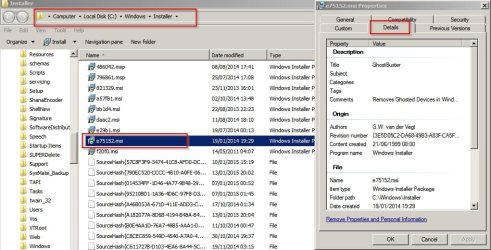
What you can do is right click on the file and look at the details tab to see if you can identify what it is. Here's an example from my machine. It shows that the highlighted file is the installer for GhostBuster and that software is still installed on my machine. Deleting the file could break the software or leave me unable to remove or repair it.

msi Properties.jpg

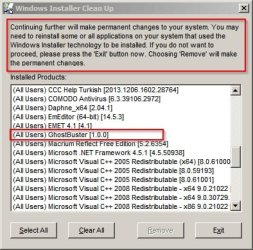
It's better to use the Windows Installer Cleanup Utility but it's no longer officially available from Microsoft and is currently unsupported.

Windows Installer Clean Up.jpg

Personally I'd only use it to clean .msi files for software that's already been uninstalled.
 

My Computer My Computer

Computer type
Laptop
Computer Manufacturer/Model Number
ASUS
OS
Microsoft Windows 7 Home Premium 64-bit 7601 Multiprocessor Free Service Pack 1
CPU
AMD C-60 APU with Radeon(tm) HD Graphics
Motherboard
ASUSTeK COMPUTER INC. X501U
Memory
4.00 GB
Graphics Card(s)
AMD Radeon HD 6290 Graphics
Sound Card
(1) AMD High Definition Audio Device (2) Realtek High Defi
Screen Resolution
1366 x 768 x 32 bits (4294967296 colors) @ 60 Hz
Hard Drives
Hitachi HTS545050A7E380 SATA Disk Device
Antivirus
Comodo CIS & FW, SecureAplus App Whitelisting, Threatfire
Browser
Cyberfox 64bit, Opera 64bit, Airfox
Other Info
Spy-The-Spy, HitmanPro.Alert, Norton Connect Safe, MJRegWatcher, BitDefender TrafficLight, Voodoo Shield, Zemana AntiMalware
Thanks Callender. I'm taking your advice and not messing with the installer files. There's other things that I can cut.
 

My Computer My Computer

Computer type
PC/Desktop
Computer Manufacturer/Model Number
Dell Inspiron 530
OS
Win 7 pro 64 bit
CPU
Intel Q6600 @ 2.4 GHz
Memory
4 MB RAM
Graphics Card(s)
Radeon 1 GB HD 4650
Hard Drives
500 GB boot drive Samsung HD 501J ATA
1 TB rive Samsung HD 103UJ ATA
2 TB Seagate GoFlex USB drive for backup
PSU
750 Watt
Internet Speed
25 Mbps down; 1.7 Mbps up
Antivirus
Avast free
Browser
Google Chrome / IE 9
Other Info
Acronis True Image 2012 for backups
Back
Top