Do I need more ram?

ianaf

New member
Local time
2:37 PM
Messages
21
I have a HP Probook 4530s laptop with Intel i5 processor, 4 gb ram, and 500 gb hdd.
It is a decent computer, but lately I have been having issues. I am an amateur photographer, and use Photoshop CS6 and Lightroom 4 often. I need to perform a lot of big tasks while editing pictures, and lately whenever I do this my computer goes to shit. These Adobe programs slow my computer down to unusable speeds, I often need to restart more than once, and lately I can't get anything done. It is only when using these high-memory programs, Photoshop and Lightroom.
Would adding more ram help or not? I am new to updating hardware, so I don't know what to do. But I would much rather fix this computer instead of buying a new one. Speeding up my workflow would help me a ton.
Thanks for any help
 

My Computer

OS
Colorado
4gb should be enough for most things.
Are you even using 64 bit windows with this computer?
As you've listed your operating system as Colorado I'm having a hard time coming to a conclusion on that, and my magic eight ball just keeps saying ask again later...

A SSD would probably be the largest speed boost you could get for the specific applications you are talking about. Improving the amount of memory could provide a minor boost to speed as well. Based on what I've heard from others that use photoshop heavily a solid state drive makes a massive difference with it.

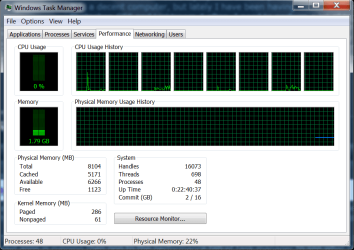
The best way to determine if ram really is your bottleneck would be to wait until it's being slow while one of said apps is running then pop to the performance tab of task manager to see what the memory usage looks like at that moment.

The attached is a example shot of what I'm talking about. Obviously even my backup machine is beefier than the vast majority of laptops, but that little bar there is measuring the memory in use.
 

Attachments

  • Untitled.png
    Untitled.png
    31.4 KB · Views: 20

My Computer

Computer Manufacturer/Model Number
Insane hobo technologies. ;-)
OS
Windows 7 x64
CPU
Intel i7 2600k
Motherboard
Asrock z68 extreme 4 gen 3
Memory
G.skill Ripjaw 16gigs @ 1866
Graphics Card(s)
Nvidia gtx580 (evga)
Sound Card
Integrated HD audio + hdmi
Monitor(s) Displays
24" ASUS widescreen + 42" insignia
Screen Resolution
1080p (1920x1080)
Hard Drives
128 Samsung 830
256 Samsung 840
3 x 1tb storage drive (various)
1 western digital 1tb (eSATA)
1 Seagate 1tb (eSATA)
PSU
1 kilowatt SLI/Crossfire rated Silverstone modular
Case
NZXT Phantom + additional 220 fan
Cooling
Zalmann
Keyboard
Microsoft wireless 3000 (v2)
Mouse
MS - wireless 5000 (bluetrack)
Internet Speed
depends on if you ask me or my provider.
Other Info
The above information is provided as is, and the author assumes no responsibility for issues it may cause with your sanity or fanboyism.
Yep, I have 64 bit. I must have thought operating system meant location for some reason.
 

My Computer

OS
Colorado
Adobe recommends a multidisk environment for their PS and PR products, perhaps an external disk plugged in the usb3 header for scratch and temp files?
 

My Computer

Computer type
PC/Desktop
OS
Microsoft Windows 10 Professional / Windows 7 Professional
CPU
Intel i5-3570
Motherboard
Lenovo Mahobay
Memory
16GB DDR3
Graphics Card(s)
AMD Radeon HD 7850 2GB
Sound Card
(1) Realtek HD Audio (2) AMD HD Audio
Monitor(s) Displays
LG LS192WS
Screen Resolution
1440 x 900 @ 32bit color
Hard Drives
(1) SUV300S37A/120G (2) ST3500413AS SATA Disk Device AHCI mode enabled.
PSU
Corsair HX620
Case
Thermaltake V4 Black Edition
Cooling
Cooler Master Hyper 212 + Artic Silver 5 on CPU/GPU
Keyboard
Dell SK-8115
Mouse
Razer Copperhead with MAPED mat (awesome!)
Internet Speed
100 Mbps up/down
Browser
Chrome
Yep, I have 64 bit. I must have thought operating system meant location for some reason.

So what did you find out about your RAM usage per Maguscreed's recommendation to look in Task Manager?

More RAM won't help if all current RAM isn't being used, and we don't know if it is.
 

My Computer

Computer type
PC/Desktop
Computer Manufacturer/Model Number
Ignatz Special; 4 speed manual gearbox; factory air conditioning; one of one
OS
Windows 7 Home Premium SP1, 64-bit
CPU
Intel Skylake i5-6600K, not overclocked
Motherboard
AsRock Z170M Extreme 4, micro ATX
Memory
8 GB HyperX DDR4-2666 (2 x 4 GB)
Graphics Card(s)
none; graphics are integrated on CPU
Sound Card
onboard: Realtek ALC1150; external: USB Behringer UF0-202
Monitor(s) Displays
Dell S2340M 23 inch IPS
Screen Resolution
1600 x 900
Hard Drives
System: Crucial MX100 series SSD, 128 GB;
Data: Samsung Spinpoint 103SJ, 1 TB;
Backup: WD Caviar Green WD30EZRX-00D8PB0, 3 TB
PSU
Rosewill SilentNight 500 watt fanless, semi-modular
Case
Antec Solo II
Cooling
Noctua NH-U12S; Noctua F12 intake, Noctua S12A exhaust
Keyboard
Microsoft 200 6JH-00001 USB
Mouse
Dell or Microsoft optical wired; USB
Antivirus
Microsoft Security Essentials and Malwarebytes Premium
Browser
Pale Moon
Other Info
All fans PWM; speeds at idle: CPU circa 500 rpm; intake circa 600 rpm; exhaust circa 600 rpm; CPU temps 27 idle and 47 C load in a warm room (27 C/81 F) when running Intel Extreme Tuning Utility stress test.
With the type of work you are doing, you will benefit greatly from a SSD.

You will also benefit from using the maximum amout of memory that the laptop permits.

Quite often, the various programs that startup, that run, that are scheduled to run are a problem.

Please carry out following:
Install CCleaner:
CCleaner - PC Optimization and Cleaning - Free Download

list of STARTUP PROGRAMS

CCleaner | Tools
icon | Startup button | Windows tab |
click on Save to text file button (bottom right side) |
accept Startup.txt as file name | SAVE button

list of SCHEDULED TASKS

CCleaner | Tools
icon | Startup button | Scheduled Tasks tab |
click on Save to text file button (bottom right side) |
enter Scheduled Tasks as File name | Save button

List of INSTALLED PROGRAMS

CCleaner | Tools
icon | Uninstall button |
click on Save to text file button (bottom right side) |
accept install.txt as File name | Save button


UPLOAD, as an attachment, the startup.txt file
UPLOAD, as an attachment, the Scheduled Tasks.txt file
UPLOAD, as an attachment, the install.txt file.

HOW TO UPLOAD
Post a File or Screenshot in Seven Forums
 

My Computer

Computer Manufacturer/Model Number
Toshiba Satellite S875D-S7239 laptop
OS
MS Windows 7 Ultimate SP1 64-bit
CPU
AMD A10-4600M
Motherboard
AMD Pumori (Socket FT1)
Memory
6.00 GB Dual-Channel DDR3 @ 798MHz (11-11-12-28)
Graphics Card(s)
AMD Radeon HD 7660G
Sound Card
High Definition Audio Device
Monitor(s) Displays
Generic PnP Monitor (1600x900@60Hz)
Screen Resolution
1600x900@60Hz
Hard Drives
SSD 119GB Corsair CSSD-V128GB2 ATA Device
Keyboard
Standard PS/2 Keyboard
Mouse
HP Wireless Optical Mobile Mouse Model FHA-3410
Internet Speed
What the local pub, local coffee shop offers.
Other Info
Optical Drive:MATSHITA BD-CMB UJ160B ATA Device


Also have an Asus ha1002xp netbook with Win 7 Ultimate installed.
Yep, I have 64 bit. I must have thought operating system meant location for some reason.

So what did you find out about your RAM usage per Maguscreed's recommendation to look in Task Manager?

More RAM won't help if all current RAM isn't being used, and we don't know if it is.

Well usually the memory says about 1.5 gb, when I was running photoshop it was about 2.3? So it might be a different problem other than memory.
 

My Computer

OS
Colorado
Photoshop version OS version Maximum amount of RAM that Photoshop can use CS4, CS5, 32 bit Windows 32 bit 1.7 GB CS4, CS5, 32 bit Windows 64 bit 3.2 GB CS4, CS5, 64 bit* Windows 64 bit As much RAM as you can fit in your computer Optimize performance | Photoshop CS4, CS5, CS6
--------------------------
Just though this information might help.
 

My Computer

Computer type
PC/Desktop
Computer Manufacturer/Model Number
Home made Desktop
OS
Windows 10 Pro. 64/ version 1709 Windows 7 Pro/64
CPU
Intel i7-6800K @ 4.3
Motherboard
ASUS X-99 Deluxe II
Memory
Corsair Platinum 16 gig @2400
Graphics Card(s)
EVGA GTX 1070 OC
Monitor(s) Displays
Asus 27" LED LCD/VE278Q
Screen Resolution
1920-1080 or 1280-720 HDMI
Hard Drives
INTEL SSD 730-240 Gb Sata 3.0/
PSU
EVGA Platium 1200W
Case
Phanteks Luxe Tempered Glass 8 fans/ one radiator
Cooling
XSPC/ Water Cooled CPU
Keyboard
Das 4 Professional
Mouse
Logitech M705/MX Anywhere 2-S
Internet Speed
100 mbits
Antivirus
Microsoft Security Essentials/ Malwarebytes Premium 3.0/ SAS
Browser
I.E. 11 default/Firefox/ ISP Time Warner Cable/Spectrum
Other Info
LG BluRay Burner/
Sound system-KLipsch-THX/
Icy Dock ssd Hot Swap bays.
Back
Top