Do I need SATA 3 cable

skanungo

New member
Member
Local time
12:48 AM
Messages
43
Location
Kolkata
I have recently purchased a SSD which supports sata 3. My motherboard also supports sata 3. But I can't find any sata 3 cable in the shop. So I want to know whether sata2 cable will be fine for my SSD or not. I mean, will i get the full speed of SSD or it will be slowed down due to sata 2 cable? Thanks
 

My Computer

OS
Microsoft Windows 7 Professional 64-bit Multiprocessor Free Service Pack 1
CPU
Intel(R) Core(TM) i5-3470 CPU @ 3.20GHz
Motherboard
Intel Corporation DB75EN
Memory
8.00 GB
Graphics Card(s)
NVIDIA GeForce GT 630
Sound Card
(1) Realtek High Definition Audio (2) NVIDIA High Definiti
Screen Resolution
1366 x 768 x 32 bits (4294967296 colors) @ 59 Hz
Hard Drives
WDC WD10EZRX-00A8LB0 ATA Device
Internet Speed
4Mbps
Antivirus
AVG Internet Security
Browser
Google Chrome
I have recently purchased a SSD which supports sata 3. My motherboard also supports sata 3. But I can't find any sata 3 cable in the shop. So I want to know whether sata2 cable will be fine for my SSD or not. I mean, will i get the full speed of SSD or it will be slowed down due to sata 2 cable? Thanks

Hi skanungo,

YES, SATA 2 & SATA 3 differ in data transfer speeds, SATA 3 is at 6GB/s whereas SATA 2 is at 3GB/s but this is only dependant of your hardware, NOT the cable. Therefore it should be completely fine to use a SATA 2 cable between 2x SATA 3 Devices. SATA 2 cables can handle 6GB/s speeds.

If it is bothering you that much take a look on Amazon: Amazon.in: SATA 3 cable

Let me know how it goes,

MistUnleashed
 

My Computer

Computer type
PC/Desktop
Computer Manufacturer/Model Number
Custom Build
OS
Windows 7 Ultimate x64
CPU
Intel Core i7 Socket 1156 LGA
Motherboard
Asus P7P55D-E LX
Memory
Corsair Dominator 4GB DDR3
Graphics Card(s)
Gainward GTX 460
Monitor(s) Displays
Acer V243HL
Screen Resolution
1920x1080
Hard Drives
Western Digital 1TB HDD
PSU
Antec TruePower 650W
Case
Antec 300
Cooling
Thermalrite CPU Cooler
Antivirus
Avast Anti-Virus
Thanks for your reply. I used the sata 2 cable to connect my SSD. Then I used Crystal disk mark to test the speed. Sequential read is around 560Mbps but the sequential write speed is around 170Mbps. Is the result fine or I am missing something?
 

My Computer

OS
Microsoft Windows 7 Professional 64-bit Multiprocessor Free Service Pack 1
CPU
Intel(R) Core(TM) i5-3470 CPU @ 3.20GHz
Motherboard
Intel Corporation DB75EN
Memory
8.00 GB
Graphics Card(s)
NVIDIA GeForce GT 630
Sound Card
(1) Realtek High Definition Audio (2) NVIDIA High Definiti
Screen Resolution
1366 x 768 x 32 bits (4294967296 colors) @ 59 Hz
Hard Drives
WDC WD10EZRX-00A8LB0 ATA Device
Internet Speed
4Mbps
Antivirus
AVG Internet Security
Browser
Google Chrome
Write speed should be around the same and your Read speed.

SATA Speeds
SATA 1 (1.5Gb/s) speeds are from 1MB/s to 150MB/s
SATA 2 (3Gb/s) speeds are from 151MB/s to 300MB/s
SATA 3 (6Gb/s) speeds are from 301MB/s to 600MB/s

Write speed can be improved by defragging your Hard-Drive. Please download Defraggler: https://www.piriform.com/defraggler and Defrag your Hard-Drive. Then use the built in 'Benchmark Drive' tool in Defraggler and then run the Disk Mark test again and post your results.

Also please disable Windows Defrag Tool:

  • Start > Type dfrgui in the Search bar
  • Highlight your SSD and click on Configure Schedule
  • Make sure Run On A Schedule is unchecked. If it’s checked, uncheck it.
 

My Computer

Computer type
PC/Desktop
Computer Manufacturer/Model Number
Custom Build
OS
Windows 7 Ultimate x64
CPU
Intel Core i7 Socket 1156 LGA
Motherboard
Asus P7P55D-E LX
Memory
Corsair Dominator 4GB DDR3
Graphics Card(s)
Gainward GTX 460
Monitor(s) Displays
Acer V243HL
Screen Resolution
1920x1080
Hard Drives
Western Digital 1TB HDD
PSU
Antec TruePower 650W
Case
Antec 300
Cooling
Thermalrite CPU Cooler
Antivirus
Avast Anti-Virus
Thanks.. :)
 

My Computer

OS
Microsoft Windows 7 Professional 64-bit Multiprocessor Free Service Pack 1
CPU
Intel(R) Core(TM) i5-3470 CPU @ 3.20GHz
Motherboard
Intel Corporation DB75EN
Memory
8.00 GB
Graphics Card(s)
NVIDIA GeForce GT 630
Sound Card
(1) Realtek High Definition Audio (2) NVIDIA High Definiti
Screen Resolution
1366 x 768 x 32 bits (4294967296 colors) @ 59 Hz
Hard Drives
WDC WD10EZRX-00A8LB0 ATA Device
Internet Speed
4Mbps
Antivirus
AVG Internet Security
Browser
Google Chrome
It is an SSD, don't defrag it.

What brand/model it is?
 

My Computer

Computer type
PC/Desktop
Computer Manufacturer/Model Number
Custom Build
OS
Windows 7 Ultimate x64 SP1
CPU
AMD Phenom 2 1090T
Motherboard
Gigabyte GA-890FXA-UD5
Memory
2x8GB Kingston HyperX Fury Black 1600Mhz Unganged
Graphics Card(s)
MSI GTX 970 Gaming 4G
Sound Card
Realtek On-Board HD 7.1 Audio / Logitech G35
Monitor(s) Displays
3xAcer GD245HQ
Screen Resolution
1920x1080
Hard Drives
Samsung 850 Pro 512GB SSD - OS /
WD Caviar Black SATA 3 - 1 TBx2 - Dynamic RAID 0 /
WD Caviar Green SATA 2 - 640GBx2 - Dynamic RAID 0 /
WD Caviar Green SATA 2 - 640GB - Internal Backup /
Seagate Barracude SATA 3 - 3TB - External Backup/ Sync
PSU
HighPower 1000W
Case
Cooler Master HAF 932
Cooling
Noctua NH-D14
Keyboard
Logitech G19
Mouse
Logitech G500
Internet Speed
100/4 Mbit Cable (100GB quota)
Antivirus
ZoneAlarm Extreme Security / MBAM Pro / MBAE Free / SAS Free
Browser
IE 11 - Firefox - Chrome
Other Info
Logitech F710/ G27/ G940/ Z5500 // TrackIR 5 // Nvidia 3D Surround Vision
It is an SSD, don't defrag it.

What brand/model it is?

Do SSD's not require defragmentation?

Learn something new every day!
 

My Computer

Computer type
PC/Desktop
Computer Manufacturer/Model Number
Custom Build
OS
Windows 7 Ultimate x64
CPU
Intel Core i7 Socket 1156 LGA
Motherboard
Asus P7P55D-E LX
Memory
Corsair Dominator 4GB DDR3
Graphics Card(s)
Gainward GTX 460
Monitor(s) Displays
Acer V243HL
Screen Resolution
1920x1080
Hard Drives
Western Digital 1TB HDD
PSU
Antec TruePower 650W
Case
Antec 300
Cooling
Thermalrite CPU Cooler
Antivirus
Avast Anti-Virus

My Computer

OS
Microsoft Windows 7 Professional 64-bit Multiprocessor Free Service Pack 1
CPU
Intel(R) Core(TM) i5-3470 CPU @ 3.20GHz
Motherboard
Intel Corporation DB75EN
Memory
8.00 GB
Graphics Card(s)
NVIDIA GeForce GT 630
Sound Card
(1) Realtek High Definition Audio (2) NVIDIA High Definiti
Screen Resolution
1366 x 768 x 32 bits (4294967296 colors) @ 59 Hz
Hard Drives
WDC WD10EZRX-00A8LB0 ATA Device
Internet Speed
4Mbps
Antivirus
AVG Internet Security
Browser
Google Chrome
Did you check what others bench with that SSD? You can try "userbench" fo that. Also try AS SSD and post a screenshot here, perhaps misaligned?

SSDs are usually fragmented due to wear levelling (and perhaps garbage collection) routines.
 

My Computer

Computer type
PC/Desktop
Computer Manufacturer/Model Number
Custom Build
OS
Windows 7 Ultimate x64 SP1
CPU
AMD Phenom 2 1090T
Motherboard
Gigabyte GA-890FXA-UD5
Memory
2x8GB Kingston HyperX Fury Black 1600Mhz Unganged
Graphics Card(s)
MSI GTX 970 Gaming 4G
Sound Card
Realtek On-Board HD 7.1 Audio / Logitech G35
Monitor(s) Displays
3xAcer GD245HQ
Screen Resolution
1920x1080
Hard Drives
Samsung 850 Pro 512GB SSD - OS /
WD Caviar Black SATA 3 - 1 TBx2 - Dynamic RAID 0 /
WD Caviar Green SATA 2 - 640GBx2 - Dynamic RAID 0 /
WD Caviar Green SATA 2 - 640GB - Internal Backup /
Seagate Barracude SATA 3 - 3TB - External Backup/ Sync
PSU
HighPower 1000W
Case
Cooler Master HAF 932
Cooling
Noctua NH-D14
Keyboard
Logitech G19
Mouse
Logitech G500
Internet Speed
100/4 Mbit Cable (100GB quota)
Antivirus
ZoneAlarm Extreme Security / MBAM Pro / MBAE Free / SAS Free
Browser
IE 11 - Firefox - Chrome
Other Info
Logitech F710/ G27/ G940/ Z5500 // TrackIR 5 // Nvidia 3D Surround Vision
My SSD is brand new one. I will try other bench mark tools and will report here. Thanks for your help. :)
 

My Computer

OS
Microsoft Windows 7 Professional 64-bit Multiprocessor Free Service Pack 1
CPU
Intel(R) Core(TM) i5-3470 CPU @ 3.20GHz
Motherboard
Intel Corporation DB75EN
Memory
8.00 GB
Graphics Card(s)
NVIDIA GeForce GT 630
Sound Card
(1) Realtek High Definition Audio (2) NVIDIA High Definiti
Screen Resolution
1366 x 768 x 32 bits (4294967296 colors) @ 59 Hz
Hard Drives
WDC WD10EZRX-00A8LB0 ATA Device
Internet Speed
4Mbps
Antivirus
AVG Internet Security
Browser
Google Chrome
Did you check what others bench with that SSD? You can try "userbench" fo that. Also try AS SSD and post a screenshot here, perhaps misaligned?

SSDs are usually fragmented due to wear levelling (and perhaps garbage collection) routines.
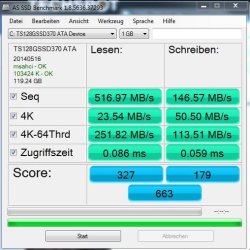
Here is the screenshot. Its same as Crystal Disk Mark. Read speed is high. But very low write speed.
 

Attachments

  • Capture.JPG
    Capture.JPG
    50.6 KB · Views: 12

My Computer

OS
Microsoft Windows 7 Professional 64-bit Multiprocessor Free Service Pack 1
CPU
Intel(R) Core(TM) i5-3470 CPU @ 3.20GHz
Motherboard
Intel Corporation DB75EN
Memory
8.00 GB
Graphics Card(s)
NVIDIA GeForce GT 630
Sound Card
(1) Realtek High Definition Audio (2) NVIDIA High Definiti
Screen Resolution
1366 x 768 x 32 bits (4294967296 colors) @ 59 Hz
Hard Drives
WDC WD10EZRX-00A8LB0 ATA Device
Internet Speed
4Mbps
Antivirus
AVG Internet Security
Browser
Google Chrome
Hey, just checked userbench for you, 150MB/s sequential write is normal for that model.
UserBenchmark: Transcend SSD370 128GB TS128GSSD370
The 128GB Transcend SSD370 proved to be a bit of a disappointment both in absolute terms and in comparison to its larger capacity 256GB sibling. The 128GB SSD370 is let down by its abysmal peak sequential write speed of just 158 MBps which is the lowest speed we have seen to date on a ~128GB SATA 3.0 SSD. Comparing the 256GB and 128GB versions shows that 256GB capacity drive has nearly double the write speed which is typical for larger flash based drives. In terms of value for money the 128GB SSD370 fares a little better but there are far faster and moderately cheaper alternatives available in the extremely competitive SSD market. [Oct '14 SSDrivePro]
 

My Computer

Computer type
PC/Desktop
Computer Manufacturer/Model Number
Custom Build
OS
Windows 7 Ultimate x64 SP1
CPU
AMD Phenom 2 1090T
Motherboard
Gigabyte GA-890FXA-UD5
Memory
2x8GB Kingston HyperX Fury Black 1600Mhz Unganged
Graphics Card(s)
MSI GTX 970 Gaming 4G
Sound Card
Realtek On-Board HD 7.1 Audio / Logitech G35
Monitor(s) Displays
3xAcer GD245HQ
Screen Resolution
1920x1080
Hard Drives
Samsung 850 Pro 512GB SSD - OS /
WD Caviar Black SATA 3 - 1 TBx2 - Dynamic RAID 0 /
WD Caviar Green SATA 2 - 640GBx2 - Dynamic RAID 0 /
WD Caviar Green SATA 2 - 640GB - Internal Backup /
Seagate Barracude SATA 3 - 3TB - External Backup/ Sync
PSU
HighPower 1000W
Case
Cooler Master HAF 932
Cooling
Noctua NH-D14
Keyboard
Logitech G19
Mouse
Logitech G500
Internet Speed
100/4 Mbit Cable (100GB quota)
Antivirus
ZoneAlarm Extreme Security / MBAM Pro / MBAE Free / SAS Free
Browser
IE 11 - Firefox - Chrome
Other Info
Logitech F710/ G27/ G940/ Z5500 // TrackIR 5 // Nvidia 3D Surround Vision
Back
Top