
Do I need to fix these failed Win 7 updates?

MDRI

New member
Member
VIP
Local time
11:32 AM
Messages
163
Do I need to fix these failed Win 7 updates?
==============================

Thanks for replies to my threads. I have HO DV6 laptop. I am using on win 7.

Here is the model/spec info.

OS Name Microsoft Windows 7 Home Premium
Version 6.1.7601 Service Pack 1 Build 7601
Other OS Description Not Available
OS Manufacturer Microsoft Corporation
System Manufacturer Hewlett-Packard
System Model HP Pavilion dv6 Notebook PC
System Type x64-based PC
Processor AMD Turion(tm) II Dual-Core Mobile M500, 2200 Mhz, 2 Core(s), 2 Logical Processor(s)
BIOS Version/Date Hewlett-Packard F.08, 10/15/2009
SMBIOS Version 2.6
Windows Directory C:\Windows
System Directory C:\Windows\system32
Boot Device \Device\HarddiskVolume1
Locale United States
Hardware Abstraction Layer Version = "6.1.7601.24441"
User Name RamIyer-PC\RamI
Time Zone Eastern Standard Time
Installed Physical Memory (RAM) 6.00 GB
Total Physical Memory 5.75 GB
Available Physical Memory 1.86 GB
Total Virtual Memory 11.5 GB
Available Virtual Memory 6.60 GB
Page File Space 5.75 GB

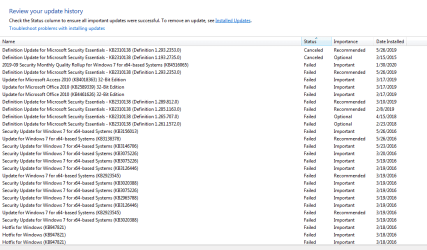
Here is the win7 failed update list. uploaded the image


Do I need to fix these failed Win 7 updates?


Thanks for guidance.
 

Attachments
  • win7failedupdates_01202020.PNG
    win7failedupdates_01202020.PNG
    69.7 KB · Views: 1

My Computer

Computer type
Laptop
Computer Manufacturer/Model Number
Lenovo IdeaPad Z580, x64-based PC
OS
Win 7 64 bit, 6.1.7601 Service Pack 1 Build 7601
CPU
1 Processor(s) Installed. [01]: Intel64 Family 6 Model 58 St
Memory
8,056 MB
Graphics Card(s)
Intel HD 4000
Antivirus
Windows Security Essential
Browser
FireFox, Chrome
Hi

from that screenshot your woes have been going on for a long time, 2016
At the bottom its showing kb947821 as failing - this is the standard repair update aka SURT
please run these
sfc /scannow and chkdsk /r

reboot retry KB947821

then post your CBS log, top 1 only

Roy
 

My Computer

Computer type
PC/Desktop
Computer Manufacturer/Model Number
medionl/Aspire 6930G/acer x55a
OS
W7 home premium 32bit/W7HP 64bit/w10 tp insider ring
CPU
E5300 dual core
Motherboard
medion MS7366
Memory
3gb
Graphics Card(s)
Nvidia Geforce 7100 Nforce 630i
Monitor(s) Displays
avixc
Internet Speed
n (isp resticted to 72)
Antivirus
mse/pands
Browser
palemoon
Other Info
Belkin Fd7050 n USB using Railink RT2870 drivers, more upto date
Thanks for weighing in. I did followed your steps. Here is the outcome.

Code:
C:\Windows\system32>sfc /scannow

Beginning system scan.  This process will take some time.

Beginning verification phase of system scan.
Verification 100% complete.

Windows Resource Protection did not find any integrity violations.

C:\Windows\system32>chkdsk /r
The type of the file system is NTFS.
Cannot lock current drive.

Chkdsk cannot run because the volume is in use by another
process.  Would you like to schedule this volume to be
checked the next time the system restarts? (Y/N) Y

This volume will be checked the next time the system restarts.

Upon re-start chkdsk ran for 5+ hours. It did not report any errors.

CBS Log is attached.

Code:
=================================
Checking System Update Readiness.
Binary Version 6.1.7601.22471
Package Version 26.0
2020-02-02 09:30

Checking Windows Servicing Packages

Checking Package Manifests and Catalogs

Checking Package Watchlist

Checking Component Watchlist

Checking Packages

Checking Component Store

Code:
findstr /c:"[SR]" %windir%\logs\cbs\cbs.log >sfcdetails.txt.

Did not find any items in above command

Past failure shows:

Code:
Hotfix for Windows (KB947821)

Installation date: ?3/?18/?2016 5:20 PM

Installation status: Failed

Error details: Code 80070050

Update type: Important

Fix for KB947821

More information: 
http://support.microsoft.com/?kbid=947821

Help and Support: 
http://support.microsoft.com


I pulled http://support.microsoft.com/?kbid=947821

https://support.microsoft.com/en-us/help/947821/fix-windows-update-errors-by-using-the-dism-or-system-update-readiness

I downloaded from above

I did NOT see any movement for 2 hours. The screen shot as shown below:

Thanks for your guidance.

I tried again, it throw

Code:
Following update not installed

Hotfix for Windows (KB947821) not installed

I am not able to find this update on Microsoft search.
 

Attachments

  • KB947821_Capture.PNG
    KB947821_Capture.PNG
    86.2 KB · Views: 17
  • CBS.LOG
    CBS.LOG
    6 KB · Views: 1
Last edited:

My Computer

Computer type
Laptop
Computer Manufacturer/Model Number
Lenovo IdeaPad Z580, x64-based PC
OS
Win 7 64 bit, 6.1.7601 Service Pack 1 Build 7601
CPU
1 Processor(s) Installed. [01]: Intel64 Family 6 Model 58 St
Memory
8,056 MB
Graphics Card(s)
Intel HD 4000
Antivirus
Windows Security Essential
Browser
FireFox, Chrome
hi

from the screenshot

Installation date: ?3/?18/?2016 5:20 PM

are your Bios and system clocks correct.

can you also run the MS cleanup tool,
results please, from CBS folder - deep clean


Roy
 

My Computer

Computer type
PC/Desktop
Computer Manufacturer/Model Number
medionl/Aspire 6930G/acer x55a
OS
W7 home premium 32bit/W7HP 64bit/w10 tp insider ring
CPU
E5300 dual core
Motherboard
medion MS7366
Memory
3gb
Graphics Card(s)
Nvidia Geforce 7100 Nforce 630i
Monitor(s) Displays
avixc
Internet Speed
n (isp resticted to 72)
Antivirus
mse/pands
Browser
palemoon
Other Info
Belkin Fd7050 n USB using Railink RT2870 drivers, more upto date
Thanks for your guidance. I did see correct time on my system clock . It shows 7:52Pm EST 2/5/2020.

I ran the MS Cleanup tool. I did not find any issues. It did not shows windows update in drop down programs list.

I am attaching the report.

I tried to download
System Update Readiness Tool for Windows 7 (KB947821) [October 2014] Windows7 Critical Updates 10/27/2014 n/a 456.3MB

I did not see a option to down load all. It shows a list like

++++
System Update Readiness Tool for Windows 7 (KB947821) [October 2014]
windows6.1-servicing-x86-7jul-13_af9797af735f641c78cdb9736020571c7a62e308.exe
windows6.1-sscab-x86_d9863e6cdecb8f0d4c50c28ad3eb5e9eefe807e7.exe
windows6.1-rtm-client-enus-x86_e9fd344d187b73466f7ebaaffac3c2239a266442.exe
windows6.1-servicing-x86-30sep13_cac0db3dff5d598f342d691f70b6103a49e8d613.exe
windows6.1-ie9gdr-servicing-x86-20aug13_01fec1bd7e95a69ec0fea73a7e8d3005c354f246.exe
windows6.1-dotnet-servicing-x86-17feb14_998450c421ec65df9ac92b157f4934eacd9e6da9.exe
windows6.1-7601-x86-cab3_1da2946e47a957a8b40f84c73df45e6058fac782.exe
windows6.1-kb947821-v34-x86_49649cb633aa4ff044cd70602ac777a0ec6f8630.msu
checksurpackage_73dbbe285609fec92381add778a8550dd23ded65.exe
windows6.1-rtm-client-cab1-x86_13c1187a50300c0918dea3fd17d28c3c9d5d1e46.exe
windows6.1-servicing-x86-19dec13_510bd66b86a2999c45fc8f14464c3aa2f7342d50.exe
windows6.1-rtm-client-cab2-x86_4be4c1f8a9b7a52f2191bd3ad382bc379b3598d3.exe
windows6.1-7601-x86-neutralcab_ecef552661b8760e6c90c77f40dfe074a9586e1e.exe
windows6.1-rtm-client-cab3-x86_97d2ae51993e09ca16237bb00f969094960194df.exe
windows6.1-servicing-x86_f27574b7288c243fa63d375efc370e2777bb5e2a.exe
windows6.1-servicing-x86-26mar14_fcd8fdc7526c8e1631a327e2863bce759697e98d.exe
windows6.1-servicing-x86-5sep14_3c6bac502a126cccd7829502ecb1788efdd0fff2.exe
windows6.1-7601-x86-cab1_42a75bfc1f5e4e9e443e0b88af9b57086b15c993.exe
windows6.1-ie-servicing-x86-7mar14_0fda837e0acd41aee80d299d00602ae44de518c2.exe
windows6.1-7601-x86-cab2_346020729188bfe3d38972228d81af3ee129f1f5.exe
windows6.1-servicing-x86-1apr13_ae2d9aae09c42c4a094cec74db47c6de016bfbaa.exe
windows6.1-7601-x86-cab4_d3d05e82d6681a6a9a03af9b5ebf05dc8e6de374.exe
windows6.1-rtm-client-neutral-x86_98016c8e69e4edca0123472498b1e7598d82ad0b.exe
windows6.1-ie9rtm-servicing-x86-20aug13_2886425637014450ff6633ab14b960ef0bb2cbc8.exe
+++++
which one to pick from above list?

My windows update history shows only failed updates for 2/2/2020

Hotfix for Windows (KB947821)

Installation date: ‎2/‎2/‎2020 1:08 PM

Installation status: Failed

Error details: Code 80070050

Update type: Important

Fix for KB947821

More information:
http://support.microsoft.com/?kbid=947821

Help and Support:
http://support.microsoft.com

How do I get the older updates into update history?

Thanks for your guidance.
 

Attachments

My Computer

Computer type
Laptop
Computer Manufacturer/Model Number
Lenovo IdeaPad Z580, x64-based PC
OS
Win 7 64 bit, 6.1.7601 Service Pack 1 Build 7601
CPU
1 Processor(s) Installed. [01]: Intel64 Family 6 Model 58 St
Memory
8,056 MB
Graphics Card(s)
Intel HD 4000
Antivirus
Windows Security Essential
Browser
FireFox, Chrome
Thanks for your guidance.

I took the option to upgrade to win 10, instead of fixing updates of dying win 7. I liked win 7, but skipping win 10 upgrade is Risky.

Thanks again.
 

My Computer

Computer type
Laptop
Computer Manufacturer/Model Number
Lenovo IdeaPad Z580, x64-based PC
OS
Win 7 64 bit, 6.1.7601 Service Pack 1 Build 7601
CPU
1 Processor(s) Installed. [01]: Intel64 Family 6 Model 58 St
Memory
8,056 MB
Graphics Card(s)
Intel HD 4000
Antivirus
Windows Security Essential
Browser
FireFox, Chrome
Back
Top