Do you have DEP Enabled?

Do you use Data Execution Preventon (DEP) ?

  • I have DEP enabled w/ NO Exceptions

    Votes: 12 66.7%
  • I have DEP enabled w/ Exceptions

    Votes: 4 22.2%
  • I do not have DEP enabled

    Votes: 2 11.1%

  • Total voters
    18

BugOutMachine

Windows Power User
Pro User
Local time
12:02 AM
Messages
196
Location
NY
I was wondering how many people are using Data Execution Prevention on Windows 7. If so, do any of you have exceptions added for specific Programs or Services?


So far I have been using both Software and Hardware-based DEP without any exceptions and have not had any issues. When I used Vista I had to make exceptions for several programs, including my ATI drivers.

I have to say that I am very impressed with Windows 7 in general. It truly runs better then Vista ever did on my specific PC and is lightning fast to boot (no pun intended)!
 

Attachments

  • DEP.PNG
    DEP.PNG
    14 KB · Views: 92

My Computer

Computer type
PC/Desktop
Computer Manufacturer/Model Number
Custom Desktop PC
OS
Windows 7 / Windows 8.1
CPU
Devils Canyon i7-4790K @ 4.8 GHz ~ 1.33v
Motherboard
Asus Z97 Deluxe
Memory
Corsair Vengeance Pro PC3-19200 DDR3 2400MHz
Graphics Card(s)
EVGA GeForce GTX 980 SuperClocked ACX 2.0
Sound Card
Realtek ALC1150 8 channels
Monitor(s) Displays
BenQ XL2720Z 27"
Screen Resolution
1920 x 1080 @ 144Hz
Hard Drives
SSD1: 512GB Samsung 850 Pro
SSD2: 1TB Samsung 850 EVO
SSD3: 1TB Samsung 850 EVO
HDD: 4TB Western Digital Black
Backup: Western Digital My Book Duo 8TB
PSU
Corsair HX1000i / CyberPower CP1500PFCLCD PFC Sinewave UPS 1
Case
Corsair Graphite 780T
Cooling
Custom single loop liquid; CPU delidded; Aerocool DS Fans
Keyboard
Logitech G710 Cherry MX Blue
Mouse
LogitechG502 Proteus Core
Internet Speed
Download: 119MBs /Upload 39.12MBs via Optimum 101 Ultra
Antivirus
MYOB
Browser
Firefox
Other Info
Cooling: EK-Supremecy MX Waterblock, XSPC AX360 Radiator, Swiftech MCP655 Series 12VDC D5 Pump, EK-RES x3 250 Reservoir, Primochill Ice Intensified Coolant, 11x AerocoolDS fans, Primochill Primoflex Avanced LRT Tubing
I was wondering how many people are using Data Execution Prevention on Windows 7. If so, do any of you have exceptions added for specific Programs or Services?


So far I have been using both Software and Hardware-based DEP without any exceptions and have not had any issues. When I used Vista I had to make exceptions for several programs, including my ATI drivers.

I have to say that I am very impressed with Windows 7 in general. It truly runs better then Vista ever did on my specific PC and is lightning fast to boot (no pun intended)!


BOM


Yes its on, no exceptions. The only time I had to except an app it was IE. Since I dont use IE, no exceptions. There are a few switches you can do to mitigate the problems some users seem to be having with event ID 1000 source 100 errors.


Ken J+
 

My Computer

Computer Manufacturer/Model Number
HP Pavillion dv-7 1005 Tx
OS
Win 8 Release candidate 8400
CPU
[email protected]
Memory
4 gigs
Graphics Card(s)
Nvidia 9600M
Sound Card
HD built-in
Monitor(s) Displays
17" Wxga
Screen Resolution
1440x900
Cooling
none
Internet Speed
45Mb down 5Mb up
Thanks Ken!

I actually removed IE 8 from my computer using the Disk Cleanup/Clean up system files option.
 

My Computer

Computer type
PC/Desktop
Computer Manufacturer/Model Number
Custom Desktop PC
OS
Windows 7 / Windows 8.1
CPU
Devils Canyon i7-4790K @ 4.8 GHz ~ 1.33v
Motherboard
Asus Z97 Deluxe
Memory
Corsair Vengeance Pro PC3-19200 DDR3 2400MHz
Graphics Card(s)
EVGA GeForce GTX 980 SuperClocked ACX 2.0
Sound Card
Realtek ALC1150 8 channels
Monitor(s) Displays
BenQ XL2720Z 27"
Screen Resolution
1920 x 1080 @ 144Hz
Hard Drives
SSD1: 512GB Samsung 850 Pro
SSD2: 1TB Samsung 850 EVO
SSD3: 1TB Samsung 850 EVO
HDD: 4TB Western Digital Black
Backup: Western Digital My Book Duo 8TB
PSU
Corsair HX1000i / CyberPower CP1500PFCLCD PFC Sinewave UPS 1
Case
Corsair Graphite 780T
Cooling
Custom single loop liquid; CPU delidded; Aerocool DS Fans
Keyboard
Logitech G710 Cherry MX Blue
Mouse
LogitechG502 Proteus Core
Internet Speed
Download: 119MBs /Upload 39.12MBs via Optimum 101 Ultra
Antivirus
MYOB
Browser
Firefox
Other Info
Cooling: EK-Supremecy MX Waterblock, XSPC AX360 Radiator, Swiftech MCP655 Series 12VDC D5 Pump, EK-RES x3 250 Reservoir, Primochill Ice Intensified Coolant, 11x AerocoolDS fans, Primochill Primoflex Avanced LRT Tubing
To date, it's enabled and so far haven't encountered any issues.
 

My Computer

Computer type
PC/Desktop
Computer Manufacturer/Model Number
Systems by SmartEyeball
OS
8 Pro x64
CPU
i7 3770K 4.6GHz
Motherboard
ASUS P8Z77 WS
Memory
16GB G.Skill Trident X 2666mhz
Graphics Card(s)
x2 EVGA 780 Ti Superclocked SLI
Sound Card
SB X-FI Surround 5.1 PRO USB / ATH-AD900 Headphones
Monitor(s) Displays
x3 Dell U2410 / 58" Samsung
Screen Resolution
5760*1200/ 1920*1200
Hard Drives
2x Intel 520 240GB (RAID 0) * 2x WD Caviar Blacks 2TB (RAID 0) * 2TB WD Caviar Black * Sony Optirac DVD
PSU
Silverstone Strider Evolution 1200W
Case
Thermaltake Level 10 GT Snow Edition
Cooling
Noctua NH-D14
Keyboard
Topre Realforce // Ducky Shine MX Black // Filco Ninja TKL
Mouse
Thermaltake Theron (Highly Recommended) + Razer Imperator
Antivirus
MSE
Browser
IE, FF, WaterFox
Other Info
GT Extreme V2 Sim Racing Cockpit + 40" LCD and K/B Mouse stand ▼
Fanatec CSR Elite Wheel + Clubsport V1 Pedals + CSR shifter/7G-H ▼Saitek X52 Pro ▼ TrackIR 5 Pro
Buttkicker v2 Seat Rumbler with Dedicated 5.1 and Sub Woofer attached to frame ▼
=
Bloody Big Grin
So far I have been using both Software and Hardware-based DEP without any exceptions and have not had any issues. When I used Vista I had to make exceptions for several programs, including my ATI drivers.

That doesn't in fact have anything to do with Windows Vista or Windows 7. The applications that needed exceptions just were not programed with DEP in mind or announce to the OS whether they support DEP or not (OPTIN or OPTOUT). This of course can and does change when updates are made to the applications. There has been 3 years for applications to catch up. When you have a CPU that supports DEP, only hardware-based DEP is active, otherwise the less effective software-based DEP.

You don't mention which version of Windows you are using, x86 or x64. In the x86 version DEP is set to OPTIN by default while in x64 it is OPTOUT. If an application is not DEP aware and it does not work with DEP, the OPTOUT setting will cause it to crash.
 

My Computer

Computer type
PC/Desktop
Computer Manufacturer/Model Number
Alienware Aurora ALX R4
OS
Windows 10 Pro (x64)
CPU
Intel Core i7-3930K (3.2GHz - 4.5GHz)
Motherboard
Alienware Aurora-R4 x79
Memory
4x Samsung 4GB PC3-12800 DDR3 (16GB 1600MHz)
Graphics Card(s)
Nvidia Geforce GTX 690
Sound Card
SteelSeries Siberia Elite
Monitor(s) Displays
Dell UltraSharp U3011
Screen Resolution
2560x1600
Hard Drives
Samsung 850 Pro 256 GB, Seagate 1TB Desktop Hybrid HDD, 2x Western Digital 4TB Green HDD
PSU
875W Some Dell PSU <.<
Case
Alienware Aurora ALX
Cooling
Custom Liquid Cooling (EK CPU & GPU blocks) dual EK 480RAD
Keyboard
Logitech G710+ Mechanical
Mouse
Logitech G700s
Internet Speed
Verizon Fios (50 mbps average)
Other Info
Server: Intel NUC D54250WYK: i5-4250U, 16GB, 256 GB mSATA, Windows Server 2012 R2
I have enabled DEP for all programms but I had to make exeption for my Half Life launcher as it kept closing it :cry:
I use Windows 7 32-bit version, and my processor supports hardware based DEP
 

My Computer

OS
Windows 7 Ultimate x86 SP1
Also, x64 systems have hardware DEP, mine is enabled with no exceptions.
 

My Computer

Computer Manufacturer/Model Number
Sony Vaio Z46GDU
OS
Windows 7 Ultimate x86-64
CPU
[email protected] 1066MHz FSB
Motherboard
Sony branded
Memory
6GB DDR3 1066MHz
Graphics Card(s)
9300M GS 256MB Dedicated (Speed) + Intel4500MHD (Stamina)
Sound Card
Realtek HD Audio
Monitor(s) Displays
13.1' WXGA
Screen Resolution
1600x900
Hard Drives
320GB 7200RPM w/ 16MB cache
Internet Speed
1MB/s
Hi there
DEP has some issues with some TV cards as these directly access the hardware.
Having DEP full on sometimes makes installing programs from an autoinstall setup.exe from a CD / DVD fail.

If you have one of these types of issues you can disable it compleetely -- install you application and then turn it back on again. The method in the control panel doesn't give you all the options.

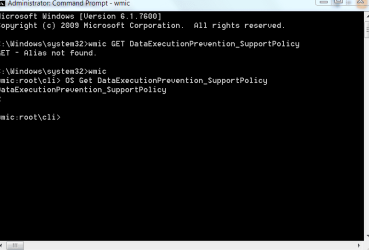
To see what your current level is run the following command prompt in elevated mode


wmic OS Get DataExecutionPrevention_SupportPolicy
(Default is 2 - on for windows services)


To turn it off completely again in elevated mode and reboot.

bcdedit.exe /set {current} nx AlwaysOff

where in most cases {current} is simply a space.
to reenable again change to AlwaysOn.


cheers
jimbo
 

Attachments

  • dep.png
    dep.png
    10.1 KB · Views: 100

My Computer

Computer type
PC/Desktop
Computer Manufacturer/Model Number
Custom built, several laptops HP/ASUS
OS
Linux CENTOS 7 / various Windows OS'es and servers
CPU
Intel i7 Intel i5
Memory
8GB, 16GB
Graphics Card(s)
On Motherboard
Sound Card
Realtek HD audio
Monitor(s) Displays
Apple Cinema display, Samsung LCD
Screen Resolution
1920 X 1080
Hard Drives
4 X 1TB SATA
Mouse
Toshiba wireless laser
Internet Speed
> 20MB up
You don't mention which version of Windows you are using, x86 or x64. In the x86 version DEP is set to OPTIN by default while in x64 it is OPTOUT. If an application is not DEP aware and it does not work with DEP, the OPTOUT setting will cause it to crash.

x86 as shown under my System Specs ;)

The other information you provided was very interesting and enlightened me. Thanks for providing it!
 

My Computer

Computer type
PC/Desktop
Computer Manufacturer/Model Number
Custom Desktop PC
OS
Windows 7 / Windows 8.1
CPU
Devils Canyon i7-4790K @ 4.8 GHz ~ 1.33v
Motherboard
Asus Z97 Deluxe
Memory
Corsair Vengeance Pro PC3-19200 DDR3 2400MHz
Graphics Card(s)
EVGA GeForce GTX 980 SuperClocked ACX 2.0
Sound Card
Realtek ALC1150 8 channels
Monitor(s) Displays
BenQ XL2720Z 27"
Screen Resolution
1920 x 1080 @ 144Hz
Hard Drives
SSD1: 512GB Samsung 850 Pro
SSD2: 1TB Samsung 850 EVO
SSD3: 1TB Samsung 850 EVO
HDD: 4TB Western Digital Black
Backup: Western Digital My Book Duo 8TB
PSU
Corsair HX1000i / CyberPower CP1500PFCLCD PFC Sinewave UPS 1
Case
Corsair Graphite 780T
Cooling
Custom single loop liquid; CPU delidded; Aerocool DS Fans
Keyboard
Logitech G710 Cherry MX Blue
Mouse
LogitechG502 Proteus Core
Internet Speed
Download: 119MBs /Upload 39.12MBs via Optimum 101 Ultra
Antivirus
MYOB
Browser
Firefox
Other Info
Cooling: EK-Supremecy MX Waterblock, XSPC AX360 Radiator, Swiftech MCP655 Series 12VDC D5 Pump, EK-RES x3 250 Reservoir, Primochill Ice Intensified Coolant, 11x AerocoolDS fans, Primochill Primoflex Avanced LRT Tubing
Back
Top