Solved Do you really get Windows 10 free with 7 and 8.1

5Clint7

New member
Member
Local time
12:38 PM
Messages
97
I have 2 PCs. One with Windows 8.1 Pro 64bit and one withWindows 7 Home premium SP1 32bit. They meet the system requirements for Windows10. The Win 8.1 has an i7 @ 2.67GHz with 8GB RAM. The Win 7 has a P4 @ 3.4GHzwith 4 GB RAM. They both have 1TB HDs with 16GB free space.

System requirements
Basically, if your PC can run Windows 8.1, you’re goodto go. If you're not sure, don't worry—Windows will check your system to makesure it can install the preview.


  • Processor: 1 gigahertz (GHz) or faster
  • RAM: 1 gigabyte (GB) (32-bit) or 2 GB (64-bit)
  • Free hard disk space: 16 GB
  • Graphics card: Microsoft DirectX 9 graphics device with WDDM driver
  • A Microsoft account and Internet access

I don’t have the Windows 10 icon in the tray on the win 7 or8.1 PC. I have all updates including KB3035583. I also have theWindows\System32\GWX folder with files. I am running Windows 10 preview on a virtualmachine since it came out with no problems. I tryed installing the KB3035583again. It said my PC is not compatible. If it’s not compatible, how did it installthe first time and how am I running Windows 10 preview with no problems?
 

My Computer My Computer

At a glance

Windows 10 Pro 64-bitIntel I7 920 @ 2.67 GHz24 GigATI 5670
Computer type
PC/Desktop
Computer Manufacturer/Model Number
Dell XPS 9100
OS
Windows 10 Pro 64-bit
CPU
Intel I7 920 @ 2.67 GHz
Motherboard
Dell
Memory
24 Gig
Graphics Card(s)
ATI 5670
Sound Card
Internal
Monitor(s) Displays
23" Wide Flat LED HDMI
Screen Resolution
1366 X 768
Hard Drives
Samsung 250 GB SSD
WD 1TB internal
Seagate 1TB internal
WD 2TB external USB 3
PSU
550 W
Case
Mid
Cooling
Fan
Keyboard
US USB
Mouse
USB
Internet Speed
3.84 Mbps down .44 Mbps up
Antivirus
MS Defener
Browser
IE 11
Other Info
1 Liteon DVD wrighter
1 Liteon BD drive
You can run almost anything in a Virtual Machine - because the guest OS never sees the hardware at all. Virtual machines put a software layer between the Guest OS and the hardware to provide a consistent set of devices throughout a multitude of hardware variants.

I can't see offhand why your machine wouldn't take Windows 10, unless there's some incompatible hardware in the mix somewhere. (I would suspect the graphics card there - but ask Dell)
 

My Computer My Computer

At a glance

Win 7 x64 Home Premium (and x86 VirtualBox VM...i3 370M/i7 6500U8GB - finally :)/8GBit's an i3, dude!/dual Intel&nVidia
Computer type
Laptop
Computer Manufacturer/Model Number
Asus K52F or Lenovo B51-80
OS
Win 7 x64 Home Premium (and x86 VirtualBox VM)/Win10
CPU
i3 370M/i7 6500U
Motherboard
Asus/Lenovo
Memory
8GB - finally :)/8GB
Graphics Card(s)
it's an i3, dude!/dual Intel&nVidia
Sound Card
onboard
Monitor(s) Displays
15.6" built-in
Screen Resolution
1366x768/1920x1080
Hard Drives
750GB Seagate internal
Sundry external drives attached to other computers on the local network
1TB SSD on the Lenovo
PSU
n/a
Internet Speed
as much as I can get - usually on a dongle/phone, so <1MB/s
Antivirus
MSE/Defender
Browser
IE11/12/Edge/Chrome/FF(if I must)
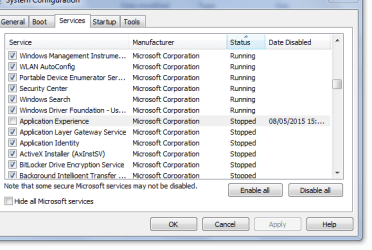
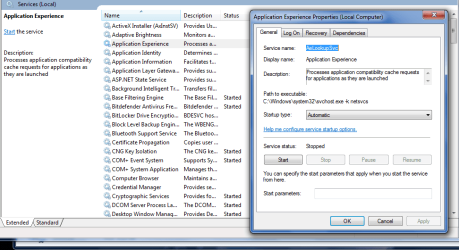
application experience

Another requirement is that you >> must << be opted into the above.

Im not therefor i dont get it see attached.

Roy
 

Attachments

  • appex.PNG
    appex.PNG
    14 KB · Views: 46
  • appex2.PNG
    appex2.PNG
    34 KB · Views: 2

My Computer My Computer

At a glance

W7 home premium 32bit/W7HP 64bit/w10 tp insid...E5300 dual core3gbNvidia Geforce 7100 Nforce 630i
Computer type
PC/Desktop
Computer Manufacturer/Model Number
medionl/Aspire 6930G/acer x55a
OS
W7 home premium 32bit/W7HP 64bit/w10 tp insider ring
CPU
E5300 dual core
Motherboard
medion MS7366
Memory
3gb
Graphics Card(s)
Nvidia Geforce 7100 Nforce 630i
Monitor(s) Displays
avixc
Internet Speed
n (isp resticted to 72)
Antivirus
mse/pands
Browser
palemoon
Other Info
Belkin Fd7050 n USB using Railink RT2870 drivers, more upto date
The Windows requirements are virtualy the same since Vista, as the OS hasn't experienced any major updates in the last 10 years in its core components. Any computer capable of running Vista, 7 or 8 will for sure be able to run 10 without major trouble.

As a wild guess, I see that maybe the "1TB HDs with 16GB free space" can have something to do with it. That's barely the minimum space needed for the OS only, so it can be complaining about not enough HD space.
 

My Computer My Computer

At a glance

Windows 7 Ultimate x64Intel Core i7-740QM8 GB DDR3NVIDIA GeForce 330GT
Computer type
Laptop
Computer Manufacturer/Model Number
Toshiba Sattelite A665-S6092
OS
Windows 7 Ultimate x64
CPU
Intel Core i7-740QM
Memory
8 GB DDR3
Graphics Card(s)
NVIDIA GeForce 330GT
Screen Resolution
1366x768
Hard Drives
Samsung 840 SSD 500GB
1TB USB3 external HD
Cooling
Coolermaster Notepal U3 notebook cooling pad
Internet Speed
3mbps ASDL
Antivirus
ClamWin 0.98.7
Browser
Opera 12.17 x86 (main), Firefox 38 (sec), IE11 (last resort)
Thanks Torchwood for the reply. My Application Experience was running. It was set to manual and I changed it to automatic. I ran the GWX.exe as administrator again rebooted and checked for updates. Still no go.
 

My Computer My Computer

At a glance

Windows 10 Pro 64-bitIntel I7 920 @ 2.67 GHz24 GigATI 5670
Computer type
PC/Desktop
Computer Manufacturer/Model Number
Dell XPS 9100
OS
Windows 10 Pro 64-bit
CPU
Intel I7 920 @ 2.67 GHz
Motherboard
Dell
Memory
24 Gig
Graphics Card(s)
ATI 5670
Sound Card
Internal
Monitor(s) Displays
23" Wide Flat LED HDMI
Screen Resolution
1366 X 768
Hard Drives
Samsung 250 GB SSD
WD 1TB internal
Seagate 1TB internal
WD 2TB external USB 3
PSU
550 W
Case
Mid
Cooling
Fan
Keyboard
US USB
Mouse
USB
Internet Speed
3.84 Mbps down .44 Mbps up
Antivirus
MS Defener
Browser
IE 11
Other Info
1 Liteon DVD wrighter
1 Liteon BD drive
The Windows requirements are virtualy the same since Vista, as the OS hasn't experienced any major updates in the last 10 years in its core components. Any computer capable of running Vista, 7 or 8 will for sure be able to run 10 without major trouble.

As a wild guess, I see that maybe the "1TB HDs with 16GB free space" can have something to do with it. That's barely the minimum space needed for the OS only, so it can be complaining about not enough HD space.
Thanks for the reply Alejandro85. My HD has 913 GB free. I was just saying that it has the min 16GB free.
 

My Computer My Computer

At a glance

Windows 10 Pro 64-bitIntel I7 920 @ 2.67 GHz24 GigATI 5670
Computer type
PC/Desktop
Computer Manufacturer/Model Number
Dell XPS 9100
OS
Windows 10 Pro 64-bit
CPU
Intel I7 920 @ 2.67 GHz
Motherboard
Dell
Memory
24 Gig
Graphics Card(s)
ATI 5670
Sound Card
Internal
Monitor(s) Displays
23" Wide Flat LED HDMI
Screen Resolution
1366 X 768
Hard Drives
Samsung 250 GB SSD
WD 1TB internal
Seagate 1TB internal
WD 2TB external USB 3
PSU
550 W
Case
Mid
Cooling
Fan
Keyboard
US USB
Mouse
USB
Internet Speed
3.84 Mbps down .44 Mbps up
Antivirus
MS Defener
Browser
IE 11
Other Info
1 Liteon DVD wrighter
1 Liteon BD drive
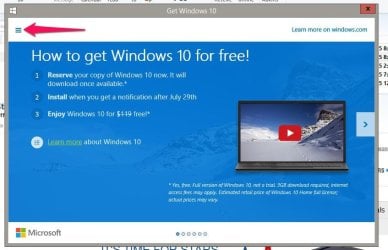
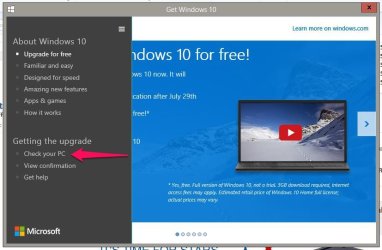
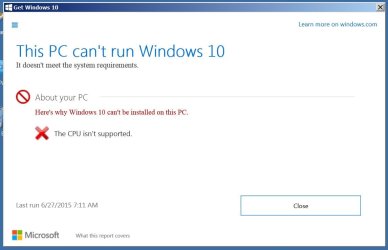
I found out what was wrong with the Windows 7 PC. I downloaded the win10fix_full.bat and ran that. Option 2 brought up the icon. I clicked on it and it brought the first screen. I looked at it for a while not knowing what to do, I clicked on the little square in the upper left corner and it brought up the menu in the second pic. I ran the Check Your Pc and it said your processor is not supported. So I guess that’s the end of that. At least I know why now.Thanks for all the replies.
Icon101.JPG
icon 102.JPG


Attachments

  • Icon103.JPG
    Icon103.JPG
    47.4 KB · Views: 1
Last edited:

My Computer My Computer

At a glance

Windows 10 Pro 64-bitIntel I7 920 @ 2.67 GHz24 GigATI 5670
Computer type
PC/Desktop
Computer Manufacturer/Model Number
Dell XPS 9100
OS
Windows 10 Pro 64-bit
CPU
Intel I7 920 @ 2.67 GHz
Motherboard
Dell
Memory
24 Gig
Graphics Card(s)
ATI 5670
Sound Card
Internal
Monitor(s) Displays
23" Wide Flat LED HDMI
Screen Resolution
1366 X 768
Hard Drives
Samsung 250 GB SSD
WD 1TB internal
Seagate 1TB internal
WD 2TB external USB 3
PSU
550 W
Case
Mid
Cooling
Fan
Keyboard
US USB
Mouse
USB
Internet Speed
3.84 Mbps down .44 Mbps up
Antivirus
MS Defener
Browser
IE 11
Other Info
1 Liteon DVD wrighter
1 Liteon BD drive
I find that extraordinary!
It's not as if that CPU is either uncommon or a problem.I would suggest contacting Dell for advice/assistance. (or posting in their forums)
 

My Computer My Computer

At a glance

Win 7 x64 Home Premium (and x86 VirtualBox VM...i3 370M/i7 6500U8GB - finally :)/8GBit's an i3, dude!/dual Intel&nVidia
Computer type
Laptop
Computer Manufacturer/Model Number
Asus K52F or Lenovo B51-80
OS
Win 7 x64 Home Premium (and x86 VirtualBox VM)/Win10
CPU
i3 370M/i7 6500U
Motherboard
Asus/Lenovo
Memory
8GB - finally :)/8GB
Graphics Card(s)
it's an i3, dude!/dual Intel&nVidia
Sound Card
onboard
Monitor(s) Displays
15.6" built-in
Screen Resolution
1366x768/1920x1080
Hard Drives
750GB Seagate internal
Sundry external drives attached to other computers on the local network
1TB SSD on the Lenovo
PSU
n/a
Internet Speed
as much as I can get - usually on a dongle/phone, so <1MB/s
Antivirus
MSE/Defender
Browser
IE11/12/Edge/Chrome/FF(if I must)
You can always do the ultimate test and install the current iso on it's own hdd/ sdd and see what happens.
Make sure you disconnect your existing hdd first and all other drives during the install.

Even my 6 y.o. low spec's system can run 10tp and have on it's own hdd since testing started
Even if I used a vm using VMware would work but my machine can only run a 32 bit vm so I didn't run 10tp that way I chose to run 64 bit on it's own hdd ;)
Better to install in a real environment as a real install would be in.
 

My Computer My Computer

At a glance

Win-7-Pro64bit 7-H-Prem-64biti7-5930K 2nd i9-9940x both water blocked VRM'...Trident-z 3200C14 2nd Trident-z 3600C16EVGA 1080ti ftw3 2nd Titan Xp both water blocked
Computer type
PC/Desktop
Computer Manufacturer/Model Number
Custom assembled by me :}
OS
Win-7-Pro64bit 7-H-Prem-64bit
CPU
i7-5930K 2nd i9-9940x both water blocked VRM's too
Motherboard
ASUS SABERTOOTH X99 2nd ASUS x299 Apex
Memory
Trident-z 3200C14 2nd Trident-z 3600C16
Graphics Card(s)
EVGA 1080ti ftw3 2nd Titan Xp both water blocked
Sound Card
Built-in Realtek
Monitor(s) Displays
1-AOC G2460PG 24"G-Sync 144Hz/ 2nd 1-ASUS VG248QE 24" 144Hz
Screen Resolution
1920 x 1080 144Hz
Hard Drives
2-Samsung M.2 Evo & Evo Plus
2-Samsung 850 EVO 500GB SSD's/ 3-2.5 W.D. Black 1tb-&3-1tb/3-3.5 WD Black 1tb hdd's
PSU
EVGA SuperNOVA 1000-P2 2nd 1200-P2
Case
2-Corsair Obsidian Series 450D Black ATX Mid Tower
Cooling
Custom water loops
Keyboard
Logitech G710+/ 2nd Logitech G910
Mouse
2-RedDragon M901 Perdition 16400 dpi Gaming mouse = wired
Internet Speed
Comcast Ping 19ms 89.31mbps download speed 6.12mbps upload
Antivirus
Malwarebytes Pro/ Superantispyware Pro
Browser
FireFox & Pale moon
Other Info
2nd ASUS X299 Apex/Intel i9-9940x with Custom water loop/7H-Prem-x64/Corsair 450D case/Ram Trident-z 3600C16 4x8gb / Samsung970Evo plus 500gb SSD/Dual ssd EZ swap evo/PSU EVGA SuperNova 1200w-P2 80+Platinum/GPU Titan Xp /8-ML-140 on push-pull on 2-280GTX rads
Back
Top