Solved Dobly Advanced Audio V2 not working in Speaker Properties ....

fahadhum

New member
Member
VIP
Local time
3:50 AM
Messages
201
Location
Doha Qatar
I was watching a Youtube video when , i noticed the sound was a bit low even after turning it to the MAX.
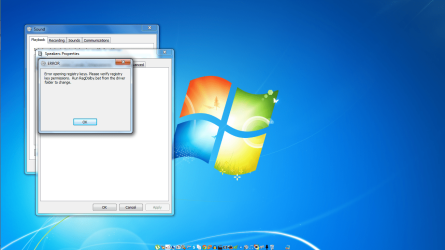
So,as usual i went to my sound settings & clicked Speaker Properties to Enable Dobly Adbanced Audio V2 , (Kindly See Pic # 1) & use some Equalizer options , such as Treble , Rock , Soft etc ...

I am getting this Error , (Kindly See Pic # 2) ...

What do i do ... ?
 

Attachments
  • Pic # 1.png
    Pic # 1.png
    265.6 KB · Views: 0
  • Pic # 2.png
    Pic # 2.png
    246.2 KB · Views: 3

My Computer My Computer

At a glance

Windows 7 Home Premium 64 biti716 GBNvidia GFORCE GTX 960 2 GB
Computer type
PC/Desktop
Computer Manufacturer/Model Number
Asus
OS
Windows 7 Home Premium 64 bit
CPU
i7
Motherboard
Gigabyte H97-D3H
Memory
16 GB
Graphics Card(s)
Nvidia GFORCE GTX 960 2 GB
Screen Resolution
1280*720
Cooling
CORSAIR Liquid Fan + One Built in FAN
Antivirus
Avast Free Anti Virus 2015
Browser
Google Chrome
Reinstall the Dolby and see if that fixes it.
 

My Computer My Computer

At a glance

Windows 10 64 bitIntel i7 6700K16GB Corsair DominatorIntel CPU Graphics
Computer type
PC/Desktop
Computer Manufacturer/Model Number
My Own Build
OS
Windows 10 64 bit
CPU
Intel i7 6700K
Motherboard
ASUS ROG Maximus VIII Hero
Memory
16GB Corsair Dominator
Graphics Card(s)
Intel CPU Graphics
Sound Card
RealTek
Monitor(s) Displays
27" Dell S2719dgf
Screen Resolution
2560X1440
Hard Drives
1 TB Samsung 850 EVO SSD for Win 10 Pro
500GB Samsung 850 EVO SSD for Win 10 Insider
2 TB drive for backup
PSU
EVGA Supernova 750G2
Case
BeQuiet Silent Base 600
Cooling
Deepcool Captain 120EX
Keyboard
Microsoft Wireless 2000
Mouse
Microsoft wireless
Internet Speed
100 MB/sec (Cable)
Antivirus
Microsoft Defender and Malwarebytes
Browser
Edge/Firefox
Other Info
Cakewalk (Sonar) by BandLab and Studio One 4.1 Pro recording studio software. MOTU 896Mk3 Hybrid recording interface, Frontier Tranzport wireless control unit, Behringer X-Touch Control Surface.
Five USB connected optical drives for CD Audio production using Nero BurningROM
Reinstall the Dolby and see if that fixes it.

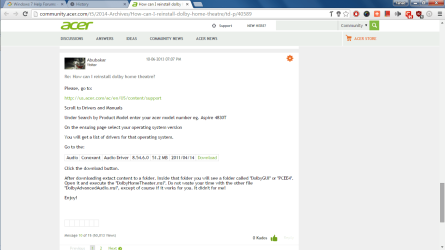
I did that.I got help from this link ,

Service & Support | Acer Official Site

Followed the instructions by the user "Abubakar" from the above mentioned link (Kindly see Pic # 1)

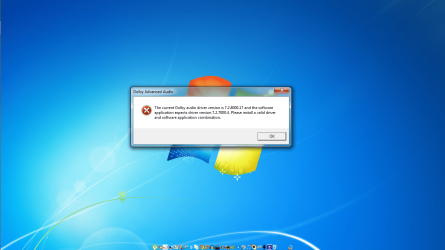
After running the Executible file & Installing it.I recieved this error (Kindly see Pic # 2)

Note : "Dobly Advanced Audio" Executable didn't work , as the user suggested.Besides I have "Dobly Advanced Audio" installed as default , so perhaps that's why "Dobly Advanced Audio" Executable won't Install on my system.
 

Attachments

  • User Help Instructions.png
    User Help Instructions.png
    41.7 KB · Views: 1
  • Dobly Install Error.png
    Dobly Install Error.png
    278.4 KB · Views: 2

My Computer My Computer

At a glance

Windows 7 Home Premium 64 biti716 GBNvidia GFORCE GTX 960 2 GB
Computer type
PC/Desktop
Computer Manufacturer/Model Number
Asus
OS
Windows 7 Home Premium 64 bit
CPU
i7
Motherboard
Gigabyte H97-D3H
Memory
16 GB
Graphics Card(s)
Nvidia GFORCE GTX 960 2 GB
Screen Resolution
1280*720
Cooling
CORSAIR Liquid Fan + One Built in FAN
Antivirus
Avast Free Anti Virus 2015
Browser
Google Chrome
Did you try running that RegDolby.bat that was in the error dialog in 2nd screenshot from earlier post?
 

My Computer My Computer

At a glance

Windows 7 Ultimate x64 SP1AMD Phenom 2 1090T2x8GB Kingston HyperX Fury Black 1600Mhz Unga...MSI GTX 970 Gaming 4G
Computer type
PC/Desktop
Computer Manufacturer/Model Number
Custom Build
OS
Windows 7 Ultimate x64 SP1
CPU
AMD Phenom 2 1090T
Motherboard
Gigabyte GA-890FXA-UD5
Memory
2x8GB Kingston HyperX Fury Black 1600Mhz Unganged
Graphics Card(s)
MSI GTX 970 Gaming 4G
Sound Card
Realtek On-Board HD 7.1 Audio / Logitech G35
Monitor(s) Displays
3xAcer GD245HQ
Screen Resolution
1920x1080
Hard Drives
Samsung 850 Pro 512GB SSD - OS /
WD Caviar Black SATA 3 - 1 TBx2 - Dynamic RAID 0 /
WD Caviar Green SATA 2 - 640GBx2 - Dynamic RAID 0 /
WD Caviar Green SATA 2 - 640GB - Internal Backup /
Seagate Barracude SATA 3 - 3TB - External Backup/ Sync
PSU
HighPower 1000W
Case
Cooler Master HAF 932
Cooling
Noctua NH-D14
Keyboard
Logitech G19
Mouse
Logitech G500
Internet Speed
100/4 Mbit Cable (100GB quota)
Antivirus
ZoneAlarm Extreme Security / MBAM Pro / MBAE Free / SAS Free
Browser
IE 11 - Firefox - Chrome
Other Info
Logitech F710/ G27/ G940/ Z5500 // TrackIR 5 // Nvidia 3D Surround Vision
Did you try running that RegDolby.bat that was in the error dialog in 2nd screenshot from earlier post?

I couldn't locate that particular file from the Drivers folder via "System Files" Folder of my computer. Also , i couldn't find any such file through " Start > Search" option in my laptop. ..
 

My Computer My Computer

At a glance

Windows 7 Home Premium 64 biti716 GBNvidia GFORCE GTX 960 2 GB
Computer type
PC/Desktop
Computer Manufacturer/Model Number
Asus
OS
Windows 7 Home Premium 64 bit
CPU
i7
Motherboard
Gigabyte H97-D3H
Memory
16 GB
Graphics Card(s)
Nvidia GFORCE GTX 960 2 GB
Screen Resolution
1280*720
Cooling
CORSAIR Liquid Fan + One Built in FAN
Antivirus
Avast Free Anti Virus 2015
Browser
Google Chrome
Ok Guys.I just got this issue fixed.Thanks to someone giving solutions on this vary seven forums website.He said something about an Acer Recovery Management Tool/Software that is installed in the system when you bout Acer Laptops (I presume , in ALL Laptops).

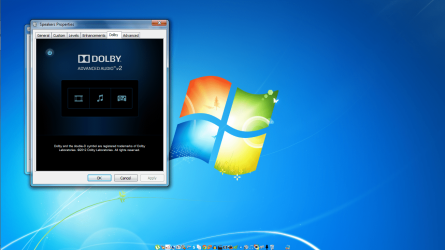
So,i ran my Recovery management tool and it said , it will uninstall the Audio Driver then will reboot my system and will install and once again i need to initiate/run the setup.So,i did and wholaa , I finally got Dobly Advanced Audio Manager V2 back.

Thank you all for the support... :)
 

My Computer My Computer

At a glance

Windows 7 Home Premium 64 biti716 GBNvidia GFORCE GTX 960 2 GB
Computer type
PC/Desktop
Computer Manufacturer/Model Number
Asus
OS
Windows 7 Home Premium 64 bit
CPU
i7
Motherboard
Gigabyte H97-D3H
Memory
16 GB
Graphics Card(s)
Nvidia GFORCE GTX 960 2 GB
Screen Resolution
1280*720
Cooling
CORSAIR Liquid Fan + One Built in FAN
Antivirus
Avast Free Anti Virus 2015
Browser
Google Chrome
Back
Top