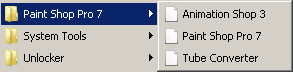
doc files are currently white paper icons

Jez2k

New member
Local time
12:28 PM
Messages
26
Any fix for .doc files? Mine are currently white paper icons. Similarly pdf and rar files have a reduced icon inside a white paper icon. Previously the pdf icons were white with a tiny app icon inside them, but I ran Windows Repair from tweaking.com and that sort of repaired that icon, but not fully, as mentioned.

- - - Updated - - -

To give you an idea, here are some examples:
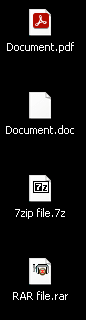
1.png

2.png

View attachment 423359

4.png

I have tried sfc /scannow, reinstalling the programs and checking file-associations.
 
Last edited:

My Computer My Computer

At a glance

Windows 7 Professional x64Intel Core i7 @ 3.20GHz 3.60GHz32GB (Crucial Hyper)EVGA GTX 960 4GB
Computer type
PC/Desktop
Computer Manufacturer/Model Number
Custom build
OS
Windows 7 Professional x64
CPU
Intel Core i7 @ 3.20GHz 3.60GHz
Motherboard
Gigabyte GA-X79-UD3
Memory
32GB (Crucial Hyper)
Graphics Card(s)
EVGA GTX 960 4GB
Hard Drives
Seagate ST375064ONS (Windows 7)
Seagate ST375064ONS (Windows XP [I dual boot])
5 x HGST HUS724020ALE640
Antivirus
Avast
Browser
Firefox
Is doc files set to open with word if not right click on a doc file and choose open with and tick always open with word see if that solves it
 

My Computer My Computer

At a glance

win 8 32 bit
Computer type
PC/Desktop
OS
win 8 32 bit
That was the first thing I checked before posting here, although I use Libre Office. Changing it to open with Word results in yet another reduced icon inside a white paper icon, like those seen in my first post. Changing it back to open with Libre Office results in a blank white icon. The problem is not exclusive to DOC files, as you can see. The PDF, RAR and 7Z files all have issues, and some shortcuts in the Start menu too.
 

My Computer My Computer

At a glance

Windows 7 Professional x64Intel Core i7 @ 3.20GHz 3.60GHz32GB (Crucial Hyper)EVGA GTX 960 4GB
Computer type
PC/Desktop
Computer Manufacturer/Model Number
Custom build
OS
Windows 7 Professional x64
CPU
Intel Core i7 @ 3.20GHz 3.60GHz
Motherboard
Gigabyte GA-X79-UD3
Memory
32GB (Crucial Hyper)
Graphics Card(s)
EVGA GTX 960 4GB
Hard Drives
Seagate ST375064ONS (Windows 7)
Seagate ST375064ONS (Windows XP [I dual boot])
5 x HGST HUS724020ALE640
Antivirus
Avast
Browser
Firefox
I had already tried deleting the icon cache using third party apps to no avail. I still gave the method you suggested a try, still no luck, even after a reboot. I never use thumbnails though, only icons.
 

My Computer My Computer

At a glance

Windows 7 Professional x64Intel Core i7 @ 3.20GHz 3.60GHz32GB (Crucial Hyper)EVGA GTX 960 4GB
Computer type
PC/Desktop
Computer Manufacturer/Model Number
Custom build
OS
Windows 7 Professional x64
CPU
Intel Core i7 @ 3.20GHz 3.60GHz
Motherboard
Gigabyte GA-X79-UD3
Memory
32GB (Crucial Hyper)
Graphics Card(s)
EVGA GTX 960 4GB
Hard Drives
Seagate ST375064ONS (Windows 7)
Seagate ST375064ONS (Windows XP [I dual boot])
5 x HGST HUS724020ALE640
Antivirus
Avast
Browser
Firefox
Back
Top