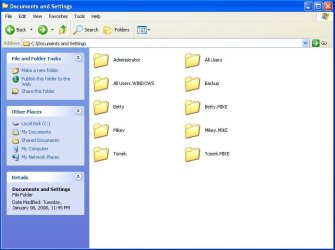
Docs and Settings taking up way too much space

BIG RED

New member
Member
Local time
8:21 PM
Messages
31
hey everyone. i understand that this is a windows 7 forum, but i have had a significant amount of help from this forum in the past and was hoping to see if anyone can help me with a windows xp x64 problem. on my desktop, we have two users with admin rights (myself and one more person) and when I go to the documents and settings directory, windows tells me it occupies over 40Gb. under docs and settings, there are two copies of each users files. for example, theres my own documents, and then theres another file that says Mikey.MIKE (my username). what is the point in the additional file? is it just from an old backup that i never realized that we had? ive attached a screen capture of what the documents and settings directory looks like in case someone needs a better picture.
 

Attachments

  • test.JPG
    test.JPG
    44.1 KB · Views: 36

My Computer

OS
Windows 7 Home Premium
Hi Big Red

Sorry for asking, but is this problem recent?

Thanks
 

My Computer

Computer Manufacturer/Model Number
Custom
OS
Win7 HP (x64)/Win7 Ultimate (x64)
CPU
Core i7 920
Motherboard
Intel X58
Memory
6 x 2GB Corsair XMS3
Graphics Card(s)
CF HD4890
Sound Card
Asus Xonar
Monitor(s) Displays
Dell 2408WFP
Screen Resolution
1920 x 1200
Hard Drives
2 x 150GB WDC Velociraptors (Raid 0)
1 x 1TB Seagate
1 x 1.5TB Seagate
PSU
Corsair HX1000W
Case
Antec 1200
Keyboard
Razer Lycosa/N52te
Mouse
Razer Lachesis
Documents & Settings is not a real folder, its just a link (junction) to C:\Users\<your user name>\ folder which is the one that actually contains your files. Its there because some legacy apps may be hard coded to look for a Documents & Settings folder. Dont mess with this folder, you may find some of your apps have stopped working.

As to the multiple copies, it probably has to do with earlier backups as you said. But i wouldnt bother if its not interfering with anything.
 

My Computer

Computer Manufacturer/Model Number
Too many to describe...
OS
Windows 7 x64 pro/ Windows 7 x86 Pro/ XP SP3 x86
If you really want to save space, I'd suggest a reformat. Make sure to backup all the files that you need and then perform a clean install, that way you'll have a fresh hard drive without any extra junk. Once you've done that you can tell your HD how much space you want to use for system restore, temporary files, etc. That way you'll know whats taking up the space and what isn't.
 

My Computer

Computer Manufacturer/Model Number
Apple Macbook Pro (April 2009)
OS
W7 Ult. x64 | OS X
CPU
Intel Mobile Core 2 Duo 2.93Ghz [T9800 Penryn]
Motherboard
NVIDIA nForce 730i Rev. B1 [Mac-F2268EC8 (U2E1)]
Memory
4096MB Samsung DDR3 Dual Channel [PC3-8500F 1066Mhz]
Graphics Card(s)
NVIDIA GeForce 9600M GT 512MB [G96M Rev. C1]
Sound Card
SB X-Fi Surround 5.1 USB | Onboard Realtek (Disabled)
Monitor(s) Displays
Acer x223wbd 22" | Apple Anti-Glare 17" (Disabled)
Screen Resolution
{Current} 1440x900 {Acer} 1680x1050 {Apple} 1920x1200
Hard Drives
{Internal}
Seagate Momentus 320GB 2.5" 7200RPM [ST9320421AS]

{Externals}
LaCie 320GB USB 2.0 HDD [301284UR]
LaCie 750GB USB 2.0 FW400 eSATA HDD [301314U]
LaCie 1TB USB 2.0 HDD [301304UR]
PSU
Magsafe
Case
Aluminum/Unibody (MBP52)
Cooling
2 x 6000 RPM Fans
Keyboard
Logitech G-15v2 [PN 920-000379]
Mouse
Logitech G-9 [PN 910-000338]
Internet Speed
12Mbps/2.5Mbps w/ 24Mbps Speed Boost [Comcast]
Other Info
Logitech X-540 Speakers [PN 970223-0122]
Sennheiser PC-151 Headset
hey everyone. i understand that this is a windows 7 forum, but i have had a significant amount of help from this forum in the past and was hoping to see if anyone can help me with a windows xp x64 problem. on my desktop, we have two users with admin rights (myself and one more person) and when I go to the documents and settings directory, windows tells me it occupies over 40Gb. under docs and settings, there are two copies of each users files. for example, theres my own documents, and then theres another file that says Mikey.MIKE (my username). what is the point in the additional file? is it just from an old backup that i never realized that we had? ive attached a screen capture of what the documents and settings directory looks like in case someone needs a better picture.

Hi Big Red...
In windows XP each folder in Documents and Settings is supposed to be a user account... Whle you can make extra folder in there it's not exactly kosher to do so. Secondly, while it's not wrong, I would be a little suspicious about folders (anywhere) with extensions... eg: "Mikey.MIKE"

The first step is to determine whether you can delete these folders without data loss...
I would suggest that you first take a look at "User Accounts" in Control Panel to see if these are accounts or just extra folders. Next I would take a look at the contents of those new folders... You will want to know what has been copied or moved to this new folder. Third you want to make sure that no needed data is missing from the original folders and copy the missing data back, if possible.

Once you are sure you can dump them without data loss whether they are user accounts or not will determine how you go about removing them. If they are user accounts you will need to use the User Accounts applet, entering each of the accounts in turn and clicking on "Delete this account". You will be given a choice to keep the user's files or not as part of this process. If they are not user accounts, you can go into the D&S folder itself highlight the extra folders, hold down the shift key and press Delete... this will trash them without filling your garbage can.

Once you have them off your system... the next question is "Where did they come from"... You will want to run a comprehensive virus scan of all folders on your system --what they call a "Deep Scan". I generally use A-Squared for this kind of scan since it catches malware, spyware, adware etc. all in one pass. Next check your installed software to see if there's anything that might legitimately be doing this and get it off your system.

Of course if it's not due to a virus... you will need to have a bit of a chat with the other people using that computer... you know; the old "Quit messing with stuff you don't understand" lecture.

You can get A-Squared here...
a-squared Free - Free of charge Anti-Virus, Anti-Trojan, Anti-Spyware, Anti-Dialer and Anti-Worm Software - Freeware!

Then as a final step, I would strongly suggest that you routinely copy your user's files on an external hard disk, just in case this happens again.

 

My Computer

Computer Manufacturer/Model Number
Homebrew
OS
XP Pro SP3 X86 / Win7 Pro X86
CPU
Amd 64 x2 4200 (2.4ghz)
Motherboard
Asus M2N-MX SE Plus
Memory
Kingston DDR2 800 2gb
Graphics Card(s)
Nvidia GF-8400
Sound Card
Realtek on Motherboard
Monitor(s) Displays
Acer x-193bw
Screen Resolution
1440 x 900
Hard Drives
Western Digital 500g
PSU
350watt In-Win
Case
In-Win
Cooling
Air
Keyboard
yes
Mouse
yes
Internet Speed
5mpbs
Other Info
Also ASRock ION 330 as HTPC (on XP).
Acer Aspire as GP netbook (on XP).
Documents & Settings is not a real folder, its just a link (junction) to C:\Users\<your user name>\ folder which is the one that actually contains your files. Its there because some legacy apps may be hard coded to look for a Documents & Settings folder. Dont mess with this folder, you may find some of your apps have stopped working.

As to the multiple copies, it probably has to do with earlier backups as you said. But i wouldnt bother if its not interfering with anything.

Actually in XP it is the "Users" folder.
 

My Computer

Computer Manufacturer/Model Number
Homebrew
OS
XP Pro SP3 X86 / Win7 Pro X86
CPU
Amd 64 x2 4200 (2.4ghz)
Motherboard
Asus M2N-MX SE Plus
Memory
Kingston DDR2 800 2gb
Graphics Card(s)
Nvidia GF-8400
Sound Card
Realtek on Motherboard
Monitor(s) Displays
Acer x-193bw
Screen Resolution
1440 x 900
Hard Drives
Western Digital 500g
PSU
350watt In-Win
Case
In-Win
Cooling
Air
Keyboard
yes
Mouse
yes
Internet Speed
5mpbs
Other Info
Also ASRock ION 330 as HTPC (on XP).
Acer Aspire as GP netbook (on XP).
Back
Top