Docsis 2.0 vs 3.0 speed difference.

mystery250

New member
Local time
6:56 AM
Messages
12
I have Comcast Blast! which claims to be 50mpbs. I never get that.

My current modem is a Linksys CM100 (docsis 2.0)

My current router is: tplink tl-wr740N

I connect straight from an ethernet port, myself.

Would upgrading to a Docsis 3.0 modem make my internet speed faster? I currently have issues getting any streaming services to show in HD. There are also three computer in the household, the other two use wireless.

Insight appreciated.
 

My Computer

Computer type
PC/Desktop
Computer Manufacturer/Model Number
Lenovo
OS
Windows 7 64
CPU
i7 3rd gen
Memory
12gb ddr3
Graphics Card(s)
512mb
Hard Drives
2tb primary
Browser
chrome
I also have Blast and regularly get 52-56Mbs speeds, I have a DOCSIS 3.0 modem though, Motorola Surfboard SB6121. I don't know if it effects speed or not but a tech said it has something to do with channel binding to have a more stable connection. Too techy for me but I'd suggest you upgrade to the 3.0 version.

I had the same Linksys modem prior and after switching my DL speed nearly doubled from about 12Mbs to over 20Mbs on two PCs.
 

My Computer

Computer type
PC/Desktop
Computer Manufacturer/Model Number
Home Built Desktop By DataTech
OS
Windows 7 Ultimate X64 SP1
CPU
Intel i5-2550K, Differing ~4.4-4.8GHz No built in GPU
Motherboard
ASUS P8Z68-V PRO/GEN3
Memory
16GB G.Skill Sniper 1866MHz @ 2133MHz 2x8GB
Graphics Card(s)
ASUS GTX650TIB-DC2OC-2GD5, (650TI Boost)
Sound Card
Onboard Realtek 5-1
Monitor(s) Displays
Samsung P2570HD
Screen Resolution
1920x1080
Hard Drives
Samsung 840 Pro 256GB SSD for OS, 500GB Seagate Constellation (Enterprise drive) for Data
PSU
Corsair HX650W
Case
Inwin Dragon Rider
Cooling
Hyper 212 EVO w/two Noctua fans, push-pull, @1300 RPM
Keyboard
E-Z Eyes, bright yellow keys with large characters
Mouse
steelseries SENSEI Laser Pro Gaming
Internet Speed
48-51Mbs Mbs down, 11 Mbs up Xfinity Cable
Antivirus
Norton Internet Security 2013
Browser
IE 10, Opera, Pale Moon if needed
Other Info
4 case fans, LG BluRay-RE, ASUS DVD-RW, Mr. Fusion power supply, 1.21 gigawatts.
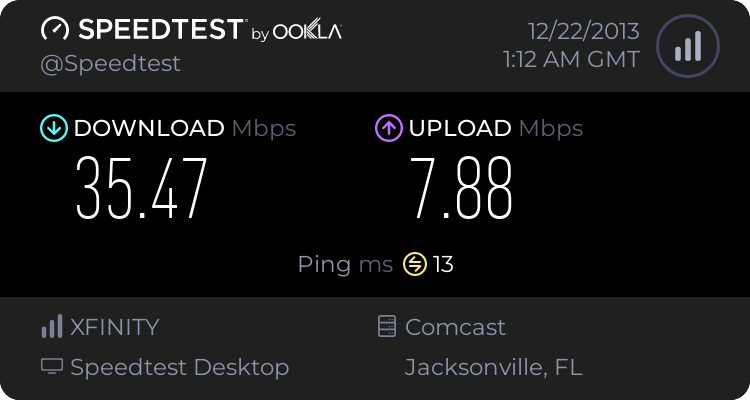
Here's my speedtest results from a state away..


My Computer

Computer type
PC/Desktop
Computer Manufacturer/Model Number
Lenovo
OS
Windows 7 64
CPU
i7 3rd gen
Memory
12gb ddr3
Graphics Card(s)
512mb
Hard Drives
2tb primary
Browser
chrome
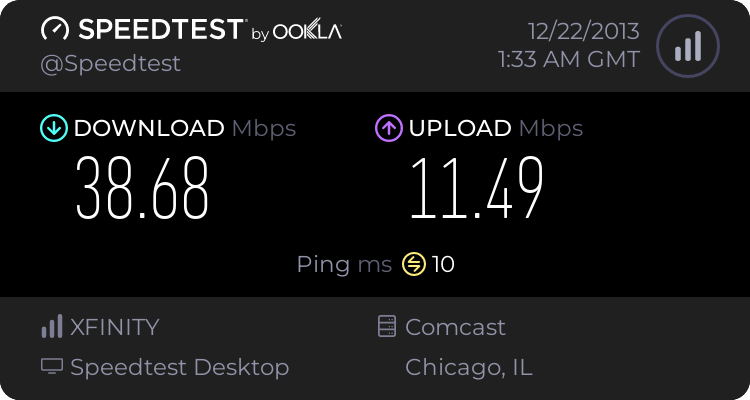
From several states away


My Computer

Computer type
PC/Desktop
Computer Manufacturer/Model Number
Lenovo
OS
Windows 7 64
CPU
i7 3rd gen
Memory
12gb ddr3
Graphics Card(s)
512mb
Hard Drives
2tb primary
Browser
chrome
I have Comcast Blast! which claims to be 50mpbs. I never get that.

My current modem is a Linksys CM100 (docsis 2.0)

My current router is: tplink tl-wr740N

I connect straight from an ethernet port, myself.

Would upgrading to a Docsis 3.0 modem make my internet speed faster? I currently have issues getting any streaming services to show in HD. There are also three computer in the household, the other two use wireless.

Insight appreciated.

You would only theoratically get a possibly 50mbps if you have a docsis 3.0 modem and you subscribe to and pay for the top speed offered by the isp. That doesnt necessairily guarantee you will get 50mbps though. There are some variables. For example; the more people that are on at the same time as you are in your area running cable as oppsed to dsl; well that will slow down the connection. As for the 3 computers; the ones running wireless are probably going to have lower speeds because a lot of times wireless cant come close to the speeds when a system is connected via ethernet cable.
 

My Computer

Computer type
PC/Desktop
Computer Manufacturer/Model Number
custom built
OS
Windows 7 ultimate 64-bit
CPU
Intel I7 2600K 3.4ghz
Motherboard
Asus Evo P8P67
Memory
Corsair 16gb ddr3 1600mhz
Graphics Card(s)
Nvidia Geforce gt 430
Sound Card
Sound Blaster Titanium x-fi pci express
Monitor(s) Displays
Dell E198WFP
Hard Drives
1 western digital 2TB drive.
PSU
Antec 1200 watt
Case
Inwin Dragon Rider
Cooling
6 case supplied cooling fans
Keyboard
logitech mk700
Mouse
logitech m705
Internet Speed
25-50mbps download; 10mbps upload(i think)
Antivirus
avg free 2014
Browser
mozilla firefox
Other Info
Also have a pretty bad speaker setup which is a klipsch promedia 5.1 surround speaker setup with huge subwoofer and lg blu ray player/writer. Also a hp officejet pro 8600 plus wireless all in one and a logitech s7500 webcam.
Here's my results today, first time it's been below 50Mbs since we got Blast. :confused:
Closest server:
3180281463.png


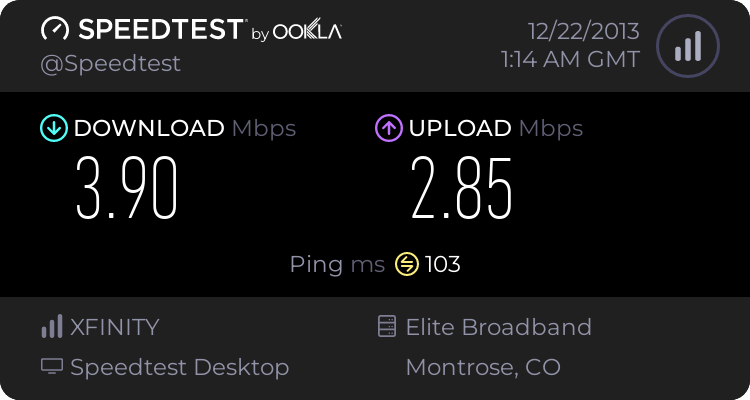
An ocean away, very extreme difference between up and down speeds.

3180283365.png


This is from a wired connection, the other PC is wireless and has the same result.
 

My Computer

Computer type
PC/Desktop
Computer Manufacturer/Model Number
Home Built Desktop By DataTech
OS
Windows 7 Ultimate X64 SP1
CPU
Intel i5-2550K, Differing ~4.4-4.8GHz No built in GPU
Motherboard
ASUS P8Z68-V PRO/GEN3
Memory
16GB G.Skill Sniper 1866MHz @ 2133MHz 2x8GB
Graphics Card(s)
ASUS GTX650TIB-DC2OC-2GD5, (650TI Boost)
Sound Card
Onboard Realtek 5-1
Monitor(s) Displays
Samsung P2570HD
Screen Resolution
1920x1080
Hard Drives
Samsung 840 Pro 256GB SSD for OS, 500GB Seagate Constellation (Enterprise drive) for Data
PSU
Corsair HX650W
Case
Inwin Dragon Rider
Cooling
Hyper 212 EVO w/two Noctua fans, push-pull, @1300 RPM
Keyboard
E-Z Eyes, bright yellow keys with large characters
Mouse
steelseries SENSEI Laser Pro Gaming
Internet Speed
48-51Mbs Mbs down, 11 Mbs up Xfinity Cable
Antivirus
Norton Internet Security 2013
Browser
IE 10, Opera, Pale Moon if needed
Other Info
4 case fans, LG BluRay-RE, ASUS DVD-RW, Mr. Fusion power supply, 1.21 gigawatts.
Would I also need to upgrade my wireless router?
 

My Computer

Computer type
PC/Desktop
Computer Manufacturer/Model Number
Lenovo
OS
Windows 7 64
CPU
i7 3rd gen
Memory
12gb ddr3
Graphics Card(s)
512mb
Hard Drives
2tb primary
Browser
chrome
Would I also need to upgrade my wireless router?

Not necessarly; try first seeing if there is updated firmware for your current router that may improve the speeds of the connection to the router. If not; then depending on how old your current router is; yes, you may want to consider upgrading the current router.
 

My Computer

Computer type
PC/Desktop
Computer Manufacturer/Model Number
custom built
OS
Windows 7 ultimate 64-bit
CPU
Intel I7 2600K 3.4ghz
Motherboard
Asus Evo P8P67
Memory
Corsair 16gb ddr3 1600mhz
Graphics Card(s)
Nvidia Geforce gt 430
Sound Card
Sound Blaster Titanium x-fi pci express
Monitor(s) Displays
Dell E198WFP
Hard Drives
1 western digital 2TB drive.
PSU
Antec 1200 watt
Case
Inwin Dragon Rider
Cooling
6 case supplied cooling fans
Keyboard
logitech mk700
Mouse
logitech m705
Internet Speed
25-50mbps download; 10mbps upload(i think)
Antivirus
avg free 2014
Browser
mozilla firefox
Other Info
Also have a pretty bad speaker setup which is a klipsch promedia 5.1 surround speaker setup with huge subwoofer and lg blu ray player/writer. Also a hp officejet pro 8600 plus wireless all in one and a logitech s7500 webcam.
Debating on getting either the motorola 6121 or motorola 6141 - would it be worth it to get the newer 6141 over the 21?

Right now, I'm directly connected via ethernet (connected from the modem to the router via ethernet cable and then from the router to me via ethernet). Speed doesn't seem to bother the others in the household as much as it does me, but I get tired of having stuff buffering every two seconds, especially Netflix.

Would I also need to upgrade my wireless router?

Not necessarly; try first seeing if there is updated firmware for your current router that may improve the speeds of the connection to the router. If not; then depending on how old your current router is; yes, you may want to consider upgrading the current router.
 

My Computer

Computer type
PC/Desktop
Computer Manufacturer/Model Number
Lenovo
OS
Windows 7 64
CPU
i7 3rd gen
Memory
12gb ddr3
Graphics Card(s)
512mb
Hard Drives
2tb primary
Browser
chrome
Debating on getting either the motorola 6121 or motorola 6141 - would it be worth it to get the newer 6141 over the 21?

Right now, I'm directly connected via ethernet (connected from the modem to the router via ethernet cable and then from the router to me via ethernet). Speed doesn't seem to bother the others in the household as much as it does me, but I get tired of having stuff buffering every two seconds, especially Netflix.

Would I also need to upgrade my wireless router?

Not necessarly; try first seeing if there is updated firmware for your current router that may improve the speeds of the connection to the router. If not; then depending on how old your current router is; yes, you may want to consider upgrading the current router.

I would say yes it sounds like you could use at the very least a dual-band router from your preferred manufacturer. A dual band router will definitely have more speed capability and i believe will also have more overall throughput speed; meaning it will just have a better connection overall. However, to get the best connection possible; when upgrading you want a router also that has gigabit ethernet which generally helps for faster speeds when connecting via router.
 

My Computer

Computer type
PC/Desktop
Computer Manufacturer/Model Number
custom built
OS
Windows 7 ultimate 64-bit
CPU
Intel I7 2600K 3.4ghz
Motherboard
Asus Evo P8P67
Memory
Corsair 16gb ddr3 1600mhz
Graphics Card(s)
Nvidia Geforce gt 430
Sound Card
Sound Blaster Titanium x-fi pci express
Monitor(s) Displays
Dell E198WFP
Hard Drives
1 western digital 2TB drive.
PSU
Antec 1200 watt
Case
Inwin Dragon Rider
Cooling
6 case supplied cooling fans
Keyboard
logitech mk700
Mouse
logitech m705
Internet Speed
25-50mbps download; 10mbps upload(i think)
Antivirus
avg free 2014
Browser
mozilla firefox
Other Info
Also have a pretty bad speaker setup which is a klipsch promedia 5.1 surround speaker setup with huge subwoofer and lg blu ray player/writer. Also a hp officejet pro 8600 plus wireless all in one and a logitech s7500 webcam.
Didn't really answer my question, though - which would be a better upgrade modem wise?

Debating on getting either the motorola 6121 or motorola 6141 - would it be worth it to get the newer 6141 over the 21?

Right now, I'm directly connected via ethernet (connected from the modem to the router via ethernet cable and then from the router to me via ethernet). Speed doesn't seem to bother the others in the household as much as it does me, but I get tired of having stuff buffering every two seconds, especially Netflix.

Not necessarly; try first seeing if there is updated firmware for your current router that may improve the speeds of the connection to the router. If not; then depending on how old your current router is; yes, you may want to consider upgrading the current router.

I would say yes it sounds like you could use at the very least a dual-band router from your preferred manufacturer. A dual band router will definitely have more speed capability and i believe will also have more overall throughput speed; meaning it will just have a better connection overall. However, to get the best connection possible; when upgrading you want a router also that has gigabit ethernet which generally helps for faster speeds when connecting via router.
 

My Computer

Computer type
PC/Desktop
Computer Manufacturer/Model Number
Lenovo
OS
Windows 7 64
CPU
i7 3rd gen
Memory
12gb ddr3
Graphics Card(s)
512mb
Hard Drives
2tb primary
Browser
chrome

My Computer

Computer type
PC/Desktop
Computer Manufacturer/Model Number
Home Built Desktop By DataTech
OS
Windows 7 Ultimate X64 SP1
CPU
Intel i5-2550K, Differing ~4.4-4.8GHz No built in GPU
Motherboard
ASUS P8Z68-V PRO/GEN3
Memory
16GB G.Skill Sniper 1866MHz @ 2133MHz 2x8GB
Graphics Card(s)
ASUS GTX650TIB-DC2OC-2GD5, (650TI Boost)
Sound Card
Onboard Realtek 5-1
Monitor(s) Displays
Samsung P2570HD
Screen Resolution
1920x1080
Hard Drives
Samsung 840 Pro 256GB SSD for OS, 500GB Seagate Constellation (Enterprise drive) for Data
PSU
Corsair HX650W
Case
Inwin Dragon Rider
Cooling
Hyper 212 EVO w/two Noctua fans, push-pull, @1300 RPM
Keyboard
E-Z Eyes, bright yellow keys with large characters
Mouse
steelseries SENSEI Laser Pro Gaming
Internet Speed
48-51Mbs Mbs down, 11 Mbs up Xfinity Cable
Antivirus
Norton Internet Security 2013
Browser
IE 10, Opera, Pale Moon if needed
Other Info
4 case fans, LG BluRay-RE, ASUS DVD-RW, Mr. Fusion power supply, 1.21 gigawatts.
Back
Top