Document & Settings

Aljay

New member
Member
Local time
2:57 AM
Messages
25
Location
New Zealand
Why can't I see "Documents and Settings" In win7. I have no trouble locating it in XP.?
Only had win7 a few days and it is driving me crazy!!
 

My Computer

OS
Windows 7 Home Premium 32bit
There are a large number of threads on this subject.


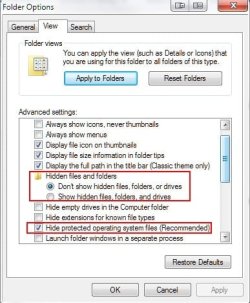
The “My Documents and Settings” is not a user folder in Windows 7. It is called a junction point. If you have "Hide protected operating system files" unchecked, then you will see these junction points. It is intended that users have no access to these junction points. You can see that the folder itself is shaded out with an overlay.

The folder has been replaced by "Users". Each user account will then have Documents, Pictures, videos etc. (The "My" designation is no longer used). These junction points exist to provide backwards compatibility for older programs that are unaware, and therefore not constructed, to use the new folder structure in Windows 7. The install of the old program is redirected to the new location.
 

My Computer

Computer Manufacturer/Model Number
Three desktops and one laptop with good specs..
OS
Vista and now 7 in 32 and 64 bit.
There are a large number of threads on this subject.


The “My Documents and Settings” is not a user folder in Windows 7. It is called a junction point. If you have "Hide protected operating system files" unchecked, then you will see these junction points. It is intended that users have no access to these junction points. You can see that the folder itself is shaded out with an overlay.

The folder has been replaced by "Users". Each user account will then have Documents, Pictures, videos etc. (The "My" designation is no longer used). These junction points exist to provide backwards compatibility for older programs that are unaware, and therefore not constructed, to use the new folder structure in Windows 7. The install of the old program is redirected to the new location.
OIC. Well I want to get into Thunderbird to see Profile. In XP I would just go to C:\Documents and Settings\User Name\Application Data\Thunderbird\Profiles
How do I get there in win7 please.? Also how do I uncheck the "Hide protected operating system files" please.? Boy this win7 is a learning curve. I am tempted into going back to XP.
 

My Computer

OS
Windows 7 Home Premium 32bit
There are a large number of threads on this subject.


The “My Documents and Settings” is not a user folder in Windows 7. It is called a junction point. If you have "Hide protected operating system files" unchecked, then you will see these junction points. It is intended that users have no access to these junction points. You can see that the folder itself is shaded out with an overlay.

The folder has been replaced by "Users". Each user account will then have Documents, Pictures, videos etc. (The "My" designation is no longer used). These junction points exist to provide backwards compatibility for older programs that are unaware, and therefore not constructed, to use the new folder structure in Windows 7. The install of the old program is redirected to the new location.
OIC. Well I want to get into Thunderbird to see Profile. In XP I would just go to C:\Documents and Settings\User Name\Application Data\Thunderbird\Profiles
How do I get there in win7 please.? Also how do I uncheck the "Hide protected operating system files" please.? Boy this win7 is a learning curve. I am tempted into going back to XP.

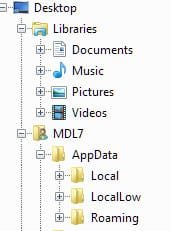
Hi, Aljay, go to your user folder then "AppData" then either "Local" or "Roaming" to access the files you were used to finding in the old "Documents and Setting\UserName" folder.
ScreenShot00020.jpg

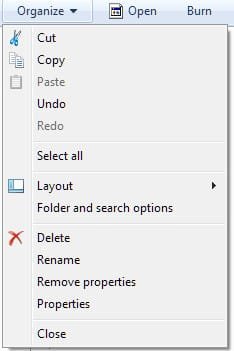
To show the files, in explorer, click on "Organize" then "Folder and search options"
ScreenShot00021.jpg

Click on the "View" tab and uncheck "Hide protected operating system files"
ScreenShot00022.jpg

I don't recommend you go sniffing around in the "Documents and Settings" folder unless you know what you are doing as all files contained within are available through your User folder and the AppData subfolder.
 

My Computer

Computer Manufacturer/Model Number
Toshiba L355D
OS
Windows 7 Ultimate x64 SP1
CPU
Core2 Duo
Motherboard
Intel
Memory
4 GB
Graphics Card(s)
GM965 on-board
Sound Card
RealTek on-board
Monitor(s) Displays
19"+17"(laptop)
Screen Resolution
1440x900 (x 2)
Hard Drives
500GB Ext. 200GB Internal
PSU
N/A
Case
N/A
Cooling
N/A
I can't get to application data via Users folder. I go into Computer/Local disk/C:/users/My Name/ but it does not show "Application Data". I'm Lost.
 

My Computer

OS
Windows 7 Home Premium 32bit
I can't get to application data via Users folder. I go into Computer/Local disk/C:/users/My Name/ but it does not show "Application Data". I'm Lost.

That's because you want "AppData"

ScreenShot00023.jpg
 

My Computer

Computer Manufacturer/Model Number
Toshiba L355D
OS
Windows 7 Ultimate x64 SP1
CPU
Core2 Duo
Motherboard
Intel
Memory
4 GB
Graphics Card(s)
GM965 on-board
Sound Card
RealTek on-board
Monitor(s) Displays
19"+17"(laptop)
Screen Resolution
1440x900 (x 2)
Hard Drives
500GB Ext. 200GB Internal
PSU
N/A
Case
N/A
Cooling
N/A
I can't get to application data via Users folder. I go into Computer/Local disk/C:/users/My Name/ but it does not show "Application Data". I'm Lost.

That's because you want "AppData"

View attachment 101854
I See your attachment but how to I get to the MDL7 folder that you show. I certainly can't see it via Users. Sorry to be so thick but I could find my around XP no trouble but I admit I am struggling in win7.
 

My Computer

OS
Windows 7 Home Premium 32bit
OIC. Well I want to get into Thunderbird to see Profile. In XP I would just go to C:\Documents and Settings\User Name\Application Data\Thunderbird\Profiles
How do I get there in win7 please.? Also how do I uncheck the "Hide protected operating system files" please.? Boy this win7 is a learning curve. I am tempted into going back to XP.
Hello Aljay -
I came over to 7 from XP so I know exactly what you're saying about a learning curve. Give it a few weeks and I think you'll be very happy with 7. If I can make a suggestion ... one of the nice things about 7 is how easy it is to make a system image. If you can get an external USB hard drive, make a system image (and the system repair disk) while everything is working. Then have at it and mess around with 7 as much as you like. If something breaks or the system crashes, restore the image and your computer will be exactly like it was when the image was made (OS, personal settings, updates, files, folders, data, etc.)

http://www.sevenforums.com/tutorials/663-backup-complete-computer-create-image-backup.html

If you'd rather use a different imaging program, a lot of forum users recommend Macrium Reflect Free. And one of the forum members created a sweet tutorial (thanks to WHS.)
 

My Computer

Computer type
Laptop
Computer Manufacturer/Model Number
Sony Vaio VPCEB47GM Laptop
OS
Win 7 Pro 64-bit
CPU
Intel i5 2.4 Ghz
Memory
8GB DDR3
Graphics Card(s)
Intel HD 3000
Sound Card
IDT High Definition
Monitor(s) Displays
15.6 WGXA Anti-Glare LED
Screen Resolution
1280x800
Hard Drives
640Gb 7200rpm
Antivirus
MSE
Browser
Opera (primary) with IE9 backup
I can't get to application data via Users folder. I go into Computer/Local disk/C:/users/My Name/ but it does not show "Application Data". I'm Lost.
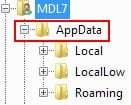
That's because you want "AppData"

View attachment 101854
I See your attachment but how to I get to the MDL7 folder that you show. I certainly can't see it via Users. Sorry to be so thick but I could find my around XP no trouble but I admit I am struggling in win7.
The MDL7 folder is my user name. Your folder will have your user name on it. I mean, not literally. Just look for your user name where I have indicated in red "Your User Name":

ScreenShot00024.jpg
 

My Computer

Computer Manufacturer/Model Number
Toshiba L355D
OS
Windows 7 Ultimate x64 SP1
CPU
Core2 Duo
Motherboard
Intel
Memory
4 GB
Graphics Card(s)
GM965 on-board
Sound Card
RealTek on-board
Monitor(s) Displays
19"+17"(laptop)
Screen Resolution
1440x900 (x 2)
Hard Drives
500GB Ext. 200GB Internal
PSU
N/A
Case
N/A
Cooling
N/A
OIC. Well I want to get into Thunderbird to see Profile. In XP I would just go to C:\Documents and Settings\User Name\Application Data\Thunderbird\Profiles
How do I get there in win7 please.? Also how do I uncheck the "Hide protected operating system files" please.? Boy this win7 is a learning curve. I am tempted into going back to XP.

Hello Aljay -
I came over to 7 from XP so I know exactly what you're saying about a learning curve. Give it a few weeks and I think you'll be very happy with 7. If I can make a suggestion ... one of the nice things about 7 is how easy it is to make a system image. If you can get an external USB hard drive, make a system image (and the system repair disk) while everything is working. Then have at it and mess around with 7 as much as you like. If something breaks or the system crashes, restore the image and your computer will be exactly like it was when the image was made (OS, personal settings, updates, files, folders, data, etc.)

http://www.sevenforums.com/tutorials/663-backup-complete-computer-create-image-backup.html

If you'd rather use a different imaging program, a lot of forum users recommend Macrium Reflect Free. And one of the forum members created a sweet tutorial (thanks to WHS.)
Thanks for your encouragement. I have an external HDD so will look at that once I know what I am doing. LOL. I have worked out why I couldn't get to the AppData folder. I had files hidden. I guess I will find my around eventually. I am at the upper end of being a "Senior" so the old brain isn't as good as it once was. Cheers.
 

My Computer

OS
Windows 7 Home Premium 32bit
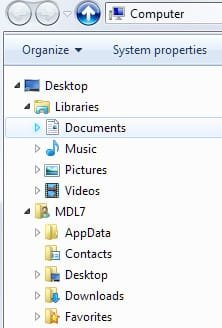
Ajay, you don't have to unhide system files to access your AppData folder. See my post above. In fact, for now, I would recommend you don't unhide the system files. After you acclimate yourself a bit further then give it a shot - just a humble suggestion.

Your explorer tree will appear bit differently than mine as I am running an add-on to emulate the tree view from XP. This is the standard view (remember, my user name is MDL7):

ScreenShot00027.jpg
 

My Computer

Computer Manufacturer/Model Number
Toshiba L355D
OS
Windows 7 Ultimate x64 SP1
CPU
Core2 Duo
Motherboard
Intel
Memory
4 GB
Graphics Card(s)
GM965 on-board
Sound Card
RealTek on-board
Monitor(s) Displays
19"+17"(laptop)
Screen Resolution
1440x900 (x 2)
Hard Drives
500GB Ext. 200GB Internal
PSU
N/A
Case
N/A
Cooling
N/A
Hi Mikedl, Until I did the unhide I could not see AppData via Users and then My User name.
I have now made it hidden. When I go into Users/My Name this is all I get:
Contents
Desktop
Downloads
Favourites
Links
My Documents
My Music
My Pictures
My Videos
Office Genuine Advanage
Saved Games
Searches
Tracing
I cannot see any way of getting to AppData. Thanks for trying to help. Cheers.
 

My Computer

OS
Windows 7 Home Premium 32bit
Hi Mikedl, Until I did the unhide I could not see AppData via Users and then My User name.
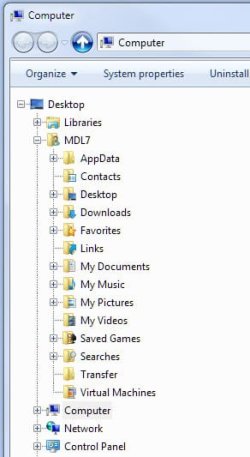
Are you attempting to access your "AppData" folder by going through the "Users" folder under the "C" drive?

You should be able to access it directly at the top of the left hand pane in explorer
without going into the "Users" folder.
ScreenShot00028.jpg

ScreenShot00029.jpg
 

My Computer

Computer Manufacturer/Model Number
Toshiba L355D
OS
Windows 7 Ultimate x64 SP1
CPU
Core2 Duo
Motherboard
Intel
Memory
4 GB
Graphics Card(s)
GM965 on-board
Sound Card
RealTek on-board
Monitor(s) Displays
19"+17"(laptop)
Screen Resolution
1440x900 (x 2)
Hard Drives
500GB Ext. 200GB Internal
PSU
N/A
Case
N/A
Cooling
N/A
Yes. That is the way I am doing it. My Explorer pane is not the same as yours. I am using what we call "Windows7 Home Premium" which is one up from the "Starter" Perhaps that explains it. The win7 was put on when I got this computer built last week.
 

My Computer

OS
Windows 7 Home Premium 32bit
Odd, it should be the same other than the tree view being slightly different on mine for the reason I explained earlier.

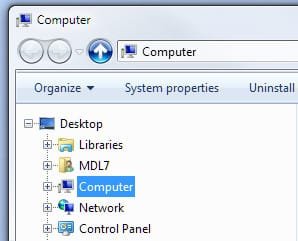
You don't have a folder with your user name under "Desktop" then below "Libraries" and above "Computer?"

ScreenShot00030.jpg

EDIT: I understand the dilemma now and, also, my inability to relate to what you have been telling me - sorry.

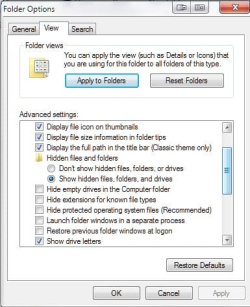
When I set my views as such:
ScreenShot00031.jpg

I see why you couldn't find the AppData folder. Show your hidden files but I recommend you leave"Hide protected operating system files" checked.

I guess I've never ran Windows without first going in and selecting "Show hidden files, folders and drives" :o
 

My Computer

Computer Manufacturer/Model Number
Toshiba L355D
OS
Windows 7 Ultimate x64 SP1
CPU
Core2 Duo
Motherboard
Intel
Memory
4 GB
Graphics Card(s)
GM965 on-board
Sound Card
RealTek on-board
Monitor(s) Displays
19"+17"(laptop)
Screen Resolution
1440x900 (x 2)
Hard Drives
500GB Ext. 200GB Internal
PSU
N/A
Case
N/A
Cooling
N/A
Odd, it should be the same other than the tree view being slightly different on mine for the reason I explained earlier.

You don't have a folder with your user name under "Desktop" then below "Libraries" and above "Computer?"

View attachment 101866

EDIT: I understand the dilemma now and, also, my inability to relate to what you have been telling me - sorry.

When I set my views as such:
View attachment 101867

I see why you couldn't find the AppData folder. Show your hidden files but I recommend you leave"Hide protected operating system files" checked.

I guess I've never ran Windows without first going in and selecting "Show hidden files, folders and drives" :o
No. I am afraid I don't.
 

My Computer

OS
Windows 7 Home Premium 32bit
Could just type in the address bar: C:\Users\[YOUR USERNAME]\AppData\Roaming
 

My Computer

Computer type
PC/Desktop
Computer Manufacturer/Model Number
Alienware Aurora ALX R4
OS
Windows 10 Pro (x64)
CPU
Intel Core i7-3930K (3.2GHz - 4.5GHz)
Motherboard
Alienware Aurora-R4 x79
Memory
4x Samsung 4GB PC3-12800 DDR3 (16GB 1600MHz)
Graphics Card(s)
Nvidia Geforce GTX 690
Sound Card
SteelSeries Siberia Elite
Monitor(s) Displays
Dell UltraSharp U3011
Screen Resolution
2560x1600
Hard Drives
Samsung 850 Pro 256 GB, Seagate 1TB Desktop Hybrid HDD, 2x Western Digital 4TB Green HDD
PSU
875W Some Dell PSU <.<
Case
Alienware Aurora ALX
Cooling
Custom Liquid Cooling (EK CPU & GPU blocks) dual EK 480RAD
Keyboard
Logitech G710+ Mechanical
Mouse
Logitech G700s
Internet Speed
Verizon Fios (50 mbps average)
Other Info
Server: Intel NUC D54250WYK: i5-4250U, 16GB, 256 GB mSATA, Windows Server 2012 R2
Thanks for your encouragement. I have an external HDD so will look at that once I know what I am doing. LOL. I have worked out why I couldn't get to the AppData folder. I had files hidden. I guess I will find my around eventually. I am at the upper end of being a "Senior" so the old brain isn't as good as it once was. Cheers.

I can also relate to the "Senior" status. Believe me, my one remaining brain cell gets overloaded just trying to remember if I already ate breakfast. If I can work my way around 7 anybody can!

Could just type in the address bar: C:\Users\*[YOUR USERNAME]*\AppData\Roaming

Nice!
 

My Computer

Computer type
Laptop
Computer Manufacturer/Model Number
Sony Vaio VPCEB47GM Laptop
OS
Win 7 Pro 64-bit
CPU
Intel i5 2.4 Ghz
Memory
8GB DDR3
Graphics Card(s)
Intel HD 3000
Sound Card
IDT High Definition
Monitor(s) Displays
15.6 WGXA Anti-Glare LED
Screen Resolution
1280x800
Hard Drives
640Gb 7200rpm
Antivirus
MSE
Browser
Opera (primary) with IE9 backup
Back
Top