Does a system image save "deleted" data on the hard drive

sheldon123

New member
Local time
2:31 AM
Messages
3
I'm trying to wipe/secure erase my computer hard drive and put it back to factory settings--the computer is getting sold. From reading the forums, I realize I can use clean all or other programs to write over the "deleted" data with ones or zeros.

However, my plan of action was to:
1. Use system recovery to put the computer back to factory settings
2. Create a system image
3. Use clean all from the command prompt to wipe the drive
4. Reinstall Windows 7 via installation CD
5. Restore via system image

The one problem is that I don't know if a system image saves absolutely everything, including data that had been "deleted" and is still present on the hard drive but is designated by the computer to be written over. I'm worried that if I do this, I'll just be undoing my attempt at securely erasing my hard drive and the "deleted" data will still be available for people to find if they tried.

Does anyone know? If this is true, I'll just do all of this and just reinstall the HP drivers and software that came with it manually and the hard drive won't have a recovery partition for the next person.
 

My Computer

Computer Manufacturer/Model Number
HP dm4 1160-us
OS
Windows 7 Home Premium 64 bit
CPU
Intel i5 M450
Memory
4GB
Graphics Card(s)
Intel HD 3000
I'm not sure I follow your steps. I'm missing why you'd install Windows 7, then restore. Do you have a Recovery Disk ?? If not can you still make one ?? If either is yes, then I'd wipe the drive and restore and be done with it.

On the other hand, if I was that concerned I'd probably just put another HDD in it and restore to it.

In answer to your question though, it depends on what you use to capture / apply the image. Imagex, by nature, simply gets the "meat" of the OS install and leaves behind anything else. Other stuff may well carry the "ones and zeros" of deleted data as well. I seem to recall once using a utility that grabbed the entire partition to apply elsewhere. I quit using it because it was more trouble than it was worth.

But by far the most secure method is to replace that hard drive and keep the drive that "might" have recoverable data and use it yourself as a spare or external drive.
 

My Computer

Computer Manufacturer/Model Number
Dell Optiplex
OS
Windows 7 Professional 64 bit
Memory
4096
Sorry, by restore, I meant applying the system image I made so that the recovery partition and all of the drivers and software HP originally put on the computer would be available.

And no recovery disk--I dropped it recently, but I have the Windows 7 installation cd? I could make another if needed.

Do you know by chance what the Windows system image creation program grabs by chance?

You're right though, if I really wanted to be secure about it, I would just keep the drive, but the data isn't that important.

Thanks for your help by the way.
 

My Computer

Computer Manufacturer/Model Number
HP dm4 1160-us
OS
Windows 7 Home Premium 64 bit
CPU
Intel i5 M450
Memory
4GB
Graphics Card(s)
Intel HD 3000
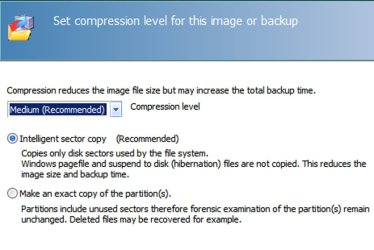
I'm not sure what imaging app you will use, but Macrium Reflect Free Edition provides 2 choices when making an image:

1: Intelligent sector copy. Only those sectors in use by the file system become part of the image.

2: Exact copy. ALL sectors in the partition are included in the image.

Macrium recommends using Intelligent sector copy for the reason you mention--greater security.

But I don't think I would use an image restoration if I were getting rid of a computer. Images don't always restore. I'd want something more foolproof.

You could:

1: make new recovery disks from your recovery partition. Then wipe the drive and restore from the recovery disks.

Or

2: wipe the drive and reinstall Windows from a Windows disk. Then download and install any necessary HP-specific drivers.

Or

3: Just do a system recovery (your step 1) and be done with it.

Here is a pic of the Macrium screen regarding the 2 imaging choices:


3:
 

Attachments

  • Untitled-1.jpg
    Untitled-1.jpg
    254 KB · Views: 9

My Computer

Computer type
PC/Desktop
Computer Manufacturer/Model Number
Ignatz Special; 4 speed manual gearbox; factory air conditioning; one of one
OS
Windows 7 Home Premium SP1, 64-bit
CPU
Intel Skylake i5-6600K, not overclocked
Motherboard
AsRock Z170M Extreme 4, micro ATX
Memory
8 GB HyperX DDR4-2666 (2 x 4 GB)
Graphics Card(s)
none; graphics are integrated on CPU
Sound Card
onboard: Realtek ALC1150; external: USB Behringer UF0-202
Monitor(s) Displays
Dell S2340M 23 inch IPS
Screen Resolution
1600 x 900
Hard Drives
System: Crucial MX100 series SSD, 128 GB;
Data: Samsung Spinpoint 103SJ, 1 TB;
Backup: WD Caviar Green WD30EZRX-00D8PB0, 3 TB
PSU
Rosewill SilentNight 500 watt fanless, semi-modular
Case
Antec Solo II
Cooling
Noctua NH-U12S; Noctua F12 intake, Noctua S12A exhaust
Keyboard
Microsoft 200 6JH-00001 USB
Mouse
Dell or Microsoft optical wired; USB
Antivirus
Microsoft Security Essentials and Malwarebytes Premium
Browser
Pale Moon
Other Info
All fans PWM; speeds at idle: CPU circa 500 rpm; intake circa 600 rpm; exhaust circa 600 rpm; CPU temps 27 idle and 47 C load in a warm room (27 C/81 F) when running Intel Extreme Tuning Utility stress test.
Thanks a lot for your help. I think I'll just reinstall and then download the drivers.

Good to know about the Macrium Reflect imaging app though. I'll probably start using that for my personal stuff.

Thanks a lot guys.
 

My Computer

Computer Manufacturer/Model Number
HP dm4 1160-us
OS
Windows 7 Home Premium 64 bit
CPU
Intel i5 M450
Memory
4GB
Graphics Card(s)
Intel HD 3000

My Computer

Computer type
Laptop
Computer Manufacturer/Model Number
HP ENVY 17-1150eg
OS
Windows 10 Pro x64 EN-GB
CPU
1.6 GHz Intel Core i7-720QM Processor
Memory
6 GB
Graphics Card(s)
ATI Mobility Radeon HD 5850 Graphics
Sound Card
Beats sound system with integrated subwoofer
Monitor(s) Displays
17" laptop display, 22" LED and 32" Full HD TV through HDMI
Screen Resolution
1600*900 (1), 1920*1080 (2&3)
Hard Drives
Internal: 2 x 500 GB SATA Hard Disk Drive 7200 rpm
External: 2TB for backups, 3TB USB3 network drive for media
Cooling
As Envy runs a bit warm, I have it on a Cooler Master pad
Keyboard
Logitech diNovo Media Desktop Laser (bluetooth)
Mouse
Logitech Performance Mouse MX
Internet Speed
50/10 Mbps VDSL
Antivirus
Windows Defender 4.3.9431.0
Browser
Maxthon 3.5.2., IE11
Back
Top