Solved Does an optical drive CONTAIN an HDD?

kv1204

New member
Local time
8:02 PM
Messages
2
I can't find the answer anywhere. I ask this because if I unplugged my TSSTcorp DVD-ROM ts-h353b drive, the computer wouldn't work at all, and there's no other drives attached in the computer. Just the motherboard and other hardware. When I open up the desktop tower, the label on the drive doesn't even mention it has a hard drive in it. So is the C:/hard drive part of an optical drive? I need to know because I'm considering a purchase of a backup drive, but the ones under optical don't state they have a HDD in them. I'm confused.

For example,

https://www.amazon.com/dp/B0033Z2BAQ/ref=psdc_172480_t1_B00PJ1RXUA

And this is specifically listed as a hard drive, yet no mention of CD/DVD capability.

WD (WD5000AADS) 500GB 32MB Cache 3.5 SATA 3Gb/s Hard Drive - PC, Mac, CCTV DVR 5051964467830 | eBay
 

My Computer My Computer

Computer type
PC/Desktop
Computer Manufacturer/Model Number
Dell
OS
Windows 7 Home Premium 32bit
Hi kv1204,

No, an optical disk drive (ODD) uses a laser light to read data from or write data to an optical disc. These include CDs, DVDs, and Blu-ray discs. This allows you to play music or watch movies using pre-recorded discs.

C: is hard drive, not optical drive. Your boot order may be to boot from DVD/CD ROM 1st. To check it, power on desktop, immediately start pressing F12, (I believe that is the Boot Menu for Dell Desktop) and select your hard drive. If your computer boots you will need to enter BIOS and change boot order to your hard drive first. I believe that is the F2 key. Power up computer and immediately repetitively press F2, this should help:
How To Change Boot Order In Computer BIOS

If you're not sure the type of hard drive you have in your computer click Start ORB, type msinfo32.exe click on it. Then you need to expand to Components –> Storage –> Disks from the left hand menu tree. The right hand pane will give you detailed information about each hard drive attached to the system.
 

My Computer My Computer

Computer type
PC/Desktop
Computer Manufacturer/Model Number
HP Desktop & Compaq Laptop
OS
Win 10 x64, Linux Lite, Win 7 x64, BlackArch, & Kali
Hard Drives
Samsung 850 Pro 256Gb,
Hitachi HDD 1Tb,
Crucial MX SSD 250Gb
Segate 3Tb USB 3.0 Ext. Backup HDD
Internet Speed
150Mbps dn, 20Mbps up
Antivirus
Avast Free, Malwarebytes Anti-Exploit & Anti-Ransomware
Browser
Firefox, Chrome, Opera, & VPN
Hi kv1204,

No, an optical disk drive (ODD) uses a laser light to read data from or write data to an optical disc. These include CDs, DVDs, and Blu-ray discs. This allows you to play music or watch movies using pre-recorded discs.

C: is hard drive, not optical drive. Your boot order may be to boot from DVD/CD ROM 1st. To check it, power on desktop, immediately start pressing F12, (I believe that is the Boot Menu for Dell Desktop) and select your hard drive. If your computer boots you will need to enter BIOS and change boot order to your hard drive first. I believe that is the F2 key. Power up computer and immediately repetitively press F2, this should help:
How To Change Boot Order In Computer BIOS

If you're not sure the type of hard drive you have in your computer click Start ORB, type msinfo32.exe click on it. Then you need to expand to Components –> Storage –> Disks from the left hand menu tree. The right hand pane will give you detailed information about each hard drive attached to the system.

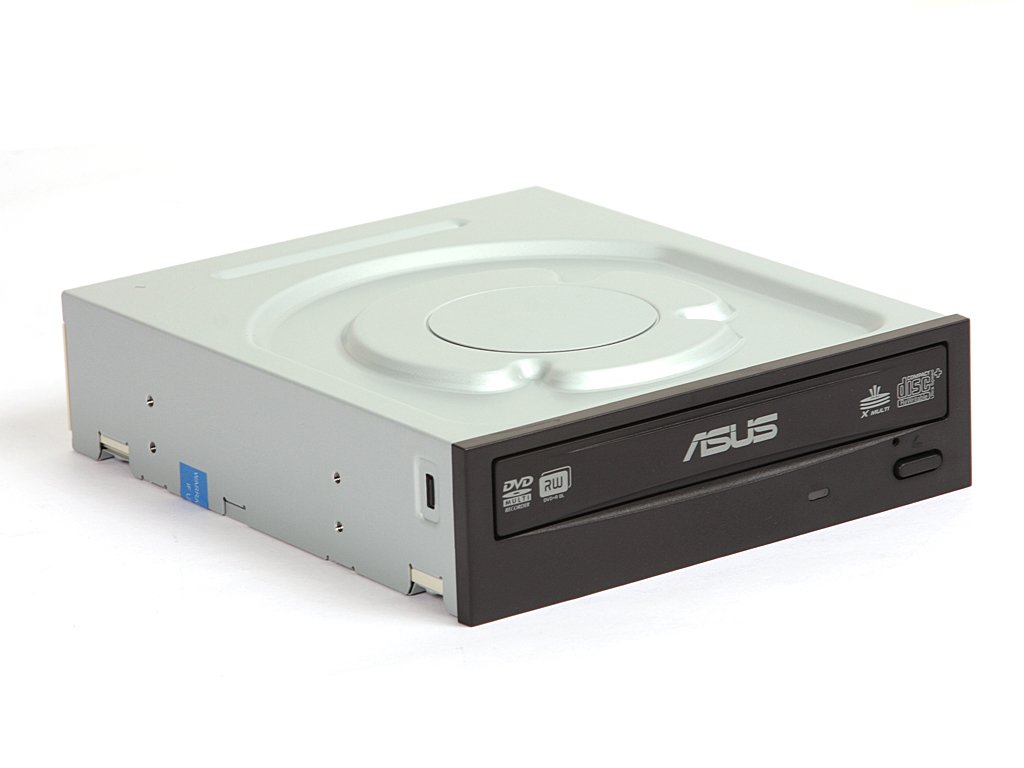
It does list the disk drive separately from the DVDROM drive, but my main concern is its location in the unit/tower, if I have to replace it. The CD/DVD drive I listed earlier is the only "drive" physically hooked up, so where is the HDD? That's why I'm confused. The only one I have looks like the one in the first link:

51vxL42MspL._SL1024_.jpg
 

My Computer My Computer

Computer type
PC/Desktop
Computer Manufacturer/Model Number
Dell
OS
Windows 7 Home Premium 32bit
You will need to check the inside of the case -- Take care to check access points, (screws), for labels about Warranty being "Void if opened", only if the system is still under warranty, obviously.

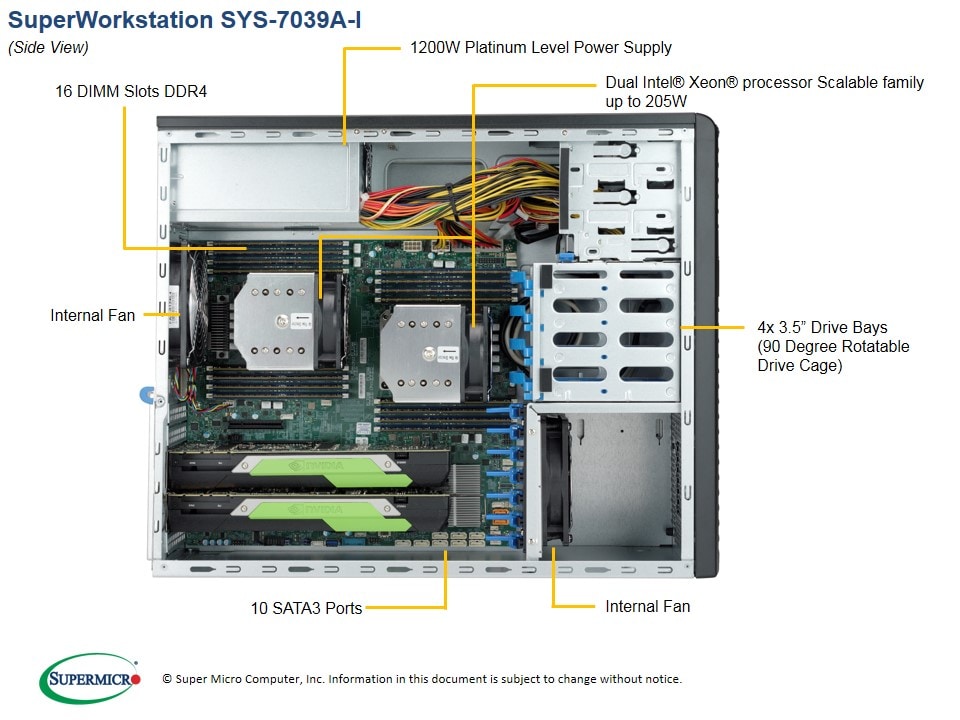
Most regular cases will have one or two Media drive bays at the top of the case that are open to the front of the case, (may have a clip in cover if not used), and below these there will be a number of 3½" Drive bays which are only accessible from the inside of the case

This image may help ...

7039A-i_side.jpg


Also these days you may have an SSD, (solid state Drive), fitted rather than the traditional drive - These are quite small and can be found anywhere in the case often fixed using Velcro strips, there are also types, that consist of a set of chips that fit into a special socket on the motherboard, (Like memory modules but with connection at one end rather than along one edge )
 

My Computers My Computers

System One System Two

  • Computer type
    PC/Desktop
    Computer Manufacturer/Model Number
    ChillBlast - Custom to my design
    OS
    Windows 11 Pro x64 [Latest Release and Release Preview]
    CPU
    Ryzen 9 5950X, 3.8 - 5.2 MHz
    Motherboard
    Asus Prime X570-Pro
    Memory
    64GB [2 x 32GB] DDR4 3200MHz
    Graphics Card(s)
    4GB NVIDIA GEFORCE GTX 1650 Ti
    Sound Card
    On-board SPDIF to 5.1 System + HDMI [5.1 system]
    Monitor(s) Displays
    32" UHD 32 Bit HDR Monitor + 43" UHD 4K 32Bit HDR TV
    Screen Resolution
    2 x 3840 x 2160 @60Hz
    Hard Drives
    1TB M2 SSD OS, 500GB Fast Access SSD, 2 x 8TB Data + Various Externals from 1TB to 4TB, 10TB NAS
    PSU
    NZXT C750 80 PLUS Gold 750W Modular PSU
    Case
    Workstation Case [Matt Black]
    Cooling
    NZXT Kraken X63 280mm CPU Cooler +2x Quiet Case fans
    Keyboard
    Logitech Wireless MX Keys & K400 + others
    Mouse
    Logitech Wireless MX Master 3S
    Internet Speed
    920 MB Down 50 MB Up
    Antivirus
    BitDefender Total Security Pro
    Browser
    Chrome (always run latest Non-Beta)
    Other Info
    Also run ...
    Laptop - Quad 8GB - Windows 10 Pro x64
    Nexus 7 Android tablet x2
    Samsung 10.2" tablet
    Blackview TAB 8 4G Android Tablet c/w Keyboard
    Wacom Intuos Pro Medium Pen Pad
    Wacom Intuos Pro Small Pen Pad
    Wacom Expresskeys Remote
    Loopdeck+ Graphics Controller
    Shuttle Pro v2 Control
  • Computer type
    Laptop
    System Manufacturer/Model Number
    Dell XPS 17 10750H
    OS
    Windows 11 Pro x64 Latest RP
    CPU
    Intel I7 10750H 5.0GHz
    Motherboard
    Dell XPS
    Memory
    32GB [2x16GB] DDR4 2933 MHz
    Graphics Card(s)
    nVidia GTX1650Ti 4 GB GDDR6
    Sound Card
    Stock [Realtek] 4 Speaker
    Monitor(s) Displays
    17" IPS UHD+ Infinity Edge Touchscreen
    Screen Resolution
    3840 x 2400
    Hard Drives
    2TB M2 NVMe, 4TB External + various 500GB & 1TB External NVMe (also have access to spinner HDD from
    PSU
    Stock
    Case
    Stock XPS Aluminium & Carbon Fibre
    Cooling
    Stock - Active Fan Control
    Keyboard
    Backlit + Various Logitech
    Mouse
    Stock Track Pad + Logitech MX Trackball
    Internet Speed
    72 MB Down 18MB Up
    Browser
    Chrome
    Other Info
    Also run ...
    Laptop - Quad 8GB - Windows 10 Pro x64
    Nexus 7 Android tablet x2
    10.2" tablet
    Sony Z3 Android Smartphone
    Wacom Intuos Pro Medium Pen Pad
    Wacom Intuos Pro Small Pen Pad
    Wacom Expresskeys Remote
    Loopdeck+ Graphics Controller
    Shuttle Pro v2 Control Pad
    10TB NAS

My Computer My Computer

Computer type
PC/Desktop
Computer Manufacturer/Model Number
HP Desktop & Compaq Laptop
OS
Win 10 x64, Linux Lite, Win 7 x64, BlackArch, & Kali
Hard Drives
Samsung 850 Pro 256Gb,
Hitachi HDD 1Tb,
Crucial MX SSD 250Gb
Segate 3Tb USB 3.0 Ext. Backup HDD
Internet Speed
150Mbps dn, 20Mbps up
Antivirus
Avast Free, Malwarebytes Anti-Exploit & Anti-Ransomware
Browser
Firefox, Chrome, Opera, & VPN
Back
Top