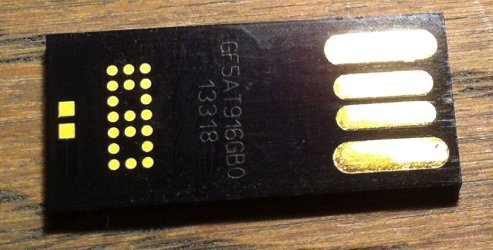
Does anybody recognize this USB chip?

Rkousbroek

New member
Local time
6:09 PM
Messages
4
Hello. I have a fancy USB memory key, but it is virtually identify itself as:
1 CDFS (readonly) 12,6 GB
2 Removable Disk 1,78GB (FILESYSTEM: FAT32)

How can I take full use of it?
SMI USB DISK USB DEVICE

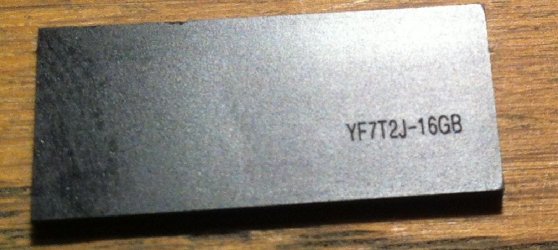
See pictures
Any info is welcome
PnP Device ID: VID = 046D PID = C52B
Serial Number: 6&&11A11C73&&0&&0001
Revision: 1100
Device Type: Standard USB device - USB2.0 Full-Speed (USB1.1)
Chip Vendor: (No match record)
Chip Part-Number: (No match record)

Many thanks and regards
Robert
 

Attachments
  • foto1.JPG
    foto1.JPG
    104 KB · Views: 0
  • foto2.jpg
    foto2.jpg
    184.6 KB · Views: 0
Last edited:

My Computer

Computer type
PC/Desktop
OS
Windows7 ultimate 64 bit
Searching SMI show it is Sun Microsystems, Inc. Does it hold anything important? If not, you can try to format it with NTFS in Disk Management or Partition Wizard free.
 

My Computer

Computer type
PC/Desktop
Computer Manufacturer/Model Number
Custom Build
OS
Windows 7 Ultimate x64 SP1
CPU
AMD Phenom 2 1090T
Motherboard
Gigabyte GA-890FXA-UD5
Memory
2x8GB Kingston HyperX Fury Black 1600Mhz Unganged
Graphics Card(s)
MSI GTX 970 Gaming 4G
Sound Card
Realtek On-Board HD 7.1 Audio / Logitech G35
Monitor(s) Displays
3xAcer GD245HQ
Screen Resolution
1920x1080
Hard Drives
Samsung 850 Pro 512GB SSD - OS /
WD Caviar Black SATA 3 - 1 TBx2 - Dynamic RAID 0 /
WD Caviar Green SATA 2 - 640GBx2 - Dynamic RAID 0 /
WD Caviar Green SATA 2 - 640GB - Internal Backup /
Seagate Barracude SATA 3 - 3TB - External Backup/ Sync
PSU
HighPower 1000W
Case
Cooler Master HAF 932
Cooling
Noctua NH-D14
Keyboard
Logitech G19
Mouse
Logitech G500
Internet Speed
100/4 Mbit Cable (100GB quota)
Antivirus
ZoneAlarm Extreme Security / MBAM Pro / MBAE Free / SAS Free
Browser
IE 11 - Firefox - Chrome
Other Info
Logitech F710/ G27/ G940/ Z5500 // TrackIR 5 // Nvidia 3D Surround Vision
GokAy, only with the Removable Disk 1,78GB I can do what ever i like, format, etc, without any problems.
But I want convert this U3 behaviour and tricky device to a normal USB device so I can use the full 16 GB capacity again. The CDFS readonly part that contains the old, obsolete software is not listed in diskpart. Probably I have to use a kind of small utilility who can do this wiping. But there are so many different utilities. Maybe someone can help me pointing in the right direction? Many thanks and regards, Robert​
 

My Computer

Computer type
PC/Desktop
OS
Windows7 ultimate 64 bit

My Computer

Computer type
PC/Desktop
Computer Manufacturer/Model Number
Custom Build
OS
Windows 7 Ultimate x64 SP1
CPU
AMD Phenom 2 1090T
Motherboard
Gigabyte GA-890FXA-UD5
Memory
2x8GB Kingston HyperX Fury Black 1600Mhz Unganged
Graphics Card(s)
MSI GTX 970 Gaming 4G
Sound Card
Realtek On-Board HD 7.1 Audio / Logitech G35
Monitor(s) Displays
3xAcer GD245HQ
Screen Resolution
1920x1080
Hard Drives
Samsung 850 Pro 512GB SSD - OS /
WD Caviar Black SATA 3 - 1 TBx2 - Dynamic RAID 0 /
WD Caviar Green SATA 2 - 640GBx2 - Dynamic RAID 0 /
WD Caviar Green SATA 2 - 640GB - Internal Backup /
Seagate Barracude SATA 3 - 3TB - External Backup/ Sync
PSU
HighPower 1000W
Case
Cooler Master HAF 932
Cooling
Noctua NH-D14
Keyboard
Logitech G19
Mouse
Logitech G500
Internet Speed
100/4 Mbit Cable (100GB quota)
Antivirus
ZoneAlarm Extreme Security / MBAM Pro / MBAE Free / SAS Free
Browser
IE 11 - Firefox - Chrome
Other Info
Logitech F710/ G27/ G940/ Z5500 // TrackIR 5 // Nvidia 3D Surround Vision
GokaY. Thanks for your suggestion. I tried all. The first tools only recognize the removable disk. The other volume is still recognized as CD drive even under Linux. With the last tool ImageUSB it says imaging failed when selecting the CDFS volume.
 

My Computer

Computer type
PC/Desktop
OS
Windows7 ultimate 64 bit
Yea, CDFS means it's a U3 drive.

To my knowledge you can't reformat a U3 drive unless a utility to do so is provided by the manufacturer. For example, SanDisk provides tools to you switch back/forth between U3 and regular drives for only some of their devices. Many (most? IDK) manufacturers provide no such option at all

The device firmware won't allow that "CD" to be overwritten
 

My Computer

Computer type
PC/Desktop
Computer Manufacturer/Model Number
Dell Optiplex 360 and Optiplex 755
OS
Desk 1: Win 7 Pro x32; Desk 2: Windows 10 x64
Hard Drives
500GB Crucial SSD in both Desktops
Other Info
Buffalo 6TB NAS, Raid 1
Back
Top