Does it matter about the 100 MB partition

sam49

New member
Member
VIP
Local time
3:58 AM
Messages
140
Hi i have done a search and not found the answer to my question so i hope someone can help me.

I have installed windows 7 to my main desktop computer and i got the 100 Mb partition, now i have installed win 7 to my laptop the drive was already partitioned on when i look at the drives i have not got the 100 Mb partition, after the search i did on this forum i see the reason i did not get the small partition is because the drive was already partitioned, and this is normal.

But my question is will the instalation work or like this or do i need to remove all the partitions and start again.

Hope someone can advise me. :sarc:
 

My Computer My Computer

At a glance

Windows 7 Professional 64 BitIntel Core I7 920 @ 2.6 GHz12 Meg Triple Channel DDR3Nvidia Gforce GTX 260
Computer Manufacturer/Model Number
Custom Made
OS
Windows 7 Professional 64 Bit
CPU
Intel Core I7 920 @ 2.6 GHz
Motherboard
Asus P6T SE
Memory
12 Meg Triple Channel DDR3
Graphics Card(s)
Nvidia Gforce GTX 260
Sound Card
On Board
Monitor(s) Displays
DGM
Hard Drives
500 gig Sata
PSU
Not sure
Case
Thermalite
Cooling
Standard cooling
Keyboard
Usb
Mouse
Usb
Internet Speed
7meg
Hi sam49, Im assuming the laptop is booting? If so then you have nothing to worry about :)

For peace of mind though, please upload a screenshot of Disk Management (search for it in the Start Menu) and we will be able to tell you exactly what is going on.
 

My Computer My Computer

At a glance

Windows 10 Pro x64Intel Core i5 7400 @ 3.00GHz8GB 2133Mhz DDR4 (OEM supplied)Gygabyte Windforce GTX 1050Ti (Factory Overcl...
Computer type
PC/Desktop
Computer Manufacturer/Model Number
Medion Erazer (note to self: insert model number) - with custom additions
OS
Windows 10 Pro x64
CPU
Intel Core i5 7400 @ 3.00GHz
Motherboard
OEM supllied with PC
Memory
8GB 2133Mhz DDR4 (OEM supplied)
Graphics Card(s)
Gygabyte Windforce GTX 1050Ti (Factory Overclocked)
Sound Card
Realtek
Monitor(s) Displays
Acer Al1980 + HKC
Screen Resolution
1360*768(HKC) / 1280*1024(Acer)
Hard Drives
1TB Toshiba
1TB WD Caviar Green
120GB Samsung Evo 840
PSU
OEM supplied (no power rating on case)
Case
OEM Supplied
Cooling
Stock
Keyboard
Logitech Wireless
Mouse
Logitect Wireless
Internet Speed
40Mb/s Down 10Mb/s Up
Antivirus
Defender
Browser
Firefox
Hi severedsolo

I have sent a screenshot tats if it works

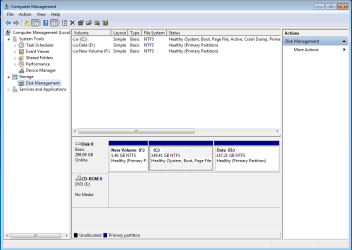
Just to give you a little more information the screenshot will show three patritions. this is a toshiba laptop that was running windows Vista upto yesterday.

So win 7 is installed on the C: drive. the D: is the old data drive that was setup by toshiba with the restore data on it. and the F: the 1.46 Gb is the old hidden partition used by toshiba as the recovery data i just deleted the partition and reformated it.

I would like to remove this 1.46 Gb partition if i can.

Do you think it might be better to remove all the partition and start again

PS and yes the laptop is booting normal.
 

Attachments

  • Capture (2).PNG
    Capture (2).PNG
    20.9 KB · Views: 137
Last edited:

My Computer My Computer

At a glance

Windows 7 Professional 64 BitIntel Core I7 920 @ 2.6 GHz12 Meg Triple Channel DDR3Nvidia Gforce GTX 260
Computer Manufacturer/Model Number
Custom Made
OS
Windows 7 Professional 64 Bit
CPU
Intel Core I7 920 @ 2.6 GHz
Motherboard
Asus P6T SE
Memory
12 Meg Triple Channel DDR3
Graphics Card(s)
Nvidia Gforce GTX 260
Sound Card
On Board
Monitor(s) Displays
DGM
Hard Drives
500 gig Sata
PSU
Not sure
Case
Thermalite
Cooling
Standard cooling
Keyboard
Usb
Mouse
Usb
Internet Speed
7meg
Your Win7 is correct and all contained within C.

I'm not sure why you didn't wipe the HD or use the installer to delete all partitions before install since you apparently don't want to preserve the Vista Recovery Partition. The installer would then have issued the 100mb System Reserved partition which places the Repair Console on F8 Advanced Boot Tools.

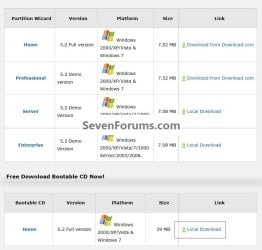
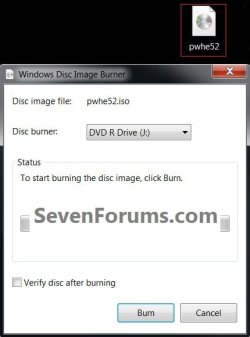
To do it now requires using a bootable Partition Manager. Download and burn Free Partition Wizard bootable CD using Windows Image Burner: Partition Wizard

Boot PW CD, rightclick delete F, click OK.

Then rightclick to Resize C, drag left grey border to the left to take up deleted F space, OK, Apply all steps.

If Win7 fails to boot, boot DVD Repair console to Startup Repair - Run 3 Separate Times

You can delete everything in D to use it as a Data partition if you haven't already. I'm assuming you made your Recovery Disks before wiping the Vista recovery partition so you have a path back if you decide to sell or gift the machine but keep your Win7 copy.
If not you'll have to order them when needed, or find a Vista retail installer for your version to clean reinstall.
 
Hello sam49, welcome to Seven Forums!


To resize Windows 7 into the space to the left of the C: partition, have a look at this tutorial at the link below, it's a complete step-by-step guide and be sure to post back with any further questions you may have and to keep us informed.

Partition : Recover Space Used by an Older OS


Here's a couple others showing different non-destructive methods to create the new Windows 7 System Reserved partition after Windows 7 has been installed.

System Reserved : Create Using Disk Management

System Reserved : Create for Dual Boot
 

My Computer My Computer

At a glance

W 7 64-bit UltimateIntel Q9550 Yorkfield8GB Dominator 8500C5DATI : XFX 5870
Computer Manufacturer/Model Number
* BFK Customs *
OS
W 7 64-bit Ultimate
CPU
Intel Q9550 Yorkfield
Motherboard
ASUS P5Q Pro
Memory
8GB Dominator 8500C5D
Graphics Card(s)
ATI : XFX 5870
Sound Card
Realtek HD Audio 7-1
Monitor(s) Displays
1x 47" LCD HDMI & 3x 26" LCD HDMI
Screen Resolution
1920x1080P & 1920x1200
Hard Drives
1x 80GB Intel X25-M G2 SSD : 1x 500GB & 1x 640GB WD Caviar Black(s)
PSU
Corsair 620HX
Case
Cooler Master RC-690
Cooling
Tuniq Tower 120, 2x 140mm and 3x 120mm case fans
Keyboard
Microsoft 500
Mouse
Razer Diamondback 3G
Internet Speed
14 Mb/s
Other Info
1x Koutech 3Gb/s SATA HDD Hot Swap Rack
Hi guys thanks for the info, but i decided to delete all the partitions on my hard drive and reinstall windows 7 and now it has the 100mb system reserved partition.
I just need to split the hard drive swo i can have my data partition again.

Thanks for all the help
 

My Computer My Computer

At a glance

Windows 7 Professional 64 BitIntel Core I7 920 @ 2.6 GHz12 Meg Triple Channel DDR3Nvidia Gforce GTX 260
Computer Manufacturer/Model Number
Custom Made
OS
Windows 7 Professional 64 Bit
CPU
Intel Core I7 920 @ 2.6 GHz
Motherboard
Asus P6T SE
Memory
12 Meg Triple Channel DDR3
Graphics Card(s)
Nvidia Gforce GTX 260
Sound Card
On Board
Monitor(s) Displays
DGM
Hard Drives
500 gig Sata
PSU
Not sure
Case
Thermalite
Cooling
Standard cooling
Keyboard
Usb
Mouse
Usb
Internet Speed
7meg

My Computer My Computer

At a glance

W 7 64-bit UltimateIntel Q9550 Yorkfield8GB Dominator 8500C5DATI : XFX 5870
Computer Manufacturer/Model Number
* BFK Customs *
OS
W 7 64-bit Ultimate
CPU
Intel Q9550 Yorkfield
Motherboard
ASUS P5Q Pro
Memory
8GB Dominator 8500C5D
Graphics Card(s)
ATI : XFX 5870
Sound Card
Realtek HD Audio 7-1
Monitor(s) Displays
1x 47" LCD HDMI & 3x 26" LCD HDMI
Screen Resolution
1920x1080P & 1920x1200
Hard Drives
1x 80GB Intel X25-M G2 SSD : 1x 500GB & 1x 640GB WD Caviar Black(s)
PSU
Corsair 620HX
Case
Cooler Master RC-690
Cooling
Tuniq Tower 120, 2x 140mm and 3x 120mm case fans
Keyboard
Microsoft 500
Mouse
Razer Diamondback 3G
Internet Speed
14 Mb/s
Other Info
1x Koutech 3Gb/s SATA HDD Hot Swap Rack
Hi guys thanks for all the advice you have given mei have got this sorted now thanks to you guys.

Just one last question you talk about downloading the bootable version of partition wizard i have done this but it downloads as a zip file, when i open the zip files there is no ISO to burn so just how do i make a bootable cd plesase
 

My Computer My Computer

At a glance

Windows 7 Professional 64 BitIntel Core I7 920 @ 2.6 GHz12 Meg Triple Channel DDR3Nvidia Gforce GTX 260
Computer Manufacturer/Model Number
Custom Made
OS
Windows 7 Professional 64 Bit
CPU
Intel Core I7 920 @ 2.6 GHz
Motherboard
Asus P6T SE
Memory
12 Meg Triple Channel DDR3
Graphics Card(s)
Nvidia Gforce GTX 260
Sound Card
On Board
Monitor(s) Displays
DGM
Hard Drives
500 gig Sata
PSU
Not sure
Case
Thermalite
Cooling
Standard cooling
Keyboard
Usb
Mouse
Usb
Internet Speed
7meg

My Computer My Computer

At a glance

W 7 64-bit UltimateIntel Q9550 Yorkfield8GB Dominator 8500C5DATI : XFX 5870
Computer Manufacturer/Model Number
* BFK Customs *
OS
W 7 64-bit Ultimate
CPU
Intel Q9550 Yorkfield
Motherboard
ASUS P5Q Pro
Memory
8GB Dominator 8500C5D
Graphics Card(s)
ATI : XFX 5870
Sound Card
Realtek HD Audio 7-1
Monitor(s) Displays
1x 47" LCD HDMI & 3x 26" LCD HDMI
Screen Resolution
1920x1080P & 1920x1200
Hard Drives
1x 80GB Intel X25-M G2 SSD : 1x 500GB & 1x 640GB WD Caviar Black(s)
PSU
Corsair 620HX
Case
Cooler Master RC-690
Cooling
Tuniq Tower 120, 2x 140mm and 3x 120mm case fans
Keyboard
Microsoft 500
Mouse
Razer Diamondback 3G
Internet Speed
14 Mb/s
Other Info
1x Koutech 3Gb/s SATA HDD Hot Swap Rack
Yes the bottom one
 

My Computer My Computer

At a glance

Windows 7 Professional 64 BitIntel Core I7 920 @ 2.6 GHz12 Meg Triple Channel DDR3Nvidia Gforce GTX 260
Computer Manufacturer/Model Number
Custom Made
OS
Windows 7 Professional 64 Bit
CPU
Intel Core I7 920 @ 2.6 GHz
Motherboard
Asus P6T SE
Memory
12 Meg Triple Channel DDR3
Graphics Card(s)
Nvidia Gforce GTX 260
Sound Card
On Board
Monitor(s) Displays
DGM
Hard Drives
500 gig Sata
PSU
Not sure
Case
Thermalite
Cooling
Standard cooling
Keyboard
Usb
Mouse
Usb
Internet Speed
7meg
When you first posted about the dl, I downloaded from that same link just to make sure and I did get an ISO file that when clicked I got this.


click to enlarge
bwb.jpg
 

My Computer My Computer

At a glance

W 7 64-bit UltimateIntel Q9550 Yorkfield8GB Dominator 8500C5DATI : XFX 5870
Computer Manufacturer/Model Number
* BFK Customs *
OS
W 7 64-bit Ultimate
CPU
Intel Q9550 Yorkfield
Motherboard
ASUS P5Q Pro
Memory
8GB Dominator 8500C5D
Graphics Card(s)
ATI : XFX 5870
Sound Card
Realtek HD Audio 7-1
Monitor(s) Displays
1x 47" LCD HDMI & 3x 26" LCD HDMI
Screen Resolution
1920x1080P & 1920x1200
Hard Drives
1x 80GB Intel X25-M G2 SSD : 1x 500GB & 1x 640GB WD Caviar Black(s)
PSU
Corsair 620HX
Case
Cooler Master RC-690
Cooling
Tuniq Tower 120, 2x 140mm and 3x 120mm case fans
Keyboard
Microsoft 500
Mouse
Razer Diamondback 3G
Internet Speed
14 Mb/s
Other Info
1x Koutech 3Gb/s SATA HDD Hot Swap Rack
Hi again i am not sure what happening here as i have just downloaded the same file again and i get a zip file with some iso file in it but it will not make a bootable cd, si i dont know what i am doing wrong
 

My Computer My Computer

At a glance

Windows 7 Professional 64 BitIntel Core I7 920 @ 2.6 GHz12 Meg Triple Channel DDR3Nvidia Gforce GTX 260
Computer Manufacturer/Model Number
Custom Made
OS
Windows 7 Professional 64 Bit
CPU
Intel Core I7 920 @ 2.6 GHz
Motherboard
Asus P6T SE
Memory
12 Meg Triple Channel DDR3
Graphics Card(s)
Nvidia Gforce GTX 260
Sound Card
On Board
Monitor(s) Displays
DGM
Hard Drives
500 gig Sata
PSU
Not sure
Case
Thermalite
Cooling
Standard cooling
Keyboard
Usb
Mouse
Usb
Internet Speed
7meg
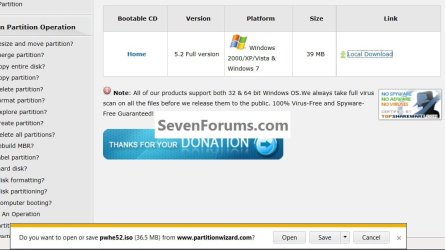
I'm not sure what's happening, I just used the same link in my post #9 and you can see my dl manager and I get the exact same ISO file dl'd to my desktop that I showed in my last post here, not a zip file at all, just the ISO file.


click to enlarge
2.jpg
 

My Computer My Computer

At a glance

W 7 64-bit UltimateIntel Q9550 Yorkfield8GB Dominator 8500C5DATI : XFX 5870
Computer Manufacturer/Model Number
* BFK Customs *
OS
W 7 64-bit Ultimate
CPU
Intel Q9550 Yorkfield
Motherboard
ASUS P5Q Pro
Memory
8GB Dominator 8500C5D
Graphics Card(s)
ATI : XFX 5870
Sound Card
Realtek HD Audio 7-1
Monitor(s) Displays
1x 47" LCD HDMI & 3x 26" LCD HDMI
Screen Resolution
1920x1080P & 1920x1200
Hard Drives
1x 80GB Intel X25-M G2 SSD : 1x 500GB & 1x 640GB WD Caviar Black(s)
PSU
Corsair 620HX
Case
Cooler Master RC-690
Cooling
Tuniq Tower 120, 2x 140mm and 3x 120mm case fans
Keyboard
Microsoft 500
Mouse
Razer Diamondback 3G
Internet Speed
14 Mb/s
Other Info
1x Koutech 3Gb/s SATA HDD Hot Swap Rack
Hi there.

Many solutions have been around the net for getting rid of this wretched 100MB system partition --but THIS METHOD is FOOLPROOF and works every time.

The trick is to install or recover an image into a disk which consists of only ONE partition which stops Windows creating the other partition. You need to define THE WHOLE DISK as one partition - don't leave undefined areas. We will re-partition the disk later of course.

The 100 MB partition is the ACTIVE bootable partition and I agree it's a bit of a nuisance if like me you prefer to image a single partition and then use that if you need to recover your OS.

The rest of the "C" partition is a PRIMARY partition and won't boot until you can get it into an ACTIVE partition with the boot program.

So what I would suggest is the following. Ensure you have or can create a W7 recovery disk before starting.

(Tools needed -- Stand alone bootable backup software -- I use Acronis but others should be fine too, a bootable partition manager such as partition manager or GPARTED and enough space to backup your application data and OS on ANOTHER drive --external USB is fine too).

1) Backup ALL your application (non OS) data on any other partition(s) you have on that drive.

2) Backup the OS (normally drive C).

3) create a bootable GPARTED or partition manger ISO.

4) Boot the GPARTED and Wipe the entire disk (we will re-create partitions later) creating A SINGLE partition using the ENTIRE DISK. This will ensure Windows doesn't create the 100 MB system partition.

5) Restore your OS with your backup software AND SPECIFY PARTITION IS ACTIVE.

6) Boot your OS -- it WILL BSOD but that's fine since we use the RECOVERY disk to fix the boot problem.

7) Repair system -- you will now find a W7 installation on a SINGLE large partition.

8) Reboot your partition manager software --GPARTED or partition mananger.

9) repartition the HDD to your taste -- a typical 40 GB partition for W7 should normally be MORE than enough.

10) Restore your application data.

11) Job done -- go and have some Beers etc.

Cheers
jimbo
 

My Computer My Computer

At a glance

Linux CENTOS 7 / various Windows OS'es and se...Intel i7 Intel i58GB, 16GBOn Motherboard
Computer type
PC/Desktop
Computer Manufacturer/Model Number
Custom built, several laptops HP/ASUS
OS
Linux CENTOS 7 / various Windows OS'es and servers
CPU
Intel i7 Intel i5
Memory
8GB, 16GB
Graphics Card(s)
On Motherboard
Sound Card
Realtek HD audio
Monitor(s) Displays
Apple Cinema display, Samsung LCD
Screen Resolution
1920 X 1080
Hard Drives
4 X 1TB SATA
Mouse
Toshiba wireless laser
Internet Speed
> 20MB up
For what it's worth, the link gives me an ISO as well, not a zip.

Might be worth clearing your download history, and then trying again.
 

My Computer My Computer

At a glance

Windows 10 Pro x64Intel Core i5 7400 @ 3.00GHz8GB 2133Mhz DDR4 (OEM supplied)Gygabyte Windforce GTX 1050Ti (Factory Overcl...
Computer type
PC/Desktop
Computer Manufacturer/Model Number
Medion Erazer (note to self: insert model number) - with custom additions
OS
Windows 10 Pro x64
CPU
Intel Core i5 7400 @ 3.00GHz
Motherboard
OEM supllied with PC
Memory
8GB 2133Mhz DDR4 (OEM supplied)
Graphics Card(s)
Gygabyte Windforce GTX 1050Ti (Factory Overclocked)
Sound Card
Realtek
Monitor(s) Displays
Acer Al1980 + HKC
Screen Resolution
1360*768(HKC) / 1280*1024(Acer)
Hard Drives
1TB Toshiba
1TB WD Caviar Green
120GB Samsung Evo 840
PSU
OEM supplied (no power rating on case)
Case
OEM Supplied
Cooling
Stock
Keyboard
Logitech Wireless
Mouse
Logitect Wireless
Internet Speed
40Mb/s Down 10Mb/s Up
Antivirus
Defender
Browser
Firefox
@jimbo, you're a day late and a dollar short mate, read the whole thread. :shock:
 

My Computer My Computer

At a glance

W 7 64-bit UltimateIntel Q9550 Yorkfield8GB Dominator 8500C5DATI : XFX 5870
Computer Manufacturer/Model Number
* BFK Customs *
OS
W 7 64-bit Ultimate
CPU
Intel Q9550 Yorkfield
Motherboard
ASUS P5Q Pro
Memory
8GB Dominator 8500C5D
Graphics Card(s)
ATI : XFX 5870
Sound Card
Realtek HD Audio 7-1
Monitor(s) Displays
1x 47" LCD HDMI & 3x 26" LCD HDMI
Screen Resolution
1920x1080P & 1920x1200
Hard Drives
1x 80GB Intel X25-M G2 SSD : 1x 500GB & 1x 640GB WD Caviar Black(s)
PSU
Corsair 620HX
Case
Cooler Master RC-690
Cooling
Tuniq Tower 120, 2x 140mm and 3x 120mm case fans
Keyboard
Microsoft 500
Mouse
Razer Diamondback 3G
Internet Speed
14 Mb/s
Other Info
1x Koutech 3Gb/s SATA HDD Hot Swap Rack
Well i am lost now i have just tried the same download on my laptop and i got a iso thats very strange why did i get a zip file on my desktop
 

My Computer My Computer

At a glance

Windows 7 Professional 64 BitIntel Core I7 920 @ 2.6 GHz12 Meg Triple Channel DDR3Nvidia Gforce GTX 260
Computer Manufacturer/Model Number
Custom Made
OS
Windows 7 Professional 64 Bit
CPU
Intel Core I7 920 @ 2.6 GHz
Motherboard
Asus P6T SE
Memory
12 Meg Triple Channel DDR3
Graphics Card(s)
Nvidia Gforce GTX 260
Sound Card
On Board
Monitor(s) Displays
DGM
Hard Drives
500 gig Sata
PSU
Not sure
Case
Thermalite
Cooling
Standard cooling
Keyboard
Usb
Mouse
Usb
Internet Speed
7meg

My Computer My Computer

At a glance

W 7 64-bit UltimateIntel Q9550 Yorkfield8GB Dominator 8500C5DATI : XFX 5870
Computer Manufacturer/Model Number
* BFK Customs *
OS
W 7 64-bit Ultimate
CPU
Intel Q9550 Yorkfield
Motherboard
ASUS P5Q Pro
Memory
8GB Dominator 8500C5D
Graphics Card(s)
ATI : XFX 5870
Sound Card
Realtek HD Audio 7-1
Monitor(s) Displays
1x 47" LCD HDMI & 3x 26" LCD HDMI
Screen Resolution
1920x1080P & 1920x1200
Hard Drives
1x 80GB Intel X25-M G2 SSD : 1x 500GB & 1x 640GB WD Caviar Black(s)
PSU
Corsair 620HX
Case
Cooler Master RC-690
Cooling
Tuniq Tower 120, 2x 140mm and 3x 120mm case fans
Keyboard
Microsoft 500
Mouse
Razer Diamondback 3G
Internet Speed
14 Mb/s
Other Info
1x Koutech 3Gb/s SATA HDD Hot Swap Rack
Ok thanks guys i will do that, but right now i have to get ready for work. :cry:
 

My Computer My Computer

At a glance

Windows 7 Professional 64 BitIntel Core I7 920 @ 2.6 GHz12 Meg Triple Channel DDR3Nvidia Gforce GTX 260
Computer Manufacturer/Model Number
Custom Made
OS
Windows 7 Professional 64 Bit
CPU
Intel Core I7 920 @ 2.6 GHz
Motherboard
Asus P6T SE
Memory
12 Meg Triple Channel DDR3
Graphics Card(s)
Nvidia Gforce GTX 260
Sound Card
On Board
Monitor(s) Displays
DGM
Hard Drives
500 gig Sata
PSU
Not sure
Case
Thermalite
Cooling
Standard cooling
Keyboard
Usb
Mouse
Usb
Internet Speed
7meg
LOL.

I understand Jimbo's point.

Many people don't want the 100mb partition and go to some lengths to get rid of it.

It seems the OP misunderstood Greg's post to mean he should have one and deleted all partitions then reinstalled.

Seversolo had already answered the original question and confirmed it was fine as it was.

:confused:
 

My Computers My Computers

  • At a glance

    7 X64i5 84002x8gb 3200mhz
    Computer type
    PC/Desktop
    OS
    7 X64
    CPU
    i5 8400
    Motherboard
    gigabyte b365m ds3h
    Memory
    2x8gb 3200mhz
    Hard Drives
    various
    PSU
    pure power 11 400w cm
    Case
    Coolermaster
    Cooling
    cryorig m9i
  • At a glance

    7x64g54008gb ddr4 2400
    Computer type
    PC/Desktop
    OS
    7x64
    CPU
    g5400
    Motherboard
    ga b365m ds3h
    Memory
    8gb ddr4 2400
    PSU
    xfx pro 450w
Back
Top