Does my MB support AHCI...

Deltawar

New member
Local time
11:41 AM
Messages
38
hi, i have a sony vaio vgc-rm2u pc so i dont exactely know what MB i have, but i have looked into it and the ich9r chipset should support ahci but i cant find it in the bios.

There is no editable settings in my bios, so does that mean i cant disable/enable it, or does it mean my mb simply doesnt support ahci?

reason for this is i have a vertex 2 ssd in teh post and am told i should enable ahci

im never going to buy a pre-built pc again.


any help accepted.
 

My Computer

Computer Manufacturer/Model Number
Sony Vaio VGC-RM2U
OS
Windows 7 Ultimate X64
CPU
Q6600 Quad Core
Hello Deltawar. You have to turn the option on in the registry you may also need to update the bios if it isnt giving you the option to enable AHCI ( Advanced Host Controller Interface ) The steps below are modifying your registry so be very careful and backup the Registry first!!! Cant stress this enough.


  1. Exit all Windows-based programs.
  2. Click Start, type regedit in the Start Search box, and then press ENTER.
  3. If you receive the User Account Control dialog box, click Continue.
  4. Locate and then click the following registry subkey: HKEY_LOCAL_MACHINESystemCurrentControlSetServicesMsahci
  5. In the right pane, right-click Start in the Name column, and then click Modify.
  6. In the Value data box, type 0, and then click OK.
  7. On the File menu, click Exit to close Registry Editor.
After this you’ll have to restart your computer, go to BIOS and enable AHCI. When you log in to Windows again, you’ll notice the installation of drivers for AHCI. Another restart will be required to finish the driver installation.
 

My Computer

Computer Manufacturer/Model Number
Custom
OS
Windows 7 Ultimate x64
CPU
AMD Phenom x4 965 BE
Motherboard
MSI 790FX GD70 Not Wiki
Memory
4gb Gskill
Graphics Card(s)
HD 4850
Sound Card
Onboard Realtek
Monitor(s) Displays
Asus VW246H
Screen Resolution
1920x1080 Native
Hard Drives
2 Seagate Drives Raid 0
PSU
650Watt Corsair
Case
CoolerMaster
Cooling
Air Cooling Stock Heatsink and Fan
Keyboard
Logitech Cordless Duo
Mouse
Logitech Cordless Duo
Internet Speed
24000 KBPS
thanks, so i can enable it in the OS, but its the part of enabling it in the bios i cant seem to understand, if the board is meant to support it but doesnt have the option in the bios, does this mean it will auto-anable or just cant be enabled due to a rubbish pheonix bios?


ive also tried updating the bios through the .exe off the vaio support website but i get a 'cannot read system information' error and there is no help on their forums as to why this happens even though it has happened to everyone who has tried to update their bios on vaio pcs
 

My Computer

Computer Manufacturer/Model Number
Sony Vaio VGC-RM2U
OS
Windows 7 Ultimate X64
CPU
Q6600 Quad Core
Hello Deltawar, welcome to Seven Forums!


Just be aware if you change the Windows registry value to enable AHCI and the PC does not support AHCI the PC will not boot/start after the registry change.

If you wanted to experiment, set a System Restore point before you make the change to the registry, if it won't boot use Method Two in this tutorial at the link below to do a system restore to the point you set before the attempt.


How to Do a System Restore in Windows 7
 

My Computer

Computer Manufacturer/Model Number
* BFK Customs *
OS
W 7 64-bit Ultimate
CPU
Intel Q9550 Yorkfield
Motherboard
ASUS P5Q Pro
Memory
8GB Dominator 8500C5D
Graphics Card(s)
ATI : XFX 5870
Sound Card
Realtek HD Audio 7-1
Monitor(s) Displays
1x 47" LCD HDMI & 3x 26" LCD HDMI
Screen Resolution
1920x1080P & 1920x1200
Hard Drives
1x 80GB Intel X25-M G2 SSD : 1x 500GB & 1x 640GB WD Caviar Black(s)
PSU
Corsair 620HX
Case
Cooler Master RC-690
Cooling
Tuniq Tower 120, 2x 140mm and 3x 120mm case fans
Keyboard
Microsoft 500
Mouse
Razer Diamondback 3G
Internet Speed
14 Mb/s
Other Info
1x Koutech 3Gb/s SATA HDD Hot Swap Rack
thank for the continued info,

i made a system repair disc incase of worst case scenario, then edited the registry.

restarted my pc (as couldnt find anything in bios) and it started as normal, it DIDNT add any drivers, and my system hasnt crashed.

when i checked the registry it IS set to 0.

does this mean all is good, or my my is just weird lol?
 

My Computer

Computer Manufacturer/Model Number
Sony Vaio VGC-RM2U
OS
Windows 7 Ultimate X64
CPU
Q6600 Quad Core
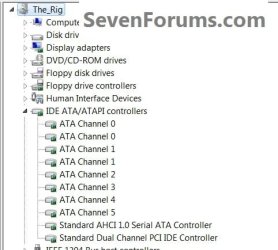
What does Windows device manager look like?


click to enlarge
AHCI.jpg
 

My Computer

Computer Manufacturer/Model Number
* BFK Customs *
OS
W 7 64-bit Ultimate
CPU
Intel Q9550 Yorkfield
Motherboard
ASUS P5Q Pro
Memory
8GB Dominator 8500C5D
Graphics Card(s)
ATI : XFX 5870
Sound Card
Realtek HD Audio 7-1
Monitor(s) Displays
1x 47" LCD HDMI & 3x 26" LCD HDMI
Screen Resolution
1920x1080P & 1920x1200
Hard Drives
1x 80GB Intel X25-M G2 SSD : 1x 500GB & 1x 640GB WD Caviar Black(s)
PSU
Corsair 620HX
Case
Cooler Master RC-690
Cooling
Tuniq Tower 120, 2x 140mm and 3x 120mm case fans
Keyboard
Microsoft 500
Mouse
Razer Diamondback 3G
Internet Speed
14 Mb/s
Other Info
1x Koutech 3Gb/s SATA HDD Hot Swap Rack
Doesnt show in the device manager, but i also included a screnshot of the registry.

Ive restarted twice to make sure.

ahci.jpg
 

My Computer

Computer Manufacturer/Model Number
Sony Vaio VGC-RM2U
OS
Windows 7 Ultimate X64
CPU
Q6600 Quad Core
In Device Manager, can you expand the list that shows the IDE/ATA/ATAPI Controllers, and re-post the image please?

Thanks,
Golden

EDIT : My bad, you don't have that in your Device Manager
 

My Computer

Computer type
PC/Desktop
Computer Manufacturer/Model Number
Golden Mk. I.4
OS
Windows 10 Pro x64 ; Xubuntu x64
CPU
Intel i7 860 @ 2.80 GHz O/C'ed to 4.0GHz
Motherboard
Gigabyte P55A-UD3R Rev.1. Award BIOS F13
Memory
16GB Corsair Vengance DDR3 @ 661 MHz Dual Channel (9-9-9-24)
Graphics Card(s)
EVGA NVidia GTX 560 1024MB
Sound Card
Realtek Integrated
Monitor(s) Displays
Dual Samsung SyncMaster 2494HS
Screen Resolution
1920*1080 and 1920*1080
Hard Drives
1*Samsung 840 EVO 120GB SSD;
1*OCZ Vertex 2 60GB SSD;
2*Samsung F3 SpinPoint 1TB in RAID0;
1*Samsung F1 SpinPoint 1TB;
2*Western Digital 1TB External USB 3.0
1*Western Digital 500GB External USB 3.0
1*Seagate 500GB External USB 2.0
PSU
Thermaltake ToughPower QFan 750W
Case
Thermaltake Element S VK60001W2Z
Cooling
Corsair H60 Water Cooling, 2*230mm and 2*80mm case fans
Keyboard
Logitech G110
Mouse
Logitech MX518
i know, thats why im soo stumped.
 

My Computer

Computer Manufacturer/Model Number
Sony Vaio VGC-RM2U
OS
Windows 7 Ultimate X64
CPU
Q6600 Quad Core
What does storage controllers list, though I doubt that's it?
 

My Computer

Computer Manufacturer/Model Number
* BFK Customs *
OS
W 7 64-bit Ultimate
CPU
Intel Q9550 Yorkfield
Motherboard
ASUS P5Q Pro
Memory
8GB Dominator 8500C5D
Graphics Card(s)
ATI : XFX 5870
Sound Card
Realtek HD Audio 7-1
Monitor(s) Displays
1x 47" LCD HDMI & 3x 26" LCD HDMI
Screen Resolution
1920x1080P & 1920x1200
Hard Drives
1x 80GB Intel X25-M G2 SSD : 1x 500GB & 1x 640GB WD Caviar Black(s)
PSU
Corsair 620HX
Case
Cooler Master RC-690
Cooling
Tuniq Tower 120, 2x 140mm and 3x 120mm case fans
Keyboard
Microsoft 500
Mouse
Razer Diamondback 3G
Internet Speed
14 Mb/s
Other Info
1x Koutech 3Gb/s SATA HDD Hot Swap Rack
What appears under Other Devices?
 

My Computer

Computer type
PC/Desktop
Computer Manufacturer/Model Number
Golden Mk. I.4
OS
Windows 10 Pro x64 ; Xubuntu x64
CPU
Intel i7 860 @ 2.80 GHz O/C'ed to 4.0GHz
Motherboard
Gigabyte P55A-UD3R Rev.1. Award BIOS F13
Memory
16GB Corsair Vengance DDR3 @ 661 MHz Dual Channel (9-9-9-24)
Graphics Card(s)
EVGA NVidia GTX 560 1024MB
Sound Card
Realtek Integrated
Monitor(s) Displays
Dual Samsung SyncMaster 2494HS
Screen Resolution
1920*1080 and 1920*1080
Hard Drives
1*Samsung 840 EVO 120GB SSD;
1*OCZ Vertex 2 60GB SSD;
2*Samsung F3 SpinPoint 1TB in RAID0;
1*Samsung F1 SpinPoint 1TB;
2*Western Digital 1TB External USB 3.0
1*Western Digital 500GB External USB 3.0
1*Seagate 500GB External USB 2.0
PSU
Thermaltake ToughPower QFan 750W
Case
Thermaltake Element S VK60001W2Z
Cooling
Corsair H60 Water Cooling, 2*230mm and 2*80mm case fans
Keyboard
Logitech G110
Mouse
Logitech MX518
Expand Everything and post a couple screenshots. Thats pretty weird
 

My Computer

Computer Manufacturer/Model Number
Custom
OS
Windows 7 Ultimate x64
CPU
AMD Phenom x4 965 BE
Motherboard
MSI 790FX GD70 Not Wiki
Memory
4gb Gskill
Graphics Card(s)
HD 4850
Sound Card
Onboard Realtek
Monitor(s) Displays
Asus VW246H
Screen Resolution
1920x1080 Native
Hard Drives
2 Seagate Drives Raid 0
PSU
650Watt Corsair
Case
CoolerMaster
Cooling
Air Cooling Stock Heatsink and Fan
Keyboard
Logitech Cordless Duo
Mouse
Logitech Cordless Duo
Internet Speed
24000 KBPS
Have you clicked view on the menu bar in device manager and then selected show all?
 

My Computer

Computer Manufacturer/Model Number
Gateway GT5692
OS
Windows 7 Ulti. x64
CPU
AMD Phenom 8450 triple-core 2.10 ghz
Memory
4GB
Graphics Card(s)
ATI Radion HD 3200
Monitor(s) Displays
Gateway FPD1775W
Screen Resolution
1280x720
Hard Drives
465.6613 Gibibytes
Have you clicked view on the menu bar in device manager and then selected show all?

+1


Actually thats a nifty little trick to allow you to even show devices your system no longer uses. Just click view from device mananger and click show hidden devices. Then expand most everything and take a snapshot. You may even have old drivers installed you could remove to help clean your system.
 

My Computer

Computer Manufacturer/Model Number
Custom
OS
Windows 7 Ultimate x64
CPU
AMD Phenom x4 965 BE
Motherboard
MSI 790FX GD70 Not Wiki
Memory
4gb Gskill
Graphics Card(s)
HD 4850
Sound Card
Onboard Realtek
Monitor(s) Displays
Asus VW246H
Screen Resolution
1920x1080 Native
Hard Drives
2 Seagate Drives Raid 0
PSU
650Watt Corsair
Case
CoolerMaster
Cooling
Air Cooling Stock Heatsink and Fan
Keyboard
Logitech Cordless Duo
Mouse
Logitech Cordless Duo
Internet Speed
24000 KBPS

My Computer

Computer Manufacturer/Model Number
* BFK Customs *
OS
W 7 64-bit Ultimate
CPU
Intel Q9550 Yorkfield
Motherboard
ASUS P5Q Pro
Memory
8GB Dominator 8500C5D
Graphics Card(s)
ATI : XFX 5870
Sound Card
Realtek HD Audio 7-1
Monitor(s) Displays
1x 47" LCD HDMI & 3x 26" LCD HDMI
Screen Resolution
1920x1080P & 1920x1200
Hard Drives
1x 80GB Intel X25-M G2 SSD : 1x 500GB & 1x 640GB WD Caviar Black(s)
PSU
Corsair 620HX
Case
Cooler Master RC-690
Cooling
Tuniq Tower 120, 2x 140mm and 3x 120mm case fans
Keyboard
Microsoft 500
Mouse
Razer Diamondback 3G
Internet Speed
14 Mb/s
Other Info
1x Koutech 3Gb/s SATA HDD Hot Swap Rack
At request of tonytiger, sorry took so long everyone, mspaint isnt that ideal.

ahci3.jpg
 

My Computer

Computer Manufacturer/Model Number
Sony Vaio VGC-RM2U
OS
Windows 7 Ultimate X64
CPU
Q6600 Quad Core
ahci2.jpg
 

My Computer

Computer Manufacturer/Model Number
Sony Vaio VGC-RM2U
OS
Windows 7 Ultimate X64
CPU
Q6600 Quad Core
sorry about triple post, i tried putting all images in one post but it only posted the last one.

ahci1.jpg
 

My Computer

Computer Manufacturer/Model Number
Sony Vaio VGC-RM2U
OS
Windows 7 Ultimate X64
CPU
Q6600 Quad Core
Are you running a RAID setup?
 

My Computer

Computer Manufacturer/Model Number
* BFK Customs *
OS
W 7 64-bit Ultimate
CPU
Intel Q9550 Yorkfield
Motherboard
ASUS P5Q Pro
Memory
8GB Dominator 8500C5D
Graphics Card(s)
ATI : XFX 5870
Sound Card
Realtek HD Audio 7-1
Monitor(s) Displays
1x 47" LCD HDMI & 3x 26" LCD HDMI
Screen Resolution
1920x1080P & 1920x1200
Hard Drives
1x 80GB Intel X25-M G2 SSD : 1x 500GB & 1x 640GB WD Caviar Black(s)
PSU
Corsair 620HX
Case
Cooler Master RC-690
Cooling
Tuniq Tower 120, 2x 140mm and 3x 120mm case fans
Keyboard
Microsoft 500
Mouse
Razer Diamondback 3G
Internet Speed
14 Mb/s
Other Info
1x Koutech 3Gb/s SATA HDD Hot Swap Rack
Back
Top