Solved Does reinstall win7 make poor Asus better?

Slowandlow

New member
Local time
7:00 AM
Messages
5
Hello!
I have an Asus Eee R11CX (ca 5 yrs old) with Intel N2600 (320 GB HDD) and Windows 7 Starter installed, among several Asus stuff.

Im thinking of giving the machine away to a friends little daughter, and wonder if there would be of any use to make a "format C:" on the computer and then install only the win7 and nothing else?

Would that help the poor machine to get a little bit quicker, or is it a hopeless case with the hardware setup as described..?

Thanx!

BRG/ Örjan.
 

My Computer

Computer type
Laptop
Computer Manufacturer/Model Number
Asus Eee R11CX
OS
Window 7 Starter
It might make a bit of difference - depends on the state of the current installation.

1.You could use dism++ to export the third party drivers ( e.g. to a usb stick ). Then use dism++ to backup the activation. Then copy the entire dism++ folder ( including the ActiveBackup ) to the usb stick.

On a faster machine:

2. Extract the contents win7 x86 iso file. Use dism++ to download and install the updates into image 1 (Starter).
Use dism++ to integrate the drivers you exported into image 1 (Starter)


3. Use the media you have just updated to install Starter onto the notebook HDD.


Replacing the HDD with an SSD would probably make quite a difference. I think they take the thin (7mm) drives

View attachment Dism++10.1.1000.80.zip
 

My Computers

System One System Two

  • Computer type
    PC/Desktop
    OS
    7 X64
    CPU
    i5 8400
    Motherboard
    gigabyte b365m ds3h
    Memory
    2x8gb 3200mhz
    Hard Drives
    various
    PSU
    pure power 11 400w cm
    Case
    Coolermaster
    Cooling
    cryorig m9i
  • Computer type
    PC/Desktop
    OS
    7x64
    CPU
    g5400
    Motherboard
    ga b365m ds3h
    Memory
    8gb ddr4 2400
    PSU
    xfx pro 450w
The faster way to clean and reinstall is to launch a Factory Restore.
It can be done under windows or under BIOS. It will format the C: partition and load a new image stored on the Recovery Partition.
It will end as it was released from Asus. Unfortunately all trash that came with it will be there. And it will need all updates.
Use Dism++10.1.1000.80.zip to update it. Dism++ will do it better than WU and you can skip the spy features.
 

My Computers

System One System Two

  • Computer type
    PC/Desktop
    Computer Manufacturer/Model Number
    custom build
    OS
    Windows 7 HP 64
    CPU
    i5 6600K - 800MHz to 4200MHz
    Motherboard
    GA-Z170-HD3P
    Memory
    4+4G GSkill DDR4 3000
    Graphics Card(s)
    IG - Intel 530
    Monitor(s) Displays
    Samsung 226BW
    Screen Resolution
    1680x1050
    Hard Drives
    (1) -1 SM951 – 128GB M.2 AHCI PCIe SSD drive for Windows 7 and Lubuntu
    (2) -1 WD SATA 3 - 1T for Data
    (3) -1 WD SATA 3 - 1T for backup
    PSU
    Thermaltake 450W TR2 gold
    Keyboard
    Old and good Chicony mechanical keyboard
    Mouse
    Logitech mX performance - 9 buttons (had to disable some)
    Internet Speed
    500Mb/s
    Browser
    Firefox 64
    Other Info
    TinyWall firewall
  • Computer type
    Laptop
    System Manufacturer/Model Number
    Asus Q550LF
    OS
    Windows 7 Pro
    CPU
    i7-4500U 800MHz to 3.0GHz
    Motherboard
    Asus Q550LF
    Memory
    (4+4)G DDR3 1600
    Graphics Card(s)
    IG intel 4400 + NVIDIA GeForce GT 745M
    Sound Card
    Realtek
    Monitor(s) Displays
    LG Display LP156WF4-SPH1
    Screen Resolution
    1920 x 1080
    Hard Drives
    BX500 120G SSD for Windows and programs +
    1T HDD for data
    Internet Speed
    500 Mb/s
    Browser
    Firefox
    Other Info
    TinyWall firewall
I did the Factory restore, but with no difference in performance. Is there some easy tutorial on making just a quick and simple Format C: and then install a fresh copy of Win7 ?
/Örjan.
 

My Computer

Computer type
Laptop
Computer Manufacturer/Model Number
Asus Eee R11CX
OS
Window 7 Starter
ditto SIW2 on the SSD. You have a 5400rpm drive in there now, even a cheap (<$40) 256GB SSD drive will be miles faster.

the factory restore should have made it faster, if the slowdown was windows fault. You might want to temporarily uncheck everything on start > run > msconfig to make sure bloatware is not slowing it down.
 

My Computer

Computer type
PC/Desktop
Computer Manufacturer/Model Number
diy
OS
Win7 pro x64
CPU
stock i7 7700k
Motherboard
Gigabyte Z270N-WIFI mini-ITX
Memory
Corsair Vengeance LPX 16GB (2x8GB) DDR4 @ 3200MHz
Graphics Card(s)
integrated Intel HD 630
Sound Card
onboard Realtek ALC1220
Monitor(s) Displays
two vertically mounted samsung 55" 4k un55mu8000
Screen Resolution
1920x1280
Hard Drives
256GB Samsung EVO 960 M.2 pci-e NVMe SSD
PSU
SilverStone Nightjar ST45NF 450Watt Fanless
Case
No case. Motherboard is mounted directly onto power supply
Cooling
Evercool low profile 815EP with Panaflow 12L fan at 7v
Keyboard
Ortek MCK-86 mini
Mouse
Belkin 5-button USB
Internet Speed
spectrum 400mbps
I did the Factory restore, but with no difference in performance. Is there some easy tutorial on making just a quick and simple Format C: and then install a fresh copy of Win7 ?
/Örjan.


Clean Install Windows 7


But you will need to reactivate the new installation - you can use dism++ to back up the existing activation - or you can use the key on the COA sticker.

There might also be machine specific drivers - you can use dism++ to back up the drivers from your existing installation - or you should be able to download them from the manufacturer website
 

My Computers

System One System Two

  • Computer type
    PC/Desktop
    OS
    7 X64
    CPU
    i5 8400
    Motherboard
    gigabyte b365m ds3h
    Memory
    2x8gb 3200mhz
    Hard Drives
    various
    PSU
    pure power 11 400w cm
    Case
    Coolermaster
    Cooling
    cryorig m9i
  • Computer type
    PC/Desktop
    OS
    7x64
    CPU
    g5400
    Motherboard
    ga b365m ds3h
    Memory
    8gb ddr4 2400
    PSU
    xfx pro 450w
Excellent, thanx!
 

My Computer

Computer type
Laptop
Computer Manufacturer/Model Number
Asus Eee R11CX
OS
Window 7 Starter
The faster way to clean and reinstall is to launch a Factory Restore.
It can be done under windows or under BIOS. It will format the C: partition and load a new image stored on the Recovery Partition.
It will end as it was released from Asus. Unfortunately all trash that came with it will be there. And it will need all updates.
Use Dism++10.1.1000.80.zip to update it. Dism++ will do it better than WU and you can skip the spy features.
This seems the best way to re-install the OS.
 

My Computer

Computer type
Laptop
Computer Manufacturer/Model Number
Dell
OS
Windows 10 64
I know you don't want this advice but in the happenstance that anyone reading can take advantage of improving an old ASUS EeePC 1025C I offer a great solution that worked for me.


I think keeping Windows on this machine will always be sluggish. But a Linux distro Peppermint ( Peppermint 9 Released. - Peppermint - The Linux Desktop OS ) will work much better. And it is a close facsimile to the Windows experience. I knew next to nothing about Linux but this OS was pretty easy to install and setup.


John
 

My Computer

Computer type
Laptop
Computer Manufacturer/Model Number
Samsung
OS
Win 7 home perm. 64 bit
CPU
Intel(R) Core(TM) i3 CPU M 380 @ 2.53GHz
Motherboard
SAMSUNG ELECTRONICS CO., LTD. RV411/RV511/E3511/S3511/RV711/
Memory
8.00 GB
Graphics Card(s)
Intel(R) HD Graphics (Core i3)
Sound Card
(1) Realtek High Definition Audio (2) Intel(R) Display Aud
Hard Drives
ST500LM012 HN-M500MBB
The main limitation isn't the Win 7 starter. It's the laptop itself.
The Intel Atom® Processor N2600 is the bottom line Intel processor.
The best you can do to increase performance is to install a SSD.
 

My Computers

System One System Two

  • Computer type
    PC/Desktop
    Computer Manufacturer/Model Number
    custom build
    OS
    Windows 7 HP 64
    CPU
    i5 6600K - 800MHz to 4200MHz
    Motherboard
    GA-Z170-HD3P
    Memory
    4+4G GSkill DDR4 3000
    Graphics Card(s)
    IG - Intel 530
    Monitor(s) Displays
    Samsung 226BW
    Screen Resolution
    1680x1050
    Hard Drives
    (1) -1 SM951 – 128GB M.2 AHCI PCIe SSD drive for Windows 7 and Lubuntu
    (2) -1 WD SATA 3 - 1T for Data
    (3) -1 WD SATA 3 - 1T for backup
    PSU
    Thermaltake 450W TR2 gold
    Keyboard
    Old and good Chicony mechanical keyboard
    Mouse
    Logitech mX performance - 9 buttons (had to disable some)
    Internet Speed
    500Mb/s
    Browser
    Firefox 64
    Other Info
    TinyWall firewall
  • Computer type
    Laptop
    System Manufacturer/Model Number
    Asus Q550LF
    OS
    Windows 7 Pro
    CPU
    i7-4500U 800MHz to 3.0GHz
    Motherboard
    Asus Q550LF
    Memory
    (4+4)G DDR3 1600
    Graphics Card(s)
    IG intel 4400 + NVIDIA GeForce GT 745M
    Sound Card
    Realtek
    Monitor(s) Displays
    LG Display LP156WF4-SPH1
    Screen Resolution
    1920 x 1080
    Hard Drives
    BX500 120G SSD for Windows and programs +
    1T HDD for data
    Internet Speed
    500 Mb/s
    Browser
    Firefox
    Other Info
    TinyWall firewall
Hello, thanx for input. Cant install Linux, because needed programs don't support Linux. Don't want to spend money on SSD, just get rid of all the junk and have a fresh Windows 7-only computer. Hope this would let the machine run a bit lighter.

The official Windows download- site don't accept the Product Key from the backside of computer (says its "only" factory installed version of Win7, which is correct, but its still a genuine copy of Windows...).

Is the first link (heidoc.net) the same stuff, or would my product key be valid with the Download Tool/ ISO downloader found there?
 

My Computer

Computer type
Laptop
Computer Manufacturer/Model Number
Asus Eee R11CX
OS
Window 7 Starter
No key needed for Heidoc download. You will need a key to activate the installation - unless you have already backed it up using dism++.
As you were already informed in this post
 

My Computers

System One System Two

  • Computer type
    PC/Desktop
    OS
    7 X64
    CPU
    i5 8400
    Motherboard
    gigabyte b365m ds3h
    Memory
    2x8gb 3200mhz
    Hard Drives
    various
    PSU
    pure power 11 400w cm
    Case
    Coolermaster
    Cooling
    cryorig m9i
  • Computer type
    PC/Desktop
    OS
    7x64
    CPU
    g5400
    Motherboard
    ga b365m ds3h
    Memory
    8gb ddr4 2400
    PSU
    xfx pro 450w
Ok!
With "a Key"- do you refer to the Key I used when trying to download from windows official site? Will that not get me the same problem (i.e. "Product Key not valid due to factory preinstalled Windows") ?

What do you mean with "...backed it up" ? Is it the actual Product Key I can back up before reinstalling, if so, does that give me a better chance to activate the installation, compared to the Key on the backside- sticker?

Thanx again.
/Örjan.
 

My Computer

Computer type
Laptop
Computer Manufacturer/Model Number
Asus Eee R11CX
OS
Window 7 Starter
If you have a key from the COA sticker - it can be used to activate. Some of them are batch keys and need phone activation.

That is why you are better using dism++ . There is a reason we suggest things. We are not just doing it because we enjoy typing. This is the third time I have suggested it to you.

What do you mean with "...backed it up"

Read the post I linked to

this post

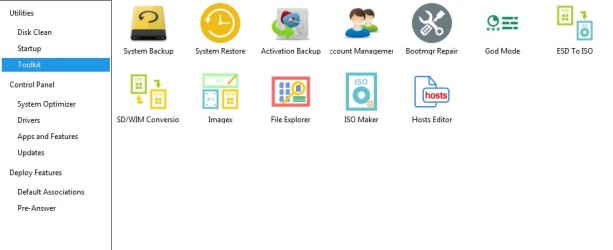
Then use dism++ to backup the activation. Then copy the entire dism++ folder ( including the ActiveBackup ) to the usb stick.

I attached dism++ to that post.

Click Toolkit in the left pane of dism++.

dism++ toolkit.jpg
 

My Computers

System One System Two

  • Computer type
    PC/Desktop
    OS
    7 X64
    CPU
    i5 8400
    Motherboard
    gigabyte b365m ds3h
    Memory
    2x8gb 3200mhz
    Hard Drives
    various
    PSU
    pure power 11 400w cm
    Case
    Coolermaster
    Cooling
    cryorig m9i
  • Computer type
    PC/Desktop
    OS
    7x64
    CPU
    g5400
    Motherboard
    ga b365m ds3h
    Memory
    8gb ddr4 2400
    PSU
    xfx pro 450w
Back
Top