Does the Internet Explorer 9 back button not work correctly for you?

Does the Internet Explorer 9 Back button work for you?


  • Total voters
    34

windude99

Windows 7 Guy
I have had issues, as well as other people, with the Internet Explorer 9 Back button not working. I click it and it doesn't go back. I have to click it a bunch for it to go back. If you have found a fix for this, please state the fix below, so others can be helped.
 

My Computer

Computer type
PC/Desktop
Computer Manufacturer/Model Number
HP Pavilion P7-1010
OS
Windows 7 Professional x64 Service Pack 1
CPU
AMD Athlon X4 645
Motherboard
Foxxcon N-Alvorix RS880
Memory
6GB DDR3 1066
Graphics Card(s)
Sapphire Radeon HD 5670 512MB GDDR5
Sound Card
Realtek Integrated Audio
Monitor(s) Displays
HP 2011x
Screen Resolution
1600x900
Hard Drives
1. Crucial M4 128GB SSD
2. 1TB Seagate Barracuda 7200.12 RPM
3. 1TB Western Digital Caviar Green 5400RPM
PSU
Seasonic S12 II Bronze 380 Watt
Case
HP OEM
Cooling
Coolermaster Heatsink, AVC Case Fan
Keyboard
HP OEM- Made by Chicony
Mouse
HP OEM- Made by Logitech
Internet Speed
20MBit Down/4 Up
Antivirus
Microsoft Security Essentials
Browser
Internet Explorer 10
You Are Not Alone

Mine does the same thing. Been livin' with it.
 

My Computer

Computer Manufacturer/Model Number
BGC (Bob's Garage Crew)
OS
win 7 X64 Ultimate SP1
CPU
I3770K
Motherboard
Asus P8Z77-V Deluxe
Memory
G Skill F3-14900CL9-4GBXL x 4
Graphics Card(s)
NVIDIA GeForce GTX670 + Intel 4000
Sound Card
Realtek HD 5.1 (MOB)
Monitor(s) Displays
Asus VW224T (1)
Screen Resolution
1920 x 1080
Hard Drives
SATA Corsair Force GT 2.5" 180GB (System) Sata 3
OCZ Vertex3 120GB
OCZ Vertex 2 120GB 2.5" SATA II
ST31000524AS 1000.2GB
WD15EARS (External)
PSU
CoolerMaster 1000 Watt
Case
CoolerMaster HAF X
Cooling
CPU -- CoolerMaster 520N
Keyboard
MS Wireless 3000 V2
Mouse
MS Wireless 3000 V2
Internet Speed
Cable
Antivirus
Norton Internet Security
Browser
IE9
Other Info
AMI Bios 1805
OC'd 3%
Works fine for me on three systems that I use.

However, I have found that a number of sites insert ads and the like into the back que and as such it appears that back is not working as you must hit the back button multiple times to wade through this junk to get to the previous site url.

Right click the back button to see this when it happens.
 

My Computer

Computer type
PC/Desktop
Computer Manufacturer/Model Number
Custom Built
OS
Windows 10 Pro x64, Windows 8.1 Pro x64, Windows 7 Ultimate x64 SP1,
CPU
INTEL i9-7920X LGA 2066
Motherboard
Gigabyte X299-WU8 F3
Memory
64 GB (4 X 16 GB) G-Skill V Series DDR4 3200 Quad Channel
Graphics Card(s)
EVGA GTX 1060 SC 3 GB
Sound Card
Realtek Onboard ALC1220
Monitor(s) Displays
2 x Samsung S27E310
Screen Resolution
1920x1080
Hard Drives
Samsung 2 x 970 EVO Plus 500 GB NVMe
1 x 6TB WD 6003FZBX SATA
1 x 6TB WD 60EFRX SATA
12 x 3TB WD 30EFRX SATA
PSU
Seasonic X-1050
Case
Thermaltake Armor+
Cooling
Corsair H80i V2 Liquid AOI Cooler
Keyboard
Logitech G510s
Mouse
Logitech MX Master 2S
Internet Speed
200 Mb/s
Antivirus
ESET NOD32 13.1
Browser
EDGE (Dev, Canary, Beta), Chrome
Other Info
ASUS RT-AC68U router
Malwarebytes 4.0.4
Works fine for me on three systems that I use.

However, I have found that a number of sites insert ads and the like into the back que and as such it appears that back is not working as you must hit the back button multiple times to wade through this junk to get to the previous site url.

Right click the back button to see this when it happens.
That's why! Thanks for the information!
 

My Computer

Computer type
PC/Desktop
Computer Manufacturer/Model Number
HP Pavilion P7-1010
OS
Windows 7 Professional x64 Service Pack 1
CPU
AMD Athlon X4 645
Motherboard
Foxxcon N-Alvorix RS880
Memory
6GB DDR3 1066
Graphics Card(s)
Sapphire Radeon HD 5670 512MB GDDR5
Sound Card
Realtek Integrated Audio
Monitor(s) Displays
HP 2011x
Screen Resolution
1600x900
Hard Drives
1. Crucial M4 128GB SSD
2. 1TB Seagate Barracuda 7200.12 RPM
3. 1TB Western Digital Caviar Green 5400RPM
PSU
Seasonic S12 II Bronze 380 Watt
Case
HP OEM
Cooling
Coolermaster Heatsink, AVC Case Fan
Keyboard
HP OEM- Made by Chicony
Mouse
HP OEM- Made by Logitech
Internet Speed
20MBit Down/4 Up
Antivirus
Microsoft Security Essentials
Browser
Internet Explorer 10
Sometimes it doesn't work but I think it's related to the website your on. Click and hold the mouse button on the back arrow and you'll see what site is blocking it. I just click, hold, and move the arrow over the site I wanted to go back to .
Hope I explained that well enough.
 

My Computer

Computer type
PC/Desktop
Computer Manufacturer/Model Number
custom build
OS
Windows 7 Professional 64bit
CPU
Intel i7-5960X
Motherboard
EVGA X99 Classified
Memory
64GB Corsair Dominator 2400MHz
Graphics Card(s)
3 EVGA GTX980's
Sound Card
on board
Monitor(s) Displays
3 Dell E2715H 27"
Screen Resolution
1920x1080 (5760x1080)
Hard Drives
Samsung 950 Pro 1TB M.2 SSD,
Western Digital Black 2TB HDD's x5
Western Digital Black 1TB HDD's x3
PSU
Corsair AX1200i
Case
Corsair 750D
Cooling
Corsair H110i GT
Keyboard
Corsair K70
Mouse
Corsair M45
Internet Speed
250 down/10 up
Antivirus
Microsoft Security Essentials
Browser
IE 11, Google Chrome
pbcopter is right. That is exactly what the issue is, not IE9 itself.
 

My Computer

Computer type
Laptop
Computer Manufacturer/Model Number
Toshiba P775-S7100
OS
Windows 7 Professional SP1 64-bit
CPU
Intel Core i5-2450M @2.5 GHz
Memory
6 GB DDR3 1333MHz
Graphics Card(s)
Intel HD 3000
Monitor(s) Displays
Built-in 17.3" LED; 22" Insignia NS-L22Q-10A
Screen Resolution
1600x900; 1360x768
Hard Drives
750 GB Hitachi
1TB Seagate FreeAgent External
Internet Speed
Verizon DSL Speed(Down/Up): 3360 Kbps / 800 Kbps
Antivirus
MSE and MBAM Pro
Browser
IE10
Works fine for me on three systems that I use.

However, I have found that a number of sites insert ads and the like into the back que and as such it appears that back is not working as you must hit the back button multiple times to wade through this junk to get to the previous site url.

Right click the back button to see this when it happens.

This is exactly what causes it. Annoying as hell though.
 

My Computer

Computer Manufacturer/Model Number
Toshiba Satellite L455D
OS
Windows 7 Home Premium
CPU
Amd Semperon 2.10GHz
Memory
2 Gig
Graphics Card(s)
ATI Radeon 3100
Sound Card
Realtek
Monitor(s) Displays
15.6 inch
Screen Resolution
1366x768
Hard Drives
250gig
Mouse
Logitech Wireless
Internet Speed
16/2 cable
Works fine for me on three systems that I use.

However, I have found that a number of sites insert ads and the like into the back que and as such it appears that back is not working as you must hit the back button multiple times to wade through this junk to get to the previous site url.

Right click the back button to see this when it happens.

This is exactly what causes it. Annoying as hell though.
Yea. It is really annoying. Along with the face that Youtube is laggy on IE an chrome is perfectly smooth. I have a quad core and dedicated graphics card. Youtube shouldn't be laggy.:mad:
 

My Computer

Computer type
PC/Desktop
Computer Manufacturer/Model Number
HP Pavilion P7-1010
OS
Windows 7 Professional x64 Service Pack 1
CPU
AMD Athlon X4 645
Motherboard
Foxxcon N-Alvorix RS880
Memory
6GB DDR3 1066
Graphics Card(s)
Sapphire Radeon HD 5670 512MB GDDR5
Sound Card
Realtek Integrated Audio
Monitor(s) Displays
HP 2011x
Screen Resolution
1600x900
Hard Drives
1. Crucial M4 128GB SSD
2. 1TB Seagate Barracuda 7200.12 RPM
3. 1TB Western Digital Caviar Green 5400RPM
PSU
Seasonic S12 II Bronze 380 Watt
Case
HP OEM
Cooling
Coolermaster Heatsink, AVC Case Fan
Keyboard
HP OEM- Made by Chicony
Mouse
HP OEM- Made by Logitech
Internet Speed
20MBit Down/4 Up
Antivirus
Microsoft Security Essentials
Browser
Internet Explorer 10
Particular Sites

I had noticed that the problem was particular sites. That is one reason I had never really trouble shot it. I suspect some sites are preventing you from exiting because of ads.
 

My Computer

Computer Manufacturer/Model Number
BGC (Bob's Garage Crew)
OS
win 7 X64 Ultimate SP1
CPU
I3770K
Motherboard
Asus P8Z77-V Deluxe
Memory
G Skill F3-14900CL9-4GBXL x 4
Graphics Card(s)
NVIDIA GeForce GTX670 + Intel 4000
Sound Card
Realtek HD 5.1 (MOB)
Monitor(s) Displays
Asus VW224T (1)
Screen Resolution
1920 x 1080
Hard Drives
SATA Corsair Force GT 2.5" 180GB (System) Sata 3
OCZ Vertex3 120GB
OCZ Vertex 2 120GB 2.5" SATA II
ST31000524AS 1000.2GB
WD15EARS (External)
PSU
CoolerMaster 1000 Watt
Case
CoolerMaster HAF X
Cooling
CPU -- CoolerMaster 520N
Keyboard
MS Wireless 3000 V2
Mouse
MS Wireless 3000 V2
Internet Speed
Cable
Antivirus
Norton Internet Security
Browser
IE9
Other Info
AMI Bios 1805
OC'd 3%
Same problem here. Resetting IE9 to defaults doesn't help. I can only get to original Google search page by rightclicking the back button.

This needs to be resolved as it is a flaw in IE9. That said, I use Firefox.
 
I have always had this problem on all browsers, like explain earlier it has to do with advertisiments on certain sites.
 

My Computer

Computer type
PC/Desktop
Computer Manufacturer/Model Number
Gateway / Slight Modifications
OS
Windows 8 64 bit PRO
CPU
AMD Phenom X4 9100e
Motherboard
Gateway RS780
Memory
2GB X2 DDR2
Graphics Card(s)
Sapphire HD 6850
Sound Card
Integrated
Monitor(s) Displays
Gateway 19" + Dell 19"
Screen Resolution
1440X900 sometimes 2880 by 900
Hard Drives
WD 80GB
WD 640GB
WD 1,000GB
PSU
Antec BP 550watts
Case
Antec 300
Cooling
Stock Cooling
Keyboard
Saitek Eclipse II
Mouse
Gigabyte GM-M6800
Internet Speed
D: 30Mbps U:4Mbps
Antivirus
Avast version 8
Browser
Internet Explorer ver 10 64 bit
Other Info
This is my work computer.
I have another laptop running Windows 7 64 bit.
Another PC running Windows 8 64 bit pro.
Total of 3
Ie 9 issues with back button working intermittently

I had this problem with IE 9 also , I found out something that everyone should be interested in. Microsoft inherently lets around 30 websites track your moves and in the process it makes IE react very slow when going to a website and or using back and forward buttons........
This worked for me and others!
1) Go to Internet options and delete browser history for good measure.....
2) Go to Manage Add Ons and click Tracking Protection
3) You will see Your Personalized List ...Right click and enable it!
4) Double click Your Personalized List and another window pops up and click Automatically Block and click Ok.
5) Now go check your IE........
 

My Computer

Computer Manufacturer/Model Number
Custom Built
OS
Win 7 Ultimate 64 bit VMware ( Linux mint 13 - WinXp Pro - Win Vista 64 )
CPU
Amd Athlon 64 x2 5600+
Motherboard
enforce4m
Memory
Patriot 6gb
Graphics Card(s)
Geforce7900 Gt OC
Sound Card
SoundBlaster
Monitor(s) Displays
23" Acer LED LCD
Screen Resolution
1920x1080
Hard Drives
Seagate x4 4TB total
PSU
Antec
Case
Antec 900
Cooling
thermaltake Rx Series
Internet Speed
17/2
Click multiple times on the back arrow

This is how I fixed it.
Right click on the back arrow and select SHOW FULL HISTORY
Click on EXTENSIONS
Disable Produtools Manuals
Save and enjoy your single click restored.
Hope this helps
Regards
Sam;)
 

My Computer

OS
Windows 7
It works?

I think the problem is preconcieved idea of how it works. Is it not it gives choices of where to go? By right click see choices or just hold click to see. Then choose. But then it is error multiple clicks goes back to previous page? maybe leads to getting redirect virus???
 

My Computer

OS
win 7 64 bit
pbcopter is right. That is exactly what the issue is, not IE9 itself.
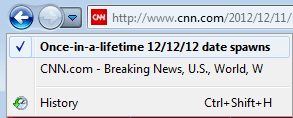
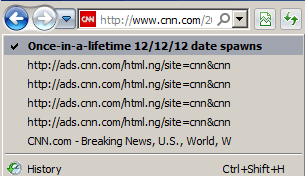
Well, yes and no. pbcopter did correctly describe what is happening... but there has been a change from IE8 to IE9 in how it handles adverts and history. So it could be said that there is an issue with IE9: e.g. this new "feature" sucks.

IE8 does not add the adverts as pages in history...
IE8.png
...and only one click on the back button take me back to cnn's main page.

IE9 requires multiple clicks or at least two:
(one click on the list of recent pages and one click on the page of interest*)
IE9.png

*unless there were so many advertizing pages that the page of interest is no longer displayed from that drop down - this is why I try to always open links in a new tab instead of "clicking thru".
 

My Computer

Computer type
Laptop
Computer Manufacturer/Model Number
Employer provided Dell Latitude
OS
W7 Pro SP1 64bit
CPU
i7
Memory
8GB
Graphics Card(s)
Intel HD Graphics
Hard Drives
crappy SSD
Antivirus
Employer mandated Symantec Endpoint Protection
Browser
Pale Moon 64bit, IE11 64bit & Chrome 64bit
Same problem here but ironically not at work, same OS

So the only solution I have found is to double click the back button, this works 95%
 

My Computer

OS
windows 7
...only solution I have found is to double click the back button, this works 95%
or get into the habit of opening links in a new tab...
that way:
...you just close the new tab
...and you are back to where you started
...and you don't have to reload the previous page
(even though it should still be cached)

This works most of the time :-)
 

My Computer

Computer type
Laptop
Computer Manufacturer/Model Number
Employer provided Dell Latitude
OS
W7 Pro SP1 64bit
CPU
i7
Memory
8GB
Graphics Card(s)
Intel HD Graphics
Hard Drives
crappy SSD
Antivirus
Employer mandated Symantec Endpoint Protection
Browser
Pale Moon 64bit, IE11 64bit & Chrome 64bit
Hi

Have tried all points mentioned so far, but back button still works intermitently so any other ideas welcome.


:banghead:
 

My Computer

Computer Manufacturer/Model Number
Samsung
OS
windows 7 home premium 64 bit
CPU
Core i5
Memory
1 TB
Back
Top