
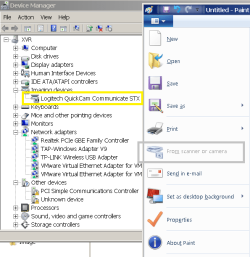
Does the mspaint [From scanner or camera] command apply for webcams?

asafaq

New member
Local time
11:52 PM
Messages
7
doesn't seem to be functional for me, the option is grayed out.
The webcam is working fine, I went on tinychat and had it working.
Maybe there is a permission I didn't allow?
 

Attachments

  • cam.png
    cam.png
    71.1 KB · Views: 14

My Computer

Computer type
PC/Desktop
Computer Manufacturer/Model Number
Asus
OS
Windows 7u x64
CPU
Intel64 Family 6 Model 60 Stepping 3 GenuineIntel ~3400 Mhz
Motherboard
Asus H81m-a5
Memory
4GB Corsair
Graphics Card(s)
Super minimal nVidia 210
Sound Card
On board
Monitor(s) Displays
Proview 19 inches.
Screen Resolution
1400 X 900
Hard Drives
120GB Samsung SSD 840 Series
Keyboard
generic microsoft
Mouse
generic logitec
Internet Speed
ADSL 15Mb / 800Kb
Antivirus
NOD32 AV 8
Browser
Chrome
Hello asafaq,

No, there are no extra permissions to set. You could, however, try re-installing the device driver for the "Logitecc QuickCam Communicate STX".

Hope that helps!
 

My Computer

Computer type
PC/Desktop
OS
Windows 7 x64, Vista x64, 8.1 smartphone
CPU
Intel E8400 65W 64-bit
Motherboard
Gigabyte EP45-UD3LR
Memory
DDR2 2 x 2GB, 1GB x 2
Graphics Card(s)
XFX Radeon HD5750
Sound Card
AMD High Definition Audio; Realtek High Definition Audio
Monitor(s) Displays
iiyama prolite X2377HDS
Screen Resolution
1920 x 1080
Hard Drives
500GB 7200 rpm Seagate ST3500413AS 16MB, 500GB 5400 rpm Toshiba MQ02ABF050H 32MB, 200GB 7200 rpm Seagate ST3200820AS 8MB, 2TB 7200 rpm Western Digital WD20EZRX 64MB
PSU
Enermax Liberty Modular
Case
Antec P193 Midi Tower
Keyboard
Mionix ZIBAL 60
Mouse
Razer USB 2.0 Diamondback Mouse or Huion Graphics Tablet
Browser
Internet Explorer, Lunascape, Firefox, Opera, Avast Safezone
Back
Top