Thanks for the reply
SIW2, it is appreciated.
I have
DISM++ on my list of things to learn about in the very near future.
Here is a bit of background about me.
I had an accident at work well over a year ago and I am awaiting one, maybe two, more operations. I am pretty much housebound. Anyway, I thought I would use my time productively and learn new things. I decided I would learn about
DISM, and what better way to learn about it than putting it to good use on something that I could use. With this in mind, I decided that I would try and create an updated
install.wim image file with
ALL the Windows updates included, ready for a clean install. I think I have done pretty well so far. In fact I have managed to also incorporate learning about
Batch files.
Anyway, back to my initial question in
post #1.
Depending on the answer to whether or not the Windows updates need to be integrated in a particular order or not I was going to post an additional question. I have decided to post this anyway now.
The main question (it is
Batch script related) that I need answered to completely finish my Batch file to integrate ALL the Windows updates into a new install.wim file is as below highlighted in
Red.
I have
21 updates (.msu) in the folder C:\Win7ISOUpdates.
The
Dism command (I am using a
Batch file to do this) to loop through the updates in the folder one by one and integrate them is:
Dism /Image:"C:\Win7ISO\OFFLine" /Add-Package /PackagePath:"C:\Win7ISOUpdates"
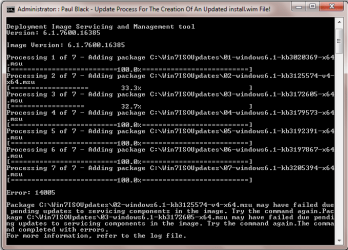
As you will see from the attachement it gives me an error.
The first attempt I put ALL
21 updates (mainly Security-Only updates) in the folder C:\Win7ISOUpdates and run the Dism command and got an error as per the attachement.
The second attempt I only put
7 updates in the folder C:\Win7ISOUpdates and run the Dism command and got the same error on the same
2 updates as per the attachement below.
I have manually installed each of the updates seperately (the
7 updates above that is) and they worked fine so I know that there isn't a problem with the updates themselves.
The errors are on the same
2 updates (because they
appear to have only reached
33.3% and
32.7% respectfully):
KB3125574 - Convenience Rollup Package.
KB3172605 - Functional Update Rollup (THIS ONE IS IMPORTANT) - July 2016.
Now on the first attempt when I used ALL
21 updates and got the error message I ran those
2 updates again and they
WORKED.
I ran
Dism /Image:C:\Win7ISO\OFFLine /Get-Packages > C:\Win7Lists\Packages.txt (to output the Packages to a .txt log file) and when I looked at the log file it had put them in ascending order, although the
2 updates that errored were run last and out of sequence. This leads me to believe that it
DOESN'T make a difference what order they are integrated in!
The alternative of course is that they are flagged in some way with respect to the order they are integrated in and then get sorted within the
Dism /Image:C:\Win7ISO\OFFLine /Get-Packages > C:\Win7Lists\Packages.txt log file!!!
I think the problem that causes the errors probably has something to do with the fact that after each update is integrated that the program needs to wait for a few seconds (
15 maybe) to catch up before continuing onto the next update. Something like
timeout or
wait. I have Googled for a solution but can't seem to find anything that works.
I have however tried
choice /d y /t 15 > nul but that is not recognised.
I have also tried the following which are also not recignised:
timeout /t 15
timeout /t 15 /nobreak
timeout /t 15 /nobreak > NUL
Here is the snippet of the code that is relevant:
Code:
echo off
echo.
echo [06] Integrating ALL the updates from the C:\Win7ISOUpdates folder...
Dism /Image:"C:\Win7ISO\OFFLine" /Add-Package /PackagePath:"C:\Win7ISOUpdates"
echo. & pause & cls
exit
Does anyone know if there is a command that will be accepted in a Batch file to wait say 15 seconds from the end of one update being integrated to the start of the next update being integrated please?
It needs to be in or around the DISM command:
Dism /Image:"C:\Win7ISO\OFFLine" /Add-Package /PackagePath:"C:\Win7ISOUpdates"
I just thought that this might then not give me the error(s)!
Another option would be to list
EACH of the
21 updates on seperate DISM lines. Then I could use
pause after each one and just wait
15 seconds before I
Press any key to continue . . .. I have actually just done it this way and did not receive any errors, so it is definately connected to the fact that there needs to be a short delay between finishing integrating one update before it goes onto the next one, hence the reason why I am looking for a command that will work in the Batch file.
I am so so close to finishing this!
Any ideas and help will be greatly apprecited!
Thanks in advance.