

Bit64z
New member
- Local time
- 7:50 PM
- Messages
- 17
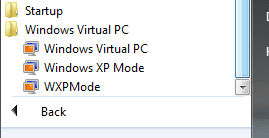
I just uninstalled and reinstalled XPMode and the Virtual PC update. My start menu now looks like this (see attachment).
The two entries, one reading
Windows XP Mode
the other reading
WXPMode
have identical properties from what I can tell.
Is this normal, or is it a relic of something that is not configured correctly?
Thank you
The two entries, one reading
Windows XP Mode
the other reading
WXPMode
have identical properties from what I can tell.
Is this normal, or is it a relic of something that is not configured correctly?
Thank you
Attachments
My Computer
- Computer Manufacturer/Model Number
- Homebuilt
- OS
- Win 7 64
- CPU
- Intel Quad 2.4
- Motherboard
- MSI 875X Platinum
- Memory
- 6 Gb
- Graphics Card(s)
- GE Force 7600 GS
- Sound Card
- OnBoard
- Monitor(s) Displays
- Gateway FPD218SW DCDi
- Hard Drives
- SATA & eSATA
- PSU
- 250 W
- Case
- MidTower
- Cooling
- Sealed Liquid Copper Coil
