Does Windows remember HDMI devices?

AlanRR

New member
Member
Local time
1:20 AM
Messages
57
Location
Kings Lynn, Norfolk, UK
Plug my large widescreen TV into my graphics card (hdmi connection) to use it as a 3rd monitor used to work just fine - after appropriate adjustment in ControlPanel/Displays.

Now everytime I plug my large widescreen TV in - all manner of odd effects take place. Some are - it alters the multiple dropdown choice to show desktop only on 2 and that of course blanks one of my 2 normally connected monitors. It pinches desktop icons from monitor 2 when it is monitor 1. All very weird.

BUT - when I plug in my small widescreen TV into the same HDMI socket on my GPU all works as expected. It waits for me to extend the desktop to include it and all works as expected.

The problem with my large widescreen TV manifests itself whether the connection is made to HDMI3 (legend next to socket) or HDMI2. No I have not tried HDMI1 because at this stage I am going bald (or maybe that should be balder).

The 2 TV's show as different names on Windows so there must be some feedback TV>PC and I am left to conclude that Windows is functioning different when it sees my large TV. Maybe a corrupt device profile if such a thing exists I don't know. If one does - can it be deleted or reset?

Help!!!
 

My Computer

Computer type
PC/Desktop
Computer Manufacturer/Model Number
self build
OS
Windows 7 - 32bit
CPU
Intel Core2Duo E8400
Motherboard
ASUS P5Q SE
Memory
2GB
Graphics Card(s)
Asus NVIDIA GT640
Sound Card
Realtek on mobo
Monitor(s) Displays
2 identical IIyama 19"
Screen Resolution
1280 x 1024
Hard Drives
4 HDD + 1 SSD all SATA
PSU
520W Corsair HX series modular.
Case
Gigabyte - Triton
Cooling
Fans
Keyboard
Logitech
Mouse
Logitech wireless
Internet Speed
2.8M on a good day
Browser
IE11
Other Info
Wacom Bamboo Tablet CTH-470
I can't answer your main question as to why your large HDMI TV is malfunctioning, however, I can clear up one thing.

When you plug a video device into Windows (i.e. a monitor), there is definitely a conversation that takes place between Windows and the device, and Windows recognizes the capabilities of that device based on a profile information package that is transmitted form the device. I believe that a corresponding signature for the monitor is then stored in a Windows config file for access later. It saves the time of auto-negotiation when you plug the device in again. Windows just simply says "Aha! Monitor X is plugged in." and it works.

Sadly, I don't know where this profile is kept in Windows, or you could try to delete it.

I know that isn't the answer you were looking for, but I hope it helped clear things up a little bit. Perhaps a member with more knowledge in this area will happen by and give a better answer.
 

My Computer

Computer type
PC/Desktop
Computer Manufacturer/Model Number
Mellon Labs (custom build)
OS
Win 7 Pro x64/Win 10 Pro x64 dual boot
CPU
AMD FX 8350 Vishera @ 4200
Motherboard
ASUS M5A97 R2.0
Memory
16 GB Mushkin Blackline DDR3-2400 @ 1866 (9-10-10-10-31)
Graphics Card(s)
XFX Radeon R9 280 Double D Black Edition
Sound Card
Realtek HD Audio on MB. Sounds great.
Monitor(s) Displays
Acer 24", Acer 22"
Screen Resolution
3840 x 1080
Hard Drives
1 x Mushkin Chronos 120 GB SSD (Win 10)
1 x Samsung 850 EVO 250 GB SSD (Win 7)
1 x WD 1TB SATA Blue
1 x WD 1TB SATA Green
PSU
Corsair TX-750
Case
CoolerMaster HAF 912+
Cooling
Coolermaster Seidon 240M Liquid AIO. 6 case fans
Keyboard
Logitech G710+
Mouse
Logitech G500s
Internet Speed
Much better since I got fiber, but still way overpriced.
Antivirus
MSE, Malware Bytes for scanning
Browser
Firefox
Other Info
Corsair VOID USB headphones.

A Mellon Labs X-1 - LCD Smartie driven system status display.

Brought to you by the letter E
Yes - thanks - that confirms what I suspected - brilliant - thank you.
 

My Computer

Computer type
PC/Desktop
Computer Manufacturer/Model Number
self build
OS
Windows 7 - 32bit
CPU
Intel Core2Duo E8400
Motherboard
ASUS P5Q SE
Memory
2GB
Graphics Card(s)
Asus NVIDIA GT640
Sound Card
Realtek on mobo
Monitor(s) Displays
2 identical IIyama 19"
Screen Resolution
1280 x 1024
Hard Drives
4 HDD + 1 SSD all SATA
PSU
520W Corsair HX series modular.
Case
Gigabyte - Triton
Cooling
Fans
Keyboard
Logitech
Mouse
Logitech wireless
Internet Speed
2.8M on a good day
Browser
IE11
Other Info
Wacom Bamboo Tablet CTH-470
Research reveals we have a name for it - EDID - Extended Display Identification Data. Read from the display device over HDMI and stored in W7 registry. Enables the AV source device (pc) to understand lots of parameters of the display device it is feeding with AV data to ensure best possible experience and save human from entering data manually which could be wrong etc etc.

All research on EDID data and possible corruption seems to always assumes the corruption occurs in the device and describes many ways of rewriting EEPROM in device, but you need a lot of info and special software and GPU that's capable of rewriting EDID and a display device that permits remote rewriting of its EEPROM EDID data. Way too complex and impractical.

What is missing is a procedure to locate and delete registry based EDID data where I believe my problem lies. Apparently when a new device is connected EDID is requested once and stored forever so eliminating the need to repeat the exercise when the same device shows up again.

At the moment - reinstalling W7 seems the only way to rebuild the registry - and cause W7 to request fresh EDID for each display device it then encounters, and that for the time being is not worth the effort.

It would be so nice to be able to destroy all registry based EDID and get W7 to request again when necessary - but so far I cannot see any info as to how to achieve this......
 

My Computer

Computer type
PC/Desktop
Computer Manufacturer/Model Number
self build
OS
Windows 7 - 32bit
CPU
Intel Core2Duo E8400
Motherboard
ASUS P5Q SE
Memory
2GB
Graphics Card(s)
Asus NVIDIA GT640
Sound Card
Realtek on mobo
Monitor(s) Displays
2 identical IIyama 19"
Screen Resolution
1280 x 1024
Hard Drives
4 HDD + 1 SSD all SATA
PSU
520W Corsair HX series modular.
Case
Gigabyte - Triton
Cooling
Fans
Keyboard
Logitech
Mouse
Logitech wireless
Internet Speed
2.8M on a good day
Browser
IE11
Other Info
Wacom Bamboo Tablet CTH-470
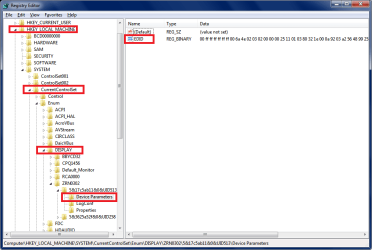
I don't know if this will help, but i see EDID registry info at
HKLM\SYSTEM\CurrentControlSet\Enum\DISPLAY\"name"\Device Parameters\EDID

If you know the "name" of the problem device, you could try deleting it from the registry,
then re-boot and attach the device to see if it will rebuild this info correctly.

I've never done this, i'm just guessing.

I would not do this without first creating a system image backup so i can restore if things go wrong.

Here is an example from my registry:

EDID.png
 

My Computer

Computer type
PC/Desktop
Computer Manufacturer/Model Number
home built
OS
Multi-Boot W7_Pro_x64 W8.1_Pro_x64 W10_Pro_x64 +Linux_VMs +Chromium_VM
CPU
AMD Athlon II x4 620
Motherboard
Gigabyte GA-MA785G-UD3H
Memory
6GB GSkill DDR2 800
Graphics Card(s)
AMD 4670 GPU + AMD 4200 IGP
Sound Card
on board Realtek ALC889A
Monitor(s) Displays
RCA 40" LCD TV, Insignia 32" LCD TV, HP 15" LCD monitor
Screen Resolution
1680 x 1050
Hard Drives
OCZ Vertex 3 120GB,
Samsung F3 1TB (3),
Several others - WD, Seagate, Hitachi, ...
PSU
Corsair 500 W
Case
Rosewill mid tower
Cooling
CM 90mm rifle
Keyboard
Gyration wireless, Logitech wireless, Dell USB wired
Mouse
Gyration wireless, Logitech wireless, V7 USB wired
Internet Speed
Spectrum - 100Mbps D / 10Mbps U
Antivirus
Avast, MBAM3, EMET, WinPatrol
Browser
Pale Moon, Firefox, IE
Other Info
2 multi-boot PC's
Mainly HTPC/Office/Gen purpose (no gaming).
Trendnet USB KVM.
LG DVD burner/Blue Ray Player.
Tray system for removable SATA backup drives.

Not currently OCd, under-volted.
I use Hybrid sleep, rarely re-boot or shutdown.

Hauppauge HD-PVR, Avermedia PCIe TV Tuner, Hauppauge PCI TV Tuner.
What's about the Devices Manager, when set to show hidden peripherals you should be able to see the details of each monitors. Could search in the registry using the class GUID after or uninstall from there?
 

My Computer

Computer type
PC/Desktop
Computer Manufacturer/Model Number
Custom Build
OS
Windows 7 Professional SP1 - x64 [Non-UEFI Boot]
CPU
Ivy Bridge Core i5 3570K (Delidded)
Motherboard
Asus P8Z77-V LE PLUS
Memory
G.Skill "Ares" DDR3 PC3-12800 - 1600MHz (16Gb)
Graphics Card(s)
Asus Dual-RX480-O4G
Sound Card
Creative Sound Blaster Z w/5.1 sound system
Monitor(s) Displays
Asus IPS 23"
Screen Resolution
16/9
Hard Drives
Internal:
500Go Sata 6Gb/s (x2)
500Go Sata 3Gb/s (x2)
SSD 60Go Sata 6Gb/s
PSU
In Win C 900W Series 80+ Platinum
Case
Thermaltake Chaser A71
Cooling
Custom Water Cooling Loop
Keyboard
Cooler Master QuickFire XTi
Mouse
Razer Imperator 2012 (4G)
Antivirus
MSE
Browser
IE 11.0.xxx Rtm
Other Info
"Raid0" with Intel Smart Response Technology (HDD/SSD)
DavidE - thanks for that info - got to same place in mine and found 5 entries in DISPLAY -

Default_Monitor had a BAD_EDID record in it - I assume this is a default sort of catch-all monitor entry for a fictitious device hence the lack of real EDID hence BAD_EDID entry.

the four other entries relate to 1) my LCD TV 2) my small LCD TV 3) my 1st dual monitor 4) my 2nd dual monitor - so all making good sense.

Found a neat little utility called DumpEDID from NirSoft - freeware utilities: password recovery, system utilities, desktop utilities follow the instructions to write results to a txt file and it will give you a human readable listing of the actual EDID data and what it means - quite interesting.

Now I am in a position to boldly delete the EDID data relating to the large LCD TV and see if it is the root cause of my problems. This may not happen too soon as I need to ensure reliable recovery is in place just in case this intimate surgery proves fatal and right now am very busy. Have a rebuild coming up soon so may try this just before final shutdown when I won't care if its fatal - but will in any event keep you posted.

NoN - tried Device manager idea but could not see any further devices when hunting for hidden peripherals - see above reply for interesting info. Thanks.
 

My Computer

Computer type
PC/Desktop
Computer Manufacturer/Model Number
self build
OS
Windows 7 - 32bit
CPU
Intel Core2Duo E8400
Motherboard
ASUS P5Q SE
Memory
2GB
Graphics Card(s)
Asus NVIDIA GT640
Sound Card
Realtek on mobo
Monitor(s) Displays
2 identical IIyama 19"
Screen Resolution
1280 x 1024
Hard Drives
4 HDD + 1 SSD all SATA
PSU
520W Corsair HX series modular.
Case
Gigabyte - Triton
Cooling
Fans
Keyboard
Logitech
Mouse
Logitech wireless
Internet Speed
2.8M on a good day
Browser
IE11
Other Info
Wacom Bamboo Tablet CTH-470
I would like to highlight 1 point.


----delete----

The problem with my large widescreen TV manifests itself whether the connection is made to HDMI3 (legend next to socket) or HDMI2. No I have not tried HDMI1 because at this stage I am going bald (or maybe that should be balder).

The 2 TV's show as different names on Windows so there must be some feedback TV>PC and I am left to conclude that Windows is functioning different when it sees my large TV. Maybe a corrupt device profile if such a thing exists I don't know. If one does - can it be deleted or reset?

Help!!!


There is one point you should take note and understand.

For example: USB port.

Whenever you plug a device to USB port-1, it will create a profile USB port-1, and will recognize the same device is plug in to the same USB port-1.

But if plug the device to USB port-2, then it will create a profile in USB port-2, and will recognize the same device is plug in to the same USB port-2.


So it is better to use the same HDMI port.

This is maybe how Windows works.


Regards
Eric.
 

My Computer

Computer type
Laptop
Computer Manufacturer/Model Number
Toshiba L630 and L735
OS
Windows 7 x64
Hard Drives
240 GB SSD
Back
Top