Does WLM "completely" delete email without "Compact Datadases"?

scottls59901

New member
Member
VIP
Local time
10:00 PM
Messages
114
Does WLM "completely" delete email without "Compact Datadases"?

With XP's Outlook Express-
When you'd delete email from their Folders, they weren't "completely deleted..." until you Compacted Databases & Reboot (without CD, OE would Not release from backup..., and Bloat...!).
~~~~

Q1?- I now use WLM 2009 POP3/only (I like 2009's GUI, Much better than 2012), and wondered if I needed to regularly Compact Databases for "complete delete...", like I did with OE?

Q2?-If WLM's CD is the same as OE, how often should I schedule CD?
 

My Computer

Computer Manufacturer/Model Number
ZT Desktop
OS
Windows 7 Pro (32)
CPU
i7/2600
Motherboard
Intel
Memory
4gb
Graphics Card(s)
512mg (add on card was less buggy than Intel direct driver)
Sound Card
Internal
Monitor(s) Displays
19" DELL Ultra Sharp
Hard Drives
C:= WD Raptor Sata6 10k rpm
D:/E:= WD Black Sata 3.0
Case
ZT Full
Cooling
ZT
Internet Speed
8000kbps cable
Other Info
Free Outpost Pro Internet Security, and no other active anti-malware.
Free On-Demand- SpyWareBlaster, MBAM, Emsisoft-Kit, and Kaspersky Anti-rootkit utility TDSSKiller.
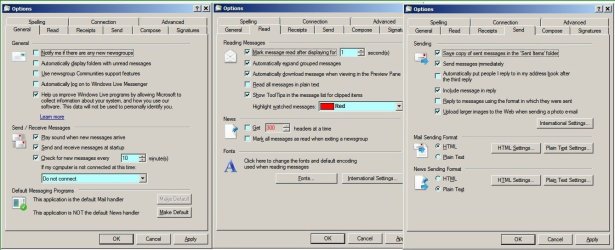
I also like and use WLM 2009. It depends how your mail accounts are set. My Gmail is archived when accessed by POP, My AOL mail is left on the server.
This is how my settings are.

RR.jpg
 

My Computer

Computer Manufacturer/Model Number
Look in my Signature.
OS
Win7 H.Prem. 32bit+SP1
I also like and use WLM 2009. It depends how your mail accounts are set. My Gmail is archived when accessed by POP, My AOL mail is left on the server.
This is how my settings are.

View attachment 217732
I am using pretty much the same settings, except I stopped All Logging (slows!).
~~~~~~~~~~~
Things that Used to caused my already Slow WLM (POP3 only, and I Never Login), to "Stop Working" (crash)...-

-I find that WLM likes "Do Not Send Immediately"-
I wait 2min for messages to complete..., before Send (Usually all at once, at end-of-session...).

-If I get an AV Update Pop-Up (EAM, and same with my old Avira, NOD32)-
I wait 10min before doing anything, except for Read.

-To Delete email, at end-of-session Only-
I highlight All msgs to Delete (Newest Down in Inbox, and Newest Up in Sent), and then wait 2min before Delete.

-When completely finished-
I wait 5min before closing (I use a small digital kitchen timer- only $5 at Wally World...).

BTW- My Huge WLM has 27 Folders/ over 1k msgs, so your times may be different...?
 

My Computer

Computer Manufacturer/Model Number
ZT Desktop
OS
Windows 7 Pro (32)
CPU
i7/2600
Motherboard
Intel
Memory
4gb
Graphics Card(s)
512mg (add on card was less buggy than Intel direct driver)
Sound Card
Internal
Monitor(s) Displays
19" DELL Ultra Sharp
Hard Drives
C:= WD Raptor Sata6 10k rpm
D:/E:= WD Black Sata 3.0
Case
ZT Full
Cooling
ZT
Internet Speed
8000kbps cable
Other Info
Free Outpost Pro Internet Security, and no other active anti-malware.
Free On-Demand- SpyWareBlaster, MBAM, Emsisoft-Kit, and Kaspersky Anti-rootkit utility TDSSKiller.
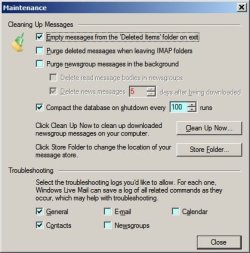
This is some of the settings I use.

White Paper.JPG

If you don't sign-in to WLM I suggest you start doing so.
I sign-in with the same Hotmail address on both my computers. The first time its done, the Hotmail account gets added. I then wait till all folders have been downloaded, add my Gmail account then delete the Hotmail account.
This way, all my contacts are syncronised, as are the 'Safe' & 'Blocked' sender's list. Plus a few other good features.
 

My Computer

Computer Manufacturer/Model Number
Look in my Signature.
OS
Win7 H.Prem. 32bit+SP1
Back
Top