Solved "Doesn't have a valid IP configuration"

Ensiferum321

New member
Local time
3:47 AM
Messages
8
Well Hello:D

Name is Brian and I am having some technical difficulties with my internet (Wireless)

I am Running Windows 7 Ultimate 32bit

When i run the "Troubleshoot" I receive the following message. "Wireless Network Connection 2" doesn't have a valid IP configuration.

I cannot figure it out, and I have been on a few forums trying to troubleshoot it myself, but no luck so far. Can someone please help me? Been at this for 5 hours now.

Thank you!
 

My Computer

OS
Windows 7
Welcome..But you have to post this in the right section.

Need more info on ur issue.. How is your setup made, that is modem - computer or modem-router-computer.

How is the IP given, static or dynamic.
 

My Computer

Computer Manufacturer/Model Number
MacBook Pro
OS
Lion
CPU
i5
Memory
4GB
Graphics Card(s)
Intel
Screen Resolution
1200x800
Hard Drives
Seagate FreeAgent GO 250GB Ext. HDD
Welcome..But you have to post this in the right section.

Need more info on ur issue.. How is your setup made, that is modem - computer or modem-router-computer.

How is the IP given, static or dynamic.

Setup is modem-router-computer.

It's a Linksys Compact Wireless G.

How do I tell if it is static or dynamic?
 

My Computer

OS
Windows 7
Start - All programs - Accessories - Right click on command prompt and select Run as admin.
Once you get the black window, type,

ipconfig /all

Hit enter.

Provide us the screenshot of the details listed.
 

My Computer

Computer Manufacturer/Model Number
MacBook Pro
OS
Lion
CPU
i5
Memory
4GB
Graphics Card(s)
Intel
Screen Resolution
1200x800
Hard Drives
Seagate FreeAgent GO 250GB Ext. HDD
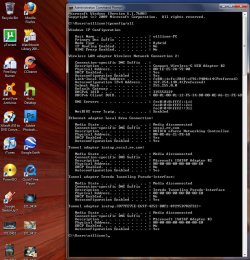
buddy, thnx for the snip. It seems you are getting a invalid IP. 169 series. APIPA.

Hw is your computer connected to your router?? wired or wireless??

Its wireless rite?? If yes, try connecting using a cable and let us knw the results.
 

My Computer

Computer Manufacturer/Model Number
MacBook Pro
OS
Lion
CPU
i5
Memory
4GB
Graphics Card(s)
Intel
Screen Resolution
1200x800
Hard Drives
Seagate FreeAgent GO 250GB Ext. HDD
I see.. It's kind of a hassle to get it wired (The routers in a hard area to get to, and the desktop is all setup on a desk)

Is it possible to do this without connecting it so it's wired?
 

My Computer

OS
Windows 7
The problem is that you aren't showing any default gateway in your Ip config. Depending on the router this will usually be 192.168.X.X either 0.1 or 1.1. This number will be different depending on the router being used.

Usually just resetting the router will fix this type of problem or you can go to network connection IPv4 properties and manually type in the default gateway. You may also need to set up your wireless security on the routers set up page. I have no idea which router you are using so that is about as much as I can tell you for now. :confused:
 

My Computer

Computer type
PC/Desktop
Computer Manufacturer/Model Number
Home built
OS
Windows 7 Ult, Windows 8.1 Pro,
CPU
Q9650-4.275GHz, E8600 4.5GHz, E6750-3.8GHz
Motherboard
Evga 780i FTW
Memory
G.Skill PC2 9600 1200Mhz 5 5 5 15 2T
Graphics Card(s)
GTX480
Sound Card
Asus Xonar D2
Monitor(s) Displays
HannsG
Screen Resolution
1680X1050
Hard Drives
GSkill Phoenix Pro 120GB SSD
PSU
ThermalTake Toughpower 1000Watt modular
Case
ThermalTake XaserV
Cooling
Xigmatek S1283
Keyboard
Logitech G15
Mouse
Logitech G9
Internet Speed
T1
Solved guys! Thanks a lot for all the help.

All I did was go to the router (Linksys WRT54G) And reset it. Small button on the back and held it down for 30 Seconds) Went into the settings of the router (Thank you Chev65) and reset my WEP.

Again thank you everyone.

EDIT!: Ok ran into another problem... I restarted the computer and when it restarted the connection had the yellow Triangle again..So i went back to the router and reset it again and it works fine..

Is there something I need to do so that whenever my computer restarts I don't have to go to the router every time?

The problem is that you aren't showing any default gateway in your Ip config. Depending on the router this will usually be 192.168.X.X either 0.1 or 1.1. This number will be different depending on the router being used.

Usually just resetting the router will fix this type of problem or you can go to network connection IPv4 properties and manually type in the default gateway. You may also need to set up your wireless security on the routers set up page. I have no idea which router you are using so that is about as much as I can tell you for now. :confused:
 

My Computer

OS
Windows 7
Ok ran into another problem... I restarted the computer and when it restarted the connection had the yellow Triangle again..So i went back to the router and reset it again and it works fine..

Is there something I need to do so that whenever my computer restarts I don't have to go to the router every time?
 

My Computer

OS
Windows 7
What brand and model of wireless card are you using? Also how did you configure your connection to the router?
 

My Computer

Computer type
PC/Desktop
Computer Manufacturer/Model Number
Custom Build
OS
Windows 7 Pro 64bit build 7601 SP1
CPU
Intel Core I5 3570K 3.4Ghz w/ Zalman CNPS9900NT RT
Motherboard
MSI Z77A-G45 Gaming
Memory
G.Skill F3-12800CL9D-8GbXL ; 4Gx2
Graphics Card(s)
EVGA Geforce GTX 770 Superclocked
Sound Card
Creative Sound Blaster Z
Monitor(s) Displays
Dual ViewSonic VX2770Smh-LED Black 27"IPS-Panel
Screen Resolution
1920x1080
Hard Drives
Kingston Hyper X 240GB SSD Win8 Pro 64bit 6GB/s Sata III
Intel 335 Series SSD 240GB Win8 Storage 6GB/s Sata III
Intel 320 Series SSD 600GB Storage 3GB/s Sata II
Western Digital Scorpio Black 1TB - Docked via Esata
PSU
Coolermaster GX 750W
Case
Corsair Vengence C70
Cooling
Coolermaster 120mm and Enermax 140mm
Keyboard
Corsair Vengence K70
Mouse
Logitech G500
Internet Speed
22mbps+
Browser
Firefox, Chrome, IE
Other Info
Swan M50W 2.1 speakers
APC UPS
Thermaltake BlacX HDD Dock
Samsung BD Optical Drive
Netgear WNDR4500
Ok ran into another problem... I restarted the computer and when it restarted the connection had the yellow Triangle again..So i went back to the router and reset it again and it works fine..

Is there something I need to do so that whenever my computer restarts I don't have to go to the router every time?

It should help to enter the default gateway manually although we need to know what it is first.

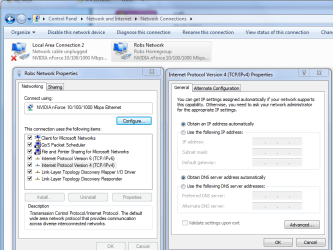
You can get that by doing an ipconfig when the connection is working then enter what ever default gateway is showing manually. Picture below shows you where to enter that info.

Click where it says ipv4 then choose properties then change to manual IP and enter which ever IP and default gateway shows up in your ipconfig.

It might be easier to make sure that you are using DHCP in your routers control panel. Usually the default gateway will stay put using DHCP.
 

Attachments

  • ipv4 IP address change.PNG
    ipv4 IP address change.PNG
    45 KB · Views: 362
Last edited:

My Computer

Computer type
PC/Desktop
Computer Manufacturer/Model Number
Home built
OS
Windows 7 Ult, Windows 8.1 Pro,
CPU
Q9650-4.275GHz, E8600 4.5GHz, E6750-3.8GHz
Motherboard
Evga 780i FTW
Memory
G.Skill PC2 9600 1200Mhz 5 5 5 15 2T
Graphics Card(s)
GTX480
Sound Card
Asus Xonar D2
Monitor(s) Displays
HannsG
Screen Resolution
1680X1050
Hard Drives
GSkill Phoenix Pro 120GB SSD
PSU
ThermalTake Toughpower 1000Watt modular
Case
ThermalTake XaserV
Cooling
Xigmatek S1283
Keyboard
Logitech G15
Mouse
Logitech G9
Internet Speed
T1
Seems to have done the trick. Restarted computer and everything went good. Thanks a lot for the help, again.
 

My Computer

OS
Windows 7
Seems to have done the trick. Restarted computer and everything went good. Thanks a lot for the help, again.

Very good Ensiferum, nice work on following those instructions. :)
 

My Computer

Computer type
PC/Desktop
Computer Manufacturer/Model Number
Home built
OS
Windows 7 Ult, Windows 8.1 Pro,
CPU
Q9650-4.275GHz, E8600 4.5GHz, E6750-3.8GHz
Motherboard
Evga 780i FTW
Memory
G.Skill PC2 9600 1200Mhz 5 5 5 15 2T
Graphics Card(s)
GTX480
Sound Card
Asus Xonar D2
Monitor(s) Displays
HannsG
Screen Resolution
1680X1050
Hard Drives
GSkill Phoenix Pro 120GB SSD
PSU
ThermalTake Toughpower 1000Watt modular
Case
ThermalTake XaserV
Cooling
Xigmatek S1283
Keyboard
Logitech G15
Mouse
Logitech G9
Internet Speed
T1
Glad the issue is resolved and thnx for posting back the solution that worked for you.
 

My Computer

Computer Manufacturer/Model Number
MacBook Pro
OS
Lion
CPU
i5
Memory
4GB
Graphics Card(s)
Intel
Screen Resolution
1200x800
Hard Drives
Seagate FreeAgent GO 250GB Ext. HDD
Back
Top