dolby 5.1 using speakers only plays stereo in wmc

sdowney717

New member
Power User
VIP
Local time
6:12 PM
Messages
705
I have this setup as 4 channel front and rear speakers, that is all I have.
A set of stereo front and a set of stereo rear speakers, so 4 speakers.
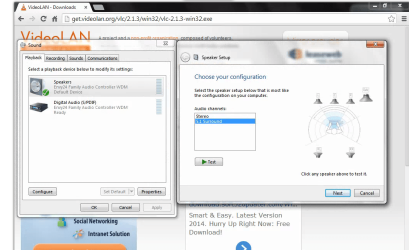
In the windows sound setup, all 4 speakers play just fine on the test, front rear, play the stereo test.

WMC i went and tried to setup but only get front speakers, no rear speakers.
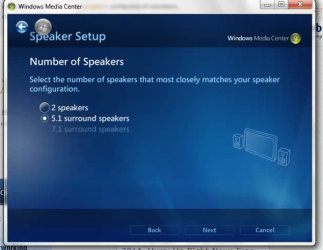
I see in WMC they only offer stereo and 5.1 sound.

So what to do to get the rear speakers working?

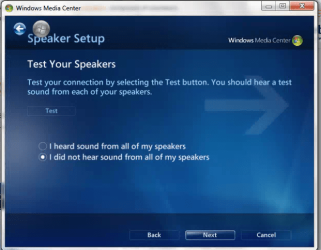
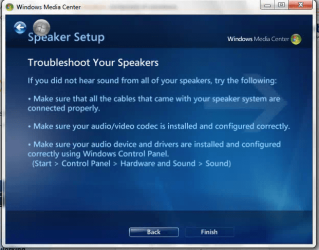
When I told WMC I could not hear my speakers properly, WMC mentioned are your codecs properly configured.
 

My Computer My Computer

At a glance

Windows 7 Ultimate x64
OS
Windows 7 Ultimate x64
With your 4 speakers, do you also have a bass speaker?

You can try the 5.1 setup in WMC and see if that makes a difference. Some audio is only set up for stereo (in your case the front speakers).
 

My Computer My Computer

At a glance

Windows 10 64 bitIntel i7 6700K16GB Corsair DominatorIntel CPU Graphics
Computer type
PC/Desktop
Computer Manufacturer/Model Number
My Own Build
OS
Windows 10 64 bit
CPU
Intel i7 6700K
Motherboard
ASUS ROG Maximus VIII Hero
Memory
16GB Corsair Dominator
Graphics Card(s)
Intel CPU Graphics
Sound Card
RealTek
Monitor(s) Displays
27" Dell S2719dgf
Screen Resolution
2560X1440
Hard Drives
1 TB Samsung 850 EVO SSD for Win 10 Pro
500GB Samsung 850 EVO SSD for Win 10 Insider
2 TB drive for backup
PSU
EVGA Supernova 750G2
Case
BeQuiet Silent Base 600
Cooling
Deepcool Captain 120EX
Keyboard
Microsoft Wireless 2000
Mouse
Microsoft wireless
Internet Speed
100 MB/sec (Cable)
Antivirus
Microsoft Defender and Malwarebytes
Browser
Edge/Firefox
Other Info
Cakewalk (Sonar) by BandLab and Studio One 4.1 Pro recording studio software. MOTU 896Mk3 Hybrid recording interface, Frontier Tranzport wireless control unit, Behringer X-Touch Control Surface.
Five USB connected optical drives for CD Audio production using Nero BurningROM
I have no bass woofer.

VLC does play all 4 speakers. VLC is actually doing 5.1 sound as all the jacks have the various sounds they should have, center, woofer seperate from rear and front.

Windows sound conguration plays all 4 speakers properly one after the other.
I tried setting sound config to 5.1 speakers but WMC made no difference.
I tried WMC with 5.1 and only hear sound from the front stereo mini plug, the center-woofer, rear jacks are dead in WMC.
It must be a config issue in WMC, not sending the sound out to the various ports.

I am using the speaker setup after I did the main setup since I added speakers.
 

My Computer My Computer

At a glance

Windows 7 Ultimate x64
OS
Windows 7 Ultimate x64
A screen shot showing the speaker tests, I dont have center and woofer.
 

Attachments

  • Screenshot from 2014-03-12 09:39:28.png
    Screenshot from 2014-03-12 09:39:28.png
    123.9 KB · Views: 0

My Computer My Computer

At a glance

Windows 7 Ultimate x64
OS
Windows 7 Ultimate x64
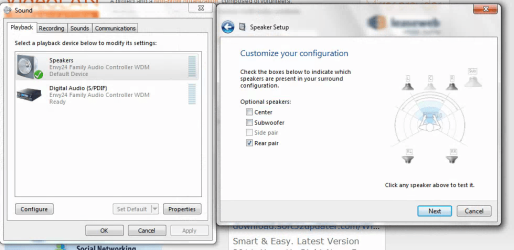
So I unchecked center and woofer.
All 4 speakers play in the test.

To me this means windows is configured ok, WMC is not configured ok.
Especially since VLC as a test does play sound from all the mini jacks.
 

Attachments

  • Screenshot from 2014-03-12 09:40:56.png
    Screenshot from 2014-03-12 09:40:56.png
    92 KB · Views: 0

My Computer My Computer

At a glance

Windows 7 Ultimate x64
OS
Windows 7 Ultimate x64
WMC speaker setup pages

So how can WMC be forced to play the sound?
 

Attachments

  • Screenshot from 2014-03-12 09:45:46.png
    Screenshot from 2014-03-12 09:45:46.png
    98.5 KB · Views: 18
  • Screenshot from 2014-03-12 09:46:51.png
    Screenshot from 2014-03-12 09:46:51.png
    93.2 KB · Views: 18
  • Screenshot from 2014-03-12 09:46:27.png
    Screenshot from 2014-03-12 09:46:27.png
    104.8 KB · Views: 18

My Computer My Computer

At a glance

Windows 7 Ultimate x64
OS
Windows 7 Ultimate x64
I suspect a WMC incompatibility with a 4.0 speaker system. That is not a common sound system. 4.1 systems were common for a short time years ago, but the 2.0/2.1, 5.1 and 7.1 systems have now become the "standard".
 

My Computer My Computer

At a glance

Windows 10 64 bitIntel i7 6700K16GB Corsair DominatorIntel CPU Graphics
Computer type
PC/Desktop
Computer Manufacturer/Model Number
My Own Build
OS
Windows 10 64 bit
CPU
Intel i7 6700K
Motherboard
ASUS ROG Maximus VIII Hero
Memory
16GB Corsair Dominator
Graphics Card(s)
Intel CPU Graphics
Sound Card
RealTek
Monitor(s) Displays
27" Dell S2719dgf
Screen Resolution
2560X1440
Hard Drives
1 TB Samsung 850 EVO SSD for Win 10 Pro
500GB Samsung 850 EVO SSD for Win 10 Insider
2 TB drive for backup
PSU
EVGA Supernova 750G2
Case
BeQuiet Silent Base 600
Cooling
Deepcool Captain 120EX
Keyboard
Microsoft Wireless 2000
Mouse
Microsoft wireless
Internet Speed
100 MB/sec (Cable)
Antivirus
Microsoft Defender and Malwarebytes
Browser
Edge/Firefox
Other Info
Cakewalk (Sonar) by BandLab and Studio One 4.1 Pro recording studio software. MOTU 896Mk3 Hybrid recording interface, Frontier Tranzport wireless control unit, Behringer X-Touch Control Surface.
Five USB connected optical drives for CD Audio production using Nero BurningROM
Maybe, I gave up on that card and put in a pci sound blaster live.
The dynex envy 24 card caused my win ATI HDTV PCI tuner to not start.

I am using the kx driver.
In win7, the master mix is broken in kx driver, so set default to 6/7 and set switch front and rear.
So I get 4.0 sound output now.

IF you leave it set on master mix as default, then you get a subtle his, pop, noise, which makes you think your SB Live sound card is bad. Also made me wonder if the PCI slot was bad, but it was fine.

I already spent too much on this old PC so I am using what I have for sound cards.

http://www.hardwareheaven.com/general-discussion/205334-noise-popping-static-fixed.html

I tried the AC3, but seems to put equal sound on all 4 speakers.
I also had to disable the builtin mb chip, because WMC hung.
The motherboard does not have mini jacks for rear, center, woofer, but does have spdif. Chip is an realtex 888.

BUT, only WMC hung. Windows played sounds ok with both cards on.
 

My Computer My Computer

At a glance

Windows 7 Ultimate x64
OS
Windows 7 Ultimate x64
Back
Top