Domain users group - no domain?

Qibbler

New member
Local time
7:50 PM
Messages
12
Hi,

I'm using Windows 7 Home Premium x64, IE9, with Comodo Firewall and HIPs, Avast AV, MBAM, EMET and SAS.

I have one LUA and one Admin a/c, both strong passworded---Guest a/c is disabled, Real Administrator is enabled, passworded, and never used. I'm behind a router with no network or file & printer sharing and have all recommended blocks on my firewall.

I've just replaced my admin and lua accounts after finding a lot of null sid logon fails at all my accounts over a few months. It might have been a self-snafu, but I seem to have cured the issue. :geek: All except Type 3 Anon Logons at every boot, but i read somewhere that too can be a snafu. I'll keep an eye on them.

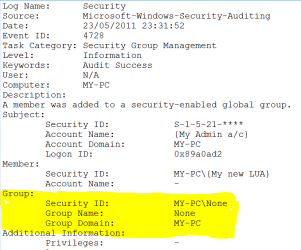
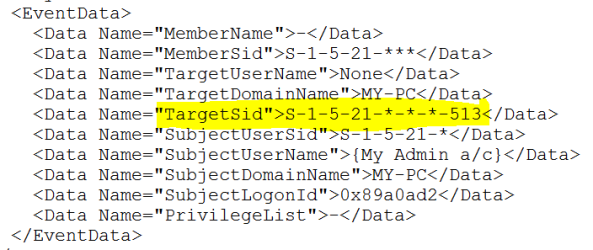
Meanwhile, eventlog showed my old accounts being removed from a 'no name' global group that had the Domain users group sid S-1-5-21-*-*-*-513. The new accounts were both added to this 'no name' global group. I'm a workgroup pc, not domain. :confused:

Home premium doesn't have secpol and I can't get NET command to enlighten me on this domain group. Should I have any global/ domain groups?

Finally, Is there a way to enforce 'Do not allow enumeration of SAM accounts and shares from the Local policy' or disable 'Network access: Allow anonymous SID/Name translation' or equivalent on Win 7 Home Premium?
Cheers :)
 

My Computer

OS
Windows 7 PRO x64
Good grief, I am afraid after just reading all of this. I recommend keeping only your windows built-in firewall, but its up to you.

Do you go to some heavy virus-infected websites a lot? All you really need for a home computer is something like MSE. MBAM is great to use with it as well. If you have more than one antivirus, chances are they will begin to conflict with eachother. update and scan for viruses, and if there aren't any, relax. DO you do things on your computer that require top notch security?

If you are looking for better, you might start looking into paying for a AV. google best antivirus to find reviews on different ones.

Windows itself has ways of locking down your computer, such as bit-locker.
 

My Computer

Computer type
PC/Desktop
Computer Manufacturer/Model Number
Custom Asus Build
OS
Microsoft Windows 8.1 Pro 64-bit
CPU
Intel(R) Core(TM) i3-4130 CPU @ 3.40GHz
Motherboard
B85M-E
Memory
8.00 GB
Graphics Card(s)
None
Sound Card
Realtek High Definition Audio
Monitor(s) Displays
Asus 23.6" Monitor
Screen Resolution
1920 x 1080 x 32 bits (4294967296 colors) @ 60 Hz
Hard Drives
INTEL SSDSC2BW180A4
Samsung SSD 840 PRO Series
PSU
Seasonic S12II-380Bronze
Case
Lian Li
Cooling
Fan, Passive
Keyboard
Logitech K120
Mouse
Microsoft Touch Mouse
Internet Speed
4ms Ping, 19.0 Mbps Download, 19.0 Mbps Upload
Antivirus
Eset Endpoint
Browser
Internet Explorer, Chrome
Do you go to some heavy virus-infected websites a lot?

DO you do things on your computer that require top notch security?

Erm ... no and no. Unless checking my gas bill is a state secret :D

I'm just curious how the Domain users group appears on my home premium system. I can't even dig the thing out to inspect as I'm not supposed to have a domain group, or be able to connect to a domain, far as I know. Eventlog shows both admin and lua accounts were automatically added to it.

Got me wondering if the options available for 'domain controller' control over a client system (eg using djoin.exe) is a hacker vulnerability. I get Type 11 null sid fails that I didn't used to get and that means cached credentials are being used. I guess I must have snarled up somewhere? Either that or my gas bill is very interesting :party:
 

My Computer

OS
Windows 7 PRO x64
So alls ya got is a single antivirus installed? Other than recommending you install Microsoft security essentials (which would mean you need to disable at least any previous antivirus, other than malwarebytes). Update that and malwarebytes and do a full scan each. see what it brings up. make sure you dont have any suspicious programs installed in control panel and other than that, I would gues domain use is just perhaps a update from windows, such as a client-host update that utilizes domains, but is not necessary (but completely safe) for your home setup.

Now, i am just guessing with that and you may need to hear it from someone else, or search it or phrase it in such a way that it would make google do a simple search for ya without too much added gibberish on Google's part.

It could be some program or such searching for domains. Tell you the truth, I'm just guessing in the dark. If nothing seems to indicate a virus and you haven't experienced any problems, than I would wager to say it is safe to assume it isn't one.
 

My Computer

Computer type
PC/Desktop
Computer Manufacturer/Model Number
Custom Asus Build
OS
Microsoft Windows 8.1 Pro 64-bit
CPU
Intel(R) Core(TM) i3-4130 CPU @ 3.40GHz
Motherboard
B85M-E
Memory
8.00 GB
Graphics Card(s)
None
Sound Card
Realtek High Definition Audio
Monitor(s) Displays
Asus 23.6" Monitor
Screen Resolution
1920 x 1080 x 32 bits (4294967296 colors) @ 60 Hz
Hard Drives
INTEL SSDSC2BW180A4
Samsung SSD 840 PRO Series
PSU
Seasonic S12II-380Bronze
Case
Lian Li
Cooling
Fan, Passive
Keyboard
Logitech K120
Mouse
Microsoft Touch Mouse
Internet Speed
4ms Ping, 19.0 Mbps Download, 19.0 Mbps Upload
Antivirus
Eset Endpoint
Browser
Internet Explorer, Chrome
Cheers for suggestions, DustSailer.

Have downloaded MSE and done full scan. Clean.

Now have to decide whether to stick with Avast AV and Comodo Defense+ or leave them disabled and rely on MSE plus Comodo firewall (prefer to WF). MSE updates once a week... Avast every few hours... mmm :(
 

My Computer

OS
Windows 7 PRO x64
I heard MSE updates 3 times a day, you sure about that?
 

My Computer

Computer type
PC/Desktop
Computer Manufacturer/Model Number
Custom Asus Build
OS
Microsoft Windows 8.1 Pro 64-bit
CPU
Intel(R) Core(TM) i3-4130 CPU @ 3.40GHz
Motherboard
B85M-E
Memory
8.00 GB
Graphics Card(s)
None
Sound Card
Realtek High Definition Audio
Monitor(s) Displays
Asus 23.6" Monitor
Screen Resolution
1920 x 1080 x 32 bits (4294967296 colors) @ 60 Hz
Hard Drives
INTEL SSDSC2BW180A4
Samsung SSD 840 PRO Series
PSU
Seasonic S12II-380Bronze
Case
Lian Li
Cooling
Fan, Passive
Keyboard
Logitech K120
Mouse
Microsoft Touch Mouse
Internet Speed
4ms Ping, 19.0 Mbps Download, 19.0 Mbps Upload
Antivirus
Eset Endpoint
Browser
Internet Explorer, Chrome
... you sure about that?

Can't find where I read it. :confused:

But have found various comparisons and it's the usual thing: matter of what rocks your boat. MSE is good here and Avast is good there.

Sometimes feel like a blind medieval knight trying to buy a castle... never able to see all four walls! :mad:

Cheers.
 

My Computer

OS
Windows 7 PRO x64
Exactly. I do recommend trying it out though, and then deciding on which ever you seem to like best. You can read up on some reviews and non-leaning tests performed on these AVs and see what the experts say about the higher performing ones, and decide from there. I do know that of the few I've tried, MSE is my favorite and comes most recommended. Tests can sometimes sway one way or the other. Also, steer clear of AVG, some may disagree, but that one tends to act more like a virus thant antivirus. Basically which ever AV snags the most viruses is the one you go for. Only problem is sometimes one AV is better at getting different viruses than another, and they all claim to be the best at what they do.
 

My Computer

Computer type
PC/Desktop
Computer Manufacturer/Model Number
Custom Asus Build
OS
Microsoft Windows 8.1 Pro 64-bit
CPU
Intel(R) Core(TM) i3-4130 CPU @ 3.40GHz
Motherboard
B85M-E
Memory
8.00 GB
Graphics Card(s)
None
Sound Card
Realtek High Definition Audio
Monitor(s) Displays
Asus 23.6" Monitor
Screen Resolution
1920 x 1080 x 32 bits (4294967296 colors) @ 60 Hz
Hard Drives
INTEL SSDSC2BW180A4
Samsung SSD 840 PRO Series
PSU
Seasonic S12II-380Bronze
Case
Lian Li
Cooling
Fan, Passive
Keyboard
Logitech K120
Mouse
Microsoft Touch Mouse
Internet Speed
4ms Ping, 19.0 Mbps Download, 19.0 Mbps Upload
Antivirus
Eset Endpoint
Browser
Internet Explorer, Chrome
Mmm ... going back to my opening post. This tale started when i found loads of weird audit fail logons to my accounts over a few months- drove me nuts ... and why I changed my accounts and found my new ones being made members of the Domain users global group - (see pics - suitably redacted:o).

Well, by labourious trial and error I've just found that every time I just click on a folder's Properties> Sharing tab (and do nothing else) my security log creates a Type 3 logon auditfail to my disabled Guest account. :confused:

Meanwhile, at that same moment Process Monitor records explorer.exe creating lots of 'Name Not Found' entries. :mad:

If only for my blood pressure, why the @$@#@!!! might Windows' treat my just clicking a folder's sharing tab as a logon attempt to my disabled guest account? Like any good scientific proof, i can now replicate this security event at will. :geek:

Now I'd just like to find what it is I do that generates logon fails to my real admin account and other accounts so that I can stop doing that too! :D

I'm resigned to the Domain Users group mystery for now. Any theories on why windows logs the above as logon fails?
 

Attachments

  • Admin_DomUsersGroup01.PNG
    Admin_DomUsersGroup01.PNG
    16.3 KB · Views: 4
  • Admin_DomUsersGroup02.PNG
    Admin_DomUsersGroup02.PNG
    7.9 KB · Views: 5

My Computer

OS
Windows 7 PRO x64
Well, I couldn't tell you honstly as I've not been that deep into windows. I could theorize for you, however.

My guess would be that since you have disabled your guest account, that shared folders (with other users on this computer, as it states) doesn't actually share (or at least not with the guest account, it is disabled). The login attempts would probably be because it uses logins (group policy or something like it) to utilize shares. So it is a simple audit of there being no guest account to share with, which it logs (as it logs quite a bit of extra information). If no viruses were deteacted, you should be able to rest easy. If you are still worried about it, you could use a couple AVs, but make sure only 1 is ever enabled at a time, as they most certanly will conflict and wreak havooc on your computer.

For your real administrator account, every time you accidentally enter the wrong password, it is audited as a failed login attempt. It is okay; likely it is all just you doing these things to yourself and snooping about in the informations that windows collects in the event that it needs it (or an IT person needs it). You have a home computer, and a hack likely would be due to an accidentally downloaded virus; never anything like a direct assault (think PS3 network). Your AVs should suffice in your situation. If they don't get something right away, they should eventually. Also, windows has a malicious software download tool that usually ships every month (I believe) which should help, in case you feel the AVs might not have gotten rid of everything.
 

My Computer

Computer type
PC/Desktop
Computer Manufacturer/Model Number
Custom Asus Build
OS
Microsoft Windows 8.1 Pro 64-bit
CPU
Intel(R) Core(TM) i3-4130 CPU @ 3.40GHz
Motherboard
B85M-E
Memory
8.00 GB
Graphics Card(s)
None
Sound Card
Realtek High Definition Audio
Monitor(s) Displays
Asus 23.6" Monitor
Screen Resolution
1920 x 1080 x 32 bits (4294967296 colors) @ 60 Hz
Hard Drives
INTEL SSDSC2BW180A4
Samsung SSD 840 PRO Series
PSU
Seasonic S12II-380Bronze
Case
Lian Li
Cooling
Fan, Passive
Keyboard
Logitech K120
Mouse
Microsoft Touch Mouse
Internet Speed
4ms Ping, 19.0 Mbps Download, 19.0 Mbps Upload
Antivirus
Eset Endpoint
Browser
Internet Explorer, Chrome
Back
Top