Don't make Windows 7 too Mac-like.

Status
Not open for further replies.

echrada

New member
Guru
VIP
Local time
3:15 AM
Messages
1,385
Location
Scotland
Blogger Paul Thurrott has written a couple of interesting posts about the difference between “simple” and “easy” in the context of Windows 7.

Sure, Windows 7 is still in the pre-beta phase, meaning the user-interface elements still will be tweaked considerably before the product is released to manufacturing. But Thurrott raises a number of points that left me nodding my head in agreement.

I am a Windows user by choice, not simply because I blog about Microsoft. When I saw the recent demos of Windows 7 — with its JumpLists, AeroPeek, AeroSnaps and lots of other eye candy — I was torn. I want some of what’s coming in Windows 7, such as fewer UAC prompts, simpler backup and restore, better peripheral handling. But I really do not care if I get more fancy bells and whistles that just clutter my desktop.

Thurrott blogged:

“Windows 7 basically takes Windows one step closer to the design aesthetic of the Mac, where form is valued over function. I’m not sure this is the right strategy. Simplicity, taken in isolation, may seem like a good idea. But I’m afraid that in Windows 7, Microsoft is sacrificing too much in its bid to be more like Apple. And it’s the users of Windows who will pay the price.”

If you are a PC user like me, you definitely will pay the price. I value ease of use far more than fancy graphics. The two don’t have to be mutually exclusive — and given the direction Microsoft ends up taking once it provides testers with the Superbar — maybe they won’t.

(Given Beta 1 of Windows 7, which many are now expecting around January 13, is supposed to be feature-complete, I’m expecting we’ll get to see what the Superbar will look like real soon now. Me? I still think we might see Win 7 Beta 1 on or around December 17, but in either case, it’s not too long until we see the latest Windows 7 look and feel.)

If I wanted a Mac-like environment, I’d buy a Mac. I want an computing environment that helps me get my work done and doesn’t require a how-to manual to figure out which icon does what. Maybe Microsoft could introduce “Windows 7 Luddite Edition” for those of us who value function over form?

What’s your take? Do you think Microsoft is too focused on making Windows 7 in Mac OS X’s image?

A plea to the Windows team: Don’t make Windows 7 too Mac-like | All about Microsoft | ZDNet.com
 

My Computer

Computer Manufacturer/Model Number
Self build
OS
Windows 7 Ultimate x64
CPU
AMD Phenom II x4
Motherboard
Gigabyte 880
Memory
8GB
Graphics Card(s)
NVIDIA GeForce HD
Sound Card
Realtek HD Audio
Screen Resolution
1920 x 1080
Hard Drives
2 x 1TB
PSU
Thermalake 550w
Case
XCase
Internet Speed
8MB
I like the new taskbar. Will like it more when it is fully functional. Nothing wrong with things working *and* looking good at the same time. I also like things to be as simple and easy as possible while retaining functionality. He complains about having to click on a UAC prompt once in a while, but doesn't mind clicking 3 extra times to get to a program he wants. Keyboard shortcuts still work. Start menu still works.

If you don't like Aero or you think it slows things down too much, don't whine, just turn it off. I haven't added that bit to the right click menu yet, but will if I can as I turn it off to do video rendering and I know some gamers like to turn it off. Fine, it's your comp, do what you like. I like the looks of Aero and the new snap features.

Not sure what he means by having a manual to figure out which icon does what. Each program has the same icon it had in previous versions of windows except Window Explorer which is a blue folder. If your new to windows, then a mouse over still gives a balloon with info.

As someone said, finally the date is displayed under the time.

I am looking forward to the public beta when supposedly everything works. Hope he's right about December.

Just my 3 cents worth.

Gary
 

My Computer

Computer Manufacturer/Model Number
Dell XPS420
OS
Vista Ult 64 bit Seven Ult RTM x64
CPU
Intel Core2 Quad Q6600 2.40 gigahertz
Memory
Crucial Ballistix 4x2GB PC2 6400
Graphics Card(s)
NVIDIA GeForce 8600 GTS 256 MB
Sound Card
Creative SB X-Fi audio
Monitor(s) Displays
HP w2207 + HPvs15
Screen Resolution
1680x1050 + 1024x768
Hard Drives
2-WD5000AAKS-500 GB
WD5000AAV-500 GB external
Keyboard
Microsoft Comfort Curve
Mouse
MX Revolution
Other Info
Wacom Intuos 2 Graphics Tablet
Experience Index=5.5
I agree with garysgold. My personal take is that Windows 7 is in no way removing from the functionality of Windows; rather, it is adding onto it a more pleasant aesthetic, and in some ways even improving that functionality as well. The new taskbar doesn't hinder anything in my opinion, and in fact I find it helpful for previewing applications and making my desktop less cluttered. By its automatic grouping, it helps me get to what I need, when I need it, more quickly, as I don't have to go around searching for a particular app or window as before. Even when you disactivate grouping, it still subtly groups your applications, which I find convenient and pretty.

But above all of this, the important thing for me is having choice, which is why for me windows has always been the operating system of choice(no pun intended, kinda sorta). If I don't like the new taskbar? Just turn on small icons, and voila, I'm back to something simlar to the vista taskbar, that is still prettier and works better. I don't want aero on? I turn it off manually, or I customize individual apps to turn it off when I open them. Being a gamer, thats something that is extremely useful for me. I think Windows represents ultimate customizability, and I don't really feel they are trying to copy mac.

Oh, and aero peek, snap, and jumplists aren't exactly aesthetic clutterifications imo. I use all three features and I find they just make my life easier. Whenever I boot into vista or ubuntu, I miss those everyday features of windows 7.
 

My Computer

Computer Manufacturer/Model Number
Compaq CQ50-107NR
OS
Windows 7 Build 7077 x64
CPU
AMD Athlon Dual Core QL-60 - 1.9Ghz
Memory
2GB
Graphics Card(s)
NVIDIA GeForce 8200 M G
Screen Resolution
1280 x 800
Hard Drives
120GB, Not sure of RPM but prolly 5400 or lower.
I agree with garysgold. My personal take is that Windows 7 is in no way removing from the functionality of Windows; rather, it is adding onto it a more pleasant aesthetic, and in some ways even improving that functionality as well. The new taskbar doesn't hinder anything in my opinion, and in fact I find it helpful for previewing applications and making my desktop less cluttered. By its automatic grouping, it helps me get to what I need, when I need it, more quickly, as I don't have to go around searching for a particular app or window as before. Even when you disactivate grouping, it still subtly groups your applications, which I find convenient and pretty.

But above all of this, the important thing for me is having choice, which is why for me windows has always been the operating system of choice(no pun intended, kinda sorta). If I don't like the new taskbar? Just turn on small icons, and voila, I'm back to something simlar to the vista taskbar, that is still prettier and works better. I don't want aero on? I turn it off manually, or I customize individual apps to turn it off when I open them. Being a gamer, thats something that is extremely useful for me. I think Windows represents ultimate customizability, and I don't really feel they are trying to copy mac.

Oh, and aero peek, snap, and jumplists aren't exactly aesthetic clutterifications imo. I use all three features and I find they just make my life easier. Whenever I boot into vista or ubuntu, I miss those everyday features of windows 7.

Yeah! I like what you said :)

But from the Beta build, it just seems as if 7 is just an updated Vista service pack with some visual tweaks lol...

I use 7 now a lot, but still find the 2 about the same. Not sure what it is, but Vista at the moment just seems to have a little edge just in my opinion, but when 7 is released i am sure I will go out and buy the 64 bit ultimate edition lol. :)
 

My Computer

Computer Manufacturer/Model Number
Asus 15.4" laptop
OS
Windows 7 7100 build
CPU
Intel Core 2 Duo 2.5
Motherboard
Asus
Memory
4gig
Graphics Card(s)
Nvidia 9500 512mb mobile
Monitor(s) Displays
External 26" Samsung TOC (very nice!!)
Screen Resolution
19200 by 1200
Hard Drives
1 320gig 7200 rpm
Hi Gary,

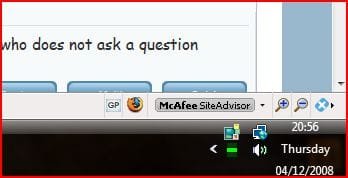
As someone said, finally the date is displayed under the time.

Taskbar dateJPG.JPG

That's not new it did it on my vista :D;)
 

My Computers

System One System Two

  • Computer type
    PC/Desktop
    Computer Manufacturer/Model Number
    ChillBlast - Custom to my design
    OS
    Windows 11 Pro x64 [Latest Release and Release Preview]
    CPU
    Ryzen 9 5950X, 3.8 - 5.2 MHz
    Motherboard
    Asus Prime X570-Pro
    Memory
    64GB [2 x 32GB] DDR4 3200MHz
    Graphics Card(s)
    4GB NVIDIA GEFORCE GTX 1650 Ti
    Sound Card
    On-board SPDIF to 5.1 System + HDMI [5.1 system]
    Monitor(s) Displays
    32" UHD 32 Bit HDR Monitor + 43" UHD 4K 32Bit HDR TV
    Screen Resolution
    2 x 3840 x 2160 @60Hz
    Hard Drives
    1TB M2 SSD OS, 500GB Fast Access SSD, 2 x 8TB Data + Various Externals from 1TB to 4TB, 10TB NAS
    PSU
    NZXT C750 80 PLUS Gold 750W Modular PSU
    Case
    Workstation Case [Matt Black]
    Cooling
    NZXT Kraken X63 280mm CPU Cooler +2x Quiet Case fans
    Keyboard
    Logitech Wireless MX Keys & K400 + others
    Mouse
    Logitech Wireless MX Master 3S
    Internet Speed
    920 MB Down 50 MB Up
    Antivirus
    BitDefender Total Security Pro
    Browser
    Chrome (always run latest Non-Beta)
    Other Info
    Also run ...
    Laptop - Quad 8GB - Windows 10 Pro x64
    Nexus 7 Android tablet x2
    Samsung 10.2" tablet
    Blackview TAB 8 4G Android Tablet c/w Keyboard
    Wacom Intuos Pro Medium Pen Pad
    Wacom Intuos Pro Small Pen Pad
    Wacom Expresskeys Remote
    Loopdeck+ Graphics Controller
    Shuttle Pro v2 Control
  • Computer type
    Laptop
    System Manufacturer/Model Number
    Dell XPS 17 10750H
    OS
    Windows 11 Pro x64 Latest RP
    CPU
    Intel I7 10750H 5.0GHz
    Motherboard
    Dell XPS
    Memory
    32GB [2x16GB] DDR4 2933 MHz
    Graphics Card(s)
    nVidia GTX1650Ti 4 GB GDDR6
    Sound Card
    Stock [Realtek] 4 Speaker
    Monitor(s) Displays
    17" IPS UHD+ Infinity Edge Touchscreen
    Screen Resolution
    3840 x 2400
    Hard Drives
    2TB M2 NVMe, 4TB External + various 500GB & 1TB External NVMe (also have access to spinner HDD from
    PSU
    Stock
    Case
    Stock XPS Aluminium & Carbon Fibre
    Cooling
    Stock - Active Fan Control
    Keyboard
    Backlit + Various Logitech
    Mouse
    Stock Track Pad + Logitech MX Trackball
    Internet Speed
    72 MB Down 18MB Up
    Browser
    Chrome
    Other Info
    Also run ...
    Laptop - Quad 8GB - Windows 10 Pro x64
    Nexus 7 Android tablet x2
    10.2" tablet
    Sony Z3 Android Smartphone
    Wacom Intuos Pro Medium Pen Pad
    Wacom Intuos Pro Small Pen Pad
    Wacom Expresskeys Remote
    Loopdeck+ Graphics Controller
    Shuttle Pro v2 Control Pad
    10TB NAS
Hi Nigel,

Not in mine and even in 7 it doesn't show the day. Is it an Ultimate thing? You have an app that does that?

clock.JPG

Gary
 

My Computer

Computer Manufacturer/Model Number
Dell XPS420
OS
Vista Ult 64 bit Seven Ult RTM x64
CPU
Intel Core2 Quad Q6600 2.40 gigahertz
Memory
Crucial Ballistix 4x2GB PC2 6400
Graphics Card(s)
NVIDIA GeForce 8600 GTS 256 MB
Sound Card
Creative SB X-Fi audio
Monitor(s) Displays
HP w2207 + HPvs15
Screen Resolution
1680x1050 + 1024x768
Hard Drives
2-WD5000AAKS-500 GB
WD5000AAV-500 GB external
Keyboard
Microsoft Comfort Curve
Mouse
MX Revolution
Other Info
Wacom Intuos 2 Graphics Tablet
Experience Index=5.5
Hi gary

No plain taskbar, unlock it, click and drag on the top of the taskbar to make it double height and the date appears, if you Autohide the task bar you don't lose any screen space. It's also useful if you tend to have lots of apps running as these have double the space to fit in :geek:
 

My Computers

System One System Two

  • Computer type
    PC/Desktop
    Computer Manufacturer/Model Number
    ChillBlast - Custom to my design
    OS
    Windows 11 Pro x64 [Latest Release and Release Preview]
    CPU
    Ryzen 9 5950X, 3.8 - 5.2 MHz
    Motherboard
    Asus Prime X570-Pro
    Memory
    64GB [2 x 32GB] DDR4 3200MHz
    Graphics Card(s)
    4GB NVIDIA GEFORCE GTX 1650 Ti
    Sound Card
    On-board SPDIF to 5.1 System + HDMI [5.1 system]
    Monitor(s) Displays
    32" UHD 32 Bit HDR Monitor + 43" UHD 4K 32Bit HDR TV
    Screen Resolution
    2 x 3840 x 2160 @60Hz
    Hard Drives
    1TB M2 SSD OS, 500GB Fast Access SSD, 2 x 8TB Data + Various Externals from 1TB to 4TB, 10TB NAS
    PSU
    NZXT C750 80 PLUS Gold 750W Modular PSU
    Case
    Workstation Case [Matt Black]
    Cooling
    NZXT Kraken X63 280mm CPU Cooler +2x Quiet Case fans
    Keyboard
    Logitech Wireless MX Keys & K400 + others
    Mouse
    Logitech Wireless MX Master 3S
    Internet Speed
    920 MB Down 50 MB Up
    Antivirus
    BitDefender Total Security Pro
    Browser
    Chrome (always run latest Non-Beta)
    Other Info
    Also run ...
    Laptop - Quad 8GB - Windows 10 Pro x64
    Nexus 7 Android tablet x2
    Samsung 10.2" tablet
    Blackview TAB 8 4G Android Tablet c/w Keyboard
    Wacom Intuos Pro Medium Pen Pad
    Wacom Intuos Pro Small Pen Pad
    Wacom Expresskeys Remote
    Loopdeck+ Graphics Controller
    Shuttle Pro v2 Control
  • Computer type
    Laptop
    System Manufacturer/Model Number
    Dell XPS 17 10750H
    OS
    Windows 11 Pro x64 Latest RP
    CPU
    Intel I7 10750H 5.0GHz
    Motherboard
    Dell XPS
    Memory
    32GB [2x16GB] DDR4 2933 MHz
    Graphics Card(s)
    nVidia GTX1650Ti 4 GB GDDR6
    Sound Card
    Stock [Realtek] 4 Speaker
    Monitor(s) Displays
    17" IPS UHD+ Infinity Edge Touchscreen
    Screen Resolution
    3840 x 2400
    Hard Drives
    2TB M2 NVMe, 4TB External + various 500GB & 1TB External NVMe (also have access to spinner HDD from
    PSU
    Stock
    Case
    Stock XPS Aluminium & Carbon Fibre
    Cooling
    Stock - Active Fan Control
    Keyboard
    Backlit + Various Logitech
    Mouse
    Stock Track Pad + Logitech MX Trackball
    Internet Speed
    72 MB Down 18MB Up
    Browser
    Chrome
    Other Info
    Also run ...
    Laptop - Quad 8GB - Windows 10 Pro x64
    Nexus 7 Android tablet x2
    10.2" tablet
    Sony Z3 Android Smartphone
    Wacom Intuos Pro Medium Pen Pad
    Wacom Intuos Pro Small Pen Pad
    Wacom Expresskeys Remote
    Loopdeck+ Graphics Controller
    Shuttle Pro v2 Control Pad
    10TB NAS
Ahh. I don't autohide the taskbar as I often want to open a pic in say PhotoPaint instead of the default photo gallery. I can easily do this by dragging the file from explorer onto the paint icon on the quick launch bar. If the taskbar is hidden, it won't pop up while I'm dragging the file. I could autohide in W2k no problems, but not in vista. Hmmm haven't tried it yet in 7. It does work in 7 so I can use autohide again. :D

Gary
 

My Computer

Computer Manufacturer/Model Number
Dell XPS420
OS
Vista Ult 64 bit Seven Ult RTM x64
CPU
Intel Core2 Quad Q6600 2.40 gigahertz
Memory
Crucial Ballistix 4x2GB PC2 6400
Graphics Card(s)
NVIDIA GeForce 8600 GTS 256 MB
Sound Card
Creative SB X-Fi audio
Monitor(s) Displays
HP w2207 + HPvs15
Screen Resolution
1680x1050 + 1024x768
Hard Drives
2-WD5000AAKS-500 GB
WD5000AAV-500 GB external
Keyboard
Microsoft Comfort Curve
Mouse
MX Revolution
Other Info
Wacom Intuos 2 Graphics Tablet
Experience Index=5.5
Status
Not open for further replies.
Back
Top