DOS and UNIX on Windows7

ArpitRaj

New member
Local time
6:54 PM
Messages
20
I have the following queries :

1. Whenever I execute a C/C++ program (using DOS Box), system exits from DOS. Is it bcoz Windows7 does not support DOS? Is there any solution?

2. I am planning to learn UNIX and want to install it on Windows7? I have enabled "Subsystem for UNIX-based Applications (SUA)" from "Control Panel>Programs>Turn Windows features on or off", but I do not know which file to download from this link Download details: Utilities and SDK for Subsystem for UNIX-based Applications in Microsoft Windows 7 and Windows Server 2008 R2. Is this right way or is there any other way?

Awaiting your reply.

Regards
Arpit
 

My Computer My Computer

OS
Windows 7 Ultimate 64-bit
CPU
Intel Core 2 Quad CPU Q9400 2.66GHz
Motherboard
Intel DG45
Memory
2 GB DDR
Graphics Card(s)
None
Sound Card
Intel HD Audio HDMI
Monitor(s) Displays
Generic Non-PnP Monitor 17'' CRT
Hard Drives
500 GB SATA
Case
ATX
I think a much better solution is to install a virtual pc, such as Virtualbox or VMware Player (both free). They support DOS and UNIX. Any reason why UNIX instead of Linux? If UNIX, are you installing Solaris?
 

My Computer My Computer

Computer Manufacturer/Model Number
Dell and Custom
OS
Systems 1 and 2: Windows 7 Enterprise x64, Win 8 Developer
CPU
System 1: i7 [email protected], System 2: AMD FX-4100 Zambezi 3.6G
Motherboard
System 1:Dell 06NWYK System 2: ASUS M5A97 AM3+
Memory
System 1: 8GB System 2: 8GB
Graphics Card(s)
System 1: ATI FirePro V4800 System 2: Radeon HD 6850
Sound Card
System 1: onboard System 2: onboard
Monitor(s) Displays
System1: Viewsonic HDMI 24"
Screen Resolution
System 1: 1920x1080 System 2: 1920x1080
Hard Drives
System 1: Mirrored .5B drives System 2: Seagate Barracuda ST1000DM003 1TB 7200 RPM 64MB Cache SATA 6.0Gb/s
Case
System 1: Dell System 2: Cooler Master
Internet Speed
10 MBPS
You could for instance pause the execution of your program just before it ends. Just add a pause before the return call in the end. the end of your code could for instance look like this:
Code:
system("pause");
 return 0;
}

Function system("pause") (C++) causes the program to stop until a key is pressed, printing "Press any key to continue" on screen.

Your other question is about Unix. I'm sorry to ask but do you know what Unix is? It is not a programming language. It is not something you can do or practice with Windows. Unix is a computer operating system, some users say The Operating System. Linux for instance are based on Linux.

If you want to learn Unix, you'll find more information here: The UNIX System

Kari
 

My Computer My Computer

Computer type
Laptop
Computer Manufacturer/Model Number
HP ENVY 17-1150eg
OS
Windows 10 Pro x64 EN-GB
CPU
1.6 GHz Intel Core i7-720QM Processor
Memory
6 GB
Graphics Card(s)
ATI Mobility Radeon HD 5850 Graphics
Sound Card
Beats sound system with integrated subwoofer
Monitor(s) Displays
17" laptop display, 22" LED and 32" Full HD TV through HDMI
Screen Resolution
1600*900 (1), 1920*1080 (2&3)
Hard Drives
Internal: 2 x 500 GB SATA Hard Disk Drive 7200 rpm
External: 2TB for backups, 3TB USB3 network drive for media
Cooling
As Envy runs a bit warm, I have it on a Cooler Master pad
Keyboard
Logitech diNovo Media Desktop Laser (bluetooth)
Mouse
Logitech Performance Mouse MX
Internet Speed
50/10 Mbps VDSL
Antivirus
Windows Defender 4.3.9431.0
Browser
Maxthon 3.5.2., IE11
There is a way to learn something about Unix (or Linux - I have never actually understood how Linux is different, apart from being "free" and PC-oriented) without buying yourself a new computer or using virtual machines. What you can do it to install an emulation layer. A free one is called Cygwin and then there are also commercial variants, X-Win32 comes to mind. These emulation layers give you a Unix-like feeling by porting a number of common Unix utilities to Windows, including shells (bash, tsch, etc.), various "commands" (grep, gawk, etc.), and so on. For a beginner this should be sufficient. They are not however a way to turn your machine into a Unix workstation. If you want more than just a feeling, then get another hard drive and install one of the free Linux distros.
 

My Computer My Computer

Computer Manufacturer/Model Number
Dell Inspiron 530
OS
Windows 7 Ultimate (x64)
CPU
Q6600
Memory
8 GB
Graphics Card(s)
ATI Radeon HD 2600 XT
Monitor(s) Displays
Samsung Syncmaster P2450
Screen Resolution
1920x1080
Hard Drives
Samsung HD103UJ
Samsung HD501LJ
Internet Speed
25 Mb/s
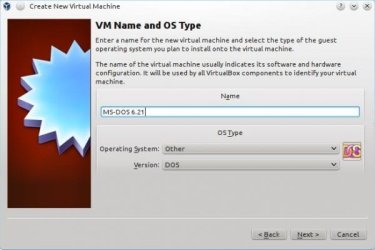
Here is a screenshot of a DOS installation on Virtualbox. Just as easy on VMWare Player. Also has option for UNIX, Linux, Windows variants, etc.
 

Attachments

  • snapshot4.jpg
    snapshot4.jpg
    27.1 KB · Views: 47

My Computer My Computer

Computer Manufacturer/Model Number
Dell and Custom
OS
Systems 1 and 2: Windows 7 Enterprise x64, Win 8 Developer
CPU
System 1: i7 [email protected], System 2: AMD FX-4100 Zambezi 3.6G
Motherboard
System 1:Dell 06NWYK System 2: ASUS M5A97 AM3+
Memory
System 1: 8GB System 2: 8GB
Graphics Card(s)
System 1: ATI FirePro V4800 System 2: Radeon HD 6850
Sound Card
System 1: onboard System 2: onboard
Monitor(s) Displays
System1: Viewsonic HDMI 24"
Screen Resolution
System 1: 1920x1080 System 2: 1920x1080
Hard Drives
System 1: Mirrored .5B drives System 2: Seagate Barracuda ST1000DM003 1TB 7200 RPM 64MB Cache SATA 6.0Gb/s
Case
System 1: Dell System 2: Cooler Master
Internet Speed
10 MBPS
I have Virtual box 3.2.1 and am an absolute rank amateur. But I find it slow and the window tiny - now shoot me down, I might learn something.

If someone wanted to learn linux maybe a BIOS boot to a USB flash drive or external HDD is an option. I seen lots of problems with people multibooting Ubuntu on the Windows 7 internal. I have 2 versions of linux on flash drives and DOS.
 

My Computer My Computer

Computer type
PC/Desktop
Computer Manufacturer/Model Number
Own build
OS
Windows 7x64 Home Premium SP1
CPU
Intel i7 2600k
Motherboard
ASUS P8Z68 Deluxe
Memory
G.Skill Ripjaws (DDR3-1600) 2x4GB
Graphics Card(s)
Nvidia GeForce GTS 450; Intel HD Graphics 3000(GT2+)
Monitor(s) Displays
Dell Ultrasharp IPS panel U2311H, Samsung SyncMaster P2350
Screen Resolution
1920x1080
Hard Drives
Samsung 850 Pro SSD 256GB, Samsung SSD 840 120GB, Seagates 1TB Barracuda ST31000528AS x2
PSU
Seasonic M12II 520W
Case
Lian Li Lancool PC-K60
Cooling
Case: 1x120mm, 3x140mm CPU: Hyper 212+
Keyboard
Logitech MK520 (wireless)
Mouse
Logitech MK520
Internet Speed
6-7 Mbps
Antivirus
Norton Security Premium, Malwarebytes on 2 (MSE on 3rd PC)
Browser
FireFox
Other Info
Audio: Logitech Z523 2.1

My Computer My Computer

Computer type
Laptop
Computer Manufacturer/Model Number
HP ENVY 17-1150eg
OS
Windows 10 Pro x64 EN-GB
CPU
1.6 GHz Intel Core i7-720QM Processor
Memory
6 GB
Graphics Card(s)
ATI Mobility Radeon HD 5850 Graphics
Sound Card
Beats sound system with integrated subwoofer
Monitor(s) Displays
17" laptop display, 22" LED and 32" Full HD TV through HDMI
Screen Resolution
1600*900 (1), 1920*1080 (2&3)
Hard Drives
Internal: 2 x 500 GB SATA Hard Disk Drive 7200 rpm
External: 2TB for backups, 3TB USB3 network drive for media
Cooling
As Envy runs a bit warm, I have it on a Cooler Master pad
Keyboard
Logitech diNovo Media Desktop Laser (bluetooth)
Mouse
Logitech Performance Mouse MX
Internet Speed
50/10 Mbps VDSL
Antivirus
Windows Defender 4.3.9431.0
Browser
Maxthon 3.5.2., IE11
Thanks I'll take a look at the tutorial. What about the speed issue.

I've seen numerous posts on this forum of people getting into trouble dual booting windows 7 and Ubuntu. All I'm saying is that it doesn't look like it's always plain sailing. Some of the long standing members appear to favour BIOS dual/multi booting.
 

My Computer My Computer

Computer type
PC/Desktop
Computer Manufacturer/Model Number
Own build
OS
Windows 7x64 Home Premium SP1
CPU
Intel i7 2600k
Motherboard
ASUS P8Z68 Deluxe
Memory
G.Skill Ripjaws (DDR3-1600) 2x4GB
Graphics Card(s)
Nvidia GeForce GTS 450; Intel HD Graphics 3000(GT2+)
Monitor(s) Displays
Dell Ultrasharp IPS panel U2311H, Samsung SyncMaster P2350
Screen Resolution
1920x1080
Hard Drives
Samsung 850 Pro SSD 256GB, Samsung SSD 840 120GB, Seagates 1TB Barracuda ST31000528AS x2
PSU
Seasonic M12II 520W
Case
Lian Li Lancool PC-K60
Cooling
Case: 1x120mm, 3x140mm CPU: Hyper 212+
Keyboard
Logitech MK520 (wireless)
Mouse
Logitech MK520
Internet Speed
6-7 Mbps
Antivirus
Norton Security Premium, Malwarebytes on 2 (MSE on 3rd PC)
Browser
FireFox
Other Info
Audio: Logitech Z523 2.1
First, please keep in your mind this is my subjective opinion, based only on my own experience. Facts can be found on the net and in the library ;)

I have had no speed or other problems in using different Linux distros in VirtualBox, or installing a Windows / Linux dual boot. I guess it's partly because I'll always try to do things, especially when I'm doing it first time ever, exactly as I've been told and / or how the manual or instructions say it should be done. I mean, no shortcuts or "that must not be important, I'll just ignore that" attitude. Like everything else in computing, the principle is easy: If your system is well maintained and you follow the instructions, it usually works.

If the Guest Additions are installed, RAM & Video RAM memory settings correct, there should be no speed problems. In any case you are not using a virtual machine to play GFX intensive multiplayer online games or to edit HD video.

If dual boot is more your thing, I recommend using BIOS to choose which OS to boot, if your system is up to it. If you use traditional bootloader, my recommendation is and has always been to install Windows first, and let Linux handle bootloader.

Kari
 

My Computer My Computer

Computer type
Laptop
Computer Manufacturer/Model Number
HP ENVY 17-1150eg
OS
Windows 10 Pro x64 EN-GB
CPU
1.6 GHz Intel Core i7-720QM Processor
Memory
6 GB
Graphics Card(s)
ATI Mobility Radeon HD 5850 Graphics
Sound Card
Beats sound system with integrated subwoofer
Monitor(s) Displays
17" laptop display, 22" LED and 32" Full HD TV through HDMI
Screen Resolution
1600*900 (1), 1920*1080 (2&3)
Hard Drives
Internal: 2 x 500 GB SATA Hard Disk Drive 7200 rpm
External: 2TB for backups, 3TB USB3 network drive for media
Cooling
As Envy runs a bit warm, I have it on a Cooler Master pad
Keyboard
Logitech diNovo Media Desktop Laser (bluetooth)
Mouse
Logitech Performance Mouse MX
Internet Speed
50/10 Mbps VDSL
Antivirus
Windows Defender 4.3.9431.0
Browser
Maxthon 3.5.2., IE11
This is why I prefer virtual machines whenever possible.

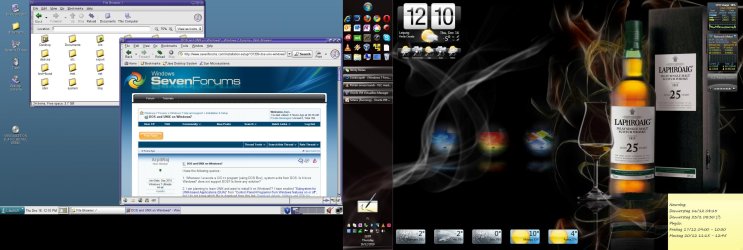
First, my windows 7 dual display system. Main display on the right reserved for Windows, left having Solaris Unix in full screen mode. With VirtualBox Guest Additions mouse totally integrated, moving without restrictions from one OS to next, keyboard working on any active app or window, regardless of which OS it belongs. Cross OS copy & paste and share of course working:

VM_fullscreen.jpg

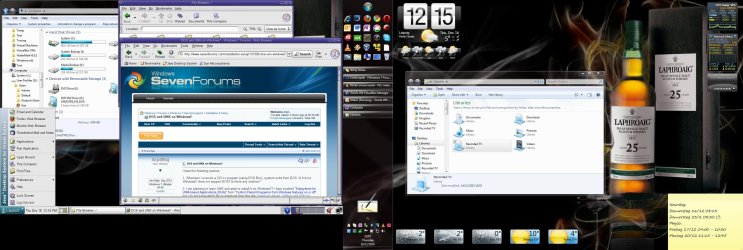
And then even better, Solaris running on left display in so called seamless mode, i.e. desktop is integrated to Windows desktop, shared with it. For instance in this screenshot on left display there's a Windows Explorer window together with Solaris File Browser and Solaris Mozilla net browser. Solaris taskbar and Launch menu ("Start Menu") on left display, Windows Taskbar and Start menu on right display:

VM_Seamless.jpg

I just love to use PC like this!

Kari
 

My Computer My Computer

Computer type
Laptop
Computer Manufacturer/Model Number
HP ENVY 17-1150eg
OS
Windows 10 Pro x64 EN-GB
CPU
1.6 GHz Intel Core i7-720QM Processor
Memory
6 GB
Graphics Card(s)
ATI Mobility Radeon HD 5850 Graphics
Sound Card
Beats sound system with integrated subwoofer
Monitor(s) Displays
17" laptop display, 22" LED and 32" Full HD TV through HDMI
Screen Resolution
1600*900 (1), 1920*1080 (2&3)
Hard Drives
Internal: 2 x 500 GB SATA Hard Disk Drive 7200 rpm
External: 2TB for backups, 3TB USB3 network drive for media
Cooling
As Envy runs a bit warm, I have it on a Cooler Master pad
Keyboard
Logitech diNovo Media Desktop Laser (bluetooth)
Mouse
Logitech Performance Mouse MX
Internet Speed
50/10 Mbps VDSL
Antivirus
Windows Defender 4.3.9431.0
Browser
Maxthon 3.5.2., IE11
Diff between UNIX and Linux

I think a much better solution is to install a virtual pc, such as Virtualbox or VMware Player (both free). They support DOS and UNIX. Any reason why UNIX instead of Linux? If UNIX, are you installing Solaris?

1. No reason for choosing UNIX instead of Linux. Are they interrelated?
2. I just came to know about UNIX, so I thought of exploring it. I would also like to know about Linux, what setup to get and how to install it?
3. I came to know about Solaris but didn't know where to get its setup from and how to install it? Can u help?

I am a novice in terms of UNIX and Linux, it would be very kind of you to answer my queries(ie clarification between UNIX and Linux and how to work on/learn them).

Regards
Arpit
 

My Computer My Computer

OS
Windows 7 Ultimate 64-bit
CPU
Intel Core 2 Quad CPU Q9400 2.66GHz
Motherboard
Intel DG45
Memory
2 GB DDR
Graphics Card(s)
None
Sound Card
Intel HD Audio HDMI
Monitor(s) Displays
Generic Non-PnP Monitor 17'' CRT
Hard Drives
500 GB SATA
Case
ATX
A very impressive scotch I mean screen display.
 

My Computer My Computer

Computer type
PC/Desktop
Computer Manufacturer/Model Number
Own build
OS
Windows 7x64 Home Premium SP1
CPU
Intel i7 2600k
Motherboard
ASUS P8Z68 Deluxe
Memory
G.Skill Ripjaws (DDR3-1600) 2x4GB
Graphics Card(s)
Nvidia GeForce GTS 450; Intel HD Graphics 3000(GT2+)
Monitor(s) Displays
Dell Ultrasharp IPS panel U2311H, Samsung SyncMaster P2350
Screen Resolution
1920x1080
Hard Drives
Samsung 850 Pro SSD 256GB, Samsung SSD 840 120GB, Seagates 1TB Barracuda ST31000528AS x2
PSU
Seasonic M12II 520W
Case
Lian Li Lancool PC-K60
Cooling
Case: 1x120mm, 3x140mm CPU: Hyper 212+
Keyboard
Logitech MK520 (wireless)
Mouse
Logitech MK520
Internet Speed
6-7 Mbps
Antivirus
Norton Security Premium, Malwarebytes on 2 (MSE on 3rd PC)
Browser
FireFox
Other Info
Audio: Logitech Z523 2.1
Oracle Solaris download: Solaris Operating System - Get Solaris 10

Unix is an operating system developed in the late 60's. According to Wikipedia the initial release was 1969. It was originally completely written in C. I gave the link to unix.org in my first post in this thread, you can read more here: http://en.wikipedia.org/wiki/Unix

Linux is developed from Unix, officially it is categorized as Unix-like operating system. Geeks around the world wanted an open source, free OS and started to develope it on top of Unix in early 80's. Name Linux comes from the of Linus Torvalds, a Finn from my old alma mater University of Helsinki in Helsinki (10 later than I was there but still, yes I am proud to say that!), who coded the first Linux kernel.

More about Linux:
Linux - Wikipedia, the free encyclopedia
The Linux Home Page at Linux Online

Please do not misunderstand me now, but I think it would be better for you to join different Linux forums and ask Unix / Linux questions there. This is a Windows forums, our advice regarding Linux normally stops when you have installed your Linux on a Windows 7 virtual machine.

Two nice places to start:
http://www.linuxforums.org/
http://www.linuxquestions.org/questions/

Kari
 

My Computer My Computer

Computer type
Laptop
Computer Manufacturer/Model Number
HP ENVY 17-1150eg
OS
Windows 10 Pro x64 EN-GB
CPU
1.6 GHz Intel Core i7-720QM Processor
Memory
6 GB
Graphics Card(s)
ATI Mobility Radeon HD 5850 Graphics
Sound Card
Beats sound system with integrated subwoofer
Monitor(s) Displays
17" laptop display, 22" LED and 32" Full HD TV through HDMI
Screen Resolution
1600*900 (1), 1920*1080 (2&3)
Hard Drives
Internal: 2 x 500 GB SATA Hard Disk Drive 7200 rpm
External: 2TB for backups, 3TB USB3 network drive for media
Cooling
As Envy runs a bit warm, I have it on a Cooler Master pad
Keyboard
Logitech diNovo Media Desktop Laser (bluetooth)
Mouse
Logitech Performance Mouse MX
Internet Speed
50/10 Mbps VDSL
Antivirus
Windows Defender 4.3.9431.0
Browser
Maxthon 3.5.2., IE11
thanks a lot :D
 

My Computer My Computer

OS
Windows 7 Ultimate 64-bit
CPU
Intel Core 2 Quad CPU Q9400 2.66GHz
Motherboard
Intel DG45
Memory
2 GB DDR
Graphics Card(s)
None
Sound Card
Intel HD Audio HDMI
Monitor(s) Displays
Generic Non-PnP Monitor 17'' CRT
Hard Drives
500 GB SATA
Case
ATX
Back
Top